Vscode-arduino: include file not found in browse.path.
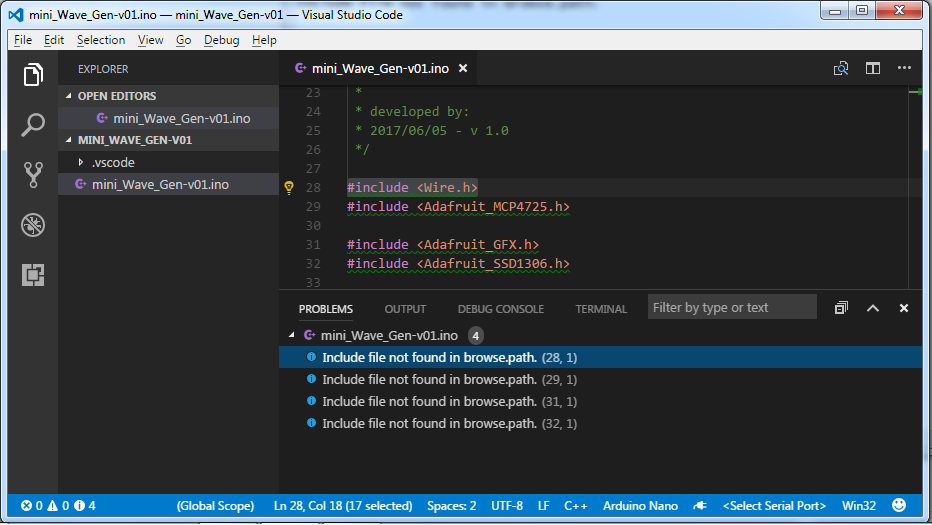
The VS Code is showing some problems in sketches. The code compile without any problem, but is not possible to view the content of include files (clicking in the function with "Ctrl" pressed).
Is there a way to resolve this?
Arduino IDE 1.8.3, VS Code 1.13.1.
Thanks
 agaelema
All 7 comments
@agaelema For this issue, it is related to the VSCode C++ extension. You can find the details about how to resolve this issue:
https://github.com/Microsoft/vscode-cpptools/blob/master/Documentation/LanguageServer/FAQ.md#why-do-i-have-red-underlines-everywhere-after-updating-to-the-latest-version
https://github.com/Microsoft/vscode-cpptools/blob/master/Documentation/LanguageServer/FAQ.md#what-is-the-difference-between-includepath-and-browsepath-in-c_cpp_propertiesjson
 yaohaizh
on 11 Jul 2017
yaohaizh
on 11 Jul 2017
That does the trick.
Is there a way to set it as a default property for all projects. Every time I open a new project I have to copy all the settings to the new project.
 svq98
on 11 Jul 2017
svq98
on 11 Jul 2017
Had same problem, I am using Arduino extensions and resolved by adding browse path as show below (i use custom libs). It fixed the problem...Is this correct way to resolve this?

 PeterSek
on 12 Jul 2017
PeterSek
on 12 Jul 2017
I was able to get my paths as defaults on new projects by doing the following:
- Use Tag Parser as the article above states
- open the arduino.js file located in .vscode\extensions\vsciot-vscode.vscode-arduino-0.2.9\outsrcarduino
- Go to line 215 and edit the section to look like this:

Also...You can do the same thing for the example sketches by searching for "const cppConfig = " and performing the same steps.
 mattywashington
on 25 Oct 2017
mattywashington
on 25 Oct 2017
I fixed it by just ending at 'avr':

You need everything under AVR.
 RyanBlace
on 28 Oct 2017
RyanBlace
on 28 Oct 2017
Your solution won't work to include paths in a default configuration...it also won't add the third party libraries that OP posted that are located in a separate folder. The last question asked was how to get the include paths, that OP successfully added, set by default so one doesn't have to type them in every time.
The arduino extension creates the configuration files when you initialize and it doesn't include a setting option to override what it adds by default, so whatever setting you made in a previous configuration won't follow over. By default, the arduino extension will only include the hardware libraries of the board you select.
After editing the file in the location that I provided, the include paths that you set will be added by default on the rest of your projects. The only downside is that every time the extension updates, you have to re-edit the file. It would be a nice addition if the devs could add an option to set include path settings that can be overridden by the user.
mattywashington
on 10 Nov 2017
Duplicated with #438
 liydu
on 9 Feb 2018
liydu
on 9 Feb 2018
Related issues
 shizn
·
4Comments
shizn
·
4Comments
 AndreyKrupskii
·
6Comments
shizn
·
4Comments
AndreyKrupskii
·
6Comments
shizn
·
4Comments
 li3
·
4Comments
li3
·
4Comments
 khaled-hamam
·
4Comments
khaled-hamam
·
4Comments
Most helpful comment
@agaelema For this issue, it is related to the VSCode C++ extension. You can find the details about how to resolve this issue:
https://github.com/Microsoft/vscode-cpptools/blob/master/Documentation/LanguageServer/FAQ.md#why-do-i-have-red-underlines-everywhere-after-updating-to-the-latest-version
https://github.com/Microsoft/vscode-cpptools/blob/master/Documentation/LanguageServer/FAQ.md#what-is-the-difference-between-includepath-and-browsepath-in-c_cpp_propertiesjson