Voyager: [BUG] Tinymce font loading over HTTPS gives mixed content error.
Version information
- Laravel: v5.8.10
- Voyager: v1.2.3
- PHP: 7.2.1
- Database: Mysql 5.7.22
Description
When voyager is used over HTTPS and you load the create or edit form of a BREAD with a rich text editor, the font of Tinymce is not loaded. This results in a broken UI, i.e. the buttons do not have any icons.
Steps To Reproduce
Steps to reproduce the behavior:
- Host Voyager over HTTPS
- Go to the create or edit of a BREAD with a rich text field
- Check the rich text editor for missing icons
- Check the browser console for errors, like:
- Mixed Content: The page at 'https://www.mydomain.com/admin/pages/create' was loaded over HTTPS, but requested an insecure font 'http://www.mydomain.com/admin/assets?path=js/skins/voyager/fonts/tinymce.woff'. This request has been blocked; the content must be served over HTTPS.
- Mixed Content: The page at 'https://www.mydomain.com/admin/pages/create' was loaded over HTTPS, but requested an insecure font 'http://www.mydomain.com/admin/assets?path=js/skins/voyager/fonts/tinymce.ttf'. This request has been blocked; the content must be served over HTTPS.
Expected behavior
The TinyMCE font should be properly loaded and the icons should be displayed in the editor.
Additional context
I have been debugging this a bit. It appears the fonts are loaded in skin.min.css via the url() function of CSS. However skin.min.css is loaded from an ajax call from app.js via the assets REST service. Within app.js the assets REST service is called over HTTPS, which is correct. I assume the dynamically loaded skin.min.css does not have any HTTPS context.
 sten
sten
All 7 comments
Same issue, please advice.

 estebangallego
on 5 Jun 2019
estebangallego
on 5 Jun 2019
Hello,
I also encountered that issue.
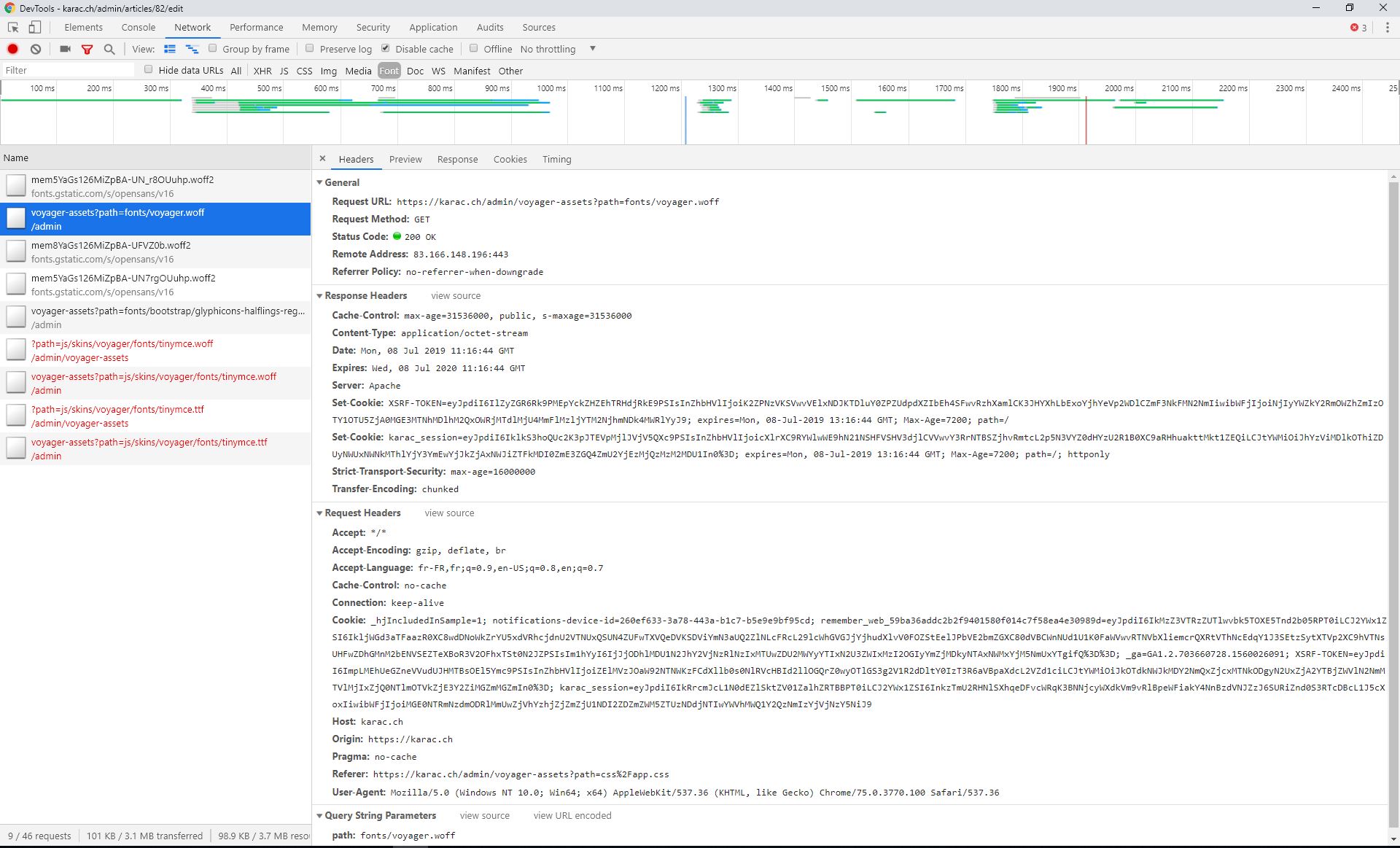
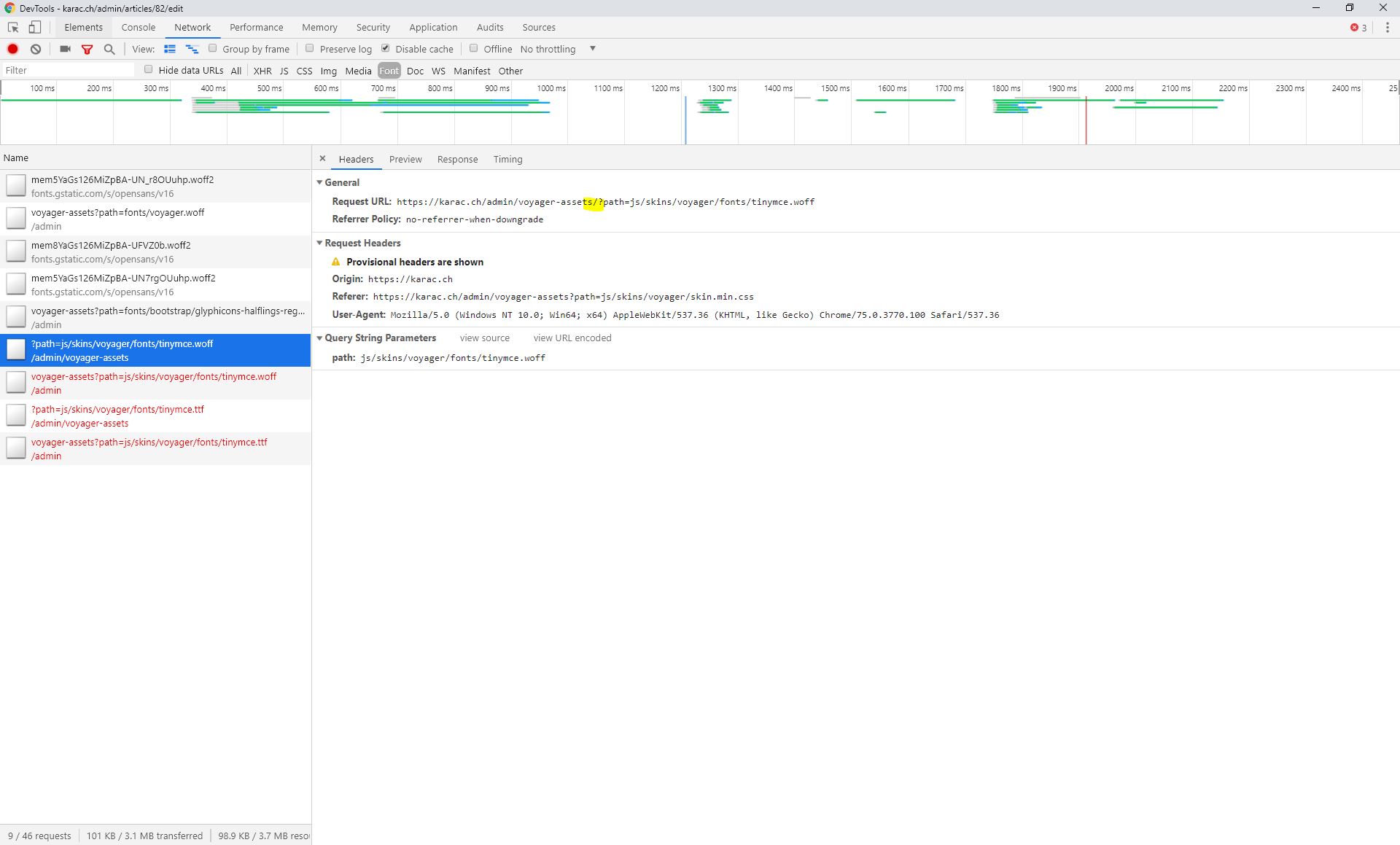
I looked at my chrome inspector and tried to spot the differences between the fonts that load correctly and the tinymce one. I noticed that there is a slash (/) in the failed request between voyager-assets and ?path=....
A failed request : https://karac.ch/admin/voyager-assets/?path=js/skins/voyager/fonts/tinymce.woff
A successfull request : https://karac.ch/admin/voyager-assets?path=fonts/voyager.woff
See the screenshots :
I then changed my skin.min.css file and removed that slash (/). The TinyMCE font loads correctly now :

The actual skin.min.css
@font-face{
font-family:'tinymce';
src:url('voyager-assets/?path=js/skins/voyager/fonts/tinymce.eot');
src:url('voyager-assets/?path=js/skins/voyager/fonts/tinymce.eot?#iefix') format('embedded-opentype'), url('voyager-assets/?path=js/skins/voyager/fonts/tinymce.woff') format('woff'), url('voyager-assets/?path=js/skins/voyager/fonts/tinymce.ttf') format('truetype'), url('voyager-assets/?path=js/skins/voyager/fonts/tinymce.svg#tinymce') format('svg');
font-weight:normal;
font-style:normal
}
@font-face{
font-family:'tinymce-small';
src:url('voyager-assets/?path=js/skins/voyager/fonts/tinymce-small.eot');
src:url('voyager-assets/?path=js/skins/voyager/fonts/tinymce-small.eot?#iefix') format('embedded-opentype'), url('voyager-assets/?path=js/skins/voyager/fonts/tinymce-small.woff') format('woff'), url('voyager-assets/?path=js/skins/voyager/fonts/tinymce-small.ttf') format('truetype'), url('voyager-assets/?path=js/skins/voyager/fonts/tinymce-small.svg#tinymce') format('svg');
font-weight:normal;
font-style:normal
}
Here are the modifications I did :
@font-face{
font-family:'tinymce';
src:url('voyager-assets?path=js/skins/voyager/fonts/tinymce.eot');
src:url('voyager-assets?path=js/skins/voyager/fonts/tinymce.eot?#iefix') format('embedded-opentype'), url('voyager-assets?path=js/skins/voyager/fonts/tinymce.woff') format('woff'), url('voyager-assets?path=js/skins/voyager/fonts/tinymce.ttf') format('truetype'), url('voyager-assets?path=js/skins/voyager/fonts/tinymce.svg#tinymce') format('svg');
font-weight:normal;
font-style:normal
}
@font-face{
font-family:'tinymce-small';
src:url('voyager-assets?path=js/skins/voyager/fonts/tinymce-small.eot');
src:url('voyager-assets?path=js/skins/voyager/fonts/tinymce-small.eot?#iefix') format('embedded- opentype'), url('voyager-assets?path=js/skins/voyager/fonts/tinymce-small.woff') format('woff'), url('voyager-assets?path=js/skins/voyager/fonts/tinymce-small.ttf') format('truetype'), url('voyager-assets?path=js/skins/voyager/fonts/tinymce-small.svg#tinymce') format('svg');
font-weight:normal;
font-style:normal
}
Is this the correct correction for this problem ?
 apiaget
on 8 Jul 2019
apiaget
on 8 Jul 2019
I had the same issue and after investigating it I found that the problem that was caused by an nginx condition:
 # removes trailing slashes (prevents SEO duplicate content issues)
if (!-d $request_filename) {
    rewrite ^/(.+)/$ /$1 permanent;
}
After changing the nginx statement to remove the tailing slashes everywhere, except the admin area, the fonts loaded correctly.
# removes trailing slashes (prevents SEO duplicate content issues)
if ($uri !~ /admin) {
     rewrite ^/(.+)/$ /$1 permanent;
}
 bluscience
on 4 Aug 2019
bluscience
on 4 Aug 2019
It is indeed caused by the trailing slash, @apiaget. I could not convince the sys admin to edit the nginx conditions, so we fixed it in our Laravel project by overriding CSS fonts and classes.
However this should be fixed in Voyager itself.
Thanks, @apiaget and @bluscience for the help!
sten
on 11 Sep 2019
Making those changes on the skin.min.css file has solved my issue!
Thank you @apiaget !
estebangallego
on 20 Sep 2019
Fixed in https://github.com/the-control-group/voyager/pull/4464 (to be released in 1.3)
 emptynick
on 9 Oct 2019
emptynick
on 9 Oct 2019
This issue has been automatically locked since there has not been any recent activity after it was closed. If you have further questions please ask in our Slack group.
![github-actions[bot] picture](https://avatars.githubusercontent.com/in/15368?v=4&s=40) github-actions[bot]
on 18 May 2020
github-actions[bot]
on 18 May 2020
Related issues
 TXRRNT
·
3Comments
TXRRNT
·
3Comments
 kevinjon27
·
3Comments
kevinjon27
·
3Comments
 TPRAsh
·
3Comments
TPRAsh
·
3Comments
 craigb88
·
3Comments
craigb88
·
3Comments
 abacram
·
3Comments
abacram
·
3Comments
Most helpful comment
I had the same issue and after investigating it I found that the problem that was caused by an nginx condition:
After changing the nginx statement to remove the tailing slashes everywhere, except the admin area, the fonts loaded correctly.