Voyager: Storage Issue AWS EC2
Version
Laravel Framework 5.7.22
PHP 7.1.16
Description
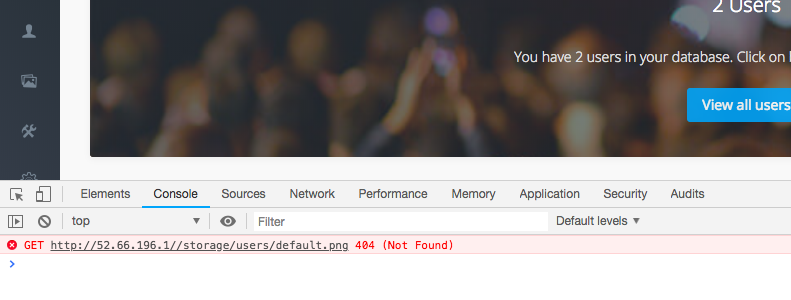
Avatar is not loading in voyager deployed in aws ec2. storage/user/default.png file is returning a 404 error.
When I checked the directory such a file doesn’t exist. Then I manually created and tested, still the 404. I think some kind of permission problem with read/write.
How can I fix the issue?

 jashanpj
All 9 comments
Please fill out the version informations, especially Voyagers.
There was a fix recently to this problem.
 emptynick
on 26 Jan 2019
emptynick
on 26 Jan 2019
Please fill out the version informations, especially Voyagers.
There was a fix recently to this problem.
Laravel Framework 5.7.22
PHP 7.1.16
Voyager - v1.1.11
this is what composer.json says
"require": {
"php": "^7.1.3",
"fideloper/proxy": "^4.0",
"laravel/framework": "5.7.*",
"laravel/tinker": "^1.0",
"tcg/voyager": "^1.1"
},
jashanpj
on 26 Jan 2019
That's not the whole Voyager version. It's written in the footer
emptynick
on 26 Jan 2019
That's not the whole Voyager version. It's written in the footer
- v1.1.11
jashanpj
on 26 Jan 2019
Did you update from a previous version, or did you install 1.1.11 fresh?
emptynick
on 26 Jan 2019
Did you update from a previous version, or did you install 1.1.11 fresh?
I installed fresh.
jashanpj
on 26 Jan 2019
Try to run php artisan vendor:publish --tag=voyager_avatar
But I'm a bit confused by the double-slash. Check your storage-config.
emptynick
on 26 Jan 2019
Yes the issue is fixed,
I set the permission 775 to the root folder
then run the php artisan vendor:publish command.
jashanpj
on 26 Jan 2019
This issue has been automatically locked since there has not been any recent activity after it was closed. If you have further questions please ask in our Slack group.
![github-actions[bot] picture](https://avatars.githubusercontent.com/in/15368?v=4&s=40) github-actions[bot]
on 18 May 2020
github-actions[bot]
on 18 May 2020
Related issues
 iwasherefirst2
·
3Comments
iwasherefirst2
·
3Comments
 rayqiri
·
3Comments
rayqiri
·
3Comments
 craigb88
·
3Comments
craigb88
·
3Comments
 MikadoInfo
·
3Comments
MikadoInfo
·
3Comments
 ferrywae
·
4Comments
ferrywae
·
4Comments
Most helpful comment
Yes the issue is fixed,
I set the permission 775 to the root folder
then run the
php artisan vendor:publishcommand.