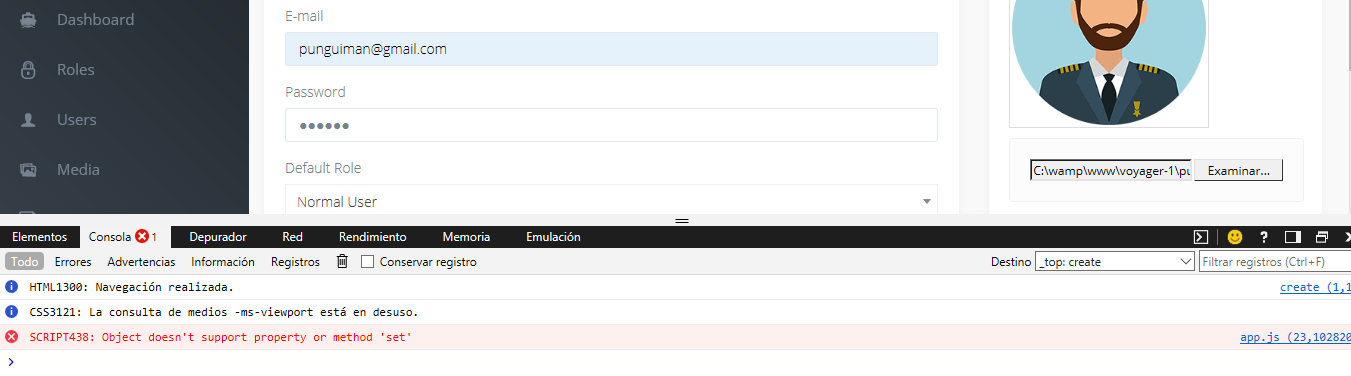
Voyager: Error Update or Edit record (Object doesn't support property or method 'set')
Version information
- Laravel: v5.6.27
- Voyager: v1.1
- PHP: 7.1.17
- Database: MySQL 5.6.17
Description:
An error occurs when trying to update or save any record, user, post, etc.
Additional context
 punguiman
All 21 comments
I'm facing the same problem, but this happens only in Edge or IE. In Chrome, Firefox all ok.
The worst part is that this is in app.js, wich is a minified js...
 nunomsh
on 24 Jul 2018
nunomsh
on 24 Jul 2018
Same here. This error doesn't appear only in Chrome.
If I find out anything useful elsewere I'll tell you.
 xaviqv
on 3 Aug 2018
xaviqv
on 3 Aug 2018
I have the same error, but it only appears in Edge, trying on Chrome every thing seems to be fine. Have you found something about it?
 rocanrolpsycho
on 27 Aug 2018
rocanrolpsycho
on 27 Aug 2018
The solution I found was replace the app.js from a previous version of voyager. I used from version 1.0.13
nunomsh
on 28 Aug 2018
Same issue here IE 11, Edge
 hooch
on 14 Sep 2018
hooch
on 14 Sep 2018
I opened a pull request GH-3546 for this.
hooch
on 15 Sep 2018
Not being able to submit any data by creating/updating any resource trough voyager forms, for one of the main browsers out there (even though it is IE (doh)), is PRETTY MAJOR issue.
I can see some code merges here, but I am kind of lost how to upgrade.
Currently what I did was:
1)composer update
this updated my tcg/voyager from 1.1.3 to 1.1.7
2) php artisan vendor:publish --tag=voyager_assets --force
Copied Directory [/vendor/tcg/voyager/publishable/assets] To [/public/vendor/tcg/voyager/assets]
Still the issue persist. I can see that in @hooch PR the polyfill is added and I can see @fletch3555 merged this commit to the-control-group:1.x branch, but then the above update actions did not update the local copy for me.. Should I do something more here, or this is just not released yet. What should I do to complete this locally on my site?
@hooch Can you help me with any manual steps to fix this with/without updating the tcg/voyager. I am not very stubborn at keeping the vendor code clean at this point as I need this fixed for my current version ASAP. Any dirty fix will do for me for the time being, as I keep track of those in my documentation.
 G00sfraba
on 16 Oct 2018
G00sfraba
on 16 Oct 2018
@G00sfraba I built my own vendor/tcg/voyager/assets/js/app.js and have been running with that, since the PR had not been accepted and I had to deploy.
Having said that, even though my PR was eventually accepted, I just checked the publishable app.js in the 1.1 branch and it hasn't been updated for 6 months. So for all intents the polyfill is not included.
hooch
on 16 Oct 2018
@G00sfraba I just dug deeper and the polyfill seems to be present in the 1.x branch. Quick n dirty I guess is to grab this: https://raw.githubusercontent.com/the-control-group/voyager/1.x/publishable/assets/js/app.js
hooch
on 16 Oct 2018
Having said that, even though my PR was eventually accepted, I just checked the publishable app.js in the 1.1 branch and it hasn't been updated for 6 months. So for all intents the polyfill is not included.
That is the problem with patch (and even minor) releases. We can't require the user to have to publish assets/run db migrations and so on.
Thats why your fix was only merged into 1.x and will be released with the next minor version.
Unfortunately it wont make its way into 1.1.x
 emptynick
on 16 Oct 2018
emptynick
on 16 Oct 2018
Sounds like a good moment for a 1.2 release? It's a terrible situation that new users are getting a Voyager that can't even do basic CRUD in many browsers, going back at least as far as July now.
hooch
on 16 Oct 2018
Yes, we have a few things going with a 1.2 release, so itll be done soon enough. However, we will not be supporting multiple development streams (i.e. 1.1.x and 1.2.x in parallel), so we need to make sure the next minor (1.2.0) is solid before releasing it
 fletch3555
on 16 Oct 2018
fletch3555
on 16 Oct 2018
@G00sfraba I just dug deeper and the polyfill seems to be present in the 1.x branch. Quick n dirty I guess is to grab this: https://raw.githubusercontent.com/the-control-group/voyager/1.x/publishable/assets/js/app.js
Yup I was thinking the same thing even at the time I was commenting on the ticket. I actually did it before the reply, but was not sure isn't it TOO Dirty. Anyway this will be my temporal solution until we get this released officially.
G00sfraba
on 19 Oct 2018
Still dealing with this issue. Not being able to save forms in a huge browser like Edge is a major problem ... I have deployed a really big app and had to tell my client he shouldn't use Edge when editing, which seems like 1999 all over again.
Any idea when this will be solved without having to resort to the dirty fixes described above?
 sergiocastrovale
on 12 Dec 2018
sergiocastrovale
on 12 Dec 2018
I think that workaround is not too dirty.
You wont get a new app.js until the one with the fix is released, so there shouldn't be any problems when upgrading.
emptynick
on 13 Dec 2018
@emptynick Unfortunately, the dirty fix didn't work for me. I published the vendor files and replaced app.js with the one on 1.x branch but started getting this error instead
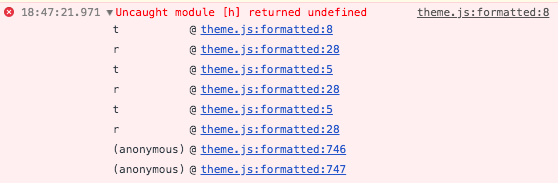
I guess it's too dirty for my installation.
Any other suggestion on how to workaround this?
EDIT: Solved it by downloading formdata.min.js into my public folder and reference it as an additional asset for Voyager.
 dportalesr
on 6 Jan 2019
dportalesr
on 6 Jan 2019
🥇@dportalesr thanks for documenting that for those of us (and our users) who don't live inside the ChromeBubble
hooch
on 6 Jan 2019
Still doesn't work as of 18-Feb-2019. Seems the error is deeply embedded in jQuery so I don't see it being fixable.
 OdinsHat
on 18 Feb 2019
OdinsHat
on 18 Feb 2019
@OdinsHat I don't think the patch is going to be properly distributed until the 1.2 release comes out. Until then, pain unless you use Chrome.
Otherwise, did you try downloading the formdata.min.js asset and linking it as an additional asset, as mentioned by dportalesr in the final line of his comment?
hooch
on 18 Feb 2019
1.2 has been released so has 1.3.
I also think this was in some way related with ajax validation that is now not used anymore, so I'm closing it.
If you are still experiencing the problem on Voyager 1.3 please open another issue and you can reference this one.
 MrCrayon
on 8 Dec 2019
MrCrayon
on 8 Dec 2019
This issue has been automatically locked since there has not been any recent activity after it was closed. If you have further questions please ask in our Slack group.
![github-actions[bot] picture](https://avatars.githubusercontent.com/in/15368?v=4&s=40) github-actions[bot]
on 6 Jun 2020
github-actions[bot]
on 6 Jun 2020
Related issues
 iwasherefirst2
·
3Comments
iwasherefirst2
·
3Comments
 wislem
·
3Comments
wislem
·
3Comments
 duongsieu
·
3Comments
duongsieu
·
3Comments
 zzpwestlife
·
3Comments
zzpwestlife
·
3Comments
 TXRRNT
·
3Comments
TXRRNT
·
3Comments
Most helpful comment
🥇@dportalesr thanks for documenting that for those of us (and our users) who don't live inside the ChromeBubble