Voyager: Default avatar is broken for new users
Version information
- Laravel: v5.6.26
- Voyager: v1.1
- PHP: 7.2
Description
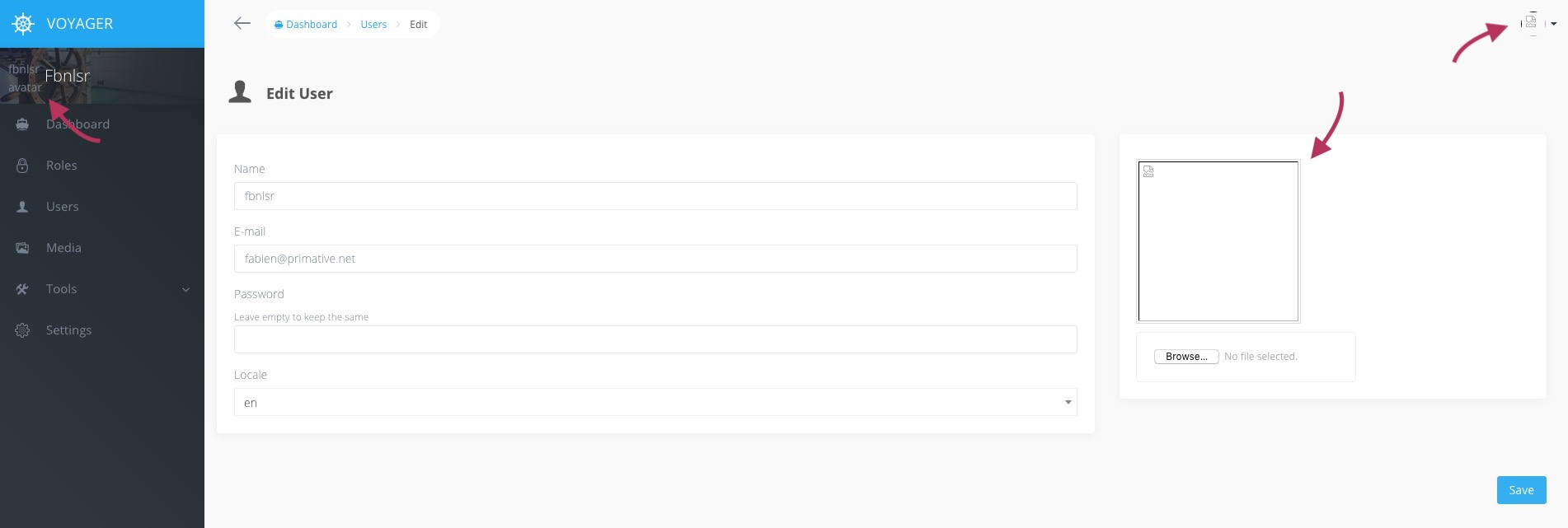
When adding user to voyager, its default avatar is broken.
Steps To Reproduce
Steps to reproduce the behavior:
- Create a new Laravel project
- Install Voyager without dummy data
- Add authentication scaffolding for Laravel, using
php artisan make:auth - Register new user, say with email
[email protected] - Add admin privileges to this user using
php artisan voyager:admin [email protected] - Go to
/adminwith the user logged in - The requested file
/storage/users/default.pngdoes not exist
Expected behavior
A default avatar picture should appear
Screenshots
Additional context
I don't know if it's important but I'm using homestead as my web server.
 fbnlsr
All 18 comments
Can you verify whether the file exists at /storage/app/public/users/default.png?
If so, what about /public/storage/users/default.png?
 fletch3555
on 26 Jun 2018
fletch3555
on 26 Jun 2018
None of them exists.
fbnlsr
on 26 Jun 2018
The default user icons are only installed during the voyager:install --with-dummy command.
 tjmckenzie
on 26 Jun 2018
tjmckenzie
on 26 Jun 2018
Did you change de .env file? I've got a similar issue, I wasn't using the Homestead though. I had to change the APP_URL=localhost to APP_URL=127.0.0.1:8000 like the docs says.
 guillermoprojaslema
on 26 Jun 2018
guillermoprojaslema
on 26 Jun 2018
I experienced the same issue but you better pick an other default avatar on internet or do your own 😄
 SteamWind
on 27 Jun 2018
SteamWind
on 27 Jun 2018
Yeah we really should have a default avatar set even when not using --with-dummy.
Maybe use Gravatar as default?
fbnlsr
on 27 Jun 2018
Gravatar is the devil 😝
(@fbnlsr This is only a personal appreciation. I just don't like the fact that you share the same image everywhere. I prefer to setup my avatar from case to case...)
SteamWind
on 27 Jun 2018
Why's that?
fbnlsr
on 27 Jun 2018
Change the APP_URL in .env file
APP_URL=http://voyager.test
 slckym
on 27 Jun 2018
slckym
on 27 Jun 2018
@slckym that is just wrong.
The image just doesn't exist, and changing the app-url to voyager.test will break everything (at least for him)
 emptynick
on 27 Jun 2018
emptynick
on 27 Jun 2018
I did change the URL in the .env file when I first set up my app.
I believe this is a problem related to Voyager, not my config.
fbnlsr
on 28 Jun 2018
Without installing with dummy data, you can manually set the path to your own default user icon in config/voyager.php
https://github.com/the-control-group/voyager/blob/1.1/publishable/config/voyager.php#L21
tjmckenzie
on 28 Jun 2018
@fbnlsr, in Laravel any file inside storage/app/public folder is considered as dummy files. take a look at .gitignore in the mentioned path.
So, to me they are not considered as my project main files and it seems reasonable to not create that file with default voyager installation.
 bluemmb
on 2 Jul 2018
bluemmb
on 2 Jul 2018
I hear what you are both saying. But I believe Voyager should provide a default avatar picture when creating users without using the --with-dummy flag. If not, what's the point of providing a whole set of icons as well? To me that's an issue that needs to be solved.
fbnlsr
on 3 Jul 2018
Agreed, and Voyager used to. It was accidentally moved, not intentionally
fletch3555
on 3 Jul 2018
Change the APP_URL in .env file
APP_URL=http://voyager.test
solve my problem. i wonder why other people dont get this issue. haha thanks alot
 indrawind48
on 21 Oct 2018
indrawind48
on 21 Oct 2018
Change the APP_URL in .env file
APP_URL=http://voyager.test
THAAAANK YOU DUD!
 mblaanco
on 25 Jan 2019
mblaanco
on 25 Jan 2019
This issue has been automatically locked since there has not been any recent activity after it was closed. If you have further questions please ask in our Slack group.
![github-actions[bot] picture](https://avatars.githubusercontent.com/in/15368?v=4&s=40) github-actions[bot]
on 18 May 2020
github-actions[bot]
on 18 May 2020
Related issues
 IvanBohonosiuk
·
4Comments
IvanBohonosiuk
·
4Comments
 kevinjon27
·
3Comments
kevinjon27
·
3Comments
 duongsieu
·
3Comments
duongsieu
·
3Comments
 jeulun
·
3Comments
jeulun
·
3Comments
 zzpwestlife
·
3Comments
zzpwestlife
·
3Comments
Most helpful comment
I hear what you are both saying. But I believe Voyager should provide a default avatar picture when creating users without using the
--with-dummyflag. If not, what's the point of providing a whole set of icons as well? To me that's an issue that needs to be solved.