- Laravel Version: 5.4.
- Voyager Version: ^1.1
- PHP Version: 5.6
- Database Driver & Version:
MySql
Description:
After launching the app from local to the server all images are not visible. The url of the image is
src="http://mysite.com/storage/users/May2018/Tq4bqKXAHMVGtMt6WNWV.jpg". In my root directory which is /public I do have the /storage directory but it has only .gitignore file. I've tried APP_URL=http://127.0.0.1:8000 Doesn't help
APP_URL=http://ubb.st.php-academy.org Doesn't help
Please help! Thank you!
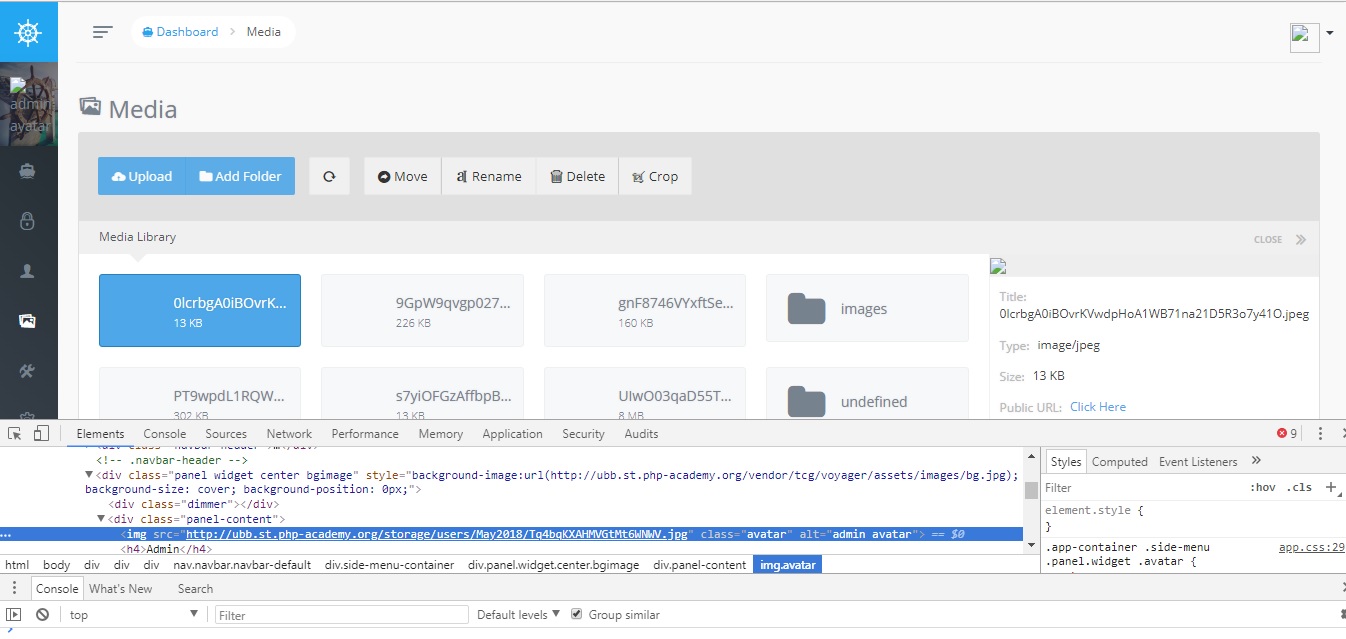
Steps To Reproduce:
 KyryloGrygorenko
All 8 comments
APP_URL needs to be the URL to your site, including port. Also, your site can't live in a subdirectory (e.g. http://domain.com/path/to/laravel) What's the URL to your site?
 fletch3555
on 7 May 2018
fletch3555
on 7 May 2018
The Url to my site is http://ubb.st.php-academy.org. I've tried http://ubb.st.php-academy.org:8000 also.
KyryloGrygorenko
on 7 May 2018
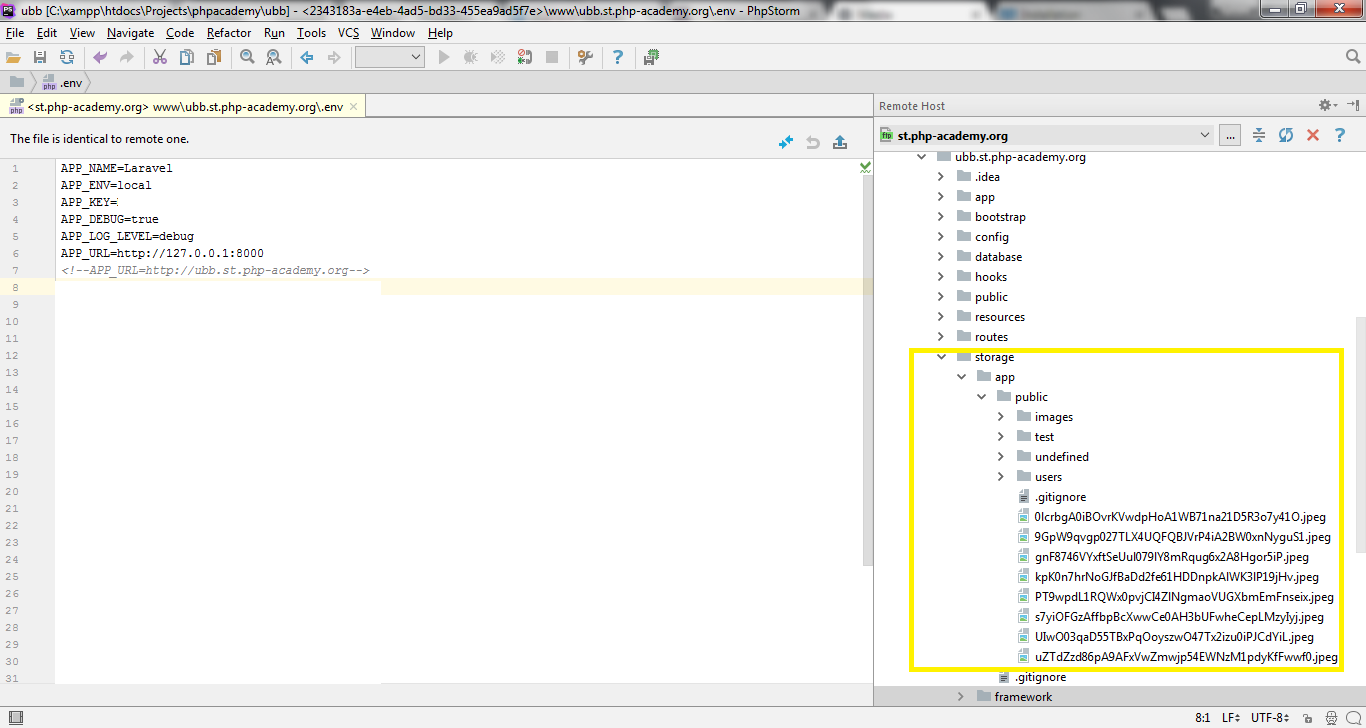
I've found out where the files that I have uploaded had been stored. It is storage/app/public/
KyryloGrygorenko
on 7 May 2018
Your APP_URL needs to change to the domain (use the commented-out one in your screenshot). While we're on the topic, .env does NOT use HTML-style comments, so please get rid of that.
By default, Voyager uses Laravel's default public filesystem (config/filesystems.php). This can be changed, but you might as well understand how it works first.
In short, Laravel will generate links to files at the path of /storage/path/to/file.ext. Through your web browser's configuration, this will equate to the file at /path/to/laravel/public/storage/path/to/file.ext, where storage is a symlink to /path/to/laravel/storage/app/public. Please make sure this is the case (if it's not, your Voyager dashboard will have a banner informing you of this.
Laravel knows how to generate links like this because of the "disk" configuration in config/filesystems.php (ref). This config has a root key which says where to write files to, and a url key which says how to generate URLs.
You're free to change this configuration however you'd like, but check the Laravel docs since Voyager doesn't do anything specific in this regard.
fletch3555
on 7 May 2018
Thank you for your help! This is what I have in filesystems.php
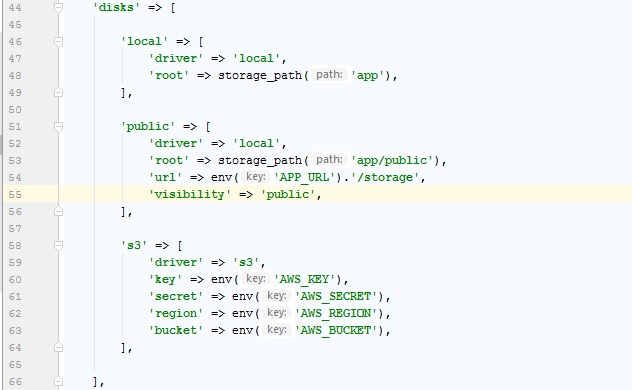 . But I didn't get the point what needs to be changed in order to make the
the links to the images work. The URL that is generated for the user avatar is http://ubb.st.php-academy.org/storage/users/May2018/ZYnEvsUSwt3WLEfmkMJ6.jpg.
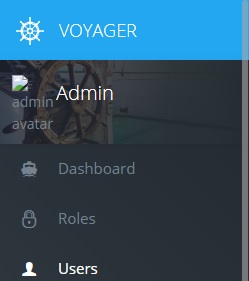 . I still don't have an idea what am I doing wrong. I appreciate your help!
KyryloGrygorenko
on 8 May 2018
Looks like I finally found the way to make it work. In the filesystems.php
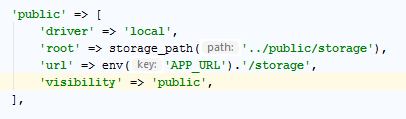
Thanks for all your help and prompt responses! Voyager is a cool product!!!
KyryloGrygorenko
on 8 May 2018
Laravel Version: 5.4.
Voyager Version: ^1.1
PHP Version: 5.6
Database Driver & Version: MySql
@fletch3555 thank you for your detailed answer,i have same issue at show avatar ,i try change my config/filesystems.php file
'public' => [
            'driver' => 'local',
            'root' => storage_path('app/public'),
            'url' => env('APP_URL').'/storage/app/public',
            'visibility' => 'public',
        ],
i have chagned the disk -> public -> url value env('APP_URL').'/storage' to env('APP_URL').'/storage/app/public',it works for me
 wakasann
on 10 Jul 2018
wakasann
on 10 Jul 2018
This issue has been automatically locked since there has not been any recent activity after it was closed. If you have further questions please ask in our Slack group.
![github-actions[bot] picture](https://avatars.githubusercontent.com/in/15368?v=4&s=40) github-actions[bot]
on 18 May 2020
github-actions[bot]
on 18 May 2020
Related issues
 craigb88
·
3Comments
craigb88
·
3Comments
 popica80
·
3Comments
popica80
·
3Comments
 jeulun
·
3Comments
jeulun
·
3Comments
 raoasifraza1
·
3Comments
raoasifraza1
·
3Comments
 Nagendra1421
·
3Comments
Nagendra1421
·
3Comments
Most helpful comment
Your APP_URL needs to change to the domain (use the commented-out one in your screenshot). While we're on the topic,
.envdoes NOT use HTML-style comments, so please get rid of that.By default, Voyager uses Laravel's default
publicfilesystem (config/filesystems.php). This can be changed, but you might as well understand how it works first.In short, Laravel will generate links to files at the path of
/storage/path/to/file.ext. Through your web browser's configuration, this will equate to the file at/path/to/laravel/public/storage/path/to/file.ext, wherestorageis a symlink to/path/to/laravel/storage/app/public. Please make sure this is the case (if it's not, your Voyager dashboard will have a banner informing you of this.Laravel knows how to generate links like this because of the "disk" configuration in
config/filesystems.php(ref). This config has arootkey which says where to write files to, and aurlkey which says how to generate URLs.You're free to change this configuration however you'd like, but check the Laravel docs since Voyager doesn't do anything specific in this regard.