Voyager: Error listing users after BREAD update
- Laravel Version: 5.5.40
- Voyager Version: 1.1.x-dev
- PHP Version: 7.0.29
- Database Driver & Version: MySQL 5.7.22
Description:
I get this error listing users after updating Users BREAD.
mb_strlen() expects parameter 1 to be string, array given (View: /var/www/soluzink.nosolosoft.es/vendor/tcg/voyager/resources/views/bread/browse.blade.php) {"userId":1,"email":"[email protected]","exception":"[object] (ErrorException(code: 0): mb_strlen() expects parameter 1 to be string, array given (View: /var/www/soluzink.nosolosoft.es/vendor/tcg/voyager/resources/views/bread/browse.blade.php) at /var/www/soluzink.nosolosoft.es/storage/framework/views/62f2e8b577c2df70187ddfef7ca73346f08fef9b.php:154, ErrorException(code: 0): mb_strlen() expects parameter 1 to be string, array given at /var/www/soluzink.nosolosoft.es/storage/framework/views/62f2e8b577c2df70187ddfef7ca73346f08fef9b.php:154)
Steps To Reproduce:
1st. I update Users BREAD even without any change
2nd. I go to users list, and I get this error.

 lagartiho
All 10 comments
What's the output of $data and $row->field?
 fletch3555
on 30 Apr 2018
fletch3555
on 30 Apr 2018
@fletch3555 I don't know, should output any BREAD data of user listing. It happens on a fresh Voyager instalation. You can check that.
lagartiho
on 2 May 2018
Can't duplicate that. Did you edit/save your own user or another one?
 emptynick
on 2 May 2018
emptynick
on 2 May 2018
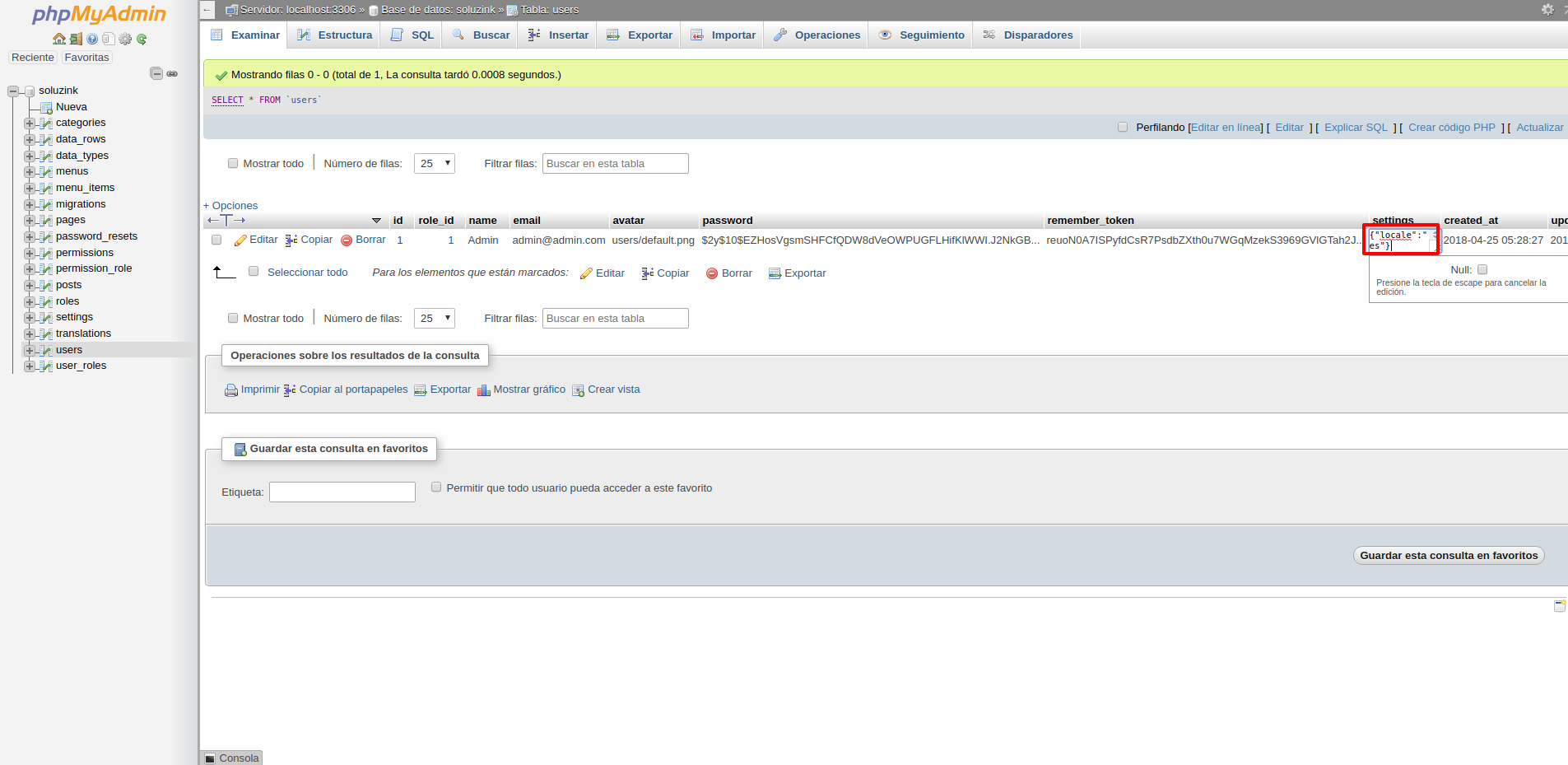
Problem appeared when I directly set on Data Base this User "Settings": {"locale":"es"}
I had to set this directly on Data Base, because it didn't work editing user locale in Voyager.
 nosolosoft
on 2 May 2018
nosolosoft
on 2 May 2018
In fact, if I remove "Browse" on "Settings" of "User" BREAD, the error doesn't appears on user listing.
nosolosoft
on 2 May 2018
This happens because in DataRowsTableSeeder the field for settings is named locale witch is not the name in the DB.
When doing mb_strlen( $data->{$row->field} ) by default the row field is locale and $data is {"locale":"en"} so $data->locale = 'en'.
But when you make any change to the Users BREAD the name for the that specific row in the DB is settings so it deletes locale form data_rows (should by id: 11) and adds a new settings data row to the user type.
Changing the name of the data_row to settings breaks mb_strlen( $data->{$row->field} ) as $data->{$row->field} return the array ['locale' => 'en'] as it can't find the key settings.
If you go into the DB and change to new data_row field from settings back to locale the User views start working again.
 jpolive
on 2 May 2018
jpolive
on 2 May 2018
Or you just set settings browse to off. Simpler
emptynick
on 2 May 2018
@emptynick true that does hide the problem but you also have to set read to off, the code is the same.
Not being able to see a user locale unless you go to the edit view might be a problem to some users.
jpolive
on 2 May 2018
The locale is visible in all bread-actions by default. See here
My PR (linked above) restricts all bread-actions for settings
emptynick
on 2 May 2018
This issue has been automatically locked since there has not been any recent activity after it was closed. If you have further questions please ask in our Slack group.
![github-actions[bot] picture](https://avatars.githubusercontent.com/in/15368?v=4&s=40) github-actions[bot]
on 18 May 2020
github-actions[bot]
on 18 May 2020
Related issues
 duongsieu
·
3Comments
duongsieu
·
3Comments
 MikadoInfo
·
3Comments
MikadoInfo
·
3Comments
 zzpwestlife
·
3Comments
zzpwestlife
·
3Comments
 raoasifraza1
·
3Comments
raoasifraza1
·
3Comments
 TXRRNT
·
3Comments
TXRRNT
·
3Comments
Most helpful comment
In fact, if I remove "Browse" on "Settings" of "User" BREAD, the error doesn't appears on user listing.