Voyager: problem with storage symlink
- Laravel Version: 5.6
- Voyager Version: latest
- PHP Version:7.1.4
- Database Driver & Version:MySQL
Description:
I have used custom directory structure to install laravel on xampp. public folder's content is in the htdocs/demos/sricargo/ folder

And rest of the files and folders are in same level of the htdocs and in this folder
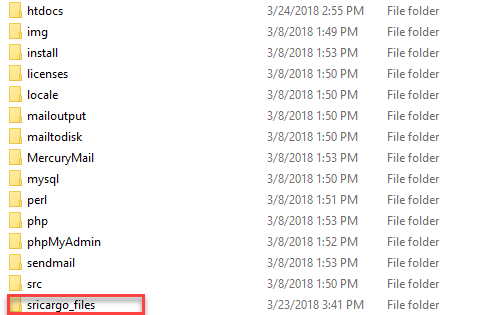
I have managed to get laravel working with this folder structure. But after I installed voyager, In voyager dashboard it gives me this error
Missing storage symlink
We could not find a storage symlink. This could cause problems with loading media files from the browser.
When I press the fix button it then gives this error
Could not create missing storage symlink
We failed to generate the missing symlink for your application. It seems like your hosting provider does not support it.
This is the .htaccess file located in the htdocs/demos/sricargo/ folder
`<IfModule mod_rewrite.c>
   <IfModule mod_negotiation.c>
        Options -MultiViews
    </IfModule>

  <IfModule mod_rewrite.c>
    RewriteEngine On
    Options +FollowSymLinks

    RedirectMatch ^/$ /wp-blog/
    Redirect "/demos/sricargo/blog" /wp-blog/

    RewriteBase /demos/sricargo/

    # Redirect Trailing Slashes...
    RewriteRule ^(.*)/$ /$1 [L,R=301]

    # Handle Front Controller...
    RewriteCond %{REQUEST_FILENAME} !-d
    RewriteCond %{REQUEST_FILENAME} !-f
    RewriteRule ^ /demos/sricargo/index.php [L]
</IfModule>
`
I even tried to created the symlink with php artisan storage:link command but it gives this error
The filename, directory name, or volume label syntax is incorrect.
The [public/storage] directory has been linked.
When I create a new folder in media page and uploaded a new image file it's actually uploaded in this location sricargo_files\storage\app\public\
So the images thumbnail are not displaying in the media page and when i click public url link in media page it gives this url http://localhost/demos/sricargo/storage/app/public/bb/0U1TwmFxLcJ833ufKOSV4nrJlZs9QvZVb7yjEwq7.jpeg ('bb' is the newly created folder through media page). Even though this storage folder doesn't exist on this path htdocs/demos/sricargo/
How can this be resolved ? Any ideas ?
 kaxterzz
All 9 comments
You can try to create manually a Symbolic Link:
xampp/htdocs/demos/sricargo/storage => xampp/sricargo_files/storage/app/public
 MrCrayon
on 25 Mar 2018
MrCrayon
on 25 Mar 2018
@MrCrayon I created a symlink manually and now images and folders in media page is visible and I can access them. But error message in the dashboard is still there saying
Missing storage symlink
We could not find a storage symlink. This could cause problems with loading media files from the browser.
kaxterzz
on 25 Mar 2018
You can try this in your AppServiceProvider:
<?php

namespace App\Providers;

use Illuminate\Support\ServiceProvider;

public function register()
{
    $this->app->bind('path.public', function() {
   return realpath(base_path().'/../public_html');
});
}

?>
if it doesn't work read all that thread here:
https://laracasts.com/discuss/channels/general-discussion/where-do-you-set-public-directory-laravel-5?page=3
MrCrayon
on 25 Mar 2018
I have tried it. And now symlink is creating and dashboard error is gone. But the problem is it's creating the symlink in drive C:\ not in the htdocs/demos/sricargo folder.
.env file app url,
APP_URL=http://localhost
In AppServiceProvider,
`$this->app->bind('path.public', function() {
       return realpath(env('APP_URL').'/demos/sricargo');
    });`
In config/filesystems.php
`'public' => [
        'driver' => 'local',
        'root' => storage_path('app/public'),
        'url' => env('APP_URL').'/demos/sricargo/storage',
        'visibility' => 'public',
    ],`
And also when I tried to create a symlink using php artisan storage:link command it's also creating the symlink in drive C:\
kaxterzz
on 25 Mar 2018
I don't think you should use env('APP_URL'), that's an http address, so try to put there base_path() instead as in the code I took from that thread.
If that still doesn't work I guess you need to check deeper in voyager code starting from addStorageSymlinkAlert in VoyagerServiceProvider.
MrCrayon
on 26 Mar 2018
This is not a Voyager issue. It's an issue with how you've set up your Laravel app. You've "made" laravel work through some hacks instead of configuring it properly (ideally, it would be set up so the standard install works without customizations). @MrCrayon's comments have provided most (if not all) of the required configuration changes.
Voyager expects the symlink to exist at public_path() and be named storage as this is what Laravel will create. If you want to change any part of that, then you have to tell Laravel how to find it (which is what the path.public override is for). Also, as has already been said, APP_URL holds a URL, not a filesystem path. realpath() might get you there, but it will certainly be less efficient. base_path() is likely what you're looking for.
 fletch3555
on 28 Mar 2018
fletch3555
on 28 Mar 2018
Hi kaxterzz,
I had the same issue and I have added : APP_URL in the .env file and it solved for me. But I thing your case is different as you did not follow the standard install steps as fletch3555 said.
 bwmadda
on 6 Apr 2018
bwmadda
on 6 Apr 2018
I still have this problem.
If any one can help me please?
 ahmedlab311
on 3 Jul 2018
ahmedlab311
on 3 Jul 2018
This issue has been automatically locked since there has not been any recent activity after it was closed. If you have further questions please ask in our Slack group.
![github-actions[bot] picture](https://avatars.githubusercontent.com/in/15368?v=4&s=40) github-actions[bot]
on 18 May 2020
github-actions[bot]
on 18 May 2020
Related issues
 rayqiri
·
3Comments
rayqiri
·
3Comments
 iwasherefirst2
·
3Comments
iwasherefirst2
·
3Comments
 jeulun
·
3Comments
jeulun
·
3Comments
 wp-src
·
3Comments
wp-src
·
3Comments
 ferrywae
·
4Comments
ferrywae
·
4Comments
Most helpful comment
You can try to create manually a Symbolic Link:
xampp/htdocs/demos/sricargo/storage => xampp/sricargo_files/storage/app/public