Voyager: (1/1) ErrorException readlink(): Invalid argument
- Laravel Version: 5.4
- Voyager Version: 1.0
- PHP Version:
- Database Driver & Version: mysql
Server : Shared Host
Description:
Steps To Reproduce:
the package well wore in locally but myserver is return folling error
(1/1) ErrorException
readlink(): Invalid argument
at readlink('/home/u122893056/public_html/public/storage')in VoyagerServiceProvider.php (line 170)
my file manager path is staring from u122893056/public_html/public/storage
but '/home/u122893056/public_html/public/storage' is start from home
 israelysm
All 9 comments
You have to provide a bit more information, like the version fields from the issue templates.
How did you upload everything to your server?
 emptynick
on 18 Mar 2018
emptynick
on 18 Mar 2018
I'm having the same issue.
- Laravel Version: 5.5.39
- Voyager Version: 1.0.16
- PHP Version: 7.1.15
Description:
This only happens on the server, locally everything is working.
Here is my error screen
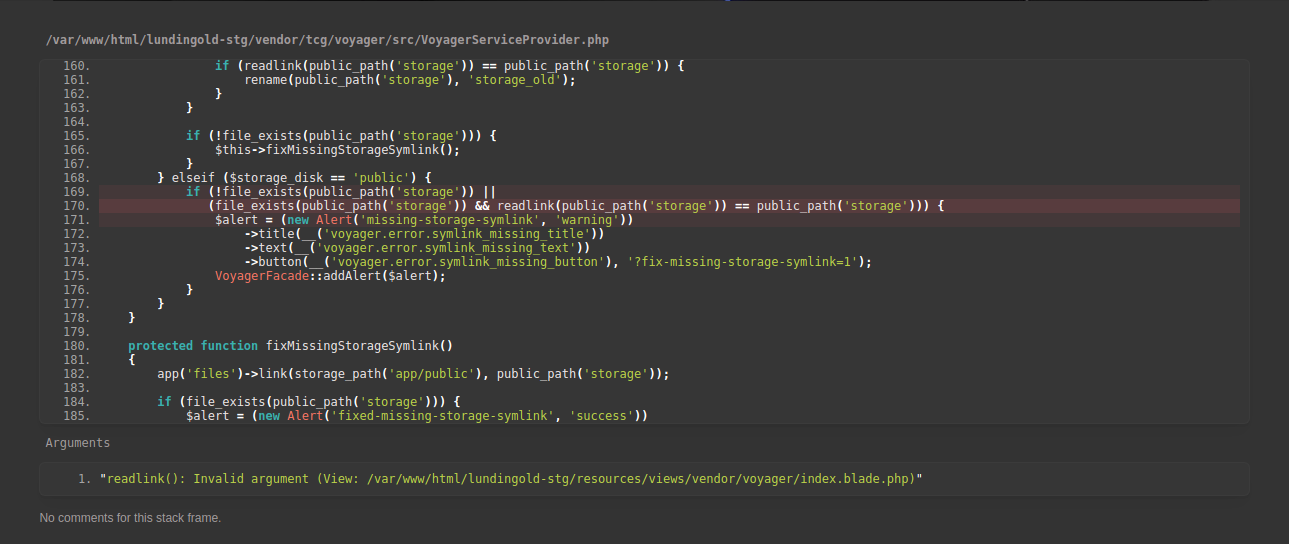
Steps To Reproduce:
Updated code on server, while updating voyager on server from 1.0.10 => 1.0.16
Would it work to use realpath() instead of readlink()?
 Derek03
on 22 Mar 2018
Derek03
on 22 Mar 2018
I had the same issue. Changing readlink to realpath fixed the problem.
 ikanc
on 23 Mar 2018
ikanc
on 23 Mar 2018
Thanks ikanc it works!!!! Buth I donth understand why this happends???? I`m working with a team and is the first time it happens, I change de readpath to realpath as you say, buth this will affect my team mates???
 Garymarena
on 25 Mar 2018
Garymarena
on 25 Mar 2018
@Garymarena if you change it locally, it will only affect you. However, next time that composer will pull a new version, it would be overwritten.
ikanc
on 25 Mar 2018
Changing it to realpath does not really fix the problem, it just passes the condition.
You could basically put every function which returns a bool there.
I submitted a fix for this
emptynick
on 25 Mar 2018
Closed by #2891
 fletch3555
on 28 Mar 2018
fletch3555
on 28 Mar 2018
I had the same issue and the way I fixed it was to delete the storage folder from the public folder and used php artisan storage:link to remake the symlink and I could visit the Admin dashboard without the same issue again. Changing the code to realpath to make it work now, you will still be affected after an update since that is not the real cause. My public folder is still as default as laravel has it, just that I used .htaccess to link it to my domain so I used storage:link without any issues.
 NanissaDev
on 4 Apr 2018
NanissaDev
on 4 Apr 2018
This issue has been automatically locked since there has not been any recent activity after it was closed. If you have further questions please ask in our Slack group.
![github-actions[bot] picture](https://avatars.githubusercontent.com/in/15368?v=4&s=40) github-actions[bot]
on 18 May 2020
github-actions[bot]
on 18 May 2020
Related issues
 vaggelis2018
·
3Comments
vaggelis2018
·
3Comments
 rayqiri
·
3Comments
rayqiri
·
3Comments
 wislem
·
3Comments
wislem
·
3Comments
 TPRAsh
·
3Comments
TPRAsh
·
3Comments
 MikadoInfo
·
3Comments
MikadoInfo
·
3Comments
Most helpful comment
I had the same issue and the way I fixed it was to delete the storage folder from the public folder and used
php artisan storage:linkto remake the symlink and I could visit the Admin dashboard without the same issue again. Changing the code to realpath to make it work now, you will still be affected after an update since that is not the real cause. My public folder is still as default as laravel has it, just that I used .htaccess to link it to my domain so I usedstorage:linkwithout any issues.