Voyager: App\User not found with autodiscover
- Laravel Version: 5.5.34
- Voyager Version: ^1.0
- PHP Version: 7.1.14
- Database Driver & Version: SQLite
Description:
App\User not found after trying to install the package by running composer require tcg/voyager. When the post scripts are fired php artisan package:discover is run and errors out with:
In VoyagerServiceProvider.php line 87:
Class 'App\User' not found
This then makes composer revert back and thus fails to write tcg/voyager into composer deps as a result. Unable to run php artisan afterwards to install voyager configs to fix the issue.
Steps To Reproduce:
Move App\User to App\Models\User (or any other namespace than App\User). Change config files to point App\User references to new App\Models\User namespace. Run composer require tcg/voyager.
Workaround.
A bit klugey but I've found a solution doing the following....
Create config/voyager.php before running composer require and add:
<?php
return [
    'user' => [
        'namespace' => App\Models\User::class // or whatever namespace you need
    ]
];
Run php artisan config:cache to store settings, delete config/voyager.php (so that the installer can provide the whole config file), run php artisan voyager:install which will add back the full config/voyager.php file and finally change the namespace in this config/voyager.php file to the namespace from above (i.e. App\Models\User)
Not sure what you'd suggest for a long term solution seeing as the issue stems from Line 87 of the VoyagerServiceProvider where the following call is made:
namespace TCG\Voyager;
// ...
class VoyagerServiceProvider extends ServiceProvider
{
// ...
public function boot(Router $router, Dispatcher $event)
    {
        if (config('voyager.user.add_default_role_on_register')) {
            $app_user = config('voyager.user.namespace'); // Line 87, issue is here...
            $app_user::created(function ($user) {
 kylemilloy
All 8 comments
Quick solution could be:
namespace TCG\Voyager;
// ...
class VoyagerServiceProvider extends ServiceProvider
{
// ...
public function boot(Router $router, Dispatcher $event)
    {
        if (config('voyager.user.add_default_role_on_register')) {
            // check for default Laravel auth config model namespace as well as voyager config
            $app_user = class_exists(config('voyager.user.namespace')) ?
                config('voyager.user.namespace') : config('auth.providers.users.model');
            $app_user::created(function ($user) {
            // ...
Lemme know if you want a pull request for this....
Edit:
Changed this a bit...
kylemilloy
on 22 Feb 2018
Is this package still managed?
 jeffreydwalter
on 7 May 2018
jeffreydwalter
on 7 May 2018
@jeffreydwalter if you looked at the closed issues/merged PRs, you'd know it's very much still maintained.
 fletch3555
on 7 May 2018
fletch3555
on 7 May 2018
@fletch3555 yeah, well why has this issue gone answered since Feb.?
jeffreydwalter
on 7 May 2018
This discussion is best had in our Slack group, not on the issue. Also, please see my response on your issue, which you already closed.
fletch3555
on 7 May 2018
Let's get this back on topic w/o name calling (re: https://github.com/the-control-group/voyager/issues/3150). For the record, this is not user error, @fletch3555, as you marked it on @jeffreydwalter's ticket...please use the steps below to try for yourself.
Steps to reproduce:
- Fresh install of Laravel.
- Change the App\User model to something like App\Models\User. Update all references to App\Models\User in config and controllesr
- Run
composer require tcg/voyager
Composer require fails with the following error
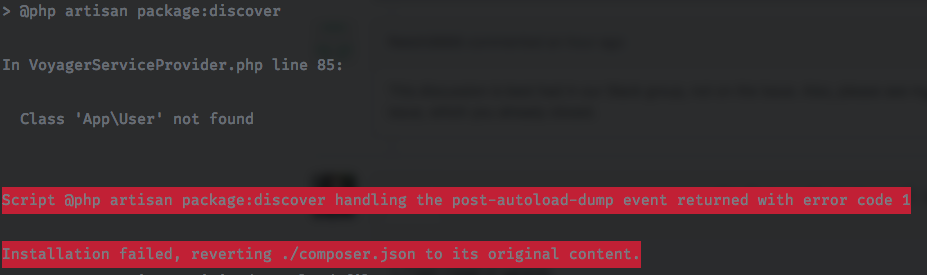
Which unwinds your composer.json and lock file preventing voyager from being able to be installed. The only way to fix this is to first make a config/voyager file and add in the location to your user model location and then delete this config after install and then use vendor:publish to reinstall it properly...not a good solution.
My fix above provides a way around this so that it will use your defacto Laravel config files if it can't find a voyager config file (ie on first load)
If you want me to write a PR for this let me know...
I don't wanna bloat the code unnecessarily with edge case fixes...perhaps a better solution is adding a note in the README to address it.
kylemilloy
on 8 May 2018
This should have been solved with #1499.
If not please open another issue.
 MrCrayon
on 6 Dec 2019
MrCrayon
on 6 Dec 2019
This issue has been automatically locked since there has not been any recent activity after it was closed. If you have further questions please ask in our Slack group.
![github-actions[bot] picture](https://avatars.githubusercontent.com/in/15368?v=4&s=40) github-actions[bot]
on 4 Jun 2020
github-actions[bot]
on 4 Jun 2020
Related issues
 jeulun
·
3Comments
jeulun
·
3Comments
 wp-src
·
3Comments
wp-src
·
3Comments
 popica80
·
3Comments
popica80
·
3Comments
 TXRRNT
·
3Comments
TXRRNT
·
3Comments
 TPRAsh
·
3Comments
TPRAsh
·
3Comments
Most helpful comment
Quick solution could be:
Lemme know if you want a pull request for this....
Edit:
Changed this a bit...