Voyager: How to create seperate user_admin table?
- Laravel Version: v5.5.27
- Voyager Version: v1.0.11
- PHP Version: 7.1.7-1+ubuntu16.04
- Database Driver & Version: MySQL 5.7.18-0ubuntu0.16.04.1 - (Ubuntu)
I want to have users and admin_users in two separate tables.
I found that this has been asked before at https://github.com/the-control-group/voyager/issues/2354 and at https://github.com/the-control-group/voyager/issues/934 but both threads did not work out for me.
This is what I have done:
- Created a VoyagerAdmin Model
php artisan make:mode VoyagerAdmin -m
- Customized VoyagerAdmin Table
public function up()
{
    Schema::create('voyager_users', function (Blueprint $table) {
        $table->increments('id');
        $table->string('name');
        $table->string('email')->unique();
        $table->string('password')->nullable();
        $table->timestamps();
    });
}
- Customized Voyager Migration
Renamed 'users' to 'voyager_users' in /database/migrations/****_**_**_*****_add_voyager_user_fields.php
- Bind at AppServiceProvider
use TCG\Voyager\Facades\Voyager;

/**
 * Bootstrap any application services.
 *
 * @return void
 */
public function boot()
{
    // Workaround for Mysql Versions < 7.
    Schema::defaultStringLength(191);

    Voyager::useModel('User', \App\VoyagerUser::class);
}
- Updated config file:
    'user' => [
        'add_default_role_on_register' => true,
        'default_role'                 => 'user',
        'namespace'                    => App\VoyagerUser::class,
        'default_avatar'               => 'users/default.png',
    ],
- Updated Database
php artisan migrate
php artisan voyager:install
I can create a new user with
php artisan voyager:admin [email protected] --create
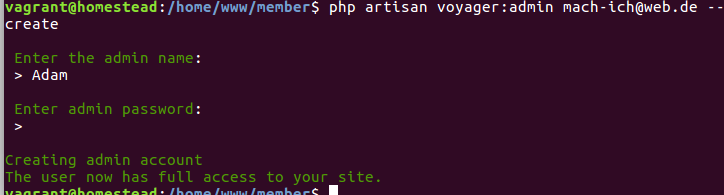
However, I cannot login with that. I get the error message that these login credentials could not be found in the database.
Have I done anything wrong?
 iwasherefirst2
All 9 comments
Did you check the database? Was your user created in the correct table?
Assuming it populated your voyager_users table correctly, then the next thing to check is the Auth guard. In config/auth.php, you need to configure which guard Auth will use by default. Voyager is difficult to change, so you're better off setting VoyagerUser as the default user model. Then you'll have to make the rest of your site use a different guard. I'm sure there are other ways to do it, but that's up to you to decide. This page will be helpful: https://laravel.com/docs/5.5/authentication
 fletch3555
on 30 Jan 2018
fletch3555
on 30 Jan 2018
Oh I see. I had to do change VoyagaerUser as default model for the default guard and set up a different guard for my app. Thank you, that worked.
iwasherefirst2
on 31 Jan 2018
@fletch3555 I just realized that while my login with Voyager works, the default user of my application can't login anymore.
I created a second guard called normal in config/auth.php which is related to app/User:class. Inside my app\Html\Controller\Auth\LoginController I have overwritten the guard method to
use Illuminate\Foundation\Auth\AuthenticatesUsers;

class LoginController extends Controller
{

    use AuthenticatesUsers;

    protected function guard()
    {
        return \Auth::guard('normal');
    }

    public function test()
    {
      dd("hi");
    }
If I try to call this LoginController via Route::get('/test', 'Auth\LoginController@test'); I get this screen:

iwasherefirst2
on 5 Feb 2018
Whoups... I figured it out, its because
```
public function __construct()
{
$this->middleware('guest')->except('logout');
}
I have to change the guest middleware to
public function __construct()
{
$this->middleware('guest:normal')->except('logout');
}
```
iwasherefirst2
on 5 Feb 2018
had to do change VoyagaerUser as default model for the default guard and set up a different guard for my app
Hey @iwasherefirst2 I realize this isn't Laravel support, but I'm attempting to replicate your results and despite reading Laravel docs repeatedly, I can't seem to get this working. Would you mind posting some of what you did here to add and enable the alternate guard?
 mandofever78
on 2 Jul 2018
mandofever78
on 2 Jul 2018
@mandofever78 sure thing.
So as explained above I created an App\VoyagerAdmin which represents the admin user. I had to change the user class inside config\voyager.php :
  /*
    |--------------------------------------------------------------------------
    | User config
    |--------------------------------------------------------------------------
    |
    | Here you can specify voyager user configs
    |
    */

    'user' => [
        'add_default_role_on_register' => true,
        'default_role'                 => 'user',
        'namespace'                    => App\VoyagerAdmin::class,
        'default_avatar'               => '',
    ],
Next I had to set the VoyagerAdmin as the default guard and I created a second guard called normal for the typical user. This happens in th econfig/auth.php file:
```
'defaults' => [
'guard' => 'web',
'passwords' => 'users',
],
'guards' => [
    'web' => [
        'driver' => 'session',
        'provider' => 'users',
    ],

    'api' => [
        'driver' => 'token',
        'provider' => 'users',
    ],

    'normal' => [
      'driver' => 'session',
      'provider' => 'people',
    ]
],

'providers' => [
    'users' => [
        'driver' => 'eloquent',
        'model' => App\VoyagerAdmin::class,
    ],

    'people' =>[
        'driver' => 'eloquent',
        'model' => App\User::class,
    ],
],
```
Let me know if you have any more questions
iwasherefirst2
on 2 Jul 2018
That is exactly what I needed to get it working! Thanks for the quick response. I appreciate you taking time to explain.
For others out there doing the same with an existing (and possibly conflicting) database, you may need to update a few tables after voyager:install (and before creating a new voyager admin) with this method. I had to do the following:
-manually ran migration from add_voyager_user_fields to add role_id and avatar to voyager_user table as this was not done during install
-add column voyager_user_id to user_roles table
-add column remember_token to voyager_users table
-add extends \TCG\Voyager\Models\User to VoyagerUser model
Also note that the updated model name and class names differ on the steps outlined above and I used VoyagerUser for the model AND class name throughout this modification.
mandofever78
on 3 Jul 2018
@iwasherefirst2
Hi, I can't login but I've checked, it don't have an error and can't redirect to dashboard page. So, I'd like to ask you about this, Have you ever encountered a problem like this?
 Pakinwet
on 29 Dec 2018
Pakinwet
on 29 Dec 2018
This has been closed for 11 months now and was for an older version. Please open your own issue or ask in our slack group
fletch3555
on 29 Dec 2018
Related issues
 popica80
·
3Comments
popica80
·
3Comments
 duongsieu
·
3Comments
duongsieu
·
3Comments
 wp-src
·
3Comments
wp-src
·
3Comments
 wislem
·
3Comments
wislem
·
3Comments
 zzpwestlife
·
3Comments
zzpwestlife
·
3Comments
Most helpful comment
That is exactly what I needed to get it working! Thanks for the quick response. I appreciate you taking time to explain.
For others out there doing the same with an existing (and possibly conflicting) database, you may need to update a few tables after voyager:install (and before creating a new voyager admin) with this method. I had to do the following:
-manually ran migration from add_voyager_user_fields to add role_id and avatar to voyager_user table as this was not done during install
-add column voyager_user_id to user_roles table
-add column remember_token to voyager_users table
-add
extends \TCG\Voyager\Models\Userto VoyagerUser modelAlso note that the updated model name and class names differ on the steps outlined above and I used VoyagerUser for the model AND class name throughout this modification.