Voyager: Uploaded images not working
- Laravel Version: 5.5
- Voyager Version: latest
- PHP Version: 7.1
Description:
When i upload a new image or file, its not showing on browser, but the image is correctly on my filesystem. Primary images from install are correctly display
Already tried
- Change my
APP_URLin.env - Try if existis on
/storage/app/public/posts
Steps To Reproduce:


 leocarmo
All 35 comments
Hi @leocarmo, I noticed that the standard Voyager files are in .JPG, and what you're trying to upload is .PNG. Have you tried uploading a .JPG file to see if the problem still continues?
 mateushackfaccat
on 18 Dec 2017
mateushackfaccat
on 18 Dec 2017
Hi @mateushackfaccat , tks for your attention.
Same problem... Its not only with images, files too
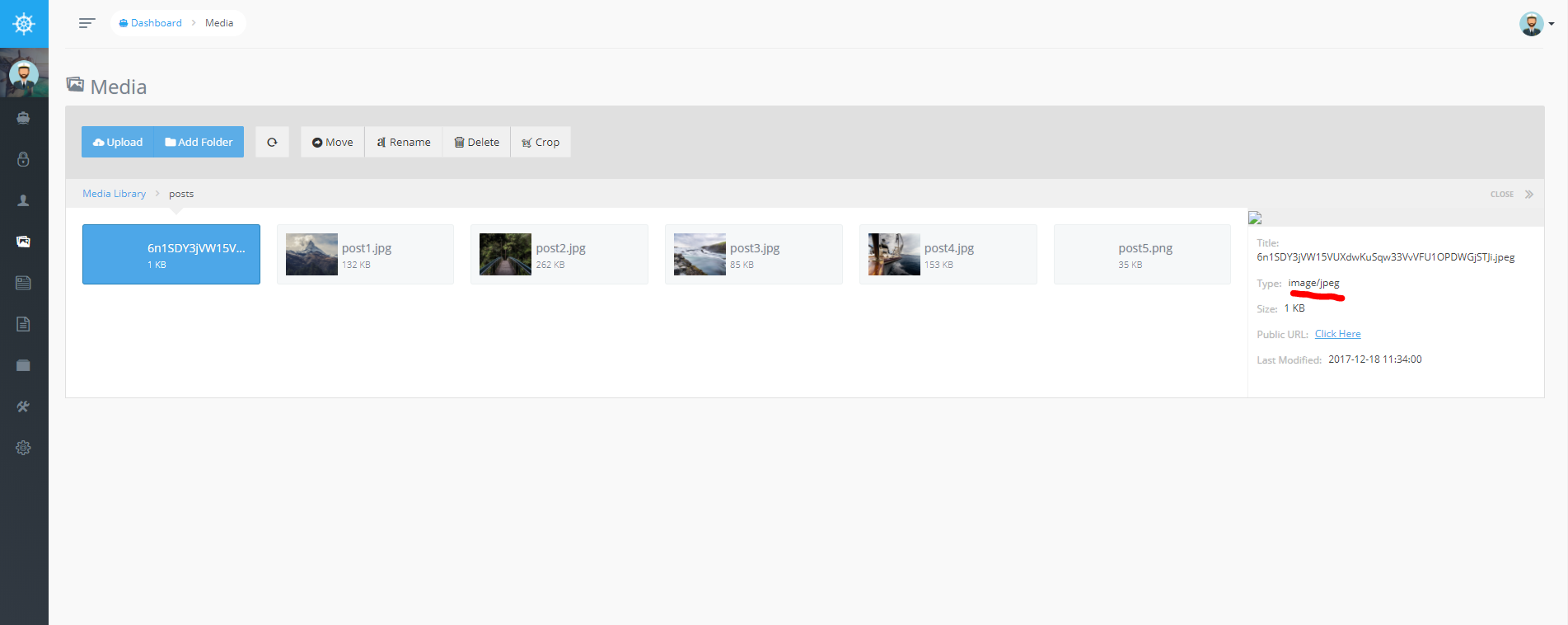
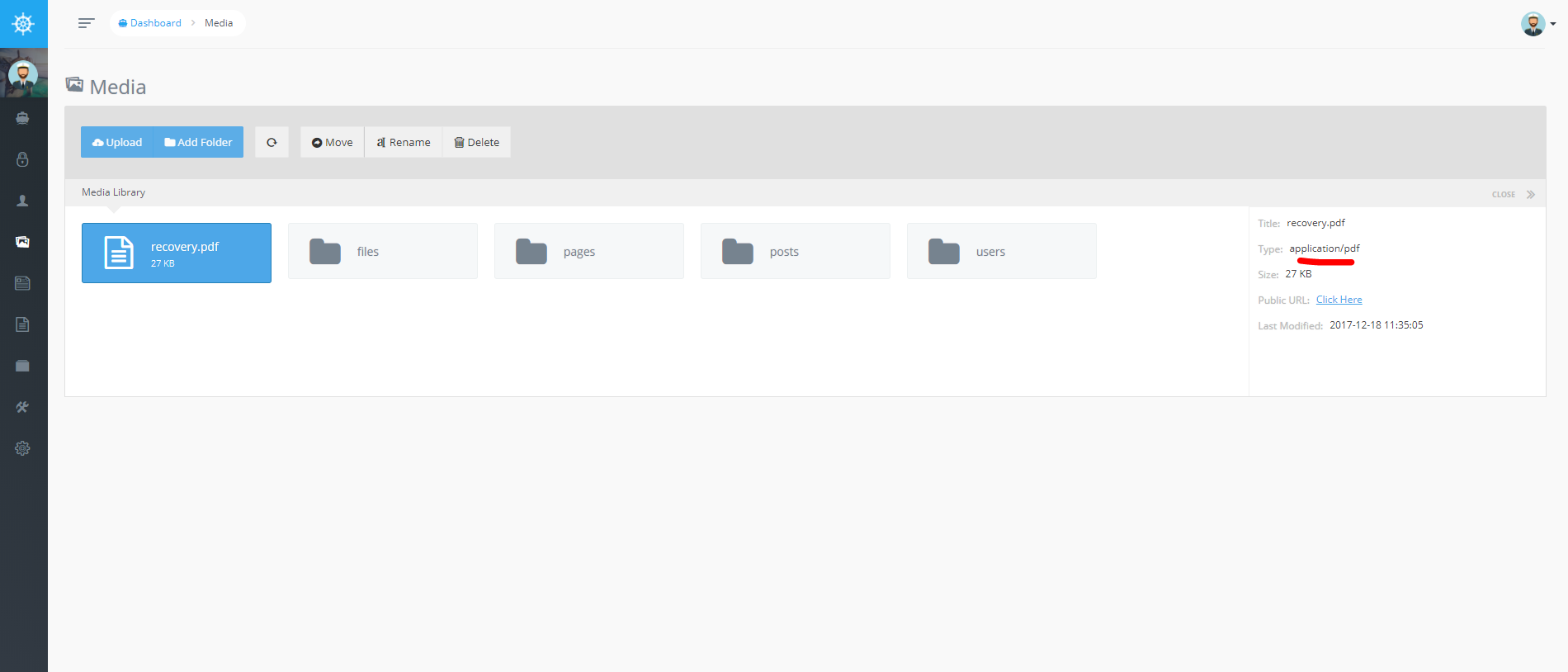
leocarmo
on 18 Dec 2017
Have you checked whether the folders where Voyager is running have all the permissions?
From what I can see, it creates the file call in the database, but does not actually save the file.
I'm glad that more Brazilians are using Voyager. :)
mateushackfaccat
on 18 Dec 2017
Yes, all permissions are the same... And all exists
Yeah! Im tryng :)

leocarmo
on 18 Dec 2017
I do not know what might be happening then. Have you tried installing a new instance of Voyager to run a test and see if that installation is not in trouble?
Another possibility could give the composer update command to update Composer and other dependencies.
mateushackfaccat
on 18 Dec 2017
Yes, already done... I tryed 3 times another instance. When i used laravel 5.4 everything run, but on 5.5 i have this problem
leocarmo
on 18 Dec 2017
I do not know what might be happening then. :(
mateushackfaccat
on 18 Dec 2017
Please reload the page with your browser's devtools open and record the requests for those images (one working, one "broken"). For each, please share with us what the URL is for the image, as well as the mime-type being sent by the server, and any other information you believe may be relevant ("size", etc).
If you'd like to repeat the process with files that do/don't work, that would be appreciated as well.
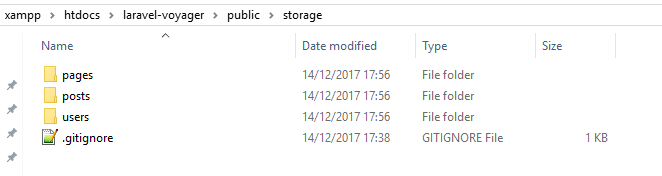
Additionally, please share a screenshot of your public folder indicating that the public/storage symlink is set up properly.
 fletch3555
on 18 Dec 2017
fletch3555
on 18 Dec 2017
Anyway thanks for the help @mateushackfaccat
Thanks for the answer @fletch3555
Yes, something is wrong with the type:
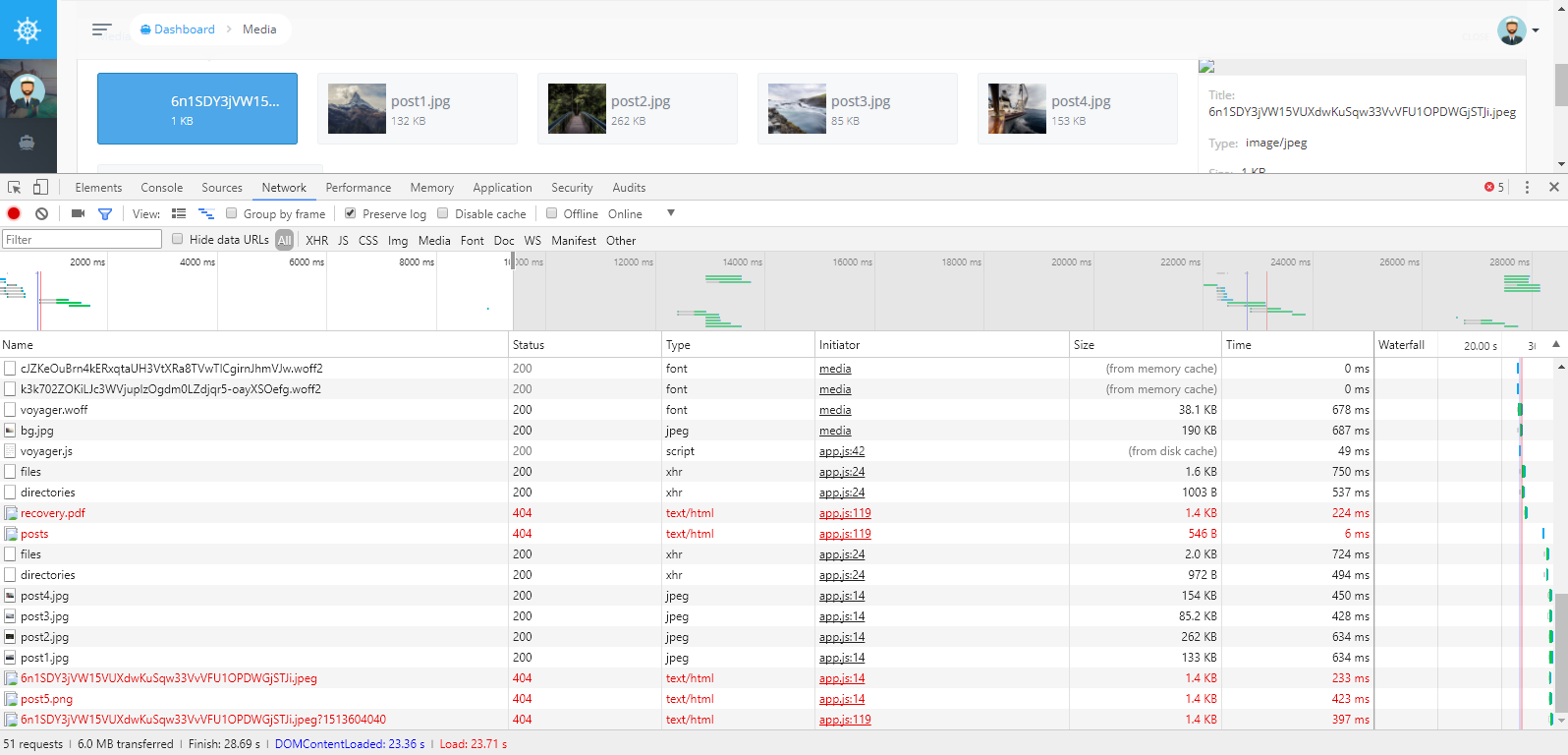
public\storage
leocarmo
on 18 Dec 2017
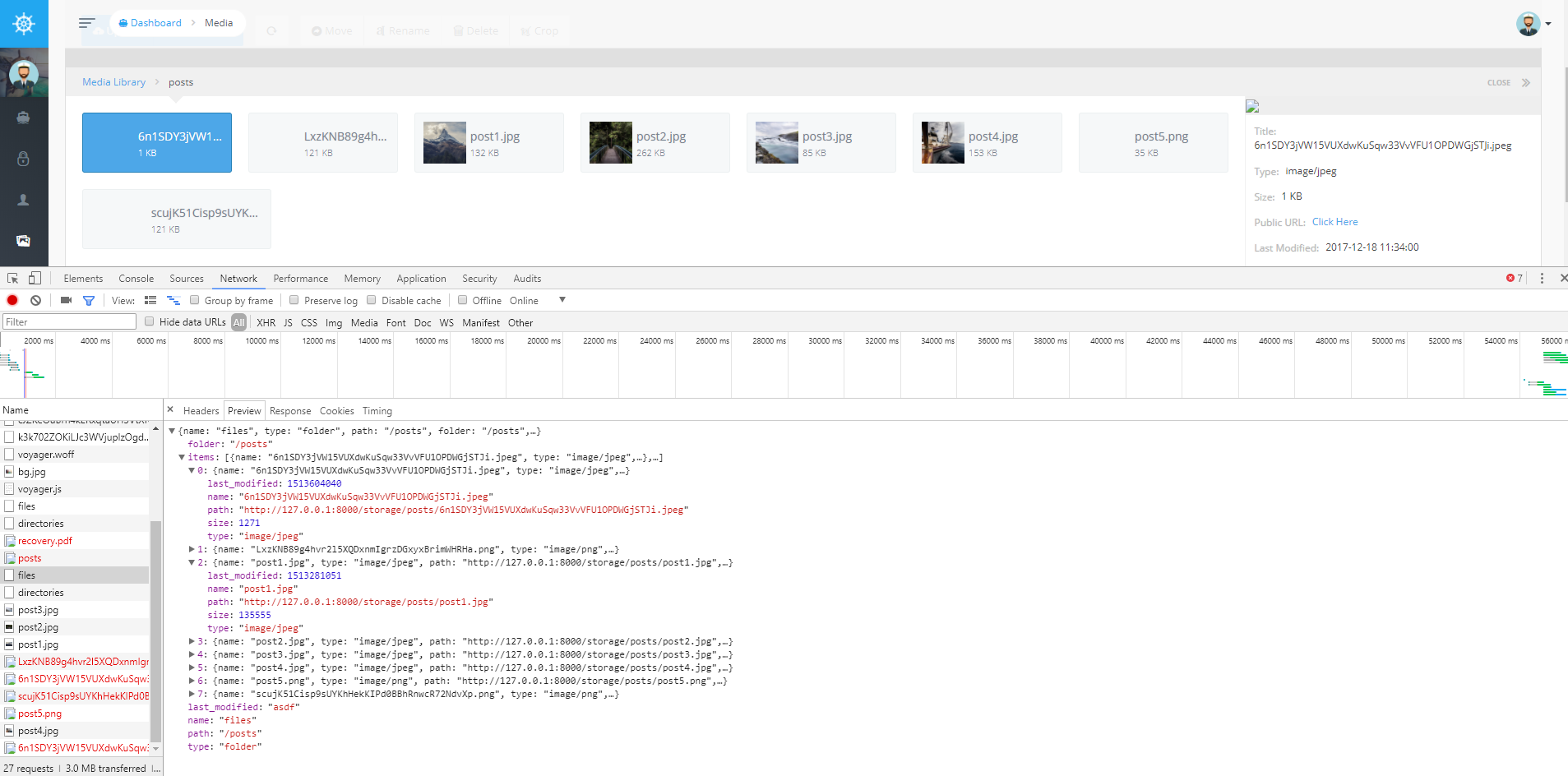
@leocarmo, Can you please look at the network request for POST /media/files? I'm interested in the response. It should contain JSON-formatted metadata about each file in that folder. For each file, there should be a type field containing the mimetype (ref).
fletch3555
on 18 Dec 2017
@fletch3555 take a look:
leocarmo
on 19 Dec 2017
i have same issue, Any solution master ?
 x5c
on 20 Dec 2017
x5c
on 20 Dec 2017
hi, i was facing such problem, i've managed to fix the issue by updating APP_URL in .env file from http://localhost to my website domain name http://example.org
 ostryanyn
on 21 Dec 2017
ostryanyn
on 21 Dec 2017
no solution sir ?
x5c
on 2 Jan 2018
nothing... @x5c
leocarmo
on 2 Jan 2018
I had a same problem. I update my .env for new domain but due to production and cache it stay same until I ran php artisan config:cache to force Laravel to get&cache new value from .env file.
Read more: hear
 vafagh
on 7 Feb 2018
vafagh
on 7 Feb 2018
php artisan storage:link
 gstoa
on 10 Feb 2018
gstoa
on 10 Feb 2018
hi, i had the same issue.
In my case i found the problem....
All files from voyager was working, but my uploads not......
i checked my public_html folder from hosting, and i found in there a FOLDER called storage, and guess what, the app was reading from this folder(/public_html/storage) and not from my /projectname/storage/app/public, i renamed the storage folder, and use this to create the link to proper folder:
<?php
$target = '/home/{your user name on hosting website}/{your project name}/storage/app/public';
$shortcut = 'storage';
symlink($target, $shortcut);
?>
by default voyager try to create symlink, but on my hosting he just copied the folder :)
 chirill
on 3 Jul 2018
chirill
on 3 Jul 2018
@chirill, since you mentioned public_html, I'm guessing you're on shared hosting, with a non-default setup (public_html is your public folder). Did you also override path.public in AppServiceProvider so laravel knows how to find the public directory? This is how laravel knows where to put the symlink, and therefore where voyager puts it. Not doing so is likely the root cause for your issue
fletch3555
on 3 Jul 2018
@fletch3555, i didn't override path.public.
i edited my index.php at require __DIR__. and $app to get back and to go to my project folder
chirill
on 3 Jul 2018
Both would be needed. What you did is enough to get laravel to work, but what I suggested is needed for anything calling the public_path() method, which is common for packages publishing static assets (css/js/images), as well as the artisan storage:link command
fletch3555
on 3 Jul 2018
I set this
public function register()
    {
        $this->app->bind('path.public', function() {
            return base_path().DIRECTORY_SEPARATOR.'public_html';
        });
    }
in AppServiceProvider, now at dashboard voyager offer me to fix symlink, i click fix and get an error
symlink(): No such file or directory
chirill
on 3 Jul 2018
In Unix systems, check your storage file owners.
It must be same user with php and nginx/apache etc.
 yilmazerhakan
on 26 Sep 2018
yilmazerhakan
on 26 Sep 2018
It's simple. I had exact same problem. So here's my fix...
Simply delete the storage folder shortcut in the public folder.
The re-run the symlink command "php artisan storage:link" from your terminal
That's it.
Lemme know if it worked for you
 stantoju
on 24 Oct 2018
stantoju
on 24 Oct 2018
I currently have this problem in production
Symlink is created
App_url is updated
Still the images are broken (avatars, etc)
However the previous images work on the frontend, I'm unable to upload new ones as it gives an error
 BMCTeixeira
on 21 Dec 2018
BMCTeixeira
on 21 Dec 2018
encountered the same issue,
currently my voyager app's core is not saved in httdocs,
what i notice is that when I copy images to httdocs/myapps/storage it correctly displays. But when I upload it goes to the public/storage
 ledikari
on 27 Feb 2019
ledikari
on 27 Feb 2019
php artisan storage:link
 cardinalwebma
on 4 Mar 2019
cardinalwebma
on 4 Mar 2019
yep, i ran php artisan storage:link couple of times, it doest not fix the issue.
ledikari
on 14 Mar 2019
having the same issue. I changed the admin background image through the options but after the image is uploaded it does not show. Dev tools show 404. Media does not load the image as well.
I can't create a symlink because I'm on corporate network and I do not have admin privileges to create it.
Everything else is working properly. Important to say that I had to move the project to a subfolder. Locally the image is loaded after an upload. Using the server the image does not show.
 Fenweldryn
on 21 Mar 2019
Fenweldryn
on 21 Mar 2019
I have uploaded an image to use in a dimmer and it works just fine. It did not work while using admin image background upload.
Fenweldryn
on 21 Mar 2019
I found my issue.
My .env APP_URL was set as localhost =P
Now it works just fine!
Fenweldryn
on 21 Mar 2019
I had same exact issues. changing my APP_URL .env did solve my problem although that is the most suggested solution here, I wasn't able to fix it until I found this video, https://www.youtube.com/watch?v=8FjqHsmAeCM . I hope this will also fix yours.
 cessto103
on 4 Jul 2019
cessto103
on 4 Jul 2019
I'm going to close this since it's so old and multiple causes/solutions have been identified, all related to misconfiguration.
fletch3555
on 4 Jul 2019
I have solved this issue by adding the below code in filesystems.php and mentioned in .env as
FILESYSTEM_DRIVER=production
'production' => [
            'driver' => 'local',
            'root' => storage_path('app/public'),
            'url' => env('APP_URL').'/public/storage',
            'visibility' => 'public',
        ],
 HariKumarValluru
on 27 Aug 2019
HariKumarValluru
on 27 Aug 2019
I solved the issue by adding this to AppServiceProvider.php in register function
$this->app->bind('path.public', function() {
//use this if you are using a subdomain
return dirname(getcwd().DIRECTORY_SEPARATOR.preg_replace('#^https?://#', '',env('APP_URL')));
// use this if you are using public_html
// return dirname(getcwd().DIRECTORY_SEPARATOR.'public_html');
});
and then php artisan storage:link
This works for Shared hosting only
 noonenew
on 27 Sep 2019
noonenew
on 27 Sep 2019
Related issues
 IvanBohonosiuk
·
4Comments
IvanBohonosiuk
·
4Comments
 kevinjon27
·
3Comments
kevinjon27
·
3Comments
 abacram
·
3Comments
abacram
·
3Comments
 zzpwestlife
·
3Comments
zzpwestlife
·
3Comments
 MikadoInfo
·
3Comments
MikadoInfo
·
3Comments
Most helpful comment
It's simple. I had exact same problem. So here's my fix...
Simply delete the storage folder shortcut in the public folder.
The re-run the symlink command "php artisan storage:link" from your terminal
That's it.
Lemme know if it worked for you