Voyager: Multilevel menu drop down bugs
- Laravel Version: 5.5.*
- Voyager Version: dev-master
- PHP Version: 7.1.8-1
- Database Driver & Version: mysql Ver 15.1 Distrib 10.1.26-MariaDB
Description:
The drop down for sidebar menu only works for 2 levels menu. I tried to create 3 levels menu, but when I click the 2nd level drop down it close the 1st level dropdown.
Steps To Reproduce:
- Go to Menu Builder
- Click Builder button
- Create New Menu Item (Menu 1)
- Create New Menu Item (Menu 2)
- Arrange them so that it become 3 level menu
e.g
Menu 1
Menu 2
Dashboard
User
Database

 kristiantokarim
All 10 comments
Voyager's nav menu only supports 2 levels (I feel like it's mentioned in the docs somewhere...). We're open to PRs to make it support more, but will likely not implement that ourselves due to other priorities.
Other menus will support as many as you'd like, because the CSS/JS will be up to you to implement.
 fletch3555
on 30 Oct 2017
fletch3555
on 30 Oct 2017
Here is a quick fix for this problem:
$('.panel-collapse').on('hide.bs.collapse', function(e) {
        if($(event.target).parent().hasClass('collapsed')) {
            e.stopPropagation();
            e.preventDefault();
        }
    });
I simply catched the hide event and checked if there was another closed dropdown where the user clicked. If yes the event is not further propagated.
.app-container .content-container .side-menu .navbar-nav li.dropdown li.dropdown div > ul > li > a {
            padding: 0 2.0em;
        }
This is some additional space at the left of the third level submenu.
 f0reclone
on 31 Mar 2018
f0reclone
on 31 Mar 2018
We're open for pull requests
fletch3555
on 31 Mar 2018
Why don't we just let the user open and close the parents as he want ?
 SteamWind
on 29 May 2018
SteamWind
on 29 May 2018
For work when you click on arrow:
$('.panel-collapse').on('hide.bs.collapse', function(e) {
var target = $(event.target);
if (!target.is('a')) {
target = target.parent();
}
if (!target.hasClass('collapsed')) {
return;
}
e.stopPropagation();
e.preventDefault();
});
 ta-tikoma
on 26 Sep 2018
ta-tikoma
on 26 Sep 2018
@ta-tikoma do you have a screen of the result?
SteamWind
on 5 Oct 2018
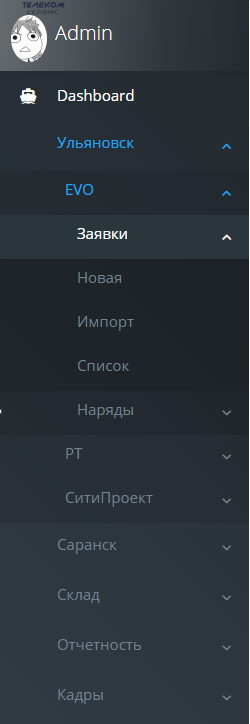
ta-tikoma
on 8 Oct 2018
Nice, you could make a pull request :)
SteamWind
on 8 Oct 2018
Original problem fixed in https://github.com/the-control-group/voyager/pull/3620
3810 discusses another problem.
 emptynick
on 26 Dec 2018
emptynick
on 26 Dec 2018
This issue has been automatically locked since there has not been any recent activity after it was closed. If you have further questions please ask in our Slack group.
![github-actions[bot] picture](https://avatars.githubusercontent.com/in/15368?v=4&s=40) github-actions[bot]
on 18 May 2020
github-actions[bot]
on 18 May 2020
Related issues
 rayqiri
·
3Comments
rayqiri
·
3Comments
 craigb88
·
3Comments
craigb88
·
3Comments
 popica80
·
3Comments
popica80
·
3Comments
 MikadoInfo
·
3Comments
MikadoInfo
·
3Comments
 vaggelis2018
·
3Comments
vaggelis2018
·
3Comments
Most helpful comment
Here is a quick fix for this problem:
$('.panel-collapse').on('hide.bs.collapse', function(e) {
        if($(event.target).parent().hasClass('collapsed')) {
            e.stopPropagation();
            e.preventDefault();
        }
    });
I simply catched the hide event and checked if there was another closed dropdown where the user clicked. If yes the event is not further propagated.
.app-container .content-container .side-menu .navbar-nav li.dropdown li.dropdown div > ul > li > a {
            padding: 0 2.0em;
        }
This is some additional space at the left of the third level submenu.