Voyager: Dropdown field showing id in browse/view
- Laravel Version: v5.4.23
- Voyager Version: v0.11.10
- PHP Version: 7.1.3-3
- Database Driver & Version:
Description:
the select dropdown is working fine in edit/create but in browse/view it shows the id instead of the name of the object

Steps To Reproduce:
 seiki
seiki
All 22 comments
Hi @seiki,
Check BREAD optional details relationship. That is working fine here.
{
    "relationship": {
        "key": "id",
        "label": "name"
    }
}
The label should be the field name from the foreign table.
 akazorg
on 29 May 2017
akazorg
on 29 May 2017
Add the field in the Model
return $this->belongsTo('AppYOUR_MODEL', 'name_of_field');
 nunomsh
on 29 May 2017
nunomsh
on 29 May 2017
I did those things, that's why the relationship is working fine in the edit/create pages, but is not in the browse/view.
seiki
on 31 May 2017
same problem here, did those things and working fine on create and edit pages, but sometimes shows fine on browse and some rows shows the id insted of name
 SerjoA
on 2 Jun 2017
SerjoA
on 2 Jun 2017
Same here. Edit page works perfectly but Browse page just shows an ID not a text value
 Dynamo6
on 19 Jun 2017
Dynamo6
on 19 Jun 2017
I've the same problem
 reficul
on 21 Jun 2017
reficul
on 21 Jun 2017
Does this continue on the latest versions? Have you customized the browse/read views since your latest updates?
I have these type of relationships in my own install and I get the proper output.
 gileswells
on 22 Jun 2017
gileswells
on 22 Jun 2017
Confirmed on v0.11.12, then yes.
reficul
on 22 Jun 2017
As @nunomsh mentioned, please make sure the 2nd argument to the relation method exists and is correct. It needs to be the foreign key (i.e. post_id, not just id)
 fletch3555
on 22 Jun 2017
fletch3555
on 22 Jun 2017
@fletch3555 OK, that fixed it for me. I've updated the belongsTo call 2nd param with the foreign key field name from the main class not the actual field name from the referenced class (e.g. User->subscription_id not Subscription->name). Thanks for your help!
Dynamo6
on 22 Jun 2017
Perfect, glad it worked for you.
fletch3555
on 22 Jun 2017
I didn't see that 2nd arg. That fixed it. Thanks!
seiki
on 22 Jun 2017
Sorry, I really need help here, because I'm lost.
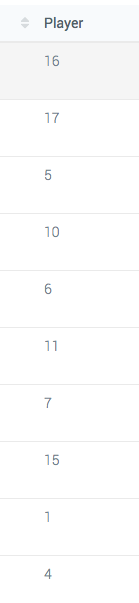
I've a table name playerstats with a field (player) that join to users table (id)
Something like: playerstats.player = users.id
In my playerstats model I've:
public function player(){
        return $this->belongsTo(User::class, 'id');
    }
and in the bread editor:
{
    "relationship": {
        "key": "id",
        "label": "name",
        "page_slug": "admin/users"
    }
}
What wrong here? I got: Trying to get property of non-object
Sorry if I'm asking again.
reficul
on 23 Jun 2017
@seiki Yeah, the second arg is missing from the documentation at the moment.
@reficul I think you have it the wrong way round. Try
public function player(){ return $this->belongsTo(User::class, 'player'); }
inside your PlayerStats class.
Then in the BREAD for the PlayerStats class, in Optional Details on the player row you need
{
    "relationship": {
        "key": "id",
        "label": "field_name_to_display_from_user_class"
    }
}
Dynamo6
on 23 Jun 2017


reficul
on 23 Jun 2017
Hmmm. Are the values in PlayerStats->player field numerical IDs?
Dynamo6
on 23 Jun 2017
@Dynamo6 yes.

reficul
on 23 Jun 2017
I'm out of ideas I'm afraid. Thats the same setup I have. The only other thing to try is a composer update -> i'm running v0.11.14
Dynamo6
on 23 Jun 2017
Thanks anyway, I tried to update, but it did not work.
I'm waiting for @fletch3555 @akazorg or some other collaborators or someone that can give me an help.
reficul
on 23 Jun 2017
Fixed... There is another field that give problem.
Thanks to all.
reficul
on 23 Jun 2017
i searching lot but cant find solution for why browse showing id instead of name even edit and create bread showing drop down with name correctly
my relation is like this :
public function userId() : BelongsTo
{
return $this->belongsTo(User::class, 'user_id');
}
finally i got a solution by simply adding BREAD accessors to my model like
public function getUserIdBrowseAttribute()
{
    return $this->usertId->name;
}
this replace id with name in browse bread
use for refrence https://voyager-docs.devdojo.com/customization/bread-accessors
 PSDeora
on 27 Feb 2020
PSDeora
on 27 Feb 2020
@PSDeora, please don't comment on old closed issues. This has been closed for nearly 3 years now and was for a much MUCH older version of Voyager
fletch3555
on 27 Feb 2020
Related issues
 rayqiri
·
3Comments
rayqiri
·
3Comments
 TXRRNT
·
3Comments
TXRRNT
·
3Comments
 raoasifraza1
·
3Comments
raoasifraza1
·
3Comments
 MikadoInfo
·
3Comments
MikadoInfo
·
3Comments
 vaggelis2018
·
3Comments
vaggelis2018
·
3Comments
Most helpful comment
Add the field in the Model
return $this->belongsTo('AppYOUR_MODEL', 'name_of_field');