Voyager: Images not showing up, Symlink works
- Laravel Version: 5.3
- Voyager Version: v0.10.11
- PHP Version: 5.6
- Database Driver & Version: MySQL, 10.1.18-MariaDB-cll-lve - MariaDB Server
Description:
Images not showing up in Voyager. Paths are missing "public/" before each image. Symlink is working and displaying all images on front end.
If I add "public/" in chrome Inspect before the image, the image shows up.
Steps To Reproduce:
Project uploaded to shared hosting with default directory structure with 2 changed lines in ".htaccess":
DirectoryIndex public/index.php
RewriteRule ^ public/index.php [L]
I do have to get this site working asap, so please help me.
 troix1
All 48 comments
Add public to the visibility path in the public disk at config/flysystems.php.
 marktopper
on 28 Feb 2017
marktopper
on 28 Feb 2017
   'public' => [
        'driver' => 'local',
        'root' => storage_path('app/public'),
        'visibility' => 'public',
    ],
This is how my config/filesystems.php looks without any changes, visibility of the public disk is already set to public, or am I missing something? @marktopper
troix1
on 1 Mar 2017
Sorry, meant the url part. Which you do not seem to have.
Try add it and prefix it with public/.
marktopper
on 1 Mar 2017
Would then be
'url' => env('APP_URL').'/public/storage',
Let me know if this works for you.
marktopper
on 1 Mar 2017
Thanks for the quick reply. I added the line but it doesnt seem to do anything. I also ran php artisan config:clear cache:clear view:clear but nothing.
.env file:
APP_URL=http://localhost
    'public' => [
        'driver' => 'local',
        'root' => storage_path('app/public'),
        'visibility' => 'public',
        'url' => env('APP_URL').'/public/storage',
    ],
It is also weird because most of images are not even giving out errors in console log, the only ones I get error for, are the ones I upload through voyager, other ones just dont show up, my user avatar shows "Klemen Avatar" instead of a picture or an error.
troix1
on 1 Mar 2017
Will look into this in a moment. (_EDIT: A little busy right now, I will be back to you soon_)
marktopper
on 1 Mar 2017
What is the URL that the site requests for the image, and what is the location for the image.
Also do you use any port other than 80?
_Sorry for the delay_
marktopper
on 1 Mar 2017
Take all the time you need, I just hope we can get this working, I'm kinda stuck.
The actual url is: klemen-lozar.com (it's my domain but I temporarily use it for this project),
URL:
klemen-lozar.com/admin
klemen-lozar.com/admin/frontpages and any other BREAD that has images
the path to images is /public_html/public/storage/users or /public_html/public/storage/frontpages
Port 80
Screenshots:
http://prntscr.com/eemuz1
http://prntscr.com/eemvfc
EDIT: The folder March2017 in frontpages doesn't even exsist, I try to upload the file but it doesnt upload for some reason. However, other images from January,February are there but are still not displayed in admin panel as you see on screenshot above.
troix1
on 1 Mar 2017
What happens if you upload a new image using the BREAD system?
marktopper
on 1 Mar 2017
I am currently away from computer, i will try few posibilities and report later
troix1
on 1 Mar 2017
Okay, no hurry. Just ping me when done.
marktopper
on 1 Mar 2017
Okay so, looks like instead of uploading the file to public/storage or rather /storage/app/public, it uploads it to /storage/app/frontpages, frontpages is one of my tables. Looks like I messed something up changing those files?
Screenshot:
http://prntscr.com/eez963
EDIT: I will try to unlink symlink and re create it and report here.
EDIT2: I did unlink storage and php artisan storage:link but when I upload through Voyager it still creates a new folder in storage/app instead of storage/app/public and this doesn't even begin to solve missing public/ path at start of requested url.
I thought it might be something with subfolder not being set up but it looks fine i think.
'storage' => [
    'subfolder' => 'public/', // include trailing slash, like 'my_folder/'
],
Good morning. :)
My project is due this week, could you please take a look when you have the time?
troix1
on 6 Mar 2017
Sorry, forgot about this issue.
marktopper
on 6 Mar 2017
Just realized that you are using v0.10.x. Is there a specific reason for that?
That version have had a lot of issues with the storage system since it didn't used Laravel's Filesystem.
Could you consider upgrade to v0.11.x that uses Laravel's Filesystem?
I can help you over at Slack 😄
marktopper
on 6 Mar 2017
I have two instances of the same project on my host, one is Voyager v0.11.3, one is Voyager v0.10.11 , I have storage issues on both, but the v0.11.* also creates some database relation issues for me, I will deal with that later. All the info I provided to you was from the v0.11.3.
I would love to talk it over at Slack but I really can't at my workplace, what about later, after 17:00, that is in 7 hours?
troix1
on 6 Mar 2017
@troix1: I will be on Slack most of the channel.
Okay, just to be clear since most of this thread is splitted between informations for both version of Voyager, please let me know the following:
1.- The URL of your admin dashboard (includeing ports, you may replace your domain with ****.com)
2.- The full requested path for the file.
3.- The Laravel filesystem configuration
4.- Your APP_URL environtment (you may replace domain again with ****.com).
marktopper
on 6 Mar 2017
Admin URL: ***.com/admin
Requested URL: src="/storage/users/January2017/Esal0SYtaoZdPZSJ2l8h.jpg"
FULL file url: ***.com/public_html/storage/app/public/users/January2017/Esal0SYtaoZdPZSJ2l8h.jpg
APP_URL: APP_URL=http://localhost
Laravel filesystems.php:
'default' => 'local',

'disks' => [

    'local' => [
        'driver' => 'local',
        'root' => storage_path('app'),
    ],
    'public' => [
        'driver' => 'local',
        'root' => storage_path('app/public'),
        'visibility' => 'public',
        'url' => env('APP_URL').'/public_html/public/storage',
    ],

    's3' => [
        'driver' => 's3',
        'key' => 'your-key',
        'secret' => 'your-secret',
        'region' => 'your-region',
        'bucket' => 'your-bucket',
    ],

],
Please change the config of filesystems.public.url to be just env('APP_URL').'/storage'.
Then please try to run php artisan vendor:publish and let me know if that works.
Also make sure that public/storage is not already a folder (it have to be a symlink)
Looking forward for your response.
marktopper
on 6 Mar 2017
Also, what is your Voyager storage configuration in config/voyager.php.
marktopper
on 6 Mar 2017
It is a symlink, this is how it is displayed in filezilla. http://prntscr.com/eglszq
Gonna edit that line in a second and report back. What do you mean with voyager storage config?
'assets_path' => '/public/vendor/tcg/voyager/assets'
'storage' => [
    'subfolder' => 'public/',
],
I edited the Filesystems.php and ran the command - no changes.
Acctually, about the Requested URL, I might have been mistaken. It shows this: http://prntscr.com/eglvnb
troix1
on 6 Mar 2017
Can you try changing the config/voyager.php's storage key to this:
'storage' => [
    'disk' => 'public',
],
That is the default for v0.11.x.
marktopper
on 6 Mar 2017
Okay finally changing something :) Now instead of blank src i get a wrong path, give me a few seconds.
<img src="http://localhost/storage/users/January2017/Esal0SYtaoZdPZSJ2l8h.jpg" class="avatar" alt="Klemen avatar">
Changed it to
<img src="http://localhost/public_html/public/storage/users/January2017/Esal0SYtaoZdPZSJ2l8h.jpg" class="avatar" alt="Klemen avatar">
Now the console says net::ERR_CONNECTION_REFUSED
troix1
on 6 Mar 2017
Got it to work..
public disk:
'url' => '/public/storage',
troix1
on 6 Mar 2017
Can you see the file at: http://localhost/public_html/public/storage/users/January2017/Esal0SYtaoZdPZSJ2l8h.jpg
marktopper
on 6 Mar 2017
It works now, I probably copied the config/voyager.php from 0.10 to 0.11 to save time and messed this up... I'm glad it works now, thanks for everything! ;)
troix1
on 6 Mar 2017
You are welcome, and sorry for the delay of the replies.
marktopper
on 6 Mar 2017
[offtopic] also, do you have any idea why the related tables dont work in 0.11.* ? Was there any change there?
troix1
on 6 Mar 2017
What table?
marktopper
on 6 Mar 2017
I have **.com/admin/frontpageswhich is my sql table that doesn't have any relation to my other tables, works fine.
My other tables, for example **.com/admin/promos throw out an error, maybe my models got overriden when updating or something?
It also says this when I try to create a new App/Promo
Make sure to setup the appropriate relationship in the pageId() method of the App\Promo class.
I should probably jsut re-do the model relationships and thats it?
troix1
on 6 Mar 2017
What is your BREAD settings for that table?
marktopper
on 6 Mar 2017
Also, can you share the model Promo?
marktopper
on 6 Mar 2017
http://prntscr.com/egmame
Promo:
```
namespace App;
use Illuminate\Database\Eloquent\Model;
class Promo extends Model
{
public function page_id(){
return $this->belongsTo(Page::class);
}
public function page(){
return $this->belongsTo('App\Page');
}
}
troix1
on 6 Mar 2017
In v0.11 we changed the relationship names to be camelCase like pageId instead of page_id.
marktopper
on 6 Mar 2017
Hope that helps.
marktopper
on 6 Mar 2017
Thanks again, you are a wizard!
troix1
on 6 Mar 2017
You are welcome 👍
marktopper
on 6 Mar 2017
Hi, I have the same issue occurred,
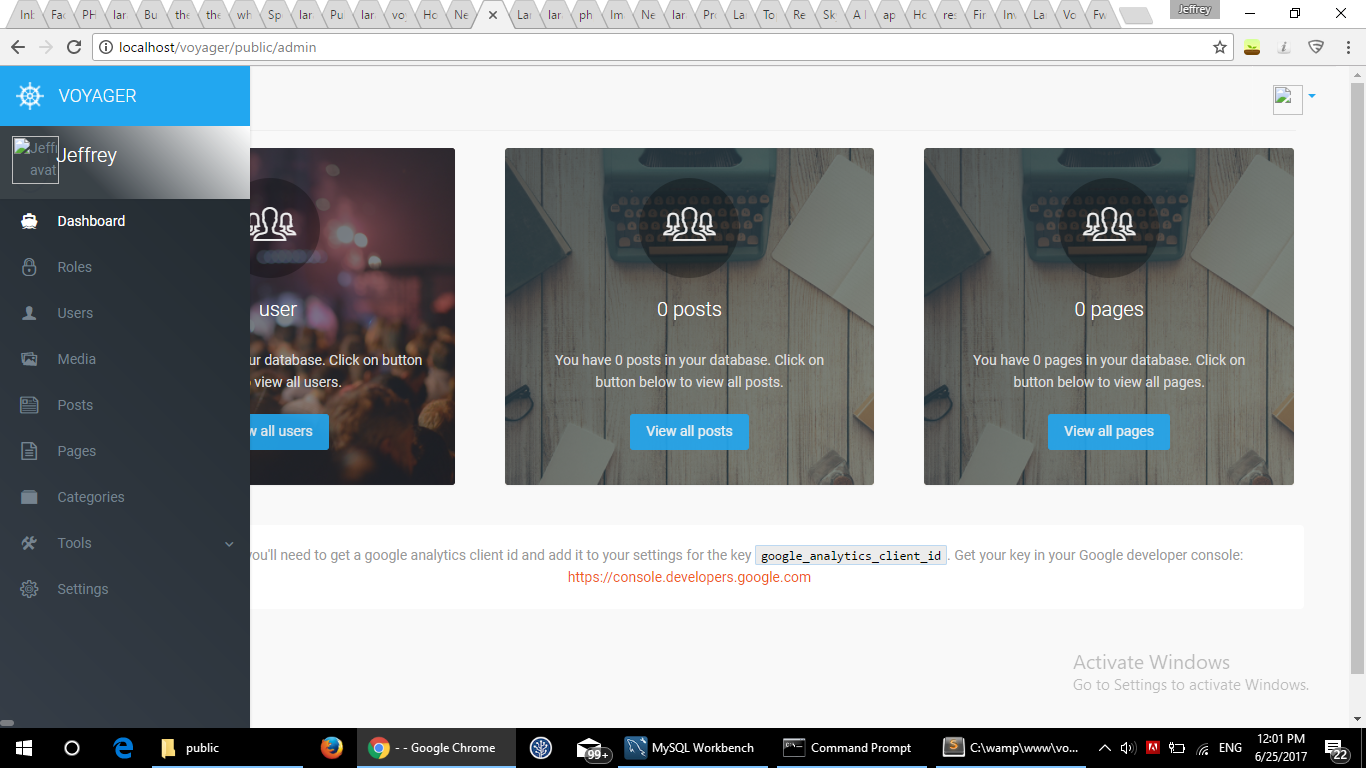
I tried to change storage -> public/storage. the problem still remain.
can you please help me to look into it ?
Voyager Version: 0.11.14
laravel: 5.4
php: 5.6.4
 anglyeds
on 25 Jun 2017
anglyeds
on 25 Jun 2017
fixed it for me by adding http:// before the URL in .env file
 unknownFrequency
on 26 Jun 2017
unknownFrequency
on 26 Jun 2017
@anglyeds, this issue has been closed for 3.5 months. Please open your own or join the Slack group and post there.
 fletch3555
on 26 Jun 2017
fletch3555
on 26 Jun 2017
Hello Everyone I have this issue and solve it this way.
On linux/debian :
1- go the public folder and remove storage folder
2- re-create the symlink : php artisan storage:link
On windows :
1- install git for widows and with git-bach
2- go the public folder and remove storage folder
3- re-create the symlink : php artisan storage:link
And it solve all problem
Alternatively for windows , you can just remove the storage folder and use windows commande to recreate the symbolic link. exemple ( Mklink /d ...pathpublicstorage\ ...pathstorageapppublic\ ).
But i never try this out.
god bless you all.
And it solve all problem
 ismaeljoseph
on 6 Dec 2017
ismaeljoseph
on 6 Dec 2017
the correct solution for me has beeen adding :8000 to .env file APP_URL where initially there is only http://localhost
 sath26
on 23 Jan 2018
sath26
on 23 Jan 2018
change .env file APP_URL=http://yoursitename
 Globalvnet
on 1 Feb 2018
Globalvnet
on 1 Feb 2018
@Globalvnet, please refrain from commenting in old CLOSED issues, especially when they've been closed for nearly a year and already have the exact solution you're proposing mentioned in a prior comment.
fletch3555
on 1 Feb 2018
- delete 'storage' shortcut folder from your project 'public' directory or folder
- re-create the symlink using this command : php artisan storage:link
- open 'filesystems.php' from config folder and change the following line
for localhost
'url' => env('APP_URL').'/WRITE YOUR PROJECT FOLDER NAME/public/storage',
for live server
'url' => env('APP_URL').'/public_html/public/storage',
I think this solution is works fine for all of voyager user. Thanks.
 hasibcsepstubd
on 31 Mar 2018
hasibcsepstubd
on 31 Mar 2018
@hasibcsepstubd, please read the comment immediately above yours....
fletch3555
on 31 Mar 2018
Related issues
 craigb88
·
3Comments
craigb88
·
3Comments
 wp-src
·
3Comments
wp-src
·
3Comments
 abacram
·
3Comments
abacram
·
3Comments
 vaggelis2018
·
3Comments
vaggelis2018
·
3Comments
 iwasherefirst2
·
3Comments
iwasherefirst2
·
3Comments
Most helpful comment
Hello Everyone I have this issue and solve it this way.
On linux/debian :
1- go the public folder and remove storage folder
2- re-create the symlink : php artisan storage:link
On windows :
1- install git for widows and with git-bach
2- go the public folder and remove storage folder
3- re-create the symlink : php artisan storage:link
And it solve all problem
Alternatively for windows , you can just remove the storage folder and use windows commande to recreate the symbolic link. exemple ( Mklink /d ...pathpublicstorage\ ...pathstorageapppublic\ ).
But i never try this out.
god bless you all.
And it solve all problem