Voyager: Images not loading in admin panel
- Laravel Version: 5.2.0
- Voyager Version: latest
- PHP Version:5.6
- Database Driver & Version:
Description:
I have an issue in uploading and viewing images on admin panel. The admin panel avatar is not shown. Also when i upload an image it is not uploaded.
Steps To Reproduce:
 basmaseyam
All 37 comments
can you screenshot the error in browser console?
 uchsarath
on 30 Jan 2017
uchsarath
on 30 Jan 2017
Please try to rebuild symlink again via
php artisan storage:link
There is no error, but the dashboard is empty. Nothing is shown.
On 30 Jan 2017 07:59, "uchsarath" notifications@github.com wrote:
can you screenshot the error in browser console?
—
You are receiving this because you authored the thread.
Reply to this email directly, view it on GitHub
https://github.com/the-control-group/voyager/issues/650#issuecomment-275985848,
or mute the thread
https://github.com/notifications/unsubscribe-auth/AQOoTUneNBuqDDSXOHH99CBf2OrD26tQks5rXXxYgaJpZM4Lw_VN
.
basmaseyam
on 30 Jan 2017
Screenshot please
 marktopper
on 31 Jan 2017
marktopper
on 31 Jan 2017


basmaseyam
on 31 Jan 2017
Did you tried what @uchsarath said?
Please try to rebuild symlink again via
php artisan storage:link
marktopper
on 31 Jan 2017
@basmaseyam can you inspect the Image Path:
www.domain.com/storage/app/public/image_name.extension
does the image exist in this storage/app/public?
uchsarath
on 3 Feb 2017
I was having issues with my Avatar images not showing up I just added the app.url to the templates img src elements as such. {{ config( 'app.url' ) }}
<img src="{{ config( 'app.url' ) }}{{ $user_avatar }}" class="profile-img">
 redsoxfan2499
on 4 Feb 2017
redsoxfan2499
on 4 Feb 2017
Hi I have the same problem: what to do?
 srz0201
on 4 Feb 2017
srz0201
on 4 Feb 2017

srz0201
on 4 Feb 2017
I also have problem with images. After uploading project on server images are broken. before upload images were in public_html/public/storage/... Now on server path looks like this public_html/storage/app/public/ (there is everything what was in storage folder before)
What i need to change to use previous path ?
 jac0b95
on 11 Feb 2017
jac0b95
on 11 Feb 2017
@jac0b95 and @srz0201:
Did you tried what @uchsarath said?
Please try to rebuild symlink again via
php artisan storage:link
marktopper
on 12 Feb 2017
Closed due to missing response from author.
Please everyone else still have this issue, please let us know as many details as possible to help you out.
marktopper
on 12 Feb 2017
I installed on 5.4 with "tcg/voyager": "dev-release/v0.11-menu-update"
and get this issue.
Installing with dummydata, then it breaks reading all media files.
like this one: http://localhost/storage/users/default.png
I have tried php artisan storage:link
Uploading works. Then file is stored correcly.. It is just not served..
using php artisan serve
Suggestions?
SOLVED!
 FrodeMMeling
on 17 Feb 2017
FrodeMMeling
on 17 Feb 2017
Just solved this:
Updated .env file:
APP_URL=http://localhost:8000
Fixed issue
FrodeMMeling
on 17 Feb 2017
And after the update in the .env you have to restart the server. Right?
 isurum
on 3 Apr 2017
isurum
on 3 Apr 2017
Sure.. I maybe also cleared all cache.. Do not remember
FrodeMMeling
on 3 Apr 2017
Hello all,
Its still happening. When i upload an avatar for my admin user i get the following error.

I am using Voyager on valet (i do not know if it serves Nginx or Apache). It could also be an admin view issue because http://johnnymast.dev/storage/users/April2017/cZKKRGnTpm9WELvzdgPB.jpg does exist while it trys to load http://johnnymast.dev/admin/storage/users/April2017/cZKKRGnTpm9WELvzdgPB.jpg
 johnnymast
on 23 Apr 2017
johnnymast
on 23 Apr 2017
The same problem I have on my hosting
I solved this problem:
-Redirect the domain to the main directory
.htaccess
<IfModule mod_rewrite.c>
   RewriteEngine On
   # enable symbolic links
   Options +FollowSymLinks
   RewriteCond %{REQUEST_FILENAME} !-d
   RewriteCond %{REQUEST_FILENAME} !-f
   RewriteCond %{REQUEST_FILENAME} !-l
   RewriteRule ^(.*)$ public/$1 [L]
</IfModule>
Next
Create file /public/symlink.php
<?php
$target = '../storage/app/public';
$link = 'storage';
symlink($target, $link);
?>
Call this file
domian.com/symlink.php
I can not access the console :(
I have not tested it yet but the images are working :)
 rocichy
on 23 Apr 2017
rocichy
on 23 Apr 2017
i have the symlink already but not public/admin/storage
johnnymast
on 24 Apr 2017
i have public/storage
johnnymast
on 24 Apr 2017
@rocichy and @johnnymast, are you using shared hosting (godaddy, bluehost, etc.)? If so, did you upload the entire project under a public_html or wwwroot directory (so you have public_html/public/index.php)? If this is the case, you have your laravel install done wrong. In this instance, your .env file will be accessible at http://yourdomain.com/.env, which is horribly bad for security.
Please search for something like "laravel on shared hosting" for directions. In short, your public_html directory needs to BE your public directory (or a symlink to it at least). If you need further help (AFTER searching and trying yourself), you are welcome to join our slack chat and post in the #help channel.
 fletch3555
on 26 Apr 2017
fletch3555
on 26 Apr 2017
it was my own bad, i had /admin/ in my app_url 🤦♂️ 🥇
johnnymast
on 26 Apr 2017
Use :
URL::to("storage/uses/mypicture.png");
^_^
 eboujlal
on 30 May 2017
eboujlal
on 30 May 2017
I'm still having this issue, it is storing assets in the public/storage/settings folder but only rendering them as /settings, omitting the /storage part
 jeremyhart
on 11 Aug 2017
jeremyhart
on 11 Aug 2017
I solve the problem with rewrite config/filesystem.php
'url' => env('APP_URL').'/public/storage',
 rkecka
on 13 Aug 2017
rkecka
on 13 Aug 2017
Guys, this issue has been closed since February. If you still have issues, please just open your own
fletch3555
on 13 Aug 2017
@uchsarath Thanks for help :) I just run this command and every images showed up without any console error :)
 rufatZZ
on 20 Dec 2017
rufatZZ
on 20 Dec 2017
- delete 'storage' shortcut folder from your project 'public' directory or folder
- re-create the symlink using this command : php artisan storage:link
- open 'filesystems.php' from config folder and change the following line
for localhost
'url' => env('APP_URL').'/WRITE YOUR PROJECT FOLDER NAME/public/storage',
for live server
'url' => env('APP_URL').'/public_html/public/storage',
I think this solution is works fine for all of voyager user. Thanks.
 hasibcsepstubd
on 31 Mar 2018
hasibcsepstubd
on 31 Mar 2018
Hi, php artisan storage:link is not published default image, but created users directory in public/storage folder!!
Also, when i inspect my image path it shows me: public//storage/users/default.png Here // after public and i don't understand why it takes // ?? I didn't change that path!
 hiren004
on 26 Apr 2018
hiren004
on 26 Apr 2018
@hiren004 public/storage/users/... is absolutely correct.
public//storage/users/default.png is a problem with your configuration.
Please follow the Laravel installation guide exactly.
 emptynick
on 26 Apr 2018
emptynick
on 26 Apr 2018
@emptynick I've installed laravel perfectly and then installed voyager step by step. Don't know why this take double // !!
hiren004
on 26 Apr 2018
I have same problem. Any one can help me please to solve
I make symlink to public/storage and not solved yet.
 ahmedlab311
on 3 Jul 2018
ahmedlab311
on 3 Jul 2018
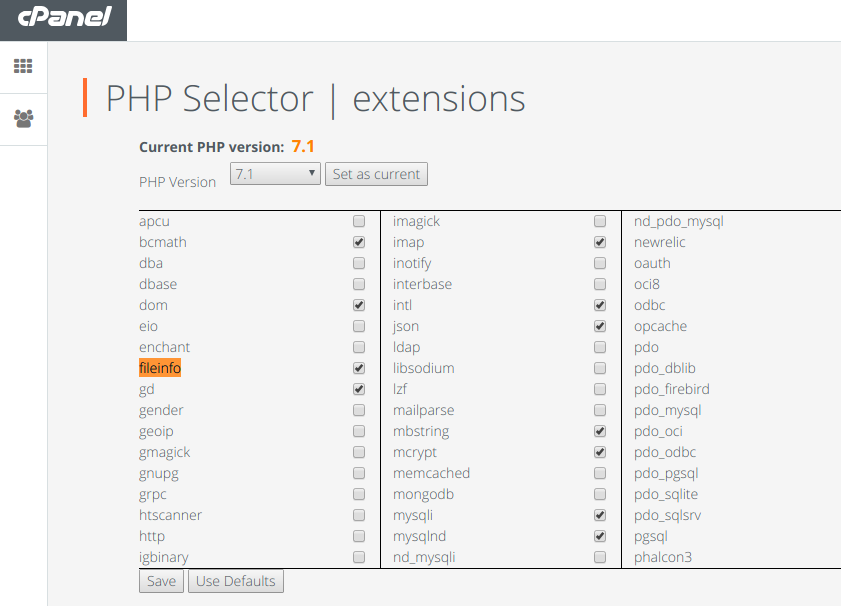
For those encountered this issue, the actual problem message is Class 'finfo' not found
This is an optional php extension which can be activated in _php.ini_ configuration file for localhost webservers, or in cpanel like a _control panel's php options_ for remote servers like below in the image.
If you have a secure connection on remote as https, Voyager documented this on Using HTTPS on your site . So just remove the env('APP_URL') on
filesystems.phpor use blank in.envfor _url_
Cheers.
 cagcak
on 8 Jul 2018
cagcak
on 8 Jul 2018
Images are not showing in my admin panel but they are in frontend.
 mukesh5094
on 20 Jul 2018
mukesh5094
on 20 Jul 2018
hello, i got the same problem as @basmaseyam
i tried all solutions in the top without any result plz help !
images are not displaying pllllz help !!
 abdessamadjadid
on 12 Aug 2018
abdessamadjadid
on 12 Aug 2018
This has been closed for a year and a half now. Also, it's from a MUCH older version of the package. Significant changes have occurred since then.
If you're still having issues, regardless of whether they're similar to this or not, please open a new issue
fletch3555
on 12 Aug 2018
Related issues
 abacram
·
3Comments
abacram
·
3Comments
 vaggelis2018
·
3Comments
vaggelis2018
·
3Comments
 duongsieu
·
3Comments
duongsieu
·
3Comments
 winex01
·
3Comments
winex01
·
3Comments
 popica80
·
3Comments
popica80
·
3Comments
Most helpful comment
Just solved this:
Updated .env file:
APP_URL=http://localhost:8000
Fixed issue