Vorta: Simpler UI mode for one-off local backups
I work at a film school and we are in need of basic backup solution for our students while they are working in our macOS computer labs. Most of our students have no knowledge of ssh, encryption keys, remote servers, etc. I'm wondering if you can add a "Simple UI" mode to Vorta that would make Vorta easy to use for our students?
Our students generally have a primary external hard drive and a backup external hard drive. It would be great to have a simplified Vorta interface that would let the student select a source folder (on their primary hard drive) and a destination folder (on their backup hard drive) and manually start a backup job.
We do have a file server on our local network that the students each have a folder on. It would be nice if the students could select a folder in their directory on the server to use as a Vorta source or backup destination.
Our students don't need to encrypt their backups, schedule backups, have any ssh options, or select a remote server. Having these options in the interface will confuse them and cause them not to use Vorta.
Carbon Copy Cloner (without the scheduling options) is a good example of how simple the interface would need to be for our students. Is it possible for you to add a "Simple UI" option to Vorta?
 michaelmcneff
All 3 comments
Vorta is (should be) the "simple UI" for Borg. 😂
Let's look at the workflow and see what could be simplified.
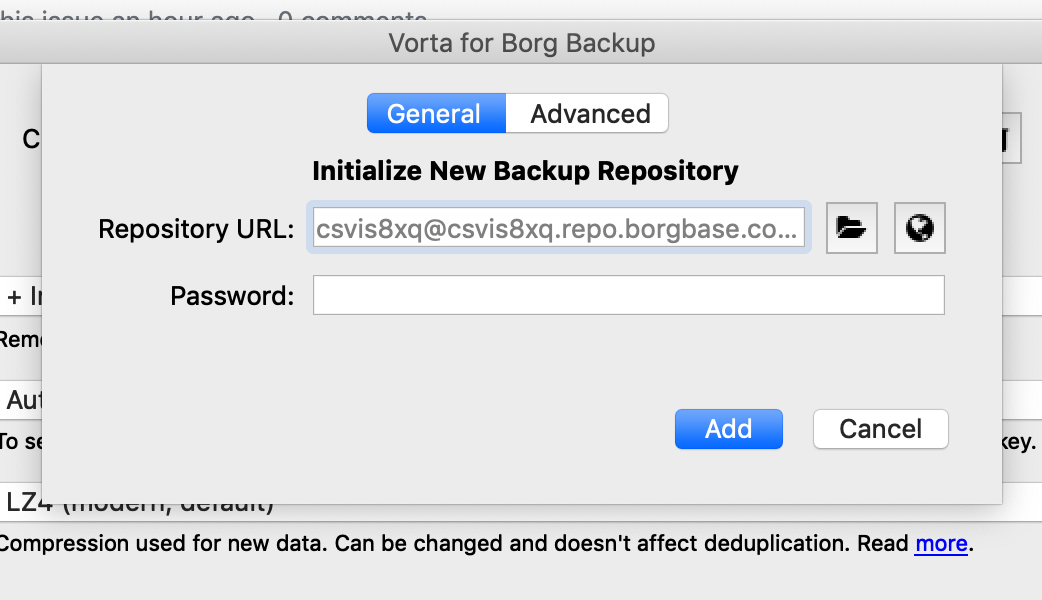
1. With Vorta open, add a new Repo
By default we encourage everyone to encrypt their backups. A good default encryption mode is already selected and only a password is required. To make this simpler, we would have to make it unencrypted by default.
Forcing the user to actively choose an unencrypted repo was a design decision taken in Borg (which also requires selecting an encryption mode) and carried over to Vorta. We aren't looking to change that. Your students can either learn the importance of encrypted backups and security or disable the encryption in the advanced tab.
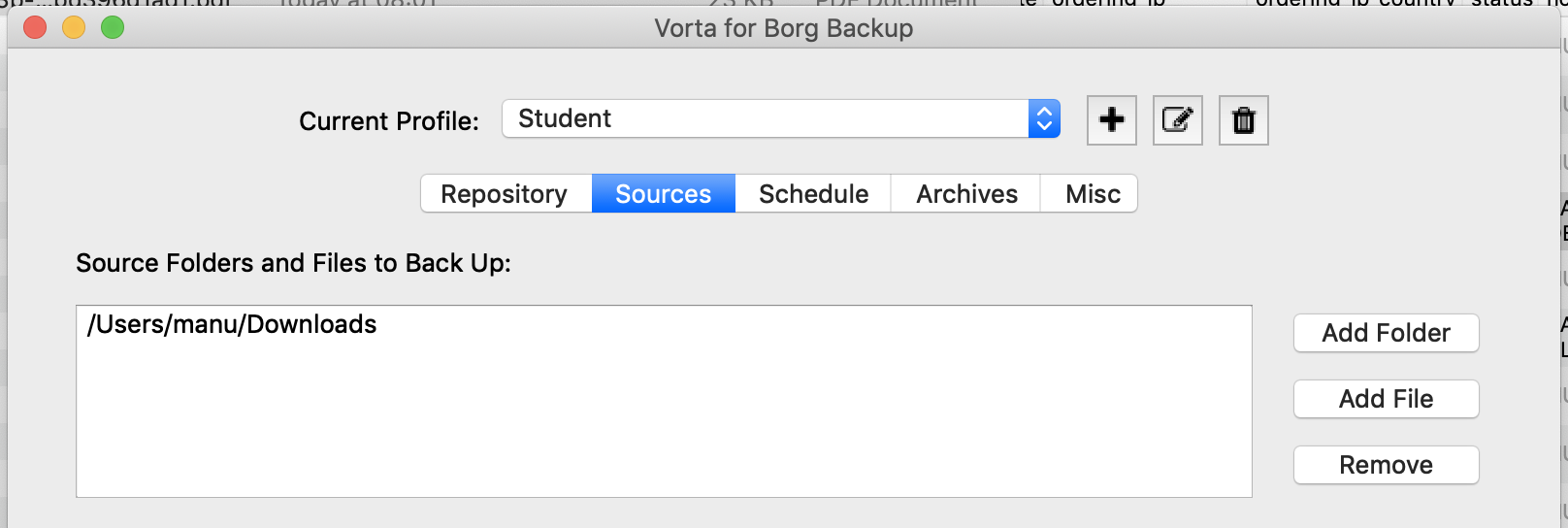
2. Select what to back up
This just asks to select a folder. Not much potential for simplification.
3. Run backup
All done. Now they can run manual backups using the button or go deeper to schedule background backups.
I admit that I can do it in so few steps because I know what to do already. As a new user, I may wonder if the SSH option is necessary.
But then, since the main use case is network-based backups, those need a SSH key. The UI already makes creating a new SSH key very easy.
Which simplifications would you suggest specifically? I'm open to incremental improvements, but not to building another local sync tool. There are plenty of those around.
And if your students ever need to restore something or validate their backup, they need to go deeper anyways. So dumbing it down would just delay that.
 m3nu
on 22 May 2019
m3nu
on 22 May 2019
Hi there,
yes vorta is the simple solution for borg backup compared to the whirl of commands/parameters /switches you have to deal with when you use it on the command line. And yes a client side backup solution should be easy to use with a GUI without expecting a not so tech-savvy user to deal with technical terms of the system engineers world.. So perhaps some sort of a vorta assistant/wizzard would be a suggestion? The assistant would just ask in plain english the basics for "local" backup (local filesystem or a mounted share or an USB disk plugged in) and restore and guide the user to set it up. So perhaps Timeshift and the way it reduces complexity could be another example from the Linux world?
 wechsler42
on 22 May 2019
wechsler42
on 22 May 2019
I'll close this, since we don't have the resources to build a second app as wizard. Would mean to redo most frontend stuff. The current interface is quite easy to use as it is. We don't need to dumb everything down to the bone.
m3nu
on 12 Jun 2019
Related issues
 penyuan
·
5Comments
penyuan
·
5Comments
 rwaldspur
·
5Comments
rwaldspur
·
5Comments
 philipkozeny
·
7Comments
philipkozeny
·
7Comments
 facorazza
·
11Comments
facorazza
·
11Comments
 ThomasWaldmann
·
10Comments
ThomasWaldmann
·
10Comments
Most helpful comment
Vorta is (should be) the "simple UI" for Borg. 😂
Let's look at the workflow and see what could be simplified.
1. With Vorta open, add a new Repo
By default we encourage everyone to encrypt their backups. A good default encryption mode is already selected and only a password is required. To make this simpler, we would have to make it unencrypted by default.
Forcing the user to actively choose an unencrypted repo was a design decision taken in Borg (which also requires selecting an encryption mode) and carried over to Vorta. We aren't looking to change that. Your students can either learn the importance of encrypted backups and security or disable the encryption in the advanced tab.
2. Select what to back up
This just asks to select a folder. Not much potential for simplification.

3. Run backup
All done. Now they can run manual backups using the button or go deeper to schedule background backups.
I admit that I can do it in so few steps because I know what to do already. As a new user, I may wonder if the SSH option is necessary.
But then, since the main use case is network-based backups, those need a SSH key. The UI already makes creating a new SSH key very easy.
Which simplifications would you suggest specifically? I'm open to incremental improvements, but not to building another local sync tool. There are plenty of those around.
And if your students ever need to restore something or validate their backup, they need to go deeper anyways. So dumbing it down would just delay that.