Voodooi2c: "Failed getting hardware pin for GPIO pin 28" on I2CHID TPD0 touchpad (coffelake)
Describe the bug
I've patched my touchpad in interrupt gpio pinning as a 3 ssdt files one for _CRS method in TPD0 of my device (I2C1) ,
the second one for SSCN and FMCN,
the third one for GPIO(GPHD) _STA method
and linking their renames in my Open core config .
the interrupt specifier is 0x33.
the problem is sometimes when logging into the macos i found the whole input system is stuck aka keyboard and touchpad , the other is that damn msg the come up in the terminal "VoodooGPIOCannonLakeH::Failed getting hardware pin for GPIO pin 28"
Did you read the common errors documentation?
Yes I did read the docs but I did not find my issues there
Did you read the troubleshooting documentation?
yes I did and get my files ready
Have you searched the issue on Github, Gitter, or Google?
I noticed that the problem is not know or repetitive and I left same as info in the Gitter but i did not get a response
System Environment
Please answer:
- macOs Catalina 10.15.4
- voodooi2c (2.4.2) & I2C HID (1.0)
- I2C1.PCI0.TPD0 "DELL0949"
Troubleshooting Archive
I2C HID.zip
Additional context
That is a full DSDT patch , one problem of my 2 problems is solved there , but anyway I don't want to use the full dsdt because I am not the man who made it , I want to use my ssdt as I made them myself , the second reason that I am on OC that doesn't recommend to use dsdt, I linked in case that you can help me determine what makes my keyboard stuck and forces me to restart
DSDT.FULL.zip
 Amin-0-1
All 39 comments
It is a known issue. Please test the latest master version. Archive.zip
 Goshin
on 20 May 2020
Goshin
on 20 May 2020
but they are same versions that I am using !!
Amin-0-1
on 20 May 2020
There is no Issues with that dude, the log files is full of that command , is not it a harmful for the cpu or whatever else ?
Amin-0-1
on 20 May 2020
but they are same versions that I am using !!
They also include the latest fixes.
Goshin
on 20 May 2020
It seams that your kexts solves the problem 😍 , thank You very much Mr Goshin
Amin-0-1
on 20 May 2020
well , but still sometimes make the keyboard stuck on login to macos, even i touched or not , what the hill is that may come from ?
Amin-0-1
on 20 May 2020
It seems not related. Try to use v2.3 or 2.2.
Goshin
on 20 May 2020
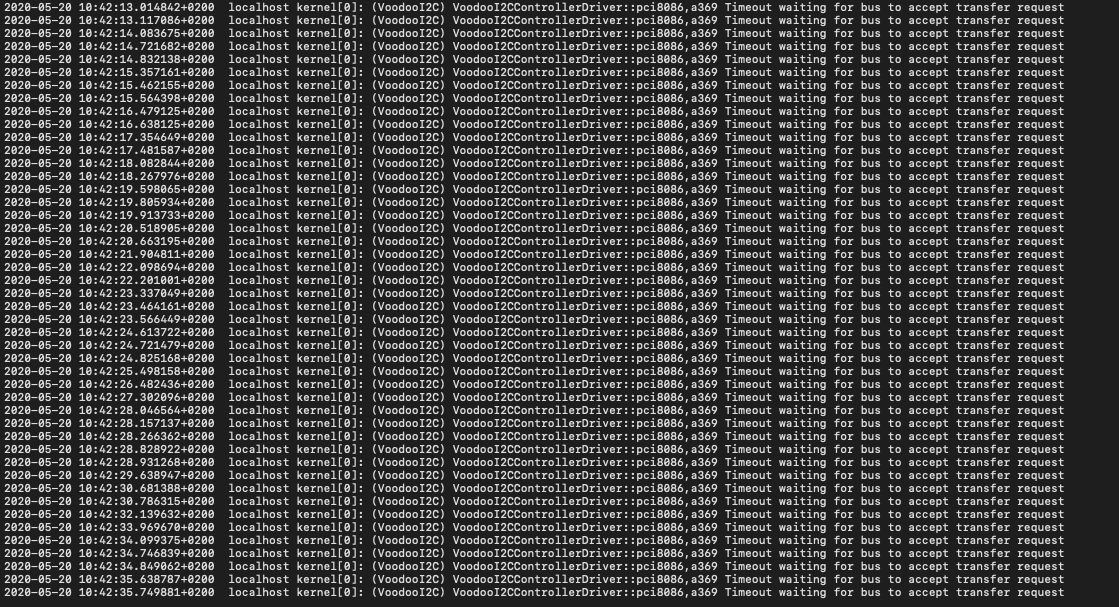
That is with ur kexts , while using the touchpad && with a little of buggy
@Goshin
Amin-0-1
on 20 May 2020
It is another known issue. Try to use v2.3 or v2.2 and wait for the next release.
Goshin
on 20 May 2020
okay , I will stay tuned , I want to ask another Q please , I tread in the docs that there is 2 methods
Polling & Interrupt(either APIC or GPIO)
the docs has the GPIO method , which I tried but also I found it a little buggy than the Polling ,
I don't want to use polling too due to the consumption of resource , can you guide me to the interrupt APIC
Amin-0-1
on 20 May 2020
No. Read and follow the guideline carefully.
https://voodooi2c.github.io/#GPIO%20Pinning/GPIO%20Pinning
Goshin
on 20 May 2020
That is with ur kexts , while using the touchpad && with a little of buggy
@Goshin
For the timeout issue, plz test this one.
Archive.zip
Goshin
on 20 May 2020
It fixes the problem then and the buggy lag also gone, but I don't know what makes keyboard and touchpad sometimes stuck , what it may comes from dude
Amin-0-1
on 21 May 2020
Same issue with new 2.4.2 -"VoodooGPIOCannonLakeH::Failed getting hardware pin for GPIO pin 28"
It was fine back with 2.2-2.3 .
only custom kexts by @tiger511 work for me .
@Amin-0-1 try these for now , see if it works for you -
Archive-ResponseLatencyMicroSecond.zip
 mesh-17
on 21 May 2020
mesh-17
on 21 May 2020
@imesh17
@Goshin made a commits that fixes the issues in last voodooi2c version,
i tried those kexts but it doesn't boot while trying with them
what about the stuck on keyboard and touchpad sometimes before login to the system ?
Amin-0-1
on 21 May 2020
@imesh17 Uh noooooh 🤩
it worked for me , no trash logs beside not stuck keyboard or mouse , I did not believe it in the beginning but i rebooted about dozens of time just to make my eyes believe 🤣
thanks dude , but actually what was the main problem ?!
Amin-0-1
on 21 May 2020
@imesh17 Uh noooooh 🤩
it worked for me , no trash logs beside not stuck keyboard or mouse , I did not believe it in the beginning but i rebooted about dozens of time just to make my eyes believe 🤣
thanks dude , but actually what was the main problem ?!
Are you still getting your keybaord mouse stuck with "Archive-ResponseLatencyMicroSecond.zip" ? If so,can you decribe the problem how to reproduce.Also exeute the following command when it happens, log show --last=boot|grep Voodoo
 tiger511
on 22 May 2020
tiger511
on 22 May 2020
@tiger511
the problem gone with the kexts that @imesh17 sent to me , now it is not stuck anymore thanks to you guys ♥️
Amin-0-1
on 22 May 2020
@tiger511
when I am running your command you'v sent to me as like that "log show --last=boot" i got about 6000 errors 😅 , is that a problem ?
when I am trying to read some of them I don't get anything
Amin-0-1
on 22 May 2020
@tiger511
when I am running your command you'v sent to me as like that "log show --last=boot" i got about 6000 errors 😅 , is that a problem ?
when I am trying to read some of them I don't get anything
You just need the logs from voodooi2c , see the above line that @tiger511 mentioned .
run the whole code below .
log show --last=boot|grep Voodoo
mesh-17
on 22 May 2020
i run it and come up with no problems at all , but what i ment is that how to check if there is problem in all kexts in last boot
Amin-0-1
on 22 May 2020
unfortunately i am still facing the problem of stuck in touchpad and keyboard in apple login screen , thought it was solved but it just was trying to keep me from craziness 💔
@imesh17
@tiger511
Amin-0-1
on 22 May 2020
unfortunately i am still facing the problem of stuck in touchpad and keyboard in apple login screen , thought it was solved but it just was trying to keep me from craziness 💔
@imesh17
@tiger511
just run the code log show --last=boot|grep Voodoo and post it here , let us see the logs !!
mesh-17
on 22 May 2020
Last login: Fri May 22 11:49:59 on console
amin@Amins-MacBook-Pro ~ % log show --last=boot|grep Voodoo
2020-05-22 11:44:58.262691+0200 0xc3 Default 0x0 0 0 kernel: (VoodooGPIO) VoodooGPIOCannonLakeH::Loading GPIO Data for CannonLake-H
2020-05-22 11:44:58.262696+0200 0xc3 Default 0x0 0 0 kernel: (VoodooGPIO) VoodooGPIOCannonLakeH:: ResponseLatency: 1000000
2020-05-22 11:44:58.262699+0200 0xc3 Default 0x0 0 0 kernel: (VoodooGPIO) VoodooGPIOCannonLakeH:: Creating new workloop
2020-05-22 11:44:58.262767+0200 0xc3 Default 0x0 0 0 kernel: (VoodooGPIO) VoodooGPIOCannonLakeH::VoodooGPIO Init!
2020-05-22 11:44:58.262769+0200 0xc3 Default 0x0 0 0 kernel: (VoodooGPIO) VoodooGPIOCannonLakeH::VoodooGPIO Initializing Community 0
2020-05-22 11:44:58.262824+0200 0xc3 Default 0x0 0 0 kernel: (VoodooGPIO) VoodooGPIOCannonLakeH::VoodooGPIO Initializing Community 1
2020-05-22 11:44:58.262875+0200 0xc3 Default 0x0 0 0 kernel: (VoodooGPIO) VoodooGPIOCannonLakeH::VoodooGPIO Initializing Community 2
2020-05-22 11:44:58.262926+0200 0xc3 Default 0x0 0 0 kernel: (VoodooGPIO) VoodooGPIOCannonLakeH::VoodooGPIO Initializing Community 3
2020-05-22 11:44:58.263056+0200 0x77 Default 0x0 0 0 kernel: (VoodooGPIO) VoodooGPIOCannonLakeH::GPIO Controller is already awake! Not reinitializing.
2020-05-22 11:44:58.446747+0200 0xf3 Default 0x0 0 0 kernel: (VoodooI2C) VoodooI2CPCIController::pci8086,a369 Starting I2C controller
2020-05-22 11:44:58.446759+0200 0xf3 Default 0x0 0 0 kernel: (VoodooI2C) VoodooI2CPCIController::pci8086,a369 Set PCI power state D0
2020-05-22 11:44:58.446881+0200 0xf3 Default 0x0 0 0 kernel: (VoodooI2C) VoodooI2CPCIController::pci8086,a369 Publishing nub
2020-05-22 11:44:58.451291+0200 0xfd Default 0x0 0 0 kernel: (VoodooI2C) VoodooI2CControllerDriver::pci8086,a369 Probing controller
2020-05-22 11:44:58.451315+0200 0xfd Default 0x0 0 0 kernel: (VoodooI2C) VoodooI2CControllerDriver::pci8086,a369 Found valid Synopsys component, continuing with initialisation
2020-05-22 11:44:58.451536+0200 0xfd Default 0x0 0 0 kernel: (VoodooI2C) VoodooI2CControllerDriver::pci8086,a369 Got bus configuration values
2020-05-22 11:44:58.451856+0200 0xfd Default 0x0 0 0 kernel: (VoodooI2C) VoodooI2CControllerDriver::pci8086,a369 Publishing device nubs
2020-05-22 11:44:58.451884+0200 0xfd Default 0x0 0 0 kernel: (VoodooI2C) VoodooI2CControllerDriver::pci8086,a369 Found I2C device: DELL0949
2020-05-22 11:44:58.452397+0200 0xfd Default 0x0 0 0 kernel: (VoodooI2C) VoodooI2CDeviceNub::Got GPIO Controller! VoodooGPIOCannonLakeH
2020-05-22 11:45:00.499086+0200 0x1ad Default 0x0 0 0 kernel: (VoodooI2CHID) VoodooI2CHIDDevice::DELL0949 newReportDescriptor called
2020-05-22 11:45:00.512194+0200 0x2f2 Default 0x0 0 0 kernel: (VoodooGPIO) VoodooGPIOCannonLakeH:: Returning existing workloop
2020-05-22 11:45:00.514428+0200 0x2f4 Default 0x0 0 0 kernel: (VoodooI2CHID) VoodooI2CHIDDevice::DELL0949 getReport Allocate
2020-05-22 11:45:00.514430+0200 0x2f4 Default 0x0 0 0 kernel: (VoodooI2CHID) VoodooI2CHIDDevice::DELL0949 getReport VoodooI2CHIDDeviceCommand Allocate
2020-05-22 11:45:00.515164+0200 0x2f6 Default 0x0 0 0 kernel: (VoodooGPIO) VoodooGPIOCannonLakeH:: Returning existing workloop
2020-05-22 11:45:00.540672+0200 0x2f4 Default 0x0 0 0 kernel: (VoodooI2CHID) VoodooI2CHIDDevice::DELL0949 getReport command FREE
2020-05-22 11:45:00.540725+0200 0x2f4 Default 0x0 0 0 kernel: (VoodooI2CHID) VoodooI2CPrecisionTouchpadHIDEventDriver::DELL0949 Putting device into Precision Touchpad Mode
2020-05-22 11:45:00.540731+0200 0x2f4 Default 0x0 0 0 kernel: (VoodooI2CHID) VoodooI2CHIDDevice::DELL0949 setReport Allocate
2020-05-22 11:45:00.541585+0200 0x2f6 Default 0x0 0 0 kernel: (VoodooGPIO) VoodooGPIOCannonLakeH:: Returning existing workloop
2020-05-22 11:45:00.541602+0200 0x2f6 Default 0x0 0 0 kernel: (VoodooGPIO) VoodooGPIOCannonLakeH:: Returning existing workloop
2020-05-22 11:45:00.541709+0200 0x311 Default 0x0 0 0 kernel: (VoodooGPIO) VoodooGPIOCannonLakeH:: Returning existing workloop
2020-05-22 11:45:00.541886+0200 0x313 Default 0x0 0 0 kernel: (VoodooGPIO) VoodooGPIOCannonLakeH:: Returning existing workloop
2020-05-22 11:45:00.545173+0200 0x314 Default 0x0 0 0 kernel: (VoodooGPIO) VoodooGPIOCannonLakeH:: Returning existing workloop
2020-05-22 11:45:00.551145+0200 0x2f4 Default 0x0 0 0 kernel: (VoodooGPIO) VoodooGPIOCannonLakeH:: Returning existing workloop
2020-05-22 11:45:00.551204+0200 0x2f4 Default 0x0 0 0 kernel: (VoodooGPIO) VoodooGPIOCannonLakeH:: Returning existing workloop
2020-05-22 11:45:00.551225+0200 0x319 Default 0x0 0 0 kernel: (VoodooPS2Controller) ApplePS2Controller: Notification consumer published: VoodooI2CPrecisionTouchpadHIDEventDriver
2020-05-22 11:45:00.813060+0200 0x278 Default 0x0 0 0 kernel: (VoodooGPIO) VoodooGPIOCannonLakeH:: Returning existing workloop
2020-05-22 11:45:00.815992+0200 0x278 Default 0x0 111 0 hidd: (IOKit) [com.apple.iohid:default] Service added: IOHIDService name:VoodooI2CPrecisionTouchpadHIDEventDriver id:0x1000003bf primaryUsagePage:0x1 primaryUsage:0x2 transport:I2C reportInterval:8000 batchInterval:0 events:0 mask:0x0
2020-05-22 11:50:00.135063+0200 0xc8d Default 0x0 0 0 kernel: (VoodooI2CHID) VoodooI2CPrecisionTouchpadHIDEventDriver::setProperties USBMouseStopsTrackpad = 0
amin@Amins-MacBook-Pro ~ %
Amin-0-1
on 22 May 2020
Whats your device? Which EFI are you using? Share your "I2C1.PCI0.TPD0 "DELL0949" patch. Also if you are using VoodooPS2Controller.kext , Go to "VoodooPS2Controller.kext/plugins/" , keep VoodooPS2Keyboard.kext and delete everything else.
tiger511
on 22 May 2020
The i2C.HID.zip is a little old , please check the one that I am using now , I about 3 days just trying to figure out what cause my system to stuck on keyboard and touchpad
Amin-0-1
on 22 May 2020
@tiger511 @imesh17 that problem comes while all touchpad ssdts are disabled and i2c & i2chid kexts too 💔
Amin-0-1
on 22 May 2020
The i2C.HID.zip is a little old , please check the one that I am using now , I about 3 days just trying to figure out what cause my system to stuck on keyboard and touchpad
Your EFI folder is large.Please do not include bootloader.Just compress OC folder without the bootloader.
tiger511
on 22 May 2020
@tiger511 @imesh17 that problem comes while all touchpad ssdts are disabled and i2c & i2chid kexts too 💔
Why do you disable touchpad ssdts? Touchpad and Keyboard drivers are isolate.If you have problem with your keyboard stuck,it's not related to VoodooI2C.Probably you have a faulty hardware/ buggy EFI.
tiger511
on 22 May 2020
I was just tracking , to make sure where is the problem is , latest thing i am trying now is a driver called Ps2KeyboardDxe.efi , it seems to be work , but I am afraid it will do same thing as it did withe the kexts that @Goshin and @imesh17 sent to me , work for sometimes and after that stuck again
Amin-0-1
on 22 May 2020
OC.zip
that is the efi that i am using currently
@tiger511
Amin-0-1
on 22 May 2020
@Amin-0-1 If this is indeed a keyboard issue, we cannot help you. Please take it outside of the VoodooI2C such as InsanelyMac, Tonymacx86, or the contact the devs that created your keyboard driver.
It is highly unlikely VoodooI2C is causing problems with your keyboard. Please contact the acidanthera team for help (assuming your keyboard is PS2 based).
 kprinssu
on 22 May 2020
kprinssu
on 22 May 2020
I don't exactly know what is the problem is , the keyboard and touchpad stuck not just a keyboard
@kprinssu
Amin-0-1
on 22 May 2020
What is the model of your laptop ? Keyboard and Trackpad drivers are different.If both of them are not working that means your EFI configuration(DSDT,SSDT,config.plist patch) is problem or something else.We can't really help you in that case.You gotta look for solution elsewhere.
tiger511
on 22 May 2020
the missing Ps2KeyboardDxe.efi driver solved the stuck , and the kexts from @Goshin and @imesh17 solved the problem of buggy and timeout waiting , thanks for everything ♥️
Amin-0-1
on 23 May 2020
@tiger511
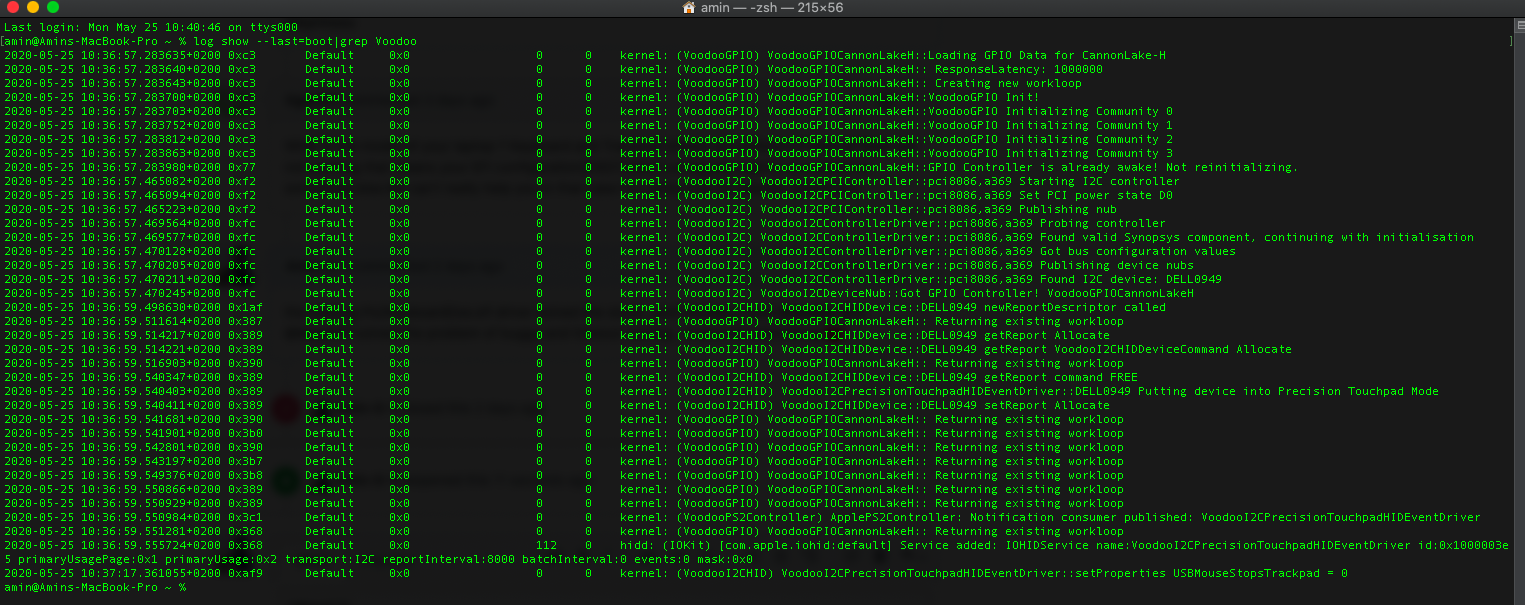
am I in terrible again ?
Amin-0-1
on 25 May 2020
@Amin-0-1 Nope.This is normal debug message.
tiger511
on 25 May 2020
@Amin-0-1 open a new Github issue if it is not related to the original issue on hand, also please use Gitter for any quick questions like the above.
kprinssu
on 25 May 2020
@kprinssu Okay , I am sorry , I used gitter in the first but I did not get any respond
Amin-0-1
on 25 May 2020
Related issues
 gujiangjiang
·
11Comments
gujiangjiang
·
11Comments
 axel9546
·
11Comments
axel9546
·
11Comments
 anonymous-writer
·
6Comments
anonymous-writer
·
6Comments
 kasti0
·
6Comments
kasti0
·
6Comments
 jaromeyer
·
10Comments
jaromeyer
·
10Comments