Voodooi2c: Click button to emulate Force Touch
Hi,
Many Laptops have a touchpad with a full or half clickable area, like ThinkPads and Macbooks before 2014. I think it would be nice to use the clickable pad as the trigger of Force Touch.
So I just implement emulating Force Touch with the physical button clicking, like VoodooPS2's way.
Since many generic I2C touchpads don't report touching pressure and area, it is hard to emulate a force touch based on these features.
Check out the simple commit here. https://github.com/Goshin/VoodooI2C/commit/5ba7d05501aed97967fc0ffcf58c37221190bc58
Binary: VoodooI2C.kext.zip
Note that the testing kext is built on Catalina, not compatible with 10.14 and below.
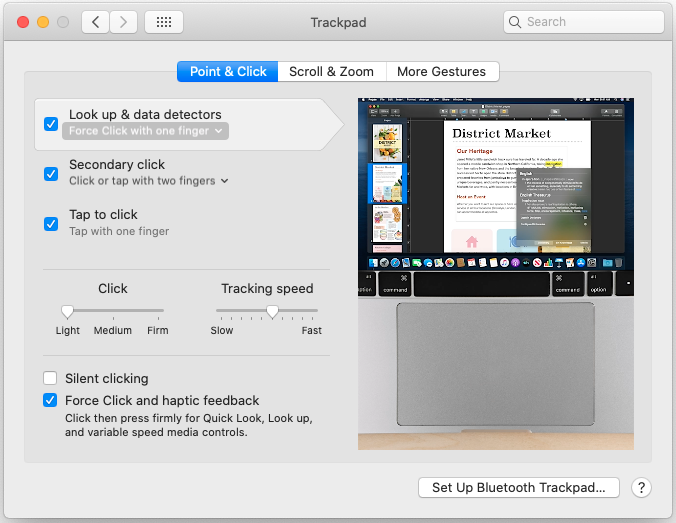
Don't forget to switch on Force Click with one finger.
If you find you don't like it, simply switch on Tap with three fingers or turn off Force Click, then it will work as a normal click.
Test and review will be welcome.
 Goshin
All 29 comments
Ideally, VoodooI2C should be integrated with VoodooInput. I am currently working on it.
 kprinssu
on 20 Feb 2020
kprinssu
on 20 Feb 2020
Well, I thought so before.
However, I found that VoodooInput introduces many backward compatibilities like the LegacyIOHIDDevice, which are originally from and intended for VoodooPS2 and seem to be unnecessary in VoodooI2C.
Some structs like the transducer and coordinate, and the naming style are also changed in VoodooInput.
Though the VoodooInput was extracted to be an independent module, these changed intended for VoodooPS2 are remained.
I think there would be a lot of effort to make to keep everything consistent.
But the new feature is just a one-line tweak.
Goshin
on 20 Feb 2020
The whole point behind VoodooInput was to abstract away the multitouch interface and only expose a limited set of events. VoodooInput was meant to be portable and light-weight. Not sure where you're getting the idea that you need to bundle the VoodooInput binary. Sure the classes maybe different, but the transducers are literally ripped from from VoodooI2C, but were then slimmed down. The whole project was to unify the different changes across VoodooPS2 and VoodooI2C multitouch implementations, not keep them different.
You just need to import the header files located here, https://github.com/acidanthera/VoodooInput/tree/master/VoodooInput/VoodooInputMultitouch and then do the something as following https://github.com/kprinssu/VoodooI2CHID/commit/e8a2ebc8e9d6569b02256cf2b4695a922b2284da.
I suggest taking a look at how VoodooInput attaches to a specific IOService (hint: https://github.com/kprinssu/VoodooI2CHID/commit/e8a2ebc8e9d6569b02256cf2b4695a922b2284da#diff-312b1a84ac27ea069920277dcd56f06eR601).
kprinssu
on 21 Feb 2020
Yeah, we don't need to bundle the full source or binary from VoodooInput, and it's cool you've done making an adaptor to wrap and sending touch events.
What I meant is that there might be something inconsistent because VoodooInput has something customized from VoodooPS2 for PS/2 touchpads.
You can find out some commits like
https://github.com/acidanthera/VoodooInput/commit/e3e381d6329d84559ba2747c276a9e2bc91a478a
, in which finger width and its manipulation are introduced in the simulator device, which is apparently for Synaptics PS/2 touchpad in definition.
The touchpad reports both finger width (ranged from 4 to 15) and pressure (ranged from 0 to 255), but in practice the measured width is almost always 4, and the reported pressure depends more on actual touch width than on actual pressure.
and things like tip_pressure are removed in VoodooInput's Transducer and simulator device.
So from my view, it seems like VoodooPS2 is intended for the specific PS/2 touchpad, while VoodooI2C is trying to support various types of HID devices like touchscreen and digitiser, as it maintains more kinds of messages than a regular touchpad has. Though these have little things to do with the abstraction of the multitouch interface, I would like to say VoodooInput might not be so generic now.
Anyway, it is great to have a shared generic multitouch interface.
Goshin
on 21 Feb 2020
Thanks, this fixed a very annoying issue I had: sometimes suddenly single clicks on the surface were read as multiple clicks leading to an unusable condition.
 soffyo
on 22 Mar 2020
soffyo
on 22 Mar 2020
Note that the testing kext is built on Catalina, not compatible with 10.14 and below.
Thank you Goshin. Are there by now testing kexts for Mojave? If not, what needs to be done to get a working compile, in addition to Xcode: "Deployment Target" -> 10.14, and Command-line tool option sdk -> -sdk macosx10.14?
 LeeBinder
on 26 Mar 2020
LeeBinder
on 26 Mar 2020
@LeeBinder can you give the latest VoodooI2C + VoodooInput a go? They have the necessary fixes in place to build for previous versions of macOS and alongside @Goshin's improvements.
kprinssu
on 26 Mar 2020
@kprinssu the latest release at https://github.com/alexandred/VoodooI2C/releases is still 2.3 from a few months ago. Whatnameisit already spent quite some time compiling - no luck for Mojave, and he's much more experienced than me and just gave up. Can you attach your local working kexts as zip, please?
LeeBinder
on 26 Mar 2020
I have a fully set up environment for compiling VoodooI2C, and I have a copy of Mojave's SDK, I'm using Catalina with Xcode11 but I'll try and see if there's any luck.
 williambj1
on 26 Mar 2020
williambj1
on 26 Mar 2020
@LeeBinder I unfortunately only have 10.15 locally, I can do a 10.14 build soon. Will do so when I get the time.
kprinssu
on 26 Mar 2020
@williambj1 @kprinssu that's really kind. To save you both some time unless you want to: dhinakg's compile works fine in Mojave https://github.com/dhinakg/VoodooI2C/releases 🥇
LeeBinder
on 26 Mar 2020
@LeeBinder no worries, just doing my part. I'll take a look into why the build is failing with the 10.14 SDK.
BTW, the CircleCI builds are configured to use the 10.14 SDK. I am not sure where the artefacts are stored though.
kprinssu
on 26 Mar 2020
BTW, the CircleCI builds are configured to use the 10.14 SDK. I am not sure where the artefacts are stored though.
@kprinssu After logging into Circle CI and switching into the new user interface, there is an artifact section on the webpage, I think the artifacts need to be compressed before uploading, it doesn't look right.

@LeeBinder good to know :)
williambj1
on 26 Mar 2020
@kprinssu : whatnameisit was able to compile and produce kexts, but they (or at least one of them) fail(s) to connect to the TP. If you also encounter the same issue, dhinakg obviously knows what to do.
LeeBinder
on 26 Mar 2020
All my devices are currently on 10.15, I don't have a 10.14 or lower device on hand. I will take a look into what's causing the issue.
kprinssu
on 26 Mar 2020
@LeeBinder are you they using VoodooInput? Can they post logs (troubleshooting archive)?
kprinssu
on 26 Mar 2020
@kprinssu : yes, VoodooI2C + VoodooI2CHID + VoodooInput.
Rather than rely on what whatnameisit did or did not, here's my suggestion: whenever you have time, compile a build with the 10.14 sdk and have me test it in Mojave. When it works as does dhinakg's compile, no troubleshooting is necessary :) Here's what dhinakg wrote in the chat room:
It should work with Sierra and up.
Do note that this is really bleeding edge, all plugins (including VoodooInput) are built from the latest commit, not the latest release.
LeeBinder
on 26 Mar 2020
@LeeBinder I am starting to suspect that you need to build VoodooInput from scratch as it has change in the header which makes older versions of kext not forward compatible.
Again, I do not have the hardware configuration to test it (nor the time to put one together from scratch). Please tell whatnameisit to post here or contact me on Gitter.
kprinssu
on 26 Mar 2020
@kprinssu I'm 100% fine with dhinakg's compile for now and neither have any time for building VoodooInput from scratch. Like you, whatnameisit is also only running Catalina and wouldn't be able to provide any debug from Mojave - he did the compile attempt merely for me but in Xcode Catalina not Mojave, so I won't to bother him again because he couldn't be of any more help.
I'm out now then busy with a project so won't have any capacity for debugging until in a few days, as it looks like. I think if you feel this needs to be tackled now, best contact dhinakg to find out how he managed to produce a Sierra+ VoodooInput. Sorry I can't contribute more right now, Kishor.
LeeBinder
on 26 Mar 2020
BTW, the CircleCI builds are configured to use the 10.14 SDK. I am not sure where the artefacts are stored though.
@kprinssu After logging into Circle CI and switching into the new user interface, there is an artifact section on the webpage, I think the artifacts need to be compressed before uploading, it doesn't look right.
@LeeBinder good to know :)
Oh, it actually works
I added artifacts to build script but couldn't actually see them when I did it :/
 ben9923
on 28 Mar 2020
ben9923
on 28 Mar 2020
@kprinssu take a look at the new commit of Force Touch emulation for VoodooI2C + VoodooInput. https://github.com/Goshin/VoodooI2C/commit/6cde5b1c3ce22a09503aefd996d6b397a72a6254
Goshin
on 28 Mar 2020
@kprinssu take a look at the new commit of Force Touch emulation for VoodooI2C + VoodooInput. Goshin@6cde5b1
It works but...how is dragging supposed to work now?
Also, quick look remains open until I click somewhere else. Wouldn't it be nice to keep it on just until you release the "button"?
 marianopela
on 28 Mar 2020
marianopela
on 28 Mar 2020
@kprinssu take a look at the new commit of Force Touch emulation for VoodooI2C + VoodooInput. Goshin@6cde5b1
It works but...how is dragging supposed to work now?
Disable Look up & data detectors or select the 3-finger click option in Trackpad pref, then you can hold the button to drag.
Goshin
on 28 Mar 2020
Disable
Look up & data detectorsor select the 3-finger click option in Trackpad pref, then you can hold the button to drag.
You're right, 3-finger click is perfect. Well done!
marianopela
on 28 Mar 2020
Also, quick look remains open until I click somewhere else. Wouldn't it be nice to keep it on just until you release the "button"?
Well, the popup and its behavior are not controlled by MT2Simulator, and I believe it works in the same way on MacBook, which allows you to browse and scroll the content.
Goshin
on 29 Mar 2020
Well, the popup and its behavior are not controlled by MT2Simulator, and I believe it works in the same way on MacBook, which allows you to browse and scroll the content.
You're right again. Thanks for the patience
marianopela
on 29 Mar 2020
@kprinssu take a look at the new commit of Force Touch emulation for VoodooI2C + VoodooInput. Goshin@6cde5b1
@kprinssu What do you think? Is it okay to merge now?
Goshin
on 9 Apr 2020
@Goshin Can you create a PR? We can discuss the changes over there?
kprinssu
on 9 Apr 2020
Sure
Goshin
on 9 Apr 2020
Related issues
 axel9546
·
11Comments
axel9546
·
11Comments
 hrytskivr
·
8Comments
hrytskivr
·
8Comments
 onejay09
·
6Comments
onejay09
·
6Comments
 im-bravo
·
5Comments
im-bravo
·
5Comments
 grantbi
·
6Comments
grantbi
·
6Comments