Voila: Make it possible to hide markdown cells
I've found that I use markdown cells for two purposes:
- To display user-friendly content alongside the code+outputs
- To display developer-friendly reminders about the code's logic etc
In some documents, you want both of these things when authoring the notebook, but only the user-friendly content when running in a dashboard mode. Currently, I believe that Voila will display all Markdown cells, but it'd be great if there were some control over this.
One way to do this: Perhaps Voila could make use of a cell tag in order to control whether the markdown. Something like voila_hide could be used to turn markdown visibility on and off.
 choldgraf
All 22 comments
That sounds like a great idea.
I wonder if we would want this filtering to be template-specific or to be done before applying the nbconvert template.
 SylvainCorlay
on 2 Jun 2019
SylvainCorlay
on 2 Jun 2019
I am not sure if this should be specific to markdown cells.
SylvainCorlay
on 2 Jun 2019
I don't think this is specific to voila either, I find that in my use of nbconvert I often rely on things like %%capture, it would be cool if there was some protocol for doing like %%capture nbconvert or %%capture voila or %%capture notebook to dictate whether to show the cell/output based on context.
 timkpaine
on 2 Jun 2019
timkpaine
on 2 Jun 2019
I believe nbconvert can be told to not show or not run cells based on the metadata of a cell, maybe with tags? If not, I think it should do there.
 maartenbreddels
on 2 Jun 2019
maartenbreddels
on 2 Jun 2019
It shouldn't be too hard... I do stuff like this in jupyter book here https://github.com/jupyter/jupyter-book/blob/cce2e7294a8942d5a9a6df844dce03287d813cc7/jupyter_book/book_template/scripts/templates/jekyllmd.tpl#L30
Agree it shouldn't just be markdown cells
choldgraf
on 3 Jun 2019
Another +1 for not just markdown cells - there are definitely cases where you have code cells with intermediate outputs that you don't want to see in the dashboard.
 jeffyjefflabs
on 6 Jun 2019
jeffyjefflabs
on 6 Jun 2019
As a POC - I think this would let you exclude markdown cells (or code cells, if you were displaying them in the config) from the output HTML:
https://github.com/QuantStack/voila/pull/206
Are folks happy w/ that kind of a patch? If we we can iterate there
choldgraf
on 7 Jun 2019
We try to upstream as much as possible, would this make more sense to be part of nbconvert, so we can also do it for static html generation?
maartenbreddels
on 7 Jun 2019
Let's open an issue about it in nbconvert and see what people say. I assumed it made more sense as part of a template rather than built in, but could see the argument for merging it upstream
choldgraf
on 7 Jun 2019
+1 for the voila feature and also the nbconvert feature. Particularly if it has easy options to a) leave it all as it is now b) strip it all out and only show widgets and c) mark individual cells to be excluded.
 cekees
on 7 Jun 2019
cekees
on 7 Jun 2019
Ah, it looks like this is actually a feature of nbconvert:
https://nbconvert.readthedocs.io/en/latest/config_options.html
search TagRemovePreprocessor. So maybe we can just call it there.
choldgraf
on 7 Jun 2019
I was going to try to code something up for this today, but I discovered it magically just works already with appropriate command-line arguments. Looks like anything respected by nbconvert's HTMLExporter will work; for example:
--TagRemovePreprocessor.remove_cell_tags='{"skip"}'will hide both code and markdown cells--TagRemovePreprocessor.remove_all_outputs_tags='{"skip"}'will hide code cells only
Note that these are applied after the notebook is executed, so while remove_cell_tags will remove the entire cell it doesn't cause the code to get skipped. Similarly, while you can also do --ClearOutputPreprocessor.enabled=True (which I looked at as a possibility for #214), it just ends up hiding the outputs from all code cells.
So, two follow-up thoughts:
- Should Voila have default configuration values for
remove_cell_tagsand/orremove_all_outputs_tags? I don't have strong feelings either way if I can do it on the command line; if Voila doesn't add a default, we would probably just establish a convention among users at my workplace. - I can imagine use cases where you do want a code cell to get skipped during execution as well; for example, debug code that doesn't affect the overall workflow. Maybe that's easily solved by passing the notebook through a NotebookExporter before executing it? (But then you might have ambiguity between things that should be done before vs after execution.)
jeffyjefflabs
on 20 Jul 2019
As a user of the classic dashboard view (https://github.com/jupyter-attic/dashboards) I really like the ability to show hide any output cell. We are currently migrating our JupyterHub servers to use Voila and I am very pleased with it's performance. We do require this ability to hide markdown and even some output cells used for debugging. In the classic dashboards this was done as follows:
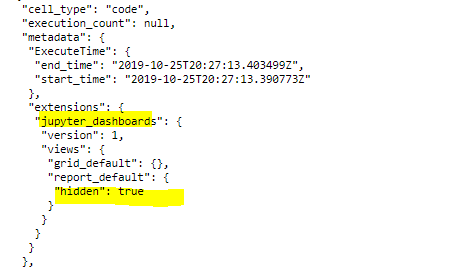
and it had a handy interface with + and - icons to show and hide each cell in either report view or grid view.
I know some one is gonna say put forth a PR, that is not my intent, just wanted to say I share this desire to have the ability to not only show/hide markdown, but any output cell in the notebook and give an example of how it was done at one time.
thanks,
-Randy
 rskabelund
on 20 Nov 2019
rskabelund
on 20 Nov 2019
This behavior seems to have changed since my previous comment above. It looks like the TagRemovePreprocessor now runs before the notebook is executed. So remove_cell_tags still works but previously the code still ran, and remove_all_outputs_tags doesn't do anything because there aren't any outputs yet when it runs.
jeffyjefflabs
on 17 Jan 2020
@MSeal proposed a fix by forcing the preprocessor order in https://github.com/jupyter/nbconvert/issues/1300#issuecomment-656477456
 fcollonval
on 27 Jul 2020
fcollonval
on 27 Jul 2020
This would be nice! Following this conversation it wasn't clear if this is possible now??
 lheagy
on 13 Aug 2020
lheagy
on 13 Aug 2020
Closing this, since this is a feature nbconvert should provide (and does!). If someone wants to highlight this feature in the docs, a PR is welcome.
maartenbreddels
on 31 Aug 2020
Please correct me if I'm wrong, but as far as I can tell, the nbconvert workaround doesn't work in Voila. I added this to my command line:
--VoilaExporter.preprocessors='["voila.execute.VoilaExecutePreprocessor", "nbconvert.preprocessors.TagRemovePreprocessor"]'
but it had no effect (and I also tried the upstream class names from the original suggestion). After poking around a bit, I think the reason is that Voila executes the notebook "outside" the preprocessor framework. You can set the preprocessor order, and it is respected, but in 0.1.23 it takes effect in this call, which happens before Voila ultimately executes the notebook for rendering. So if you include ExecutePreprocessor in your preprocessor list, the notebook actually gets executed twice, and it's the second time that counts. And in pre-release 0.2, Voila doesn't even use ExecutePreprocessor anymore, so I can't imagine it would work.
jeffyjefflabs
on 11 Sep 2020
Well, I should clarify -- the original subject of this ticket is just to hide markdown cells, and that does work using --TagRemovePreprocessor.remove_cell_tags, because it doesn't matter if markdown gets removed before or after execution. And similarly you could remove a code cell if it's not critical to the overall execution of the notebook. The only thing that doesn't work is if you have a code cell that you need to be executed but then you want to hide its output in Voila, because (unless I've missed something) you can't get --TagRemovePreprocessor.remove_all_outputs_tags to run after execution. But thanks to https://github.com/voila-dashboards/voila/issues/342#issuecomment-683657774 there will be a good workaround for that in the next release!
jeffyjefflabs
on 12 Sep 2020
For anyone still interested in the "execute code but hide the output in voila" scenario, here are a couple things I came up with using the new environment variable in 0.2. If anyone has other clever suggestions, please share!
To hide just the last value in a cell:
import os
import ipywidgets as widgets
from IPython.display import display, HTML

def hide_in_voila(var):
    if os.getenv('SERVER_SOFTWARE', '').startswith('voila'):
        return None
    else:
        return var

x = 42
hide_in_voila(HTML(f"<i>x={x}</i>"))
For a mix of outputs... a hidden Output widget still takes up vertical space, so maybe there's a better way to do this:
class HideInVoila(widgets.Output):
    def __init__(self, **kwargs):
        super(HideInVoila, self).__init__(**kwargs)
        in_voila = os.getenv('SERVER_SOFTWARE', '').startswith('voila')
        self.layout.visibility = 'hidden' if in_voila else 'visible'

y = 1
output = HideInVoila()
with output:
    display(HTML("<b>hello world</b>"))
    y += 10
    print(y)
output
@jeffyjefflabs regarding https://github.com/voila-dashboards/voila/issues/171#issuecomment-691386740 are you aware of whether a workaround was ever released? I'd like to be able to hide code output by utilising cell tags, but unsure whether it's possible yet?
 tomlevy
on 10 Jan 2021
tomlevy
on 10 Jan 2021
As far as I can tell, I don't think there's a way to run a code cell but hide the output, only remove the whole cell without running it. I've been using $SERVER_SOFTWARE as in my previous comment to achieve the same effect.
jeffyjefflabs
on 11 Jan 2021
Related issues
 roman-kouzmenko
·
5Comments
choldgraf
·
8Comments
roman-kouzmenko
·
5Comments
choldgraf
·
8Comments
 fleimgruber
·
7Comments
fleimgruber
·
7Comments
 Alexboiboi
·
3Comments
Alexboiboi
·
3Comments
 jeiche
·
8Comments
jeiche
·
8Comments
Most helpful comment
Well, I should clarify -- the original subject of this ticket is just to hide markdown cells, and that does work using
--TagRemovePreprocessor.remove_cell_tags, because it doesn't matter if markdown gets removed before or after execution. And similarly you could remove a code cell if it's not critical to the overall execution of the notebook. The only thing that doesn't work is if you have a code cell that you need to be executed but then you want to hide its output in Voila, because (unless I've missed something) you can't get--TagRemovePreprocessor.remove_all_outputs_tagsto run after execution. But thanks to https://github.com/voila-dashboards/voila/issues/342#issuecomment-683657774 there will be a good workaround for that in the next release!