ipywidget's @interact does not appear to work with voila
- widgets are all properly created
- the output widget works perfectly in a standalone fashion
- but the output for the
interactiveobject does not seem to be generated by thenbexecutenbconvert preprocessor.
 SylvainCorlay
All 14 comments
Linking to #15 for tracking purposes, so that there's at least a code example easily available.
 ericmjl
on 20 Nov 2018
ericmjl
on 20 Nov 2018
Edited the issue. The output widget appears to be generated properly. There is something going on with interact specifically.
SylvainCorlay
on 20 Nov 2018
Actually, the output widget only displays properly when at the top-level in the output area.
cc @jasongrout who may have some insight on this.
SylvainCorlay
on 20 Nov 2018
Do you have a small snippet to reproduce the problem?
 jasongrout
on 20 Nov 2018
jasongrout
on 20 Nov 2018
@jasongrout I linked an example in #15, but here it is for your convenience:
from ipywidgets import Dropdown, interact, fixed
import matplotlib.pyplot as plt
import numpy as np

%load_ext autoreload
%autoreload 2
%matplotlib inline
%config InlineBackend.figure_format = 'retina'

x = np.linspace(-10, 10, 1000)

@interact(A=range(10), x=fixed(x))
def plot(A, x):
    plt.plot(A * np.sin(x))
Anything with interact
from ipywidgets import interact

def foo(x):
    print(x)

interact(foo, x=(0, 10))
any updates on this? interact and interactive are how I've always interacted with widgets. Is the current workaround to link widget outputs together manually with callbacks?
 mathematicalmichael
on 29 Dec 2018
mathematicalmichael
on 29 Dec 2018
This may be a long shot as I have never used voila. I have been implementing a standalone js client which renders notebooks and correctly outputs interactive widgets. Here is an issue I raised while I was investigating https://github.com/jupyter-widgets/ipywidgets/issues/2292.
I believe solving https://github.com/QuantStack/voila/issues/23 should solve this one.
Not sure how much time I have in the next few days, but I may try to give it a go.
 msuperina
on 18 Jan 2019
msuperina
on 18 Jan 2019
@msuperina do shoot me a mention when you need some user-testing. Would be happy to check it out.
mathematicalmichael
on 18 Jan 2019
@msuperina I am also happy to do user testing for you as well! But no pressures, I understand that everybody is quite busy :).
ericmjl
on 18 Jan 2019
@mathematicalmichael @ericmjl https://github.com/QuantStack/voila/pull/46 should render interactive widgets and allow interaction. I only tested that notebooks/bqplot is not broken and the new notebook/interactive example I added work.
It's still a work in progress but could be a good placeholder for opening early issues and regression testing.
msuperina
on 22 Jan 2019
@msuperina I tried grabbing that branch you submitted a PR for, managed to build fine, but wasn't quite able to get interactive or interact to work. I'll play around some more, but do you have any suggestions?
mathematicalmichael
on 26 Jan 2019
@mathematicalmichael is it a specific notebook you tried and does not work ? In which case could you post here an example please ?
I am very new to developing UI on jupyter and as I said in a previous comment I have never used voila. The notebook I tried is a specific case I need to support, and it is very likely my branch is incomplete or maybe even wrong.
Let me know about the notebook or the errors you get, and I will try to help.
msuperina
on 26 Jan 2019
I'm super-excited about this change, but I can't get it to work - I've tried with the code examples here, and also with the example notebook. They either straight don't work (widgets don't appear, in the case of the ones on this page) or (in the case of interactive.ipynb) the sliders appear, and I can move them but the output updates only the first time I do so.
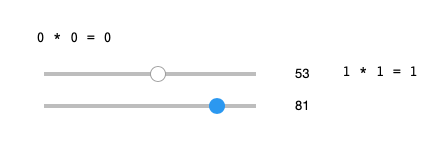
Installed via pip directly from GitHub master branch. Is there anything obvious I should check? No errors at console in either browser or voila.
 RickWalker
on 20 Feb 2019
RickWalker
on 20 Feb 2019
Related issues
 tomnewg
·
7Comments
tomnewg
·
7Comments
 jeiche
·
8Comments
jeiche
·
8Comments
 mcornudella
·
6Comments
mcornudella
·
6Comments
 johnjarmitage
·
6Comments
johnjarmitage
·
6Comments
 tylerburleigh
·
6Comments
tylerburleigh
·
6Comments
Most helpful comment
This may be a long shot as I have never used voila. I have been implementing a standalone js client which renders notebooks and correctly outputs interactive widgets. Here is an issue I raised while I was investigating https://github.com/jupyter-widgets/ipywidgets/issues/2292.
I believe solving https://github.com/QuantStack/voila/issues/23 should solve this one.
Not sure how much time I have in the next few days, but I may try to give it a go.