Voice: Recognition and Bluetooth Headset : Error required condition is false : length <= _imp->_frameCapacity on production
Bug
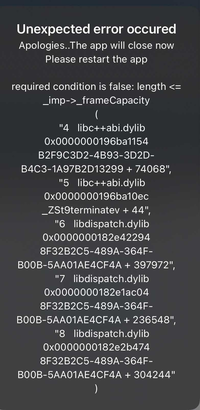
When I start recognising I get this error :
EDIT : it occurs when my phone is connected to a bluetooth headset !!
Environment info
Device on production:
iPhone X with iOS : 14.1
Xcode : Version 12.1
npmPackages:
    "@react-native-community/voice": "^1.1.9",
    "react": "16.13.1",
    "react-native": "0.63.2",
and many other whose "react-native-exception-handler": "^2.10.9".
Reproducible sample code
create this hooks useRecognition.js
import React, {useState, useEffect, useRef} from 'react';
import {Platform} from 'react-native';
import Voice from '@react-native-community/voice';
import {useSelector} from 'react-redux';

const ERROR_MSG_NO_SPEECH = Platform.OS === 'ios' ? '203/Retry' : '7/No match';

export const useRecognition = ({setSpeechIsRunning, setVoiceIsAvailable}) => {
  const {lang} = useSelector((state) => state.settings); // One of this string values : 'fr, 'en, 'ar'.

  const [error, setError] = useState(null);
  const [results, setResults] = useState([]);
  const autoStopTimeout = useRef(null);

  useEffect(() => {
    // Attribute function to all listeners of Voice library
    Voice.onSpeechStart = onSpeechStart;
    Voice.onSpeechEnd = onSpeechEnd;
    Voice.onSpeechError = onSpeechError;
    Voice.onSpeechResults = onSpeechResults;
    Voice.onSpeechPartialResults = onSpeechPartialResults;
    Voice.onSpeechRecognized = onSpeechRecognized;
    Voice.onSpeechVolumeChanged = onSpeechVolumeChanged;

    if (error?.message && error.message !== ERROR_MSG_NO_SPEECH) {
      setError(null);
      setVoiceIsAvailable(false);
      Voice.destroy().then(Voice.removeAllListeners());
    }
    return function cleanUpListeners() {
      // Component will unmount
      Voice.destroy().then(Voice.removeAllListeners());
      clearTimeout(autoStopTimeout.current);
    };
  }, [error]);

  // HANDLER FUNCTIONS

  const resetAutoStopTimeout = () => {
    clearTimeout(autoStopTimeout.current);
    let timeout = setTimeout(async () => {
      await Voice.stop();
      setSpeechIsRunning(false);
    }, 1000);
    autoStopTimeout.current = timeout;
  };
  const startAutoStopTimeout = () => {
    let timeout = setTimeout(async () => {
      await Voice.stop();
      setSpeechIsRunning(false);
    }, 4000);
    autoStopTimeout.current = timeout;
  };

  const onSpeechError = async (e) => {
    setError(e.error);
    await Voice.destroy();
  };

  const onSpeechVolumeChanged = () => {};

  const onSpeechRecognized = (e) => {
    resetAutoStopTimeout();
  };

  const onSpeechStart = (e) => {
    startAutoStopTimeout();
  };

  const onSpeechEnd = (e) => {};

  const onSpeechResults = (e) => {
    setResults(e.value);
  };

  const onSpeechPartialResults = (e) => {};

  const checkRecognition = async (e) => {
    const isAvailable = await Voice.isAvailable();
    const isRecognizing = await Voice.isRecognizing();
    let speechServicesAndroid = undefined;
    if (Platform.OS === 'android') {
      speechServicesAndroid = await Voice.getSpeechRecognitionServices();
    }
    return {isAvailable, isRecognizing, speechServicesAndroid};
  };

  // ACTION FUNCTIONS
  const startRecognition = async () => {
    try {
      await Voice.start(lang);
      // await Voice.start('fr-FR');
    } catch (error) {
      console.error('Error on start recognization : ', error);
      setError(error);
    }
  };

  const stopRecognition = async () => {
    try {
      await Voice.stop();
    } catch (error) {
      console.error('Error on stop recognization : ', error);
      setError(error);
    }
  };

  return {
    startRecognition,
    stopRecognition,
    checkRecognition,
    results,
    error,
  };
};
I call this hooks in an other component like this :
import React, {useState, useEffect, useCallback, useRef} from 'react';
import { View, Button } from 'react-native';
import {useRecognition} from '../hooks';

// ....

const MyOtherComponent = () => {
// ...
  const [speechIsRunning, setSpeechIsRunning] = useState(true);
  const [voiceIsAvailable, setVoiceIsAvailable] = useState(true);

// ...
  const {
    startRecognition,
    stopRecognition,
    checkRecognition,
    results,
  } = useRecognition({setSpeechIsRunning, setVoiceIsAvailable});

useEffect(() => {
    if (speechIsRunning) {
      // Start
      startRecognition();
      checkVoiceAvailable();
    } else {
      // Stop
      stopRecognition();
    }
  }, [speechIsRunning]);

const checkVoiceAvailable = useCallback(async () => {
    // Check if voice recognition is available
    const {isAvailable, speechServicesAndroid} = await checkRecognition();
    if (speechIsRunning) {
      if (
        !isAvailable ||
        (Platform.OS === 'android'
          ? speechServicesAndroid?.length === 0
          : false)
      ) {
        setSpeechIsRunning(false);
        stopRecognition();
        setVoiceIsAvailable(false);
      }
    }
  }, [speechIsRunning]);

return (
    <View style={{flex : 1}}>
      <Button
        onPress={onPressLearnMore}
        title="Stop Reco"
      />
    </View>
  );
};

export default MyOtherComponent
EDIT : And you have to connect a bluetooth headset on your phone.
Thank you in advance !!!
 LudoLamerre
All 20 comments
This error occured in dev environnement too with bluetooth headset. I have this log in Xcode :
libsystem_kernel.dylib`__pthread_kill:
    0x1add2f954 <+0>:  mov    x16, #0x148
    0x1add2f958 <+4>:  svc    #0x80
->  0x1add2f95c <+8>:  b.lo   0x1add2f978               ; <+36>        = Thread 23: "required condition is false: length <= _imp->_frameCapacity"
    0x1add2f960 <+12>: stp    x29, x30, [sp, #-0x10]!
    0x1add2f964 <+16>: mov    x29, sp
    0x1add2f968 <+20>: bl     0x1add0d1dc               ; cerror_nocancel
    0x1add2f96c <+24>: mov    sp, x29
    0x1add2f970 <+28>: ldp    x29, x30, [sp], #0x10
    0x1add2f974 <+32>: ret
    0x1add2f978 <+36>: ret
And this error in debug console (caught by react-native-exception-handler) :
setNativeExceptionHandler required condition is false: length <= _imp->_frameCapacity
(
    "4   libc++abi.dylib                     0x0000000196ba1154 B2F9C3D2-4B93-3D2D-B4C3-1A97B2D13299 + 74068",
    "5   libc++abi.dylib                     0x0000000196ba10ec _ZSt9terminatev + 44",
    "6   libdispatch.dylib                   0x0000000103755610 _dispatch_client_callout + 36",
    "7   libdispatch.dylib                   0x00000001037582a0 _dispatch_continuation_pop + 524",
    "8   libdispatch.dylib                   0x000000010376bb64 _dispatch_source_invoke + 1436"
)
OK I found the cause ... It's when I start voice recognition with a connected bluetooth headset !!!
Someone has already had the problem, I have to deliver a version 1 in a few days and it's the last minute surprise 😅
LudoLamerre
on 12 Nov 2020
Ok after investigation, the problem come when a bluetooth headset is connected with a microphone.
On iOS, if you start recognition with a bluetooth headset with microphone, a native error crash the app.
On Android, if you start recognition with a bluetooth headset with microphone, no error crash the app but the recognition not working with headset (work with the phone micro #172).
To handle this error on iOS I added this package to know if there is a bluetooth headset connected and I don't call Voice.start() if it is : react-native-bluetooth-headset-detect
In the meantime, if someone knows a method to find out if the device connected has a microphone, I would be grateful to him (so as not to deactivate voice recognition when connecting to wireless speakers).
The problem still requires a correction because we end up having to deactivate voice recognition when a headset is connected.
LudoLamerre
on 12 Nov 2020
has same issue on production
no idea how to fix it ((
 Desintegrator
on 17 Nov 2020
Desintegrator
on 17 Nov 2020
Any update on this? @safaiyeh
I can confirm this problem is still occurring
 agliber
on 27 Jan 2021
agliber
on 27 Jan 2021
@agliber
I had to refuse users from using bluetooth headset as a workaround ((
Desintegrator
on 27 Jan 2021
@Desintegrator Unfortunately my use case requires a bluetooth headphones (hands-free) interface.
Is this library still being maintained or is there another alternative library?
agliber
on 27 Jan 2021
Hey all! Apologies that this has been a long standing issue.
I unfortunately don’t have the bandwidth to investigate every issue and would appreciate help from the community for issues like this.
Im not aware of another library that offers the same functionality, if there are better maintained ones I would love to surface it for people.
 safaiyeh
on 27 Jan 2021
safaiyeh
on 27 Jan 2021
Hey all! Apologies that this has been a long standing issue.
I unfortunately don’t have the bandwidth to investigate every issue and would appreciate help from the community for issues like this.
Im not aware of another library that offers the same functionality, if there are better maintained ones I would love to surface it for people.
Thank you for your reply ! In reality there is two issues in this discussion :
- First one : An error on ios devices which crash the app when there is a bluetooth microphone headset connected. This error need to be fixed (by anybody 😉) because it makes the use of recognition impossible on ios without completely disabling it when a bluetooth device is detected (failing to be able to detect if this device takes control of the microphone)
- The second bigger issue is not being able to use voice recognition regardless of the active microphone on the phone.
LudoLamerre
on 28 Jan 2021
- First one : An error on ios devices which crash the app when there is a bluetooth microphone headset connected.
- The second bigger issue is not being able to use voice recognition regardless of the active microphone on the phone.
@LudoLamerre I have been experiencing issue 1 (headset caused crash).
When you say "voice recognition" do you mean that as different from speech recognition? Because, I have been able to get speech recognition to work event though it is a bit finicky.
agliber
on 28 Jan 2021
- First one : An error on ios devices which crash the app when there is a bluetooth microphone headset connected.
- The second bigger issue is not being able to use voice recognition regardless of the active microphone on the phone.
@LudoLamerre I have been experiencing issue 1 (headset caused crash).
When you say "voice recognition" do you mean that as different from speech recognition? Because, I have been able to get speech recognition to work event though it is a bit finicky.
@agliber
Yes I'm talking about speech recognition, when you run the voice.start () command with an iOS device with OS 14 (I don't know if it does on the emulator and on the previous OS), I have the error I posted on the issue
LudoLamerre
on 30 Jan 2021
from what it looks like, the code in the Voice.m fails when setting the frameLength with Bluetooth microphones:
[buffer setFrameLength:4096];
the frame capacity is probably smaller on the bluetooth mics, maybe it can be checked using the frameCapacity property?
https://developer.apple.com/documentation/avfaudio/avaudiopcmbuffer/1386941-framecapacity
 mataspetrikas
on 15 Feb 2021
mataspetrikas
on 15 Feb 2021
@mataspetrikas Yes, I think you are correct I've been testing it for a couple weeks with a simple one line change that prevents this crash by setting the frame length to be the same as the frame capacity rather than the 4096 hard coded value.
@safaiyeh I just submitted a pull request #294 for this bug fix could you take a look at merging it?
agliber
on 15 Feb 2021
@mataspetrikas @agliber does recognition works with this change when bluetooth headset connected?
Desintegrator
on 15 Feb 2021
@Desintegrator Yes voice recognition works after making this change
agliber
on 16 Feb 2021
@mataspetrikas Yes, I think you are correct I've been testing it for a couple weeks with a simple one line change that prevents this crash by setting the frame length to be the same as the frame capacity rather than the 4096 hard coded value.
@safaiyeh I just submitted a pull request #294 for this bug fix could you take a look at merging it?
Really appreciate this, I'll check it out later today
safaiyeh
on 17 Feb 2021
This was released with 2.0.1! https://github.com/react-native-voice/voice/pull/294
Closing this issue for now, let me know if the issue still persists with the update. Reminder with v2 the package was moved to @react-native-voice/voice
safaiyeh
on 17 Feb 2021
Adding for the sake of others with the same issue - this bug presented itself for me when being used with CarPlay. Took a while to narrow it down specifically to the bluetooth connection. Hopefully this may help others find this fix.
 tomdye
on 26 Feb 2021
tomdye
on 26 Feb 2021
Check this PR. It resolves this issue.
headset and bluetooth crashing issue
 DeepakM02
on 23 Nov 2021
DeepakM02
on 23 Nov 2021
@safaiyeh
DeepakM02
on 5 Dec 2021
Related issues
 dohvis
·
7Comments
dohvis
·
7Comments
 aamping
·
6Comments
aamping
·
6Comments
 henrych4
·
8Comments
henrych4
·
8Comments
 vaibhgupta09
·
4Comments
vaibhgupta09
·
4Comments
 under94
·
7Comments
under94
·
7Comments
Most helpful comment
This was released with 2.0.1! https://github.com/react-native-voice/voice/pull/294
Closing this issue for now, let me know if the issue still persists with the update. Reminder with v2 the package was moved to
@react-native-voice/voice