Voice: Is there a way to have two Voice control in one page?
Is it possible to have two voice control in one page like below?
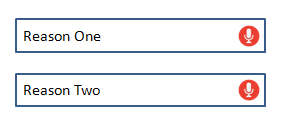
I tried to have two voice control in one page, but it does return the result to one of two functions.
Scenarios I tried.
- I tried by having a separate TextInput component with Voice control in it.
- I tried by having two separate component for two TextInput.
But all those scenarios failed. If there is a way to achieve this, please help me. Thanks in advance.
 Anandks1993
All 5 comments
Reassign the events to the current component you're using RNVoice on when starting speech recognition.
 jamsch
on 29 May 2018
jamsch
on 29 May 2018
👍3
@jamsch Sure, I will try that way. Thanks 👍
Anandks1993
on 30 May 2018
@Anandks1993 Did you solve this?
 rizshivalli
on 30 Aug 2019
rizshivalli
on 30 Aug 2019
@Anandks1993 Did you solve this?
Yes, I solved this by having separate speech recognition.
import React, { Component } from 'react';
import {
    StyleSheet,
    Text,
    View,
    Image,
    TouchableOpacity
} from 'react-native';
import Voice from 'react-native-voice';
import {
    Container,
    Content,
    Header,
    Body,
    Left,
    Right,
    Title,
    Button,
    Form,
    Textarea
} from "native-base";
import Icon from 'react-native-vector-icons/Feather';
import EIcon from 'react-native-vector-icons/Entypo';
import IonIcon from 'react-native-vector-icons/Ionicons';
import { Actions } from 'react-native-router-flux';
import Modal from 'react-native-modal';

import TextInput from '../../components/TextInput';
import ProjectNumber from './components/ProjectNumber';

export default class GetDetails extends Component {
    constructor(props) {
        super(props);
        this.state = {
            recognized: "",
            pitch: "",
            error: "",
            end: "",
            started: "",
            results: [],
            partialResults: [],
            value: "",
            recognizedOne: "",
            pitchOne: "",
            errorOne: "",
            endOne: "",
            startedOne: "",
            resultsOne: [],
            partialResultsOne: [],
            valueOne: "",
            isVisible: false,
            textAreaValue: '',
        };
    }

    componentWillUnmount() {
        Voice.destroy().then(Voice.removeAllListeners);
    }

    async _startRecognizing(e) {
        Voice.onSpeechPartialResults = this.handleOnSpeechPartialResults.bind(this);
        this.setState({
            recognized: "",
            pitch: "",
            error: "",
            started: "",
            results: [],
            partialResults: [],
            end: ""
        });
        try {
            await Voice.start("en-US");
        } catch (e) {
            console.error(e);
        }
    }

    async _startRecognizingOne(e) {
        Voice.onSpeechPartialResults = this.handleOnSpeechPartialResultsOne.bind(this);
        this.setState({
            recognizedOne: "",
            pitchOne: "",
            errorOne: "",
            startedOne: "",
            resultsOne: [],
            partialResultsOne: [],
            endOne: ""
        });
        try {
            await Voice.start("en-US");
        } catch (e) {
            console.error(e);
        }
    }

    async _stopRecognizing(e) {
        try {
            await Voice.stop();
        } catch (e) {
            console.error(e);
        }
    }

    async _cancelRecognizing(e) {
        try {
            await Voice.cancel();
        } catch (e) {
            console.error(e);
        }
    }

    async _destroyRecognizer(e) {
        try {
            await Voice.destroy();
        } catch (e) {
            console.error(e);
        }
        this.setState({
            recognized: "",
            pitch: "",
            error: "",
            started: "",
            results: [],
            partialResults: [],
            end: ""
        });
    }

    renderCommentsModal(isVisible) {
        return (
            <Modal isVisible={isVisible}>
                <View style={styles.closeIconView}>
                    <IonIcon size={24} style={styles.closeIcon} onPress={this.toggleIsVisible.bind(this)} name='md-close' />
                </View>
                <View style={styles.modalViewStyle}>
                    <Form>
                        <Textarea style={styles.textAreaStyle} rowSpan={5} bordered placeholder="Textarea" />
                    </Form>
                </View>
            </Modal>
        )
    }

    toggleIsVisible() {
        this.setState({
            isVisible: !this.state.isVisible,
        });
    }

    render() {
        const { selectedItem, itemList } = this.props;
        const { isVisible, textAreaValue, value, valueOne } = this.state;
        console.log(textAreaValue, 'textarea value');

        return (
            <Container>
                <Header androidStatusBarColor='rgba(0, 0, 0, 1)' style={styles.headerStyle}>
                    <Left style={{ flex: 0.5 }}>
                        <Button transparent onPress={() => Actions.pop()}>
                            <Icon color='#FFFFFF' size={18} name='arrow-left' />
                            <Text style={{ color: '#FFFFFF', fontSize: 16, marginLeft: 5 }}>Back</Text>
                        </Button>
                    </Left>
                    <Body style={{ flex: 1 }}>
                        <Title style={{ fontSize: 18 }}>{itemList[selectedItem]}</Title>
                    </Body>
                    <Right style={{ flex: 0.5 }}>
                        <Text style={{ fontSize: 16, color: '#FFFFFF' }}>Exit</Text>
                    </Right>
                </Header>
                <Content style={styles.contentStyle}>
                    <TextInput
                        iconName="microphone"
                        iconOnPress={this._startRecognizing.bind(this)}
                        value={value}
                        onChangeText={value => {
                            this.setState({ value });
                        }}
                        placeholder="Enter Reason"
                    />
                    <TextInput
                        iconName="microphone"
                        iconOnPress={this._startRecognizingOne.bind(this)}
                        value={valueOne}
                        onChangeText={valueOne => {
                            this.setState({ valueOne });
                        }}
                        placeholder="Enter Reason One"
                    />
                   ...
                </Content>
            </Container>
        );
    }

    handleOnSpeechStart() {
        this.setState({
            started: "√"
        });
    }

    handleOnSpeechRecognized(e) {
        this.setState({
            recognized: "√"
        });
    }

    handleOnSpeechEnd(e) {
        this.setState({
            end: "√"
        });
    }

    handleOnSpeechError(e) {
        this.setState({
            error: JSON.stringify(e.error)
        });
    }

    handleOnSpeechResults(e) {
        this.setState({
            results: e.value
        });
    }

    handleOnSpeechPartialResults(e) {
        this.setState({
            partialResults: e.value,
            value: e.value[0]
        });
    }

    handleOnSpeechStartOne() {
        this.setState({
            startedOne: "√"
        });
    }

    handleOnSpeechRecognizedOne(e) {
        this.setState({
            recognizedOne: "√"
        });
    }

    handleOnSpeechEndOne(e) {
        this.setState({
            endOne: "√"
        });
    }

    handleOnSpeechErrorOne(e) {
        this.setState({
            errorOne: JSON.stringify(e.error)
        });
    }

    handleOnSpeechResultsOne(e) {
        this.setState({
            resultsOne: e.value
        });
    }

    handleOnSpeechPartialResultsOne(e) {
        this.setState({
            partialResultsOne: e.value,
            valueOne: e.value[0]
        });
    }
}

const styles = StyleSheet.create({
    contentStyle: {
        marginTop: 20,
    },
    headerStyle: {
        backgroundColor: '#E5651C'
    },
    button: {
        width: 50,
        height: 50,
    },
    container: {
        flex: 1,
        justifyContent: 'center',
        alignItems: 'center',
        backgroundColor: '#F5FCFF',
    },
    welcome: {
        fontSize: 20,
        textAlign: 'center',
        margin: 10,
    },
    action: {
        textAlign: 'center',
        color: '#0000FF',
        marginVertical: 5,
        fontWeight: 'bold',
    },
    instructions: {
        textAlign: 'center',
        color: '#333333',
        marginBottom: 5,
    },
    stat: {
        textAlign: 'center',
        color: '#B0171F',
        marginBottom: 1,
    },
    buttonStyle: {
        borderWidth: 1,
        borderColor: '#000000',
        marginLeft: 15,
        marginRight: 15,
        marginTop: 10,
    },
    additionalDetailsView: {
        borderBottomWidth: 1,
        borderBottomColor: '#CDCDCD',
        flex: 0.3,
        flexDirection: 'row',
        justifyContent: 'space-between',
        marginTop: 15,
        paddingLeft: 10,
        paddingRight: 10,
        paddingBottom: 10
    },
    buttonContainer: {
        justifyContent: 'center',
        alignItems: 'center',
        // backgroundColor: 'lightblue',
        alignContent: 'center',
        flex: 0.5,
        flexDirection: 'column',
    },
    modalViewStyle: {
        backgroundColor: '#FFFFFF'
    },
    closeIcon: {
        top: 5,
        zIndex: 2,
    },
    closeIconView: {
        alignItems: 'center',
        justifyContent: 'center',
        position: 'relative',
        // right: 10,
        alignSelf: 'flex-end',
        backgroundColor: '#FFFFFF',
        width: 30
    },
    textAreaStyle: {
        zIndex: -1
    }
});
👍1
@Anandks1993 Thank You
rizshivalli
on 7 Sep 2019
Was this page helpful?
0 / 5 - 0 ratings
Related issues
 henrych4
·
8Comments
henrych4
·
8Comments
 jagadhishm87
·
3Comments
jagadhishm87
·
3Comments
 tiennguyen9988
·
5Comments
tiennguyen9988
·
5Comments
 inglesuniversal
·
8Comments
inglesuniversal
·
8Comments
 dohvis
·
7Comments
dohvis
·
7Comments
Most helpful comment
Reassign the events to the current component you're using RNVoice on when starting speech recognition.