Vnote: Mermaid Gantt Rendered with Wrong Axis Mark / Mermaid 甘特图渲染结果中时间轴标记错误
Thank you very much for designing and implementing such a GREAT editor!
非常感谢您, 设计和实现了这样棒的编辑器!
OS Version (操作系统): Windows 10 1909 x86_64
VNote Version (VNote版本): 2.8
Symptoms (表现):
Render of following content:
下列内容的渲染结果:
gantt
    title Timetable
    dateFormat YYYY-MM-DD

    section Section1 Work
    Enviroment Prepare: Sec1_1, 2019-10-29, 14d
    Design & Coding: Sec1_2, after Sec1_1, 21d
    Debug: Sec1_3, after Sec1_2, 14d
get gantt with axis mark of w.N:
的时间轴标记为w.N
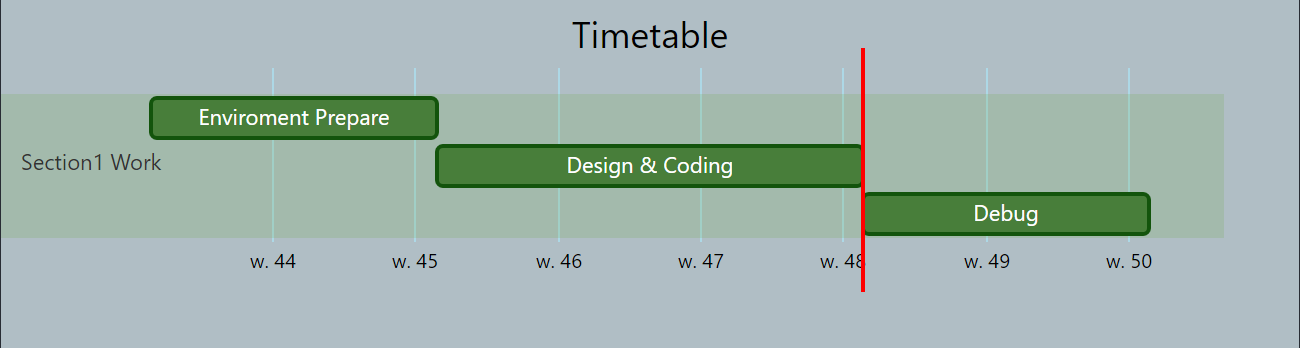
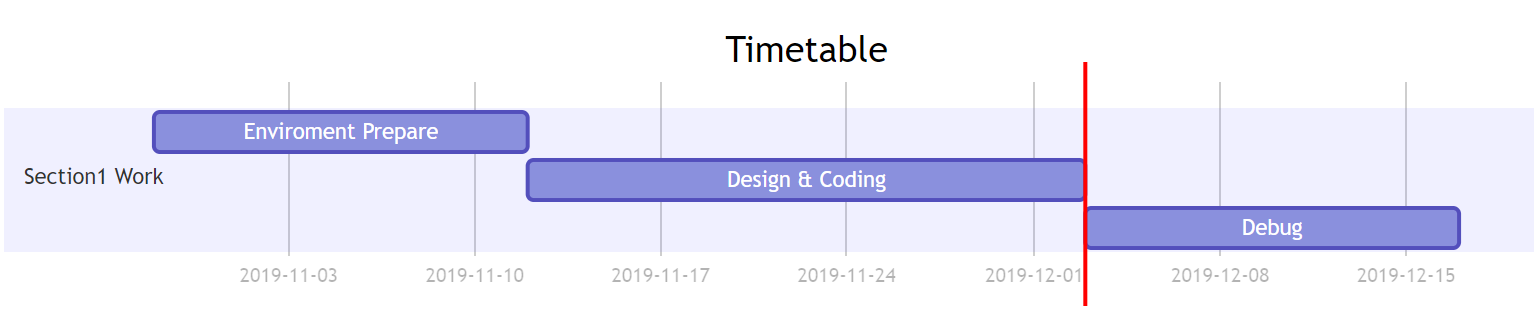
where Mermaid Online Render get gantt with axis mark of YYYY-MM-DD:
而Mermaid在线渲染的结果时间轴标记为YYYY-MM-DD
How to Repro (如何复现):
Write following content to any markdown file in VNote with Markdown-it Render and Mermaid Plugin:
在任意开启Markdown-it与Mermaid插件的VNote Markdown文件中写入下列内容
gantt
    title Timetable
    dateFormat YYYY-MM-DD

    section Section1 Work
    Enviroment Prepare: Sec1_1, 2019-10-29, 14d
    Design & Coding: Sec1_2, after Sec1_1, 21d
    Debug: Sec1_3, after Sec1_2, 14d
I guess this may be caused by the out-dated version of mermaid plugin.
个人猜测这个问题可能由Mermaid插件的版本导致.
Related Issues 相关Issues: #838 #884
 DanielW10001
All 9 comments
应该是mermaid更新版本了,后面考虑弄成插件,可以独立更新。直接英文或中文就可以了啦~
 tamlok
on 3 Dec 2019
tamlok
on 3 Dec 2019
Got it. Thanks!
明白了. 谢谢!
Maybe leave this issue open until we upgrade the mermaid plugin.
也许该保持本Issue Open直到我们完成Mermaid插件的升级.
Translation is for both people who speak Chinese and English to read easily. 😀
翻译是希望不论是说中文还是英文的人读起来都能轻松一些. 😀
DanielW10001
on 3 Dec 2019
Same problem
 Gowa2017
on 16 Dec 2019
Gowa2017
on 16 Dec 2019
作者已经更新了。
另外,mermaid 能做到如同 dot 那样,在代码的下面就能预览么
Gowa2017
on 17 Dec 2019
Tamlok indeed upgraded the mermaid plugin. Bravo!
Tamlok确实升级了Mermaid插件. 太棒了!
However, the problem still exists in the latest release (v2.8.1), which contains the upgraded mermaid plugin.
然而, 问题在包含升级后Mermaid插件的最新发布 (v2.8.1) 中仍然存在.
The following mermaid code:
下列Mermaid代码:
gantt
    title Timetable
    dateFormat YYYY-MM-DD

    section Section1 Work
    Enviroment Prepare: Sec1_1, 2019-10-29, 14d
    Design & Coding: Sec1_2, after Sec1_1, 21d
    Debug: Sec1_3, after Sec1_2, 14d
is rendered like this in the latest VNote release:
在最新的VNote发布中被渲染如下:

However, the same code is rendered like this in the Mermaid Live Editor:
然而, 相同的代码在Mermaid在线编辑器中被渲染如下:

It seems like we still have the same issue: wrong axis mark format.
看起来我们仍然有相同的问题: 错误的时间轴标记格式.
DanielW10001
on 19 Dec 2019
@DanielW10001 Download the latest build here again. I am sure you are using the wrong build.

tamlok
on 20 Dec 2019
@tamlok
最新构建确实解决了这一问题!
The Latest build indeed fix this problem!
我重新下载了最新构建后问题消失了.
I redownload the latest build and the problem is gone.
我原本使用的"最新构建"来自于GitHub发布并且看起来这是一个过时的构建.
The original "Latest Build" I used is from GitHub Release and it seems to be an outdated build.
GitHub发布的SHA1是0436B7859F88B18326CD74551F09DAFB265F9D2E.
The SHA1 of GitHub Release is 0436B7859F88B18326CD74551F09DAFB265F9D2E.
Bintray的SHA1是805DE8369E336E3D9C0AFF1712F11521F59FE4BA.
The SHA1 of Bintray is 805DE8369E336E3D9C0AFF1712F11521F59FE4BA.
看起来我们的最新发布中有一个过时的文件.
Looks like we have an outdated file in latest release.
DanielW10001
on 20 Dec 2019
The latest release is the last release v2.8.1. It will be updated only when next release is released.
The latest build is the build on the master branch. It still has the same v2.8.1 name.
tamlok
on 20 Dec 2019
@tamlok Oh, I understand now. Sorry about that, my bad. 😅
DanielW10001
on 20 Dec 2019
Related issues
 IllyaYalovyy
·
3Comments
IllyaYalovyy
·
3Comments
 dalerkd
·
4Comments
dalerkd
·
4Comments
 nikita-moor
·
5Comments
nikita-moor
·
5Comments
 htfy96
·
5Comments
htfy96
·
5Comments
 mx1680
·
4Comments
mx1680
·
4Comments