OS Version (操作系统): Linux
VNote Version (Help - About VNote - Version: )(VNote版本): 2.7.2
Symptoms (表现): Notes will not sort.
How to Repro (如何复现): Right-click in the Notes area in the sidebar, select Sort from the menu, select a note in the popup window, then choose Top, Up, Down, or Bottom. The Notes will not reorder.
Note: I saw that there was an issue opened a while ago about sorting. I'm not sure if this version was supposed to have that feature implemented yet or not. In case this is a bug, I wanted to open this issue up so it has an opportunity to be addressed. Let me know if you need any other information.
 skyblue002
All 16 comments
Hi,
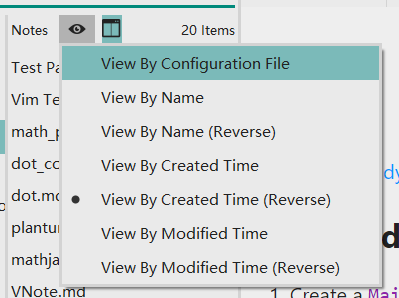
You need to VIEW it by the configuration file to see your notes in sorted order.
 tamlok
on 27 Oct 2019
tamlok
on 27 Oct 2019
Hi,
"View By Configuration File" was already selected. That didn't make any difference.
When I right-click and select "Sort" from the menu, it brings up the Sort Notes dialog. When I select a note from there and press "Up" or "Down" or any of the other buttons, the notes don't move. The order will not change.
skyblue002
on 27 Oct 2019
Are you using Arch or buliding VNote from source yourself? Could you try the AppImage file provided by VNote to have a test? I am afraid you are using a VNote built from newer version of Qt, which has some compatibility issues.
tamlok
on 28 Oct 2019
I tried every option I could. Here are the results:
vnotepackage in the Arch repository, prebuilt, does not use an AppImage file -- sorting does not work, low memory usevnote-binpackage in the Arch repository, uses an AppImage file -- sorting does work, but the app uses 3-4x as much memory- download from github, uses an AppImage file -- sorting does work, but the app uses 3-4x as much memory
vnote-gitpackage in the Arch repository, compiles from source -- sorting does not work, low memory use
I have both qt4 and qt5-base installed. If VNote does use an older version of Qt, I'm not sure why it's not detecting and using it when compiling from source (with the vnote-git package). Is there a flag that I could set when compiling it? I'd really prefer not to use an AppImage file, since they use so much more memory to run.
skyblue002
on 28 Oct 2019
VNote works fine with Qt 5.9. You could install Qt 5.9 to compile VNote. BTW, you could use Qt's *.run install file to install Qt 5.9 to your home folder, which will leave your system clean.
tamlok
on 28 Oct 2019
The most recent version of Qt available in the repositories is 5.13.1. I don't see anything above that, even in -git packages, which are usually newer. Is there any compatibility with the Qt 5 versions other than 5.9? I may just have to use another app or deal with not being able to sort anything.
skyblue002
on 28 Oct 2019
Hi,
Qt 5.9 is a LTS version of Qt 5. The timeline is 5.9, 5.10. 5.11, 5.12, and then latest 5.13. Qt always breaks things between versions. You could download Qt 5.9 installable file here.
tamlok
on 28 Oct 2019
Thanks for the link. I installed Qt 5.9. I went through ccmake, but first hoedown was missing from the source, then after manually adding hoedown, I did go through the make process, but there was no resulting executable that I could find. Even after I set the target directory. I'm really just guessing, though. There were no instructions on how to compile the source in the archive I downloaded from github. It's ccmake and then make, right? Am I missing something?
skyblue002
on 28 Oct 2019
You need to git submodule update --init to fetch all the modules at first clone.
Please refer to the doc to check out how to build VNote from source. (use qmake and then make).
tamlok
on 28 Oct 2019
Thank you. That helped with getting the vnote source in full. But, since I had to install Qt manually, it's not detecting version 5.9.8. When I run qmake and then make, it's using the other version of Qt on my computer, the later version which leaves VNote unable to sort anything. Do you know how to manually set the version of Qt when building it?
skyblue002
on 28 Oct 2019
Try adding the bin folding of Qt 5.9 to the PATH env or just call /home/path/to/qt59/bin/qmake instead of qmake.
tamlok
on 28 Oct 2019
I called qmake directly, in the Qt 5.9.8 installation. The Makefile seemed to list all the directories correctly and referenced Qt 5.9.8 instead of the other installation. However, after make was finished and I executed the VNote executable, it still had the same problem of not being able to sort.
skyblue002
on 28 Oct 2019
Strange! Then I do not have any idea for this :(
tamlok
on 28 Oct 2019
I really appreciate you trying. Thank you for your help! I will fiddle around with it when I have a chance, and see if I can get it working. I will update this thread if I manage to get any positive results. :crossed_fingers:
skyblue002
on 28 Oct 2019
I figured out what happened.
The peg-highlight and hoedown parts of the program refer to makefiles that get resources from the /usr/lib/qt directory, but that is where the later version of Qt is installed. If I edit those makefiles, they are re-created during the make process, overwriting any changes I made.
Calling qmake from the 5.9.8 directory does change the Makefile in the main vnote directory, but it does not result in changes to the Makefile in the hoedown or peg-highlight directories.
I'm not sure if knowing this helps, but it's something, at least.
skyblue002
on 28 Oct 2019
Great news! I got it to work. :smile:
For whatever reason, attempting all of this from the terminal would backfire because both peg-highlight and hoedown would end up using the default installation of Qt. However, when I edited the Build file in pamac-manager for the vnote package (side note: it looks like it _does_ build that package, my mistake), it ended up compiling vnote with only Qt 5.9.8, including both peg-highlight and hoedown. When testing the app, the sorting feature _does_ work.
I changed this part of the Build file: (these aren't the only lines, just the relevant ones)
build() {
  cd "$pkgname/build"
  qmake ../VNote.pro     # change the path to qmake here, so it goes to 5.9
  make
}
I notified the person who maintains the package about the issue. I'm not sure what they can do, seeing as Arch has 5.13.1 in the repository now. But, at least they'll be informed of the issue.
Thank you for all of your help! I hope that this can help another user if they have this same problem.
Solution Summary
- Install Qt 5.9.8, by downloading it here: Qt 5.9.8, executing the
.runfile and checking: Qt 5.9.8 >Desktop gcc 64-bit, Qt 5.9.8 >Qt WebEngine, andDeveloper and Designer Tools(Make a note of _where_ you installed it, you will need that for step 2.) - Open
pamac-managerand find thevnotepackage. Click on thevnotepackage, then click onBuild files. Change the line mentioned above to point to Qt 5.9.8 instead of your default installation. Theqmakeexecutable will be in...5.9.8/gcc_64/bin/qmake, so if you installed Qt 5.9.8 into/opt/Qt5.9.8, you would changeqmakein the original file to:/opt/Qt5.9.8/5.9.8/gcc_64/bin/qmake - Click
Buildand then clickApply. The package will now be built with Qt 5.9.8 instead of your default installation. - When
pamac-manageris done, you should now be able to use VNote and have sorting capabilities.
Edit Note: Added more detail to solution summary.
skyblue002
on 28 Oct 2019
Related issues
 scu2013
·
6Comments
scu2013
·
6Comments
 fanxinping
·
5Comments
fanxinping
·
5Comments
 ikelaiah
·
3Comments
ikelaiah
·
3Comments
 mx1680
·
4Comments
mx1680
·
4Comments
 client366932
·
4Comments
client366932
·
4Comments