Vm: smb-share script - please remove the 3 mount points limit
The smb-share script currently only allows the user to add 3 mount points.
For my current setup I sadly need 7.
It would be great if this limitation could be either removed or increased. :)
Side-note:
mount points created by the script are currently the only way how I can get smb shares to work inside nextcloud.
If I add the same SMB shares as external storage inside the GUI of nextcloud then the user is not able to access them.
https://help.nextcloud.com/t/internal-server-error-when-trying-to-access-to-a-smb-share/79678
So increasing the limit from 3 to some higher value would help me out a lot. :)
 cholzer79
All 14 comments
I mean raising the limit would definitely be possible but I wonder what would be a good limit and how so many mounts will effect the overall performance of the VM.
@enoch85 do you have an opinion on that?
@cholzer79 what do you think would be a high enough limit? 8 mounts maybe?
Btw: I definitely would suggest you to mount as less mounts as possible. Maybe you can just mount the one parent directory of all neded folders and create additional local external storage folders which take the subfolders?
 szaimen
on 30 Apr 2020
szaimen
on 30 Apr 2020
@szaimen Currently I went down the route you suggested and work with a subfolder per user inside a single share/mount.
But since the users also access these shares directly from their windows PC's, it has the unwanted sideeffect that each user could access the folder of every other user - which is not ideal.
This is why I need a mount per user so I can place the nextcloud folder inside the storage space of the individual user on the NAS.
I don't know what a good limit would be for the script. In my case it's 7 😅
That said, the only reason why I need the script to add more than 3 mount points is down to the issue that adding smb shares for external storage inside the nextcloud webgui does not work. 😬
cholzer79
on 30 Apr 2020
Hm, maybe I wasn't clear enough, so here my better explanation:
That is the folder structure on the smb-server side:
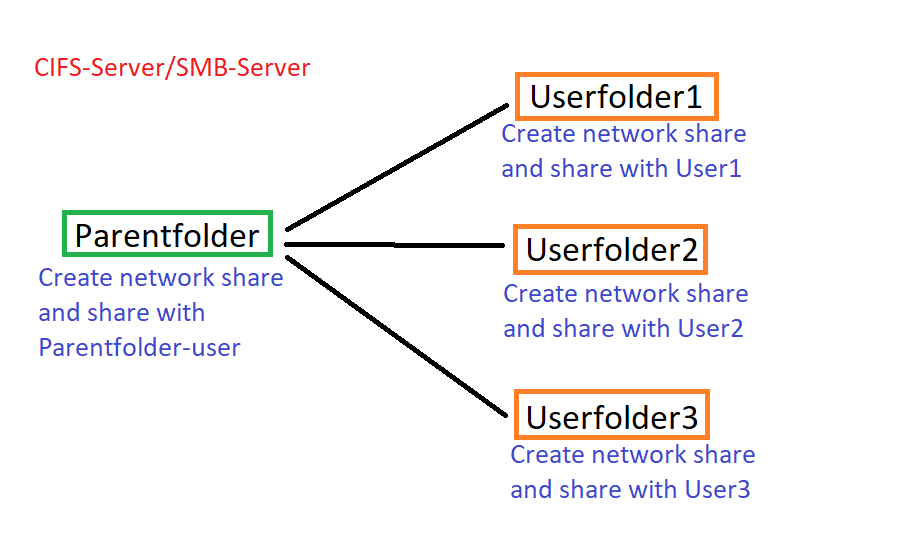
-You have a parentfolder, create a network share and share it with a special parentfolder-user
-all subfolders are also shared over the network with the specific user
-the users can still access only their specific network-share
Now if you mount the parenfolder-smb-share to the Nextcloud VM with the smb-script, it looks like this:
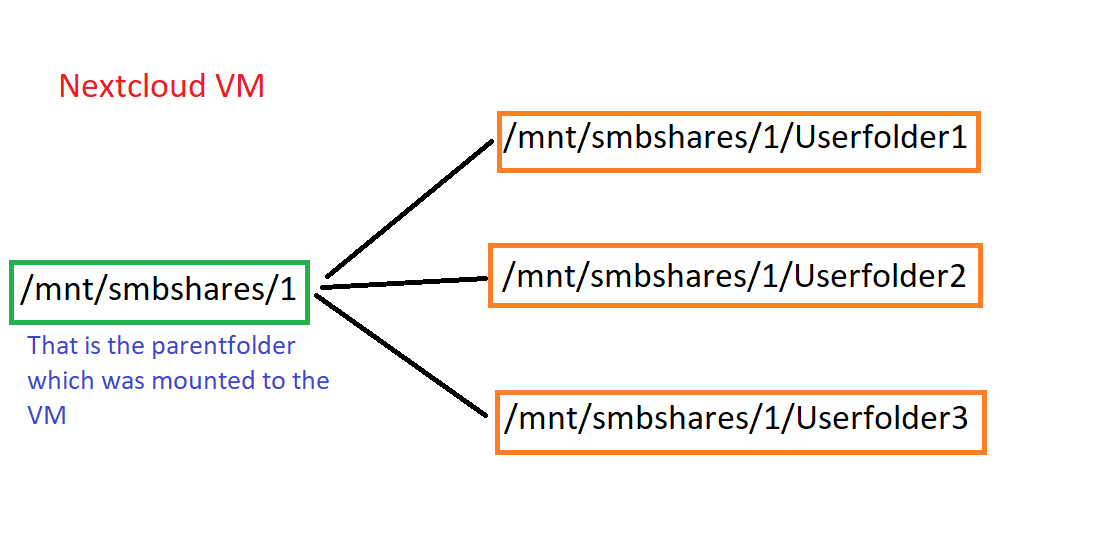
Now the parentfolder is mounted to /mnt/smbshares/1 and you can access all subfolders.
You can now use the external storage app to create additional local mountpoints and mount them only to the specific user. It would look somethink like this:
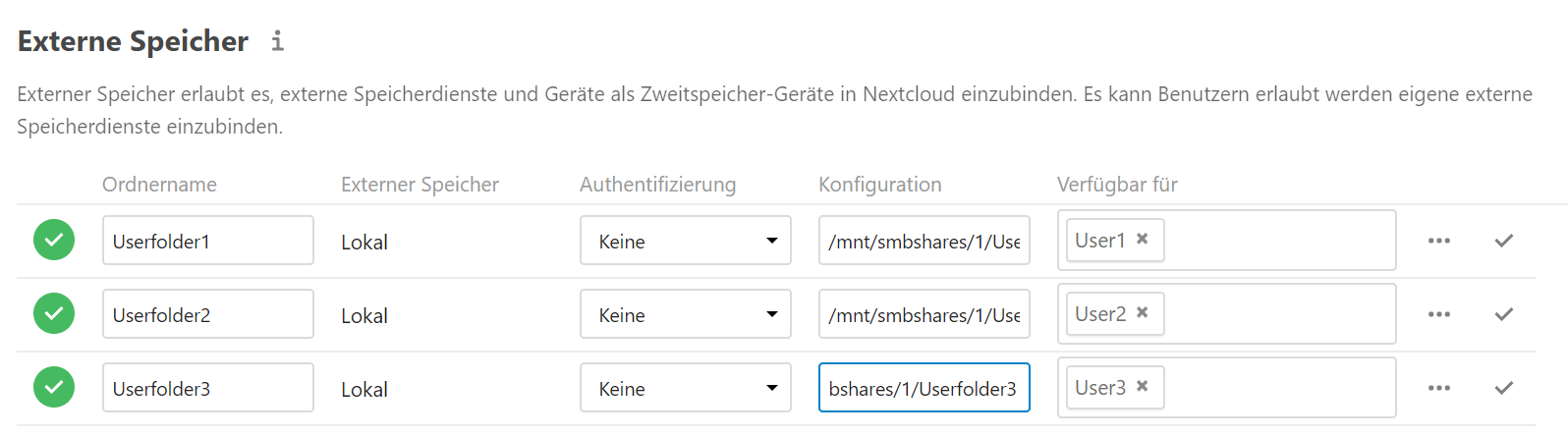
I hope this explains everything.
szaimen
on 30 Apr 2020
@szaimen thank you for taking your time to explain that in such detail! 😀
I'm very sorry that I did not mention that I though about doing that, but sadly that is not possible in unraid. When you create a share in unraid then it creates a new folder on the array and shares it. You can not share a subfolder inside a share (in the GUI at least).
But even if that would work it would still not fulfill the needs of my users.
They want a "nextcloud" folder inside their share, alongside all their other stuff.
\nas\user1\nextcloud
\nas\user2\nextcloud
.
\nas\user7\nextcloud
That is why I need to add one smb share per nextcloud user which is how I ran into the 3 mount point limit. 😅
//edit
that said, can I create a mount point for //nas without specifying a subfolder?
if so then I would only need that one mount point.
//edit2
nope that does not work :(
cholzer79
on 30 Apr 2020
Yes, that sounds like it is not possible on unraid.
Depending on the unofficial unraid docs https://wiki.unraid.net/UnRAID_Manual_5#User_shares and the Split Level section, I have an idea how this could work but only if you have not more than 3 discs (or at least the user shares are not on more than 3 discs) and split level is set to 0 or 1.
Is this the case?
szaimen
on 30 Apr 2020
@szaimen I had one customer that had 20 mounts in the VM, it's all about HW performance, not so much about what the VM can cope with since it's depending on the HW it's run on.
Very nice explanation, kudos on that! Something like that would be super nice to have in the docs! ;)
 enoch85
on 30 Apr 2020
enoch85
on 30 Apr 2020
@szaimen I had one customer that had 20 mounts in the VM, it's all about HW performance, not so much about what the VM can cope with since it's depending on the HW it's run on.
So what would you suggest then?
Raise the limit? And if yes to what amount?
I mean we could scale the max count depending on the cpu count but I am not able to evaluate what would be a good amount for which cpu count and I am not willed to test this out.
Very nice explanation, kudos on that! Something like that would be super nice to have in the docs! ;)
Thanks, you are welcomed to put that into the docs ;)
BTW: the same applies to https://github.com/nextcloud/vm/pull/1054#issuecomment-578301714
szaimen
on 30 Apr 2020
I have an idea how this could work but only if you have not more than 3 discs (or at least the user shares are not on more than 3 discs) and split level is set to 0 or 1.
@cholzer79 So I guess this is not the case?
szaimen
on 1 May 2020
@enoch85 Do you have some thoughts on that?
So what would you suggest then?
Raise the limit? And if yes to what amount? I mean we could scale the max count depending on the cpu count but I am not able to evaluate what would be a good amount for which cpu count [...]
szaimen
on 2 May 2020
@szaimen Why have a limit at all? Set it to something high, like 30.
It's not up to us to limit what the user wants. If they want 24 shares it's fine with me, it's not my server. :)
enoch85
on 2 May 2020
@szaimen Why have a limit at all? Set it to something high, like 30.
It's not up to us to limit what the user wants. If they want 24 shares it's fine with me, it's not my server. :)
Because it will not work with all menus with something like 30.
And I wasn't sure about performance limitations.
However I will probably set it to a number like 8 that will work with all menus and give the choice to the user to raise it by changing one variable in the script. (Although probably not all menus will work reliably.)
But it will need time.
szaimen
on 2 May 2020
@szaimen I trust that you know what's best. :+1:
enoch85
on 2 May 2020
Yes, that sounds like it is not possible on unraid.
Depending on the unofficial unraid docs https://wiki.unraid.net/UnRAID_Manual_5#User_shares and the Split Level section, I have an idea how this could work but only if you have not more than 3 discs (or at least the user shares are not on more than 3 discs) and split level is set to 0 or 1.
Is this the case?
sorry for the late reply. sadly that is not the case. :(
cholzer79
on 4 May 2020
@cholzer79 Now that the PR is merged you should be able to mount at least 16 smb shares ;-)
szaimen
on 4 May 2020
Related issues
 rakekniven
·
7Comments
rakekniven
·
7Comments
 lantrix
·
6Comments
lantrix
·
6Comments
 dseeker
·
4Comments
dseeker
·
4Comments
 RKlarmann
·
4Comments
RKlarmann
·
4Comments
 wouterVE
·
4Comments
wouterVE
·
4Comments