Steps to reproduce
- Download 18.0.2 version VM (I did 40 gb one, but I don't think that matters). https://cloud.hanssonit.se/s/zjsqkrSpzqJGE9N
- Go through first setup phase. When asked for a keyboard layout, select Generic 105 (intl) layout, Russian. (as switch i picked Alt+Shift and default to all next steps about keyboard, but this might not matter).
- When asked for a time zone, select Europe -> Moscow.
- When asked for "find better mirror" say Yes.
Expected behaviour
Script should go along.
Actual behaviour
Got error instead (see screenshot below).
Server configuration
Nextcloud server version:
18.0.2 (based on a downloaded image)
Server OS (Ubuntu server is default)
Ubuntu server?
How did you install the VM? (Scripted install from master OR Released version)
Imported it into VMWare and followed scripts, that launched with first login
Network
Do you use DHCP?
Yes, default NAT configuration of VMWare, which uses internal DHCP
Is port 80 and/or 443 open?
Logs / Screenshots
Installation log (command output)
Sorry, unable to copy from a vm console
Screenshoots
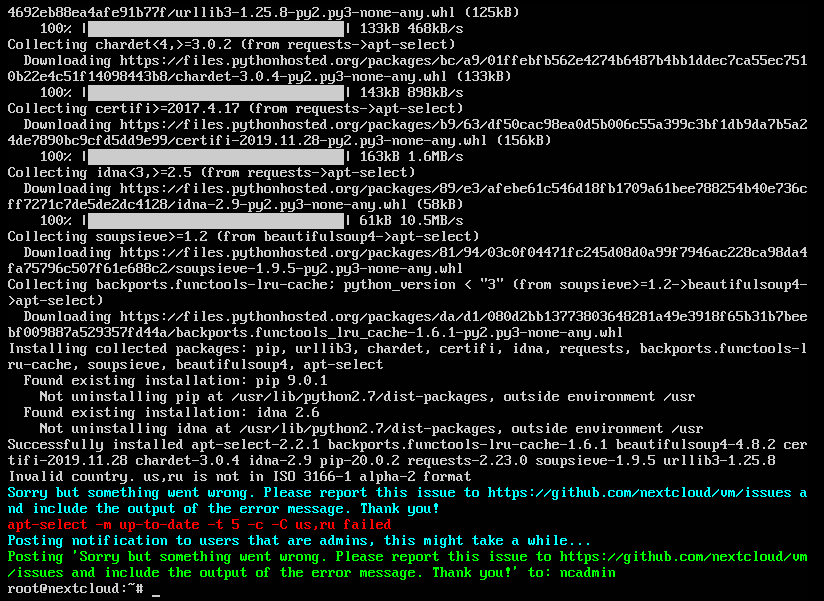
 SomebodyOdd
All 23 comments
Thanks for posting your issue!
apt-select can't handle two inputs, and in some rare cases it happens. Just skip selecting a new mirror for now, and I'll think of a fix in future versions.
 enoch85
on 23 Mar 2020
enoch85
on 23 Mar 2020
Yeah, got to the end without any troubles after skipping this part. But I won't close the issue in case you need a reminder to fix this at some point! =)
SomebodyOdd
on 27 Mar 2020
A reminder is always good!
Thanks for confirming!
enoch85
on 27 Mar 2020
I faced the same issue. However, the script should not be run twice. So, the simplest fix is to delete the VM, not change the mirror in the second run.
 Amalinda
on 30 Mar 2020
Amalinda
on 30 Mar 2020
@Amalinda Exactly what I would propose! I'm happy that users understand how it works. :)
enoch85
on 30 Mar 2020
The current fix is to remove the script all together from the next release.
That's the "easy way out", but if someone has a fix, I'm happy to merge it!
enoch85
on 16 Apr 2020
Hey guys, after some thought I think I fixed it. Please try this: https://raw.githubusercontent.com/nextcloud/vm/20.04_testing/static/locate_mirror.sh
Thanks!
cc @Amalinda @SomebodyOdd
enoch85
on 16 Apr 2020
Can't find a VM image, most recent is 2 days old which, I guess, don't contain that fix yet.
Or is there another way to test it?
SomebodyOdd
on 17 Apr 2020
Also, maybe try something like that? ipapi can return country, based on IP address of request source.
If we can't tell country based on just keyboard layout, we (as an option, because some people might not like querying external service) could try and find out our country using ipapi and use that as a country for apt-select.
(WARNING: not really tested!)
https://pastebin.com/bR07KfVU
SomebodyOdd
on 17 Apr 2020
Also, maybe try something like that? ipapi can return country, based on IP address of request source.
If we can't tell country based on just keyboard layout, we (as an option, because some people might not like querying external service) could try and find out our country using ipapi and use that as a country for apt-select.
Sounds like a good idea, principally. 👍
If I understand it correctly, could that be used to automatically setup the mirror and the keyboard layout during the startup-script?
 szaimen
on 17 Apr 2020
szaimen
on 17 Apr 2020
could that be used to automatically setup the mirror and the keyboard layout during the startup-script
Well, maybe, but i'm not sure this could be used as auto choice without asking. As a guess with option to override it during a setup - sure, why not.
SomebodyOdd
on 17 Apr 2020
Well, maybe, but i'm not sure this could be used as auto choice without asking. As a guess with option to override it during a setup - sure, why not.
I would leave the choice to the one who is running the startup script, too: of course ask if this should get configured automatically if yes get the country code and skip the manual keyboard konfiguration.
szaimen
on 17 Apr 2020
I would leave the choice to the one who is running the startup script, too: of course ask if this should get configured automatically if yes get the country code and skip the manual keyboard konfiguration.
And maybe "You country is \
SomebodyOdd
on 17 Apr 2020
And maybe "You country is
, is this correct? y/n". Challenge is - how do you figure out keyboard layout, I think it's a bit harder than just a country
I think I have already an idea how this could work: just bring up an input box and let the user test all keys. If everything is good continue, if not bring up the manual chooser.
szaimen
on 17 Apr 2020
Can't find a VM image, most recent is 2 days old which, I guess, don't contain that fix yet.
Or is there another way to test it?
Yeah, download the script I just linked, run it and tell me the output.
That wouldn't work, since the letters are in capital, and only lower case is accepted. Good idea though!
enoch85
on 17 Apr 2020
@szaimen https://github.com/nextcloud/vm/blob/20.04_testing/static/locales.sh#L34 Something for you if you have time.
enoch85
on 17 Apr 2020
That wouldn't work, since the letters are in capital, and only lower case is accepted
Well, that awesome Linux world got you covered here =)
https://stackoverflow.com/questions/2264428/how-to-convert-a-string-to-lower-case-in-bash
Yeah, download the script I just linked, run it and tell me the output.
On my installation of Nextcloud it just proceeds to find a mirror. Weird. Could it be because $KEYBOARD_LAYOUT variable doesn't exists when launching by hand?
SomebodyOdd
on 17 Apr 2020
@szaimen https://github.com/nextcloud/vm/blob/20.04_testing/static/locales.sh#L34 Something for you if you have time.
What shall that do?
szaimen
on 17 Apr 2020
Well, that awesome Linux world got you covered here =)
Even if it's a good idea, it doesn't fit here. $KEYBOARD_LAYOUT checks the current configuration, your variable would be set as the new standard, but since it just shows the conutry code, we would still need to pair it with what's used in Ubuntu.
It might also not be correct, if you are behind a VPN. Also, what if you can't curl? Then the string would be empty. so there's a risk of failure using that "fix". What we're looking for here is the most failsafe option.
On my installation of Nextcloud it just proceeds to find a mirror. Weird. Could it be because $KEYBOARD_LAYOUT variable doesn't exists when launching by hand?
All my new fixes are in the 20.04_testing repo, so if you're on master you won't get the latest fixes.
What shall that do?
As it says: # TODO: "localectl list-x11-keymap-layouts" and pair with locales. So for example, if the KEYBOARD_LAYOUT is French, that's fr - what you would do is to continue to build on the existing elif statements with the correct locale for French:
elif [ "$KEYBOARD_LAYOUT" = "fr" ]
then
    sudo locale-gen "fr_FR.UTF-8" && sudo dpkg-reconfigure --frontend=noninteractive locales
You can find all available locales with cat /etc/locale.gen. A good function would be nice, and I plan to make one, but I don't have that much time on my hands right now.
enoch85
on 17 Apr 2020
OK guys, I've tested this all night now and I consider the fix to be stable - hence this issue can be closed.
The fix is here: https://raw.githubusercontent.com/nextcloud/vm/20.04_testing/static/locate_mirror.sh
enoch85
on 17 Apr 2020
Hey guys, after some thought I think I fixed it. Please try this: https://raw.githubusercontent.com/nextcloud/vm/20.04_testing/static/locate_mirror.sh
Thanks!
cc @Amalinda @SomebodyOdd
hello Daniel, sorry about my delayed response. I did try it. It works great. My installation was done within a digital ocean 8GB, 4 core instance running latest Ubuntu Ubuntu 20.04 (LTS) x64. They only released the iso few days back. The only minor error is that php-imagick couldn't be installed and it shows a notification at the system. Thanks for your efforts!
Amalinda
on 24 Apr 2020
There's a reason for that: https://github.com/nextcloud/server/issues/13099
enoch85
on 24 Apr 2020
There's a reason for that: nextcloud/server#13099
I was unaware of this vulnerability. Great job & thank you.
Amalinda
on 25 Apr 2020
Related issues
enoch85
·
5Comments
 peacock40
·
6Comments
enoch85
·
4Comments
peacock40
·
6Comments
enoch85
·
4Comments
 dseeker
·
4Comments
dseeker
·
4Comments
 thejohnha
·
8Comments
thejohnha
·
8Comments