Vm: Doesn't automatically detect Digitalocean Volumes
Steps to reproduce
- Create DO droplet
- Create DO volume and attach to droplet
- (even though I don't think I have to do it) mount it using DO's instructions: https://imgur.com/orgMgHe
- Start the script
Expected behaviour
Have the script find it and set it up for ZFS
Actual behaviour
Script doesn't find the volume
Server configuration
Server version: Ubuntu 18.04 x64
How did you install the VM? wget https://raw.githubusercontent.com/nextcloud/vm/master/nextcloud_install_production.sh
Network
Do you use DHCP? yes
Is port 80 and/or 443 open? yes
Logs / Screenshots
I get the It seems like you didn't mount a second disk. error from line 35 from the format-sdb.sh static script
What I think is happening is that it should detect that it's using the KVM Hyperivsor on line 31. But because DO puts their volumes at locations like: /dev/disk/by-id/scsi-0DO_Volume_volume-ams3-01 it can't find it
 thibaultmol
All 37 comments
Hmm... Maybe DO doesn't use standard values like "sdb"?
Can you run fdisk -l and check the name of the second drive?
 enoch85
on 31 Aug 2018
enoch85
on 31 Aug 2018
: /dev/disk/by-id/scsi-0DO_Volume_volume-ams3-01 it can't find it
Saw this now. Yeah there's the issue.
Do you know if the name is always the same or if it's randomly created?
enoch85
on 31 Aug 2018
I think it's always that format by default (depending on what region your volume is in).
But people can manually change the 'volume-ams3-01' section to anything, upon creation: https://www.digitalocean.com/docs/volumes/how-to/create-and-attach/
thibaultmol
on 31 Aug 2018
depending on what region your volume is in
That will be an issue...
But people can manually change the 'volume-ams3-01' section to anything
So you can rename it to sdb?
enoch85
on 31 Aug 2018
(DO uses KVM, do it's best to rename it to vdb I suppose)
But yeah, that's possible.
thibaultmol
on 31 Aug 2018
OK, then it's just a matter of giving the right instructions as this already is in: https://github.com/nextcloud/vm/blob/master/static/format-sdb.sh#L31
enoch85
on 31 Aug 2018
@enoch85 Just tried naming it vdb, but it doesn't work still. Probably because, like I tried to say earlier, DO puts their volumes in /dev/disk/... so the script doesn't look there, right?
Configure your volume
To configure your volume, do the following:Log into the Droplet
$ ssh root@[IP ADDRESS REMOVED] Copy
Format the volume: First time only
WARNING: This step will destroy all existing data on the volume. Only run this command on a new volume or if you're sure you want to destroy the existing data.$ sudo mkfs.ext4 -F /dev/disk/by-id/scsi-0DO_Volume_vdb Copy
Mount the volume
Run the following commands on the Droplet to make your volume accessible:Create a mount point for your volume:
$ mkdir -p /mnt/vdb
Mount your volume at the newly-created mount point:
$ mount -o discard,defaults,noatime /dev/disk/by-id/scsi-0DO_Volume_vdb /mnt/vdb
Change fstab so the volume will be mounted after a reboot
$ echo '/dev/disk/by-id/scsi-0DO_Volume_vdb /mnt/vdb ext4 defaults,nofail,discard 0 0' | sudo tee -a /etc/fstab Copy
Access the volume, write files, and store other data on the volume in the Droplet's /mnt/vdb directory. The data will persist if you detach the volume and will be available when the volume is reattached to another Droplet.Learn more about Block Storage at https://do.co/volume-tutorial.
EDIT: btw, there's a typo in that commit: 'Please notE'
thibaultmol
on 31 Aug 2018
Would be awesome if you could send a PR to correct the issue or/and improve the logic in the format-sdb script.
I have limited time so I can't guarantee a quick fix.
enoch85
on 3 Sep 2018
I'm really bad at scripting (don't have much experience with bash scripting in general)so I'm afraid me trying to fix it isn't really going to happen unfortunately
thibaultmol
on 3 Sep 2018
Maybe @zalonic can take a look at this?
enoch85
on 3 Sep 2018
Hi @thibaultmol, could you please run lsblk on the DO Droplet and list the output for me?
I think it will output something like;
NAME   MAJ:MIN RM   SIZE RO TYPE MOUNTPOINT
sda      8:0    0   40G  0 disk
└─sda1   8:1    0   40G  0 part
vda    253:0    0    40G  0 disk
└─vda1 253:1    0    40G  0 part /
The last time I used DO it didn't stick to the standard forms, it sometimes uses deferent disk types.
This could be a slight problem if it still does. If you could do this for me it will give me a direction to work in.
Thanks :)
EDIT: Spellcheck
 zalonic
on 3 Sep 2018
zalonic
on 3 Sep 2018
@zalonic
NAME    MAJ:MIN RM  SIZE RO TYPE MOUNTPOINT
sda       8:0    0   50G  0 disk
vda     252:0    0   50G  0 disk
|-vda1  252:1    0 49.9G  0 part /
|-vda14 252:14   0    4M  0 part
`-vda15 252:15   0  106M  0 part /boot/efi
Ouch, vda could be an issue as a often is the first disk.
@thibaultmol Do you think it would be possible to give it another name?
enoch85
on 4 Sep 2018
Don't know/think so.
Started new droplet and new volume just to start from scratch again.
This is my ssh output:
root@DOservernamehere:~# sudo mkfs.ext4 -F /dev/disk/by-id/scsi-0DO_Volume_vdb
mke2fs 1.44.1 (24-Mar-2018)
Discarding device blocks: done
Creating filesystem with 2621440 4k blocks and 655360 inodes
Filesystem UUID: 8fc429be-b8fa-4fcd-bedf-c1c466373335
Superblock backups stored on blocks:
        32768, 98304, 163840, 229376, 294912, 819200, 884736, 1605632

Allocating group tables: done
Writing inode tables: done
Creating journal (16384 blocks): done
Writing superblocks and filesystem accounting information: done

root@DOservernamehere:~# mkdir -p /mnt/ncdata; mount -o discard,defaults /dev/disk/by-id/scsi-0DO_Volume_vdb /mnt/ncdata; echo /dev/disk/by-id/scsi-0DO_Volume_vdb /mnt/ncdata ext4 defaults,nofail,discard 0 0 | sudo tee -a /etc/fstab
/dev/disk/by-id/scsi-0DO_Volume_vdb /mnt/ncdata ext4 defaults,nofail,discard 0 0
root@DOservernamehere:~# lsblk
NAME    MAJ:MIN RM  SIZE RO TYPE MOUNTPOINT
sda       8:0    0   10G  0 disk /mnt/ncdata
vda     252:0    0   25G  0 disk
├─vda1  252:1    0 24.9G  0 part /
├─vda14 252:14   0    4M  0 part
└─vda15 252:15   0  106M  0 part /boot/efi
root@DOservernamehere:~#
EDIT: sent an email to DO support
thibaultmol
on 4 Sep 2018
Hmm, I wonder if there's a way to automatically format and mount if it's DO? For example, format and mount sda if it's a DO VPS.
enoch85
on 4 Sep 2018
I've personally never used DO,
well never set it up myself, only used a pre-existing one (Edited just to explain contradiction above),
could you please run hostnamectl status and list the output for me?
I would like to see what the Virtualization states to see if DO has it's own one or if it will just state KVM.
zalonic
on 4 Sep 2018
It's also possible to have multiple volumes attached, so there may be more than 1 ( e.g. sda, sdb ) volume which can be designated. In most cases, this will remain consistent on internally reboot Droplets, full on power off/power on can cause the kernel to detect them inconsistently which is why mounting them by ID is the more consistent choice.
Would it be possible to document passing in a DEVTYPE environment parameter at the main script, checking for empty and bypass the logic to determine which to use to be able to support designating this when calling the top script which in turn calls this static one?
As for the output, it does list it as kvm, otherwise detecting that would have made things easier.
Virtualization: kvm
 jc2nd
on 4 Sep 2018
jc2nd
on 4 Sep 2018
For clarity, the primary disk on the Droplet is picked up by virtio which is why it is mapped under /dev/vda and the block storage volumes get picked up by the generic scsi controller and get mapped to /dev/sd*. It's the anticipated ordering for specific environments that makes this challenging in the format-sdb.sh script, but could default to /dev/sda if it's documented that this script will not support multi-attach scenarios once a consistent way to detect it's on DO is available.
jc2nd
on 4 Sep 2018
Worth noting that the sys_vendor and product_name also might be an option for detecting system:
[root@test ~]# cat /sys/devices/virtual/dmi/id/sys_vendor
DigitalOcean
[root@test ~]# cat /sys/devices/virtual/dmi/id/product_name
Droplet
Thanks @jc2nd I can work with this to get it working! Got an idea which I will test and post asap.
Didn't even think of running sys_vendor!
zalonic
on 4 Sep 2018
Thanks a lot everyone!
enoch85
on 4 Sep 2018
@zalonic so what's the fix?
thibaultmol
on 10 Sep 2018
@thibaultmol apologies, I have been out of the country on business, bad timing my end, sorry about that.
> elif sys_vendor DigitalOcean && partprobe /dev/sda &>/dev/null;
>     DEVTYPE=sda
> else
Seems to work but I need people to test it before I'm comfortable issuing the pull request.
If you can try installing it from my fork... if it works I will create a clean fork for the pull request and you can reinstall from enoch85's repository.
wget https://raw.githubusercontent.com/zalonic/vm/master/nextcloud_install_production.sh
zalonic
on 12 Sep 2018
@thibaultmol Can you please test?
@zalonic Where can I donate?
enoch85
on 13 Sep 2018
@zalonic I'm still getting the "It seems like you didn't mount a second disk." error.
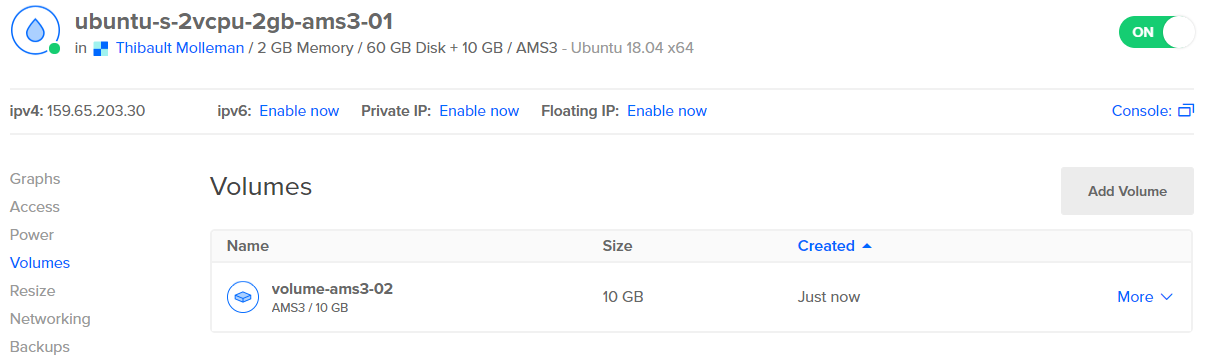
root@ubuntu-s-2vcpu-2gb-ams3-01:~# lsblk
NAME    MAJ:MIN RM  SIZE RO TYPE MOUNTPOINT
sda       8:0    0   10G  0 disk
vda     252:0    0   60G  0 disk
|-vda1  252:1    0 59.9G  0 part /
|-vda14 252:14   0    4M  0 part
`-vda15 252:15   0  106M  0 part /boot/efi
Shouldn't we check if vda1 exists, or which of them are the second disk?
enoch85
on 13 Sep 2018
sda is the second disk, not sure why it's not working. Unless I'm being silly and missed something.
I'll create a DO droplet and play with it again see what I can do.
zalonic
on 13 Sep 2018
Yep, me being silly. I've added the CAT and path to the script. Installs fine. Can you test again please?
wget https://raw.githubusercontent.com/zalonic/vm/master/nextcloud_install_production.sh
Oh when adding the volume I selected
Manually Format & Mount
We will still attach the volume. You can then manually format and mount the volume.
zalonic
on 13 Sep 2018
Nevermind… tried it again and it failed... this is very confusing!
I will start from scratch again as I'm obviously going down the wrong route.
zalonic
on 13 Sep 2018
Right, had a long nap, woke up, re-looked at this, made some changes... ran test, didn't work, confused... realised I'd uploaded the wrong folder to my GitHub, hit head on table, uploaded the correct folder to GitHub, Ran test, Installs :) Going back to sleep!
@thibaultmol Hopefully this will work, I will open a pull request in the morning if it does, or whenever I hear back from you.
Sorry for the wait to get this working. I'm exhausted. Luckily I don't have to go on business trips to often!
wget https://raw.githubusercontent.com/zalonic/vm/master/nextcloud_install_production.sh
--EDIT--
Added wget link for my repo
zalonic
on 13 Sep 2018
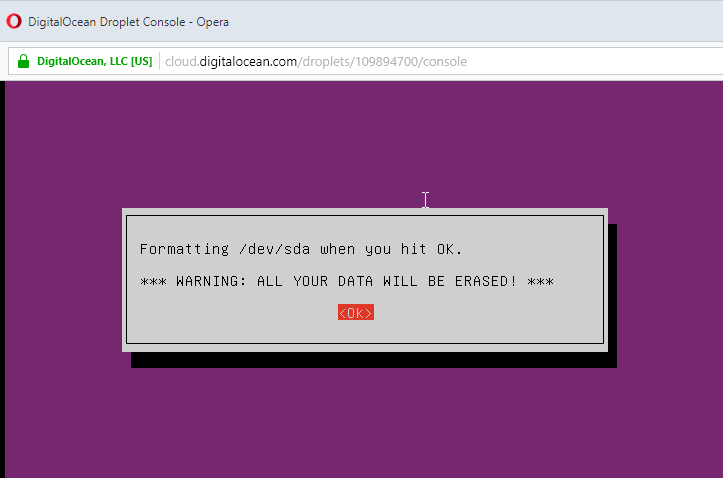
@zalonic Maybe it's a good idea to put it like this: "Formatting your DigitalOcean extra volume (/dev/sda) when you hit OK."
Just so that you're not confused with the first disk...
enoch85
on 13 Sep 2018
@enoch85 Yes thats a good idea, I will code that in tomorrow and after @thibaultmol has confirmed it is working I'll create the pull request :)
zalonic
on 14 Sep 2018
@zalonic You're awesome man!
enoch85
on 14 Sep 2018
just tested it, glad to say that it works perfectly! @zalonic
Thanks to both you and @jc2nd from Digitalocean for the tip!
thibaultmol
on 14 Sep 2018
@thibaultmol Great news! I am making some additional adjustment that enoch85 suggested.
Once I have done that and tested all the hypervisors to make sure I didn't break anything I will create the pull request and you can then reinstall from the main repository.
zalonic
on 14 Sep 2018
Just need to test hyperV but no issues so far.
zalonic
on 14 Sep 2018
Tested all working, Pull request opened! #662
zalonic
on 15 Sep 2018
Related issues
 mxschmitt
·
9Comments
mxschmitt
·
9Comments
 EmilyLove26
·
6Comments
EmilyLove26
·
6Comments
 wouterVE
·
4Comments
wouterVE
·
4Comments
 unamundan
·
6Comments
enoch85
·
5Comments
unamundan
·
6Comments
enoch85
·
5Comments
Most helpful comment
just tested it, glad to say that it works perfectly! @zalonic
Thanks to both you and @jc2nd from Digitalocean for the tip!