after running the automated installer script on ubuntu 16.04 there are to errors in the log..
Error | PHP | Array to string conversion at /var/www/nextcloud/apps/issuetemplate/lib/DetailManager.php#104 | 2018-05-02T21:42:27+0200
-- | -- | -- | --
Error | no app in context | issuetemplate | 2018-05-02T21:42:27+0200
this is from a clean install in a hyper-v vm also...
 MrLordy
All 37 comments
screenshot 1

screenshot 2

MrLordy
on 2 May 2018
@MrLordy Does everything work as expected?
The issuetepplate error is just estechic. and nothing I can do about it. I've already made a bug report for that in the app repo.
The other issue, I have no clue, same thing there - does it work?
 enoch85
on 3 May 2018
enoch85
on 3 May 2018
no. the connecting to onlyoffice part do not seem to work. so onlyoffice do not work. not sure if this matter but . also tried accessing the onlyoffice document server with the ip or domain , and nether works.
MrLordy
on 3 May 2018
I have experienced this same issue. The previous Nextcloud VM which I believe was 13.0.0 works fine but the latest 13.0.1 there is a problem with OnlyOffice Document server not starting. I receive a proxy error and if I reboot the VM it only works every other time. I’ve compared settings from both 13.0.0 and 13.0.1 and I cannot find the culprit.
 johnczer
on 4 May 2018
johnczer
on 4 May 2018
@johnczer
I’ve compared settings from both 13.0.0 and 13.0.1 and I cannot find the culprit.
Yeah, that's because there are none. :) Maybe OnlyOffice changed their code in some way. Does it work with Collabora?
enoch85
on 4 May 2018
Hi Daniel,
I was tempted to but haven’t tried Collabora. I know you said you liked Collabora more but I have read that this doesn’t work well with the Microsoft Office document formats so that’s why I have stuck with OnlyOffice. I am guessing you are correct in saying that this is an OnlyOffice or other dependency bug. The document server will work just fine every other reboot.
johnczer
on 4 May 2018
@johnczer Thanks for conforming that. If you have some spare time, maybe you could have a look around for a way to solve it in the scripts? :)
enoch85
on 4 May 2018
I have been looking at this for weeks and viewing the logs to see if I can find the answers but there are so many variables. This is what I find in the Nginx.error.log but I am still learning this stuff and primarily a Windows guy-sorry:(
2018/05/04 15:49:16 [error] 627#627: *2 connect() failed (111: Connection refused) while connecting to upstream, client: 172.17.0.1, server: , request: "GET /healthcheck HTTP/1.1", upstream: "http://127.0.0.1:8000/healthcheck", host: "office.rsa-systems.org", referrer: "https://office.rsa-systems.org/welcome/"
2018/05/04 15:49:16 [error] 627#627: *2 connect() failed (111: Connection refused) while connecting to upstream, client: 172.17.0.1, server: , request: "GET /healthcheck HTTP/1.1", upstream: "http://127.0.0.1:8000/healthcheck", host: "office.rsa-systems.org", referrer: "https://office.rsa-systems.org/welcome/"
2018/05/04 15:49:16 [error] 627#627: *1 no live upstreams while connecting to upstream, client: 172.17.0.1, server: , request: "GET /favicon.ico HTTP/1.1", upstream: "http://docservice/favicon.ico", host: "office.rsa-systems.org"
@johnczer Well, that's not the ports that are used. Here they are: https://github.com/nextcloud/vm/blob/master/apps/onlyoffice.sh#L181-L182
Where does those ports come from?
enoch85
on 4 May 2018
I’m not sure but I have tried all new installs and haven’t touched anything afterwards. If I used the VM I got back in February and do a complete install on another test VM it changes that one as well and breaks OnlyOffice. The VM that’s been running since February works fine and I have even used it to compare settings, files, etc. and I still can’t figure out what is changing but it has to be during the time it’s going through the installation scripts and downloading the various packages. I have even compared versions of Docker, Apache, etc. I have looked at the file you are referencing above and those are the ports that are set for the OnlyOffice Vhost.
johnczer
on 5 May 2018
Maybe @agolybev have a better answer to this. Anything changed in OnlyOffice?
enoch85
on 5 May 2018
Hi @enoch85, I'll check it.
 agolybev
on 5 May 2018
agolybev
on 5 May 2018
@agolybev Sorry to disturb you, did you have time to look at it yet? Had several reports now the last couple of days.
enoch85
on 9 May 2018
Here is the configuration in question.
enoch85
on 9 May 2018
Similar problem with Collabora Office. Tried several times to setup a fresh working installlation -no chance. Never had such problem before. Thanks for any help.
 nxtester
on 9 May 2018
nxtester
on 9 May 2018
Something has definitely changed. I have tried several things to get either OnlyOffice or per Daniel's recommendation Collabora. I even downloaded a new VM and still no dice. I have noticed that the Docker is not getting installed for some reason because I don's see it as a listed service nor can I run any commands on Docker. So I installed it manually and Collabora again but still not working. These guys are smarter than I am at this stuff and I am sure they will figure it out. I know everyone is busy but hopefully a resolution soon:)
johnczer
on 9 May 2018
@johnczer
Exactly same tests and results here. I noticed a error warning during installation of Collabora Office:
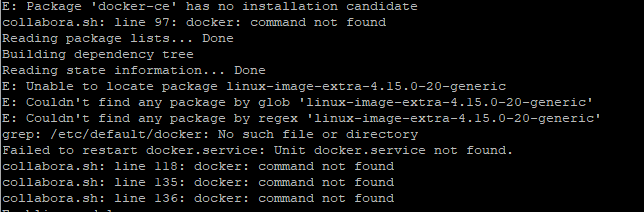
I am not a linux guy but maybe not a big deal. Thank you, great project!
nxtester
on 10 May 2018
Hmm, it seems like docker isn't installed. I'll have a look later today.
enoch85
on 10 May 2018
Daniel I know you have a real life:) so even though this is an issue it’s not the end of the world. I needed a break from working long hours on this anyways and I know you will figure this out for us eventually ;) have a good day!
johnczer
on 10 May 2018
Please try this fix: https://github.com/nextcloud/vm/pull/536
enoch85
on 10 May 2018
Daniel,
Do I need to re download the VM or are these updated scripts getting pulled from your server each time a change is made?
johnczer
on 10 May 2018
@johnczer You need to need to download the latest script with wget and then run it with sudo bash.
If you re-deploy the VM the latest scripts will be fetched automatically though.
enoch85
on 10 May 2018
Thanks Daniel, fingers crossed;)
johnczer
on 10 May 2018
So, did my fix solve the issue?
enoch85
on 11 May 2018
Hi Daniel,
Unfortunately, I cannot get anymore certs from Letsencrypt as I have exceeded my quota since I have tried to get this to work so many times. I was actually just thinking about this and wondering how long before this resets so I can try your fix. I really appreciate all of your hard work and as soon as I am able to use SSL again and try this I will definitely let you know.
Regards,
John Czereszko
Systems Integrator
RS&A Systems
johnczer
on 11 May 2018
I will definitely let you know.
Thanks!
enoch85
on 11 May 2018
Daniel - I've encountered the LetsEncrypt limit as well in previous testing. Do you think there could be a simple adjustment to use the LetsEncrypt testing servers instead of their production servers (when testing the script)?
p.s. @johnczer I believe the wait is 1 week.
 thejohnha
on 11 May 2018
thejohnha
on 11 May 2018
It would actually be nice to have the ability to use an existing cert/s during install as opposed to getting a new one each time, especially when testing like this
johnczer
on 11 May 2018
Thanks thejohnha, I think you are correct:)
johnczer
on 11 May 2018
Without real SSL it won't work, so it wouldn't matter if the script succeeded as the connection to the docker wouldn't work anyway.
But, if you do want to test anyway then you can use Let's Encrypt staging servers: https://letsencrypt.org/docs/staging-environment/
enoch85
on 11 May 2018
i have just done a clean new install on 18.04. and did not noticed any errors during install but when viewing the log off nextcloud this is what i see.. still issue with onlyoffice tho. and when doing docker ps you can see the container running. with this info 443/tcp, 127.0.0.3:9090->80/tcp
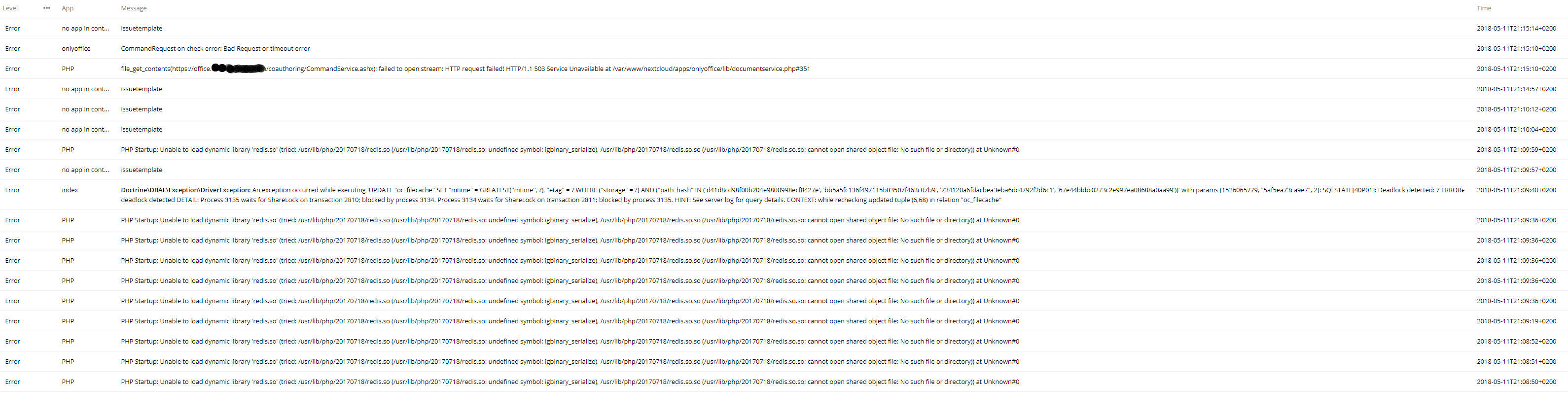
MrLordy
on 11 May 2018
good news. did a full reinstall today again. and also did some reading on issues on the onlyoffice git page.
added https://cloud.domain.com in the 3 field in the settings for onlyoffice. and now suddenly it is working. it can make new files etc and it opens fine without any errors., only issue is it downloads some files. but i assume that's because they are not supported in onlyoffice ???
MrLordy
on 12 May 2018
@MrLordy So adding the cloud domain on the third row fixed the issue?
enoch85
on 12 May 2018
yes thats correct. now it did :) . after your updated the script. did not before.
MrLordy
on 12 May 2018
Thanks! I will have a look at it!
enoch85
on 12 May 2018
That’s awesome and encouraging news! Thanks for fixing this Daniel;)
johnczer
on 12 May 2018
Waiting got @digitalocean to fix an error in their latest droplet, then I can test.
enoch85
on 12 May 2018
Related issues
 rakekniven
·
7Comments
rakekniven
·
7Comments
 unamundan
·
6Comments
unamundan
·
6Comments
 highaltidude
·
6Comments
enoch85
·
4Comments
highaltidude
·
6Comments
enoch85
·
4Comments
 mxschmitt
·
9Comments
mxschmitt
·
9Comments