Visualstudio: Wrong notification message shown when publishing a repository
On a brand new install of GitHub for VS on VS2015:
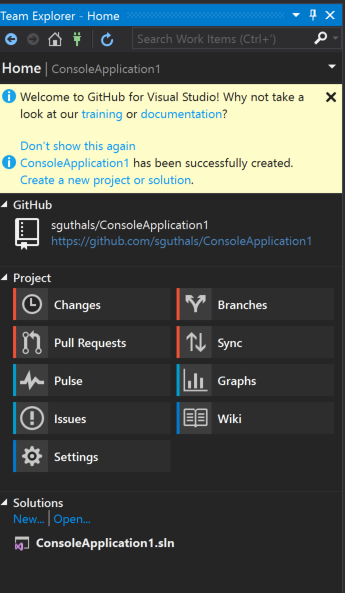
Steps:
- Created a new project locally
- Published the new project
Seeing the second message "ConsoleApplication1 has been successfully created". This is incorrect, should only be displayed on creation, not again on publishing.
Messaging should be as such:
Create new Project Locally -> "ConsoleApplication1 has been successfully created".
Publish Project -> "We have successfully published to this URL" (or something to that effect)
Clone Project -> "We have successfully cloned your project locally" (or something to that effect)
(VS 2015 on Windows 10 Pro with GitHub extension added 11/1/17)
 sguthals
All 27 comments
Hello,
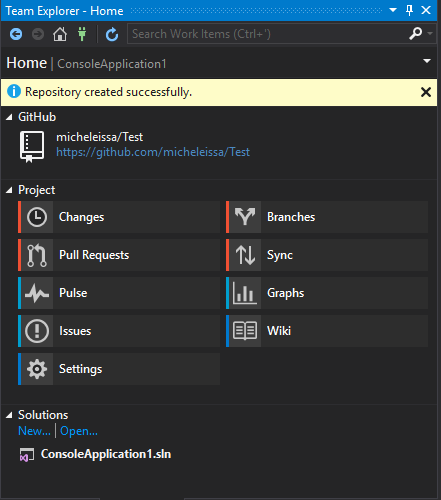
Is that still an issue, I'm not able to reproduce that at all using the mentioned steps:
- Create a new console application
- Add to Source Control from the File menu
- In Team Explorer click Sync then Publish to GitHub.
- The result message is : Repository created successfully
 micheleissa
on 11 Dec 2017
micheleissa
on 11 Dec 2017
@meaghanlewis
@grokys
Could you guys help me tackle this as a first timer? or you planning to do it yourself?
Thank you
micheleissa
on 12 Dec 2017
Hey @micheleissa! Sure, that would be great! What timezone are you in? I'd be happy to give you a helping hand over at https://gitter.im/github/VisualStudio if you like. I'm in UTC+1.
 grokys
on 12 Dec 2017
grokys
on 12 Dec 2017
@grokys thank you for rapid response, I'm in UTC-6 /CST time zone.
micheleissa
on 12 Dec 2017
Ok, great. Were you able to repro the issue in the end?
Assuming you can repro the issue I think the place to start looking is here for the repository publish command, and here for the place in the view that listens to successful publishes.
Pop into https://gitter.im/github/VisualStudio if you have any questions and ping me and I'll reply if I'm online (or when i come online).
grokys
on 12 Dec 2017
micheleissa
on 12 Dec 2017
grokys
on 14 Dec 2017
sguthals
on 14 Dec 2017
 meaghanlewis
on 14 Dec 2017
sguthals
on 14 Dec 2017
micheleissa
on 14 Dec 2017
sguthals
on 14 Dec 2017
micheleissa
on 14 Dec 2017
sguthals
on 14 Dec 2017
micheleissa
on 21 Dec 2017
grokys
on 25 Jan 2018
grokys
on 25 Jan 2018
grokys
on 25 Jan 2018
micheleissa
on 25 Jan 2018
meaghanlewis
on 31 Jan 2018
micheleissa
on 6 Feb 2018
meaghanlewis
on 14 Dec 2017
sguthals
on 14 Dec 2017
micheleissa
on 14 Dec 2017
sguthals
on 14 Dec 2017
micheleissa
on 14 Dec 2017
sguthals
on 14 Dec 2017
micheleissa
on 21 Dec 2017
grokys
on 25 Jan 2018
grokys
on 25 Jan 2018
grokys
on 25 Jan 2018
micheleissa
on 25 Jan 2018
meaghanlewis
on 31 Jan 2018
micheleissa
on 6 Feb 2018
 shana
on 16 Feb 2018
micheleissa
on 19 Feb 2018
shana
on 22 Feb 2018
micheleissa
on 28 Feb 2018
micheleissa
on 27 May 2018
grokys
on 23 Oct 2018
shana
on 16 Feb 2018
micheleissa
on 19 Feb 2018
shana
on 22 Feb 2018
micheleissa
on 28 Feb 2018
micheleissa
on 27 May 2018
grokys
on 23 Oct 2018
Related issues
grokys
·
7Comments
 jcansdale
·
10Comments
grokys
·
6Comments
jcansdale
·
10Comments
grokys
·
6Comments
 sebastianferrari
·
7Comments
sebastianferrari
·
7Comments
 nk111
·
9Comments
nk111
·
9Comments