Visualstudio-docs: Dynamic Playlist and Traits
The Visual Studio Release Notes for 16.7.0, as well as the blog announcing it both indicate that it is possible to create a dynamic test playlist based upon traits by manually editing the XML. Unfortunately, there is no indication as to what format that may take. Can we get some additional information as to what that XML must look like?
For example, I want to run all tests which include the MSTest attribute [TestCategory("SchemaUpdateBasic")]. I have tried this Rule File (several variations):
<Playlist Version="2.0">
  <Rule Name="Includes" Match="Any">
    <Property Name="Trait" Match="Contains" Value="SchemaUpdateBasic" />
  </Rule>
</Playlist>
The results of this are that the desired list of tests shows up in Test Explorer, but no tests run. The Tests pane of the Output window indicates:
========== Test discovery finished: 0 Tests found in 2.5 sec ==========
No tests found to run.
Document Details
⚠ Do not edit this section. It is required for docs.microsoft.com ➟ GitHub issue linking.
- ID: c3681419-a041-da72-a134-37401922a536
- Version Independent ID: 57b6194d-cb07-0e89-8f38-544bf4ce9816
- Content: Run unit tests with Test Explorer - Visual Studio
- Content Source: docs/test/run-unit-tests-with-test-explorer.md
- Product: visual-studio-windows
- Technology: vs-ide-test
- GitHub Login: @Mikejo5000
- Microsoft Alias: mikejo
 EricAllen-tr
All 15 comments
@EricAllen-tr -- Eric, thank you for your feedback. Please consider these resources:
@Mikejo5000 -- Mike, please look into this issue.
 WilliamAntonRohm
on 23 Oct 2020
WilliamAntonRohm
on 23 Oct 2020
@kendrahavens Kendra, Who would know more about what is supported in the .playlist file?
 Mikejo5000
on 3 Nov 2020
Mikejo5000
on 3 Nov 2020
@EricAllen-tr Thank you for bringing this up we will work on updating the documentation. In the meantime, this format should work:
<Playlist Version="2.0">
  <Rule Name="Includes" Match="Any">
    <Property Name="Trait" Value="TestCategory [SchemaUpdateBasic]" />
  </Rule>
</Playlist>
Make sure to have a space between TestCategory and [SchemaUpdateBasic]. Let me know if you still have any issues.
 kendrahavens
on 17 Nov 2020
kendrahavens
on 17 Nov 2020
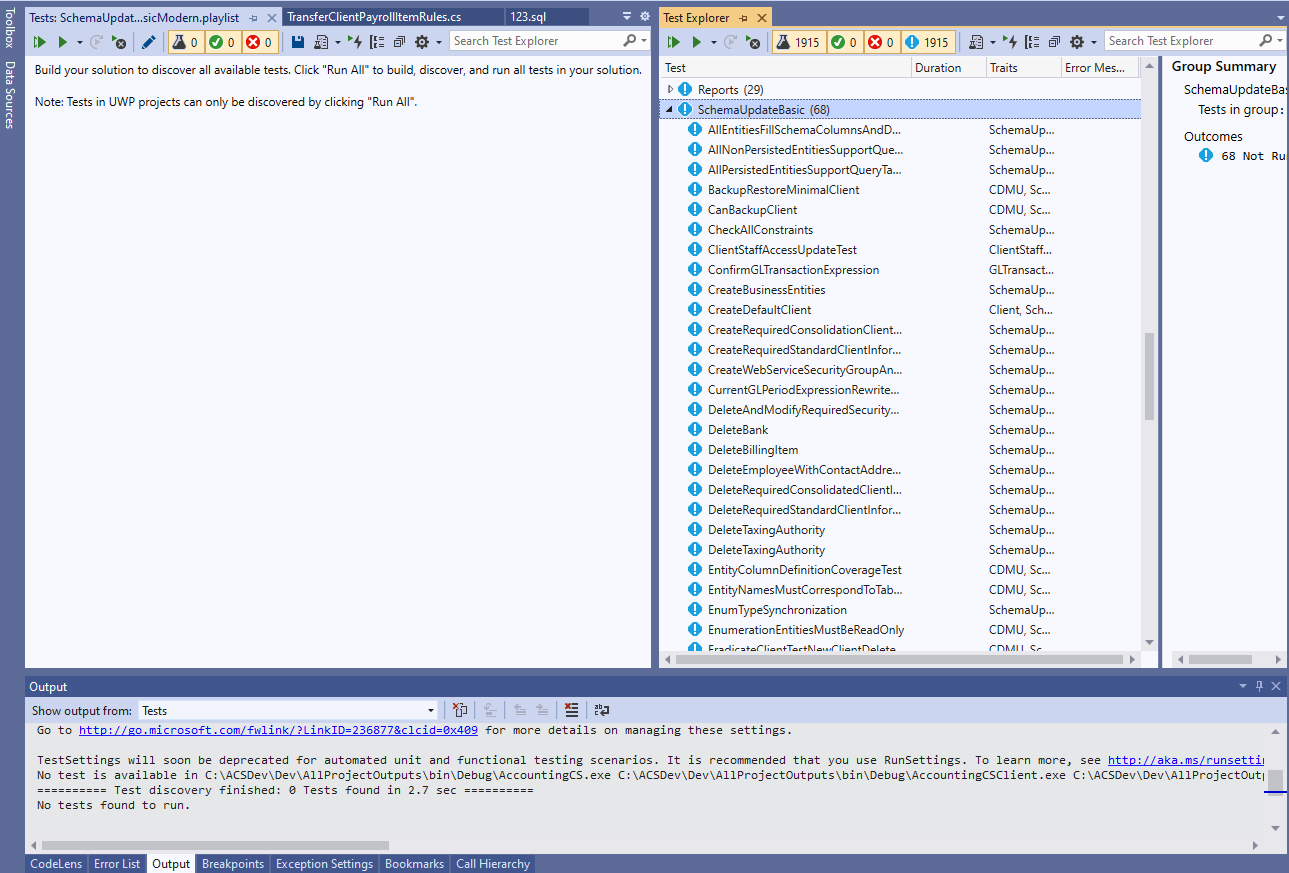
@kendrahavens : Thank you for your reply. I have tried the syntax indicated, but the results are that my Test Window shows no tests available (there should be 68 matching tests), and that a "Run All" from the pane opening that playlist runs no tests.
See attached screenshot.
EricAllen-tr
on 17 Nov 2020
Sorry, my PR to docs auto-closed this ticket. Reopening so we can keep iterating.
kendrahavens
on 17 Nov 2020
Could you share the new playlist syntax you are using?
Something that tripped me up was specifically not including a space between TestCategory and the value. If you don't have that space it will show the No tests found message. I don't think you need the Match="Contains", but I can run it by our team again.
kendrahavens
on 17 Nov 2020
My first pass was copy paste from your post above (I didn't want to risk a typo). I'll try with the contains.
EricAllen-tr
on 17 Nov 2020
Ah, I'm sorry I had been using the xUnit category. I just re-read and realized you were on MSTest. The original syntax you posted in your ticket does work for me. This might be a bug separate from the documentation issue.
<Playlist Version="2.0">
    <Rule Name="Includes" Match="Any">
        <Property Name="Trait" Value="SchemaUpdateBasic" />
    </Rule>
</Playlist>
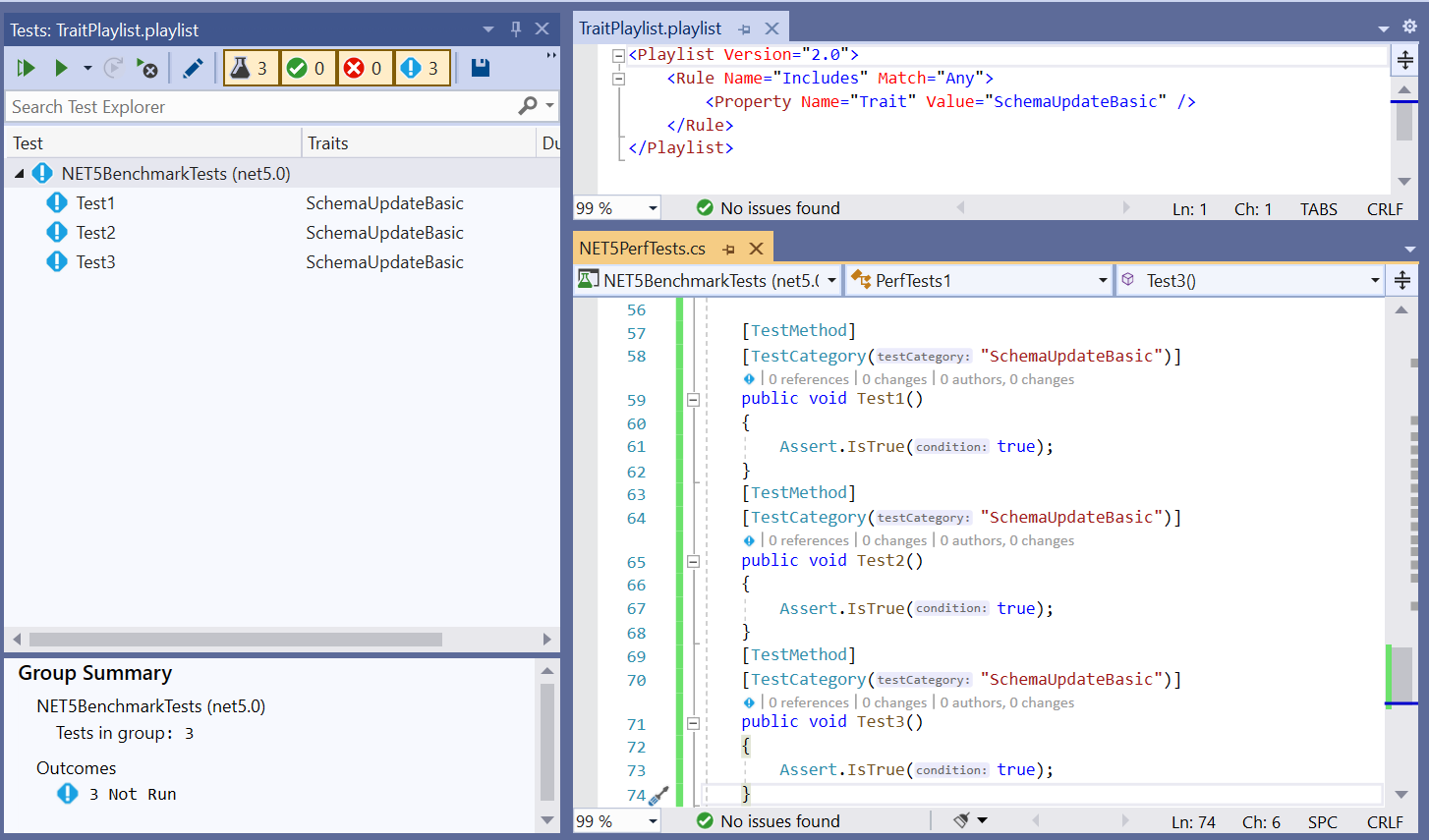
Would you mind opening a product issue at https://developercommunity.visualstudio.com/ so we can follow up?
kendrahavens
on 18 Nov 2020
Also, if you could share the version of VS you are using that would be helpful! You can find this in Help > About in the top-level menu.
kendrahavens
on 18 Nov 2020
Unfortunately, I am in the process of having my machine wiped and reset, so visual studio is currently uninstalled. I know I had initially logged the issue on Oct 23 while running 16.7.3 visual studio (I write this stuff down) and I was on version 16.7.7 before my machine got reset yesterday. Your syntax you suggested above is one variation I had tried originally, before inserting the Match="Contains" attribute.
On 16.7.3 that resulted in the desired tests displaying in the unit test window, but a "Run all in View" ran zero tests.
I will retry when I am able, and then open the issue on DeveloperCommunity as requested.
EricAllen-tr
on 18 Nov 2020
Thank you! We appreciate it and I hope we can get to the bottom of the issue soon.
kendrahavens
on 18 Nov 2020
I apologize for the long turnaround; my laptop got replaced. The syntax shown below did work for me on my new laptop with Visual Studio 16.8.2; I'm afraid I can't say how much is new laptop and how much is the version of VS2019.
xml
<Playlist Version="2.0">
    <Rule Name="Includes" Match="Any">
        <Property Name="Trait" Value="SchemaUpdateBasic" />
    </Rule>
</Playlist>
I guess the takeaway is that if you can include a snippet like this, and maybe one for your other supported test framework in the doc, we could call it a day.
EricAllen-tr
on 7 Dec 2020
No worries! I'm glad it is working and thank you for following up.
I've added an example here: https://github.com/MicrosoftDocs/visualstudio-docs-pr/pull/7494
but didn't call out that different test frameworks use different syntax. It's been on the back of my mind to add so I appreciate the reminder.
kendrahavens
on 7 Dec 2020
@kendrahavens : Glad to help with the reminder of syntax variations.
I cannot see the PR, it shows a 404 (may be a permissions thing).
Looking at the latest page on docs.microsoft.com I see the example which I believe is for a different framework. Also, I note that the doc earlier on the page calls out TestCategoryAttribute as without a value
. But, in fact, it has a required string in its constructor which is used as the value; probably should something like this, based on TestOwnerAttribute: _and requires you to provide a string value of the category_
Also, I've updated https://stackoverflow.com/a/64501809/6586652 to indicate the syntax was successful.
EricAllen-tr
on 8 Dec 2020
Yeah, I had only added xUnit a couple weeks ago. My new PR adds the MSTest xml as well. Thank you for updating the StackOverflow post!
Sorry, I forgot the PR is on an internal repo we use for staging. When the change is merged it will auto-close this ticket and the change will be visible in a couple days on docs.microsoft.com.
Thank you for the TestCategory catch. I believe you are correct, the phrasing should indicate the TestCategory uses a string parameter to specify the category. I'll open a separate PR.
kendrahavens
on 9 Dec 2020
Related issues
 JeepNL
·
3Comments
JeepNL
·
3Comments
 jnpwly
·
3Comments
jnpwly
·
3Comments
 Logerfo
·
3Comments
Logerfo
·
3Comments
 Ogglas
·
3Comments
Ogglas
·
3Comments
 CeciAc
·
3Comments
CeciAc
·
3Comments