Visualstudio-docs: JSON-RPC connection with remote party was lost before the equest could complete
Looks like there is another ou-of-proc process that is not in your list.
I get this stack trace on the err:
StreamJsonRpc.ConnectionLostException : The JSON-RPC connection with the remote party was lost before the request could complete.
at async StreamJsonRpc.JsonRpc.InvokeCoreAsync(<Unknown Parameters>)
at async StreamJsonRpc.JsonRpc.InvokeCoreAsyncTResult
at async Microsoft.CodeAnalysis.Remote.RemoteEndPoint.InvokeAsync(<Unknown Parameters>)
at Microsoft.VisualStudio.Telemetry.WindowsErrorReporting.WatsonReport.GetClrWatsonExceptionInfo(Exception exceptionObject)
Document Details
⚠ Do not edit this section. It is required for docs.microsoft.com ➟ GitHub issue linking.
- ID: 72292f7a-7616-4727-ccd3-cf44bb130477
- Version Independent ID: fe3cca82-dfd7-a85c-ab4f-014bc546d668
- Content: A process has encountered an unrecoverable error - Visual Studio
- Content Source: docs/ide/not-in-toc/visual-studio-unrecoverable-process-error.md
- Product: visual-studio-windows
- Technology: vs-ide-general
- GitHub Login: @TerryGLee
- Microsoft Alias: tglee
 djmarcus1
All 12 comments
I also got the same issue when working with a .NET Core project where a migration of Entity Framework Core has a very large data to be seeded to a database. I think that causes one of the Visual Studio's out-of-proc processes to crash in the background, as it tries to compile the whole code base I guess.
 jmoralesv
on 1 May 2020
jmoralesv
on 1 May 2020
I get this error when my system is idle (or I'm in the editor editing code). I've not had it while running (debugging) code.
djmarcus1
on 1 May 2020
I recently installed VS 2019 and it was working well for a week or two, and then suddenly I am constantly getting this specific message (JSON-RPC). Often VS will freeze up and then automatically restart, making it practically unusable.
 t-fost
on 12 May 2020
t-fost
on 12 May 2020
I get the same problem, repeatedly. Any solution?
 mcmillab
on 13 May 2020
mcmillab
on 13 May 2020
I'm getting exactly the same issue when I'm editing razor pages in a Blazor server solution. Happens multiple times a day. Result is that it keeps trying to run task in the background that never finish and slow down VS. I'm running the latest VS update:
Microsoft Visual Studio Community 2019 Preview
Version 16.7.0 Preview 2.0
StreamJsonRpc.ConnectionLostException : The JSON-RPC connection with the remote party was lost before the request could complete.
at async StreamJsonRpc.JsonRpc.InvokeCoreAsync(
at async StreamJsonRpc.JsonRpc.InvokeCoreAsyncTResult
at async Microsoft.CodeAnalysis.Remote.RemoteEndPoint.InvokeAsyncT
at Microsoft.VisualStudio.Telemetry.WindowsErrorReporting.WatsonReport.GetClrWatsonExceptionInfo(Exception exceptionObject)
 as-srandall
on 14 Jun 2020
as-srandall
on 14 Jun 2020
I just got this issue while coding on Net Framework. It has been two days since I have updated Visual Studio:
Microsoft Visual Studio Enterprise 2019
Version 16.6.2
Microsoft .NET Framework
Version 4.8.03752
Error:
StreamJsonRpc.ConnectionLostException : The JSON-RPC connection with the remote party was lost before the request could complete.
   at async StreamJsonRpc.JsonRpc.InvokeCoreAsync(<Unknown Parameters>)
   at async StreamJsonRpc.JsonRpc.InvokeCoreAsync[TResult](<Unknown Parameters>)
   at async Microsoft.CodeAnalysis.Remote.RemoteEndPoint.InvokeAsync[T](<Unknown Parameters>)
   at Microsoft.VisualStudio.Telemetry.WindowsErrorReporting.WatsonReport.GetClrWatsonExceptionInfo(Exception exceptionObject)
 myialine
on 18 Jun 2020
myialine
on 18 Jun 2020
I get this issue repeatedly, it seems to be regardless of framework which for me is usually .net 4.7.1 or one of the .net core LTS versions
Microsoft Visual Studio Enterprise 2019
Version 16.6.2
It was certainly doing it in earlier versions of VS recently.
 ellwoods
on 19 Jun 2020
ellwoods
on 19 Jun 2020
I was facing same issue recently with VS2019. Followed below step solved problem for me.
- In Account Settings page, under All Accounts section remove each added account. Sign out any personalized account as well.
- Restart the VS.
- Sign-in under All Accounts section.
- Here select Use Another Account option even if your account is prelisted. Complete sign-in process.
- You can sign-in to personalized account as well now.
- Done. You can retry the action which was throwing you error earlier.
 Nikhilpp26
on 9 Jul 2020
Nikhilpp26
on 9 Jul 2020
I'm having the same issue with Version 16.7.0 Preview 4.0 and .Net Core 5.0 Preview 8.0.
The error occurs whilst editing the code and breaks intellisense once the error is thrown, so I'm forced to restart.
 ryanjmchale
on 20 Jul 2020
ryanjmchale
on 20 Jul 2020
Took Nikhilpp26's advice and it worked. Thank you.
Been having all sorts of issues with VS Community 2019 version 16.8.0 preview 1.0
 irdublu
on 10 Aug 2020
irdublu
on 10 Aug 2020
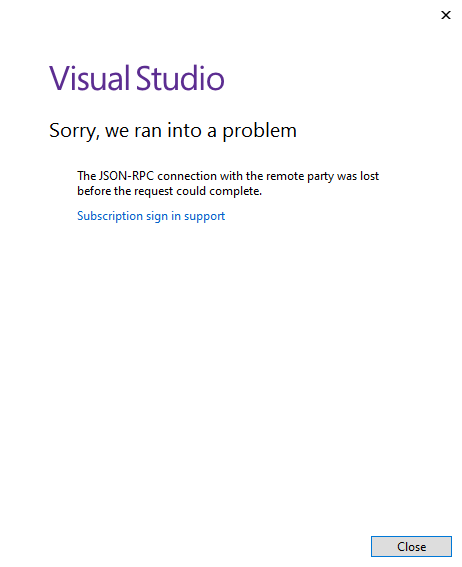
I've got the same issue. It happens when I try to sign into VS. I did try the steps mentioned by Nikhilpp26, that didn't seem to help the issue. A screen shot of what VS is showing is below. I'm running VS16.7.3.
 twurm
on 10 Sep 2020
twurm
on 10 Sep 2020
Thanks everyone for your posts. As an FYI, this product feedback also appears in the Developer Community, where it was triaged and redirected to another locale: https://github.com/dotnet/roslyn/issues/43855. From what's posted there, it looks like a fix is planned for an upcoming release.
Meanwhile, we'll add a Note to the "_Visual Studio unrecoverable process error_" page that will help direct folks to the right place to report product feedback (i.e., via the Report a Problem tool), going forward. So, we'll close this issue now, with our thanks for helping us improve the documentation.
 TerryGLee
on 11 Sep 2020
TerryGLee
on 11 Sep 2020
Related issues
 Ogglas
·
3Comments
Ogglas
·
3Comments
 rlundy
·
3Comments
rlundy
·
3Comments
 DaanV2
·
4Comments
DaanV2
·
4Comments
 jnpwly
·
3Comments
jnpwly
·
3Comments
 nitinjs
·
3Comments
nitinjs
·
3Comments
Most helpful comment
I'm having the same issue with Version 16.7.0 Preview 4.0 and .Net Core 5.0 Preview 8.0.
The error occurs whilst editing the code and breaks intellisense once the error is thrown, so I'm forced to restart.
Activity Monitor Log_xml.zip
vslogs.zip