Visualstudio-docs: Why specific exception like TimeoutException still triggers CA1031? What should be done to fix it?
This description is really broad:
A general exception such as System.Exception or System.SystemException is caught in a catch statement, or a general catch clause such as catch() is used.
Exceptions like TimeoutException even if more specific will still trigger CA1031. Is it really intended? Should TimeoutException be derived to a more specific exception?
It may be helpful to have a complete list of exceptions that can trigger CA1031, and gives a hint for each, of what should be done.
Document Details
⚠ Do not edit this section. It is required for docs.microsoft.com ➟ GitHub issue linking.
- ID: d89b0f64-db03-af39-fdf7-ccb31c9ae01b
- Version Independent ID: 95c4aac2-4e98-240b-54e5-64981ab68cec
- Content: CA1031: Do not catch general exception types - Visual Studio
- Content Source: docs/code-quality/ca1031.md
- Product: visual-studio-windows
- Technology: vs-ide-code-analysis
- GitHub Login: @Mikejo5000
- Microsoft Alias: mikejo
 Thieum
All 7 comments
@Thieum Are there other non-general exceptions you've seen that trigger CA1031? @mavasani Is this a product issue? Seems like TimeoutException should not generate CA1031.
 Mikejo5000
on 20 Feb 2020
Mikejo5000
on 20 Feb 2020
@Mikejo5000 from one of my active project here are a few:
- SocketException
- IOException
- InvalidCastException
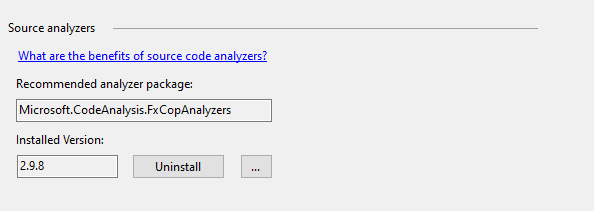
It might be an analyzer issue as you suggest - I'm using FXCopAnalyzers 2.9.8 in .Net Core and .Net Framework projects.
Thieum
on 20 Feb 2020
It seems the default list of too general exception types is only Object, Exception, and SystemException, but you can add more exception types by defining disallowed_symbol_names in an .editorconfig file.
 KalleOlaviNiemitalo
on 21 Feb 2020
KalleOlaviNiemitalo
on 21 Feb 2020
@KalleOlaviNiemitalo is correct. CA1031 is only meant to flag catch all handlers for Exception and SystemException by default. If you have not configured additional disallowed exception types for CA1031 as per https://github.com/dotnet/roslyn-analyzers/blob/master/docs/Analyzer%20Configuration.md#disallowed-symbol-names, then those additional exceptions should not fire.
@Thieum One other thing to verify is that you don't have an install of Microsoft CodeAnalysis 2017 or 2019 VSIX extension. That extension has older bits and had a bug where it reported CA1031 on other exception types. If you have just the 2.9.8 NuGet package for FxCopAnalyzers, you should not be hitting this issue.
 mavasani
on 21 Feb 2020
mavasani
on 21 Feb 2020
@mavasani disabling Microsoft Code Analysis 2019 did fix my issue, thanks a lot! Maybe the extension should be deprecated or updated? Let me know if I should open an issue elsewhere regarding that.
Especially considering VS2019 links to this extension with this warning:

Thieum
on 21 Feb 2020
@Thieum Yes, please file an issue on roslyn-analyzers repo. We are planning to deprecate it soon, but it would good to have a tracking issue for that work.
mavasani
on 21 Feb 2020
@Mikejo5000 I will close this issue, as it seems it was more a tool issue than a doc issue. I'm not sure there's a more specific way to tell what can trigger this warning by default. Thanks for your help!
Thieum
on 21 Feb 2020
Related issues
 Ogglas
·
3Comments
Ogglas
·
3Comments
 patrikhuber
·
4Comments
patrikhuber
·
4Comments
 tpodolak
·
3Comments
tpodolak
·
3Comments
 CeciAc
·
3Comments
CeciAc
·
3Comments
 ChrisMaddock
·
3Comments
ChrisMaddock
·
3Comments
Most helpful comment
@Thieum Yes, please file an issue on roslyn-analyzers repo. We are planning to deprecate it soon, but it would good to have a tracking issue for that work.