Visualstudio-docs: ENTRYPOINT command doesn't work on Docker version 19.03.1
The ENTRYPOINT that ends with && does not work on 19.03.1 version of docker. I am getting the following warning when building the image:
[Warning] Shell-form ENTRYPOINT and exec-form CMD may have unexpected results
When trying to run the container, I get the following error:
Error response from daemon: container .... encountered an error during CreateProcess: failure in a Windows system call: The system cannot find the file specified. (0x2) extra info: {"CommandLine":"\"cmd /S /C C:\BuildTools\Common7\Tools\VsDevCmd.bat \u0026\u0026\" powershell.exe -NoLogo -ExecutionPolicy Bypass","WorkingDirectory":"C:\","Environment":...,"EmulateConsole":true,"CreateStdInPipe":true,"CreateStdOutPipe":true,"ConsoleSize":[45,180]}.
When inspecting the image and compairing it to the previously working Docker version, I noticed that ArgsEscaped is missing on the current version image.
    "DockerVersion": "18.09.3",
    "Author": "",
    "Config": {
        "Hostname": "",
        "Domainname": "",
        "User": "",
        "AttachStdin": false,
        "AttachStdout": false,
        "AttachStderr": false,
        "Tty": false,
        "OpenStdin": false,
        "StdinOnce": false,
        "Env": ...,
        "Cmd": [
            "powershell.exe",
            "-NoLogo",
            "-ExecutionPolicy",
            "Bypass"
        ],
        "ArgsEscaped": true,
        "Image": "sha256:...",
        "Volumes": null,
        "WorkingDir": "",
        "Entrypoint": [
            "cmd",
            "/S",
            "/C",
            "C:\\BuildTools\\Common7\\Tools\\VsDevCmd.bat &&"
        ],
        "OnBuild": [],
        "Labels": null,
        "Shell": [
            "cmd",
            "/S",
            "/C"
        ]
    },


    "DockerVersion": "19.03.1",
    "Author": "",
    "Config": {
        "Hostname": "",
        "Domainname": "",
        "User": "",
        "AttachStdin": false,
        "AttachStdout": false,
        "AttachStderr": false,
        "Tty": false,
        "OpenStdin": false,
        "StdinOnce": false,
        "Env": ...,
        "Cmd": [
            "powershell.exe",
            "-NoLogo",
            "-ExecutionPolicy",
            "Bypass"
        ],
        "Image": "sha256:...",
        "Volumes": null,
        "WorkingDir": "",
        "Entrypoint": [
            "cmd /S /C C:\\BuildTools\\Common7\\Tools\\VsDevCmd.bat &&"
        ],
        "OnBuild": [],
        "Labels": null,
        "Shell": [
            "cmd",
            "/S",
            "/C"
        ]
    },
Is there a workaround for this?
Document Details
⚠ Do not edit this section. It is required for docs.microsoft.com ➟ GitHub issue linking.
- ID: b91a4a43-5353-97cf-7532-7644aa3b497f
- Version Independent ID: 858d9a5c-72f3-6a85-9270-0a0dd9e0438b
- Content: Install Visual Studio Build Tools into a container
- Content Source: docs/install/build-tools-container.md
- Product: visual-studio-windows
- Technology: vs-installation
- GitHub Login: @heaths
- Microsoft Alias: tglee
 pmartin-brierley
All 16 comments
@pmartin-brierley Thanks for your question. It looks like you're having an issue with the product itself, rather than an issue with the documentation. Here are a few options where you might consider asking your question:
https://social.msdn.microsoft.com/Forums/vstudio
https://www.stackoverflow.com
https://www.reddit.com/r/VisualStudio/
As well, you might also consider using the Report a Problem tool to report the issue.
 WilliamAntonRohm
on 5 Aug 2019
WilliamAntonRohm
on 5 Aug 2019
@WilliamAntonRohm I think the issue is with the documentation, as the Dockerfile example does not work with version 19 of docker.
pmartin-brierley
on 5 Aug 2019
@pmartin-brierley, while the Dockerfile example no longer works on version 19.03.1, it's because of a regression in Docker for Windows. I linked a bug I opened above, which references another bug I'm tracking.
 heaths
on 5 Aug 2019
heaths
on 5 Aug 2019
Got this problem as well, docker 19.03.2. 2 months since first reported - what's the solution? The docker for windows is provided by microsoft via the Server Core for Containers VM installed by Azure... so i don't have much choice in the underlying docker version. Attached ticket is closed so no idea where to go next.
This shouldn't be closed - documentation as followed doesn't produce a working example on microsoft provided infrastructure.
 grahambunce
on 20 Sep 2019
grahambunce
on 20 Sep 2019
There is currently no workaround with that certain of docker. You'll need to uninstall and install an older version.
heaths
on 20 Sep 2019
Ok - since these instructions don't work for the latest version of docker (which is installed by default by Microsoft themselves in their Azure windows for container image), if there is an image already available that can be used - presumable this? https://hub.docker.com/_/microsoft-dotnet-framework-sdk/ if so, this should be explicitly stated in the documentation.
grahambunce
on 23 Sep 2019
A possible workaround is creating a batch file, for example VsDevCmdPowerShell.bat
@echo off
call C:\BuildTools\Common7\Tools\VsDevCmd.bat %*
powershell.exe -NoLogo -ExecutionPolicy Bypass
In the docker file
ADD VsDevCmdPowerShell.bat C:\BuildTools\
ENTRYPOINT C:\BuildTools\VsDevCmdPowerShell.bat
 bfloch
on 17 Oct 2019
bfloch
on 17 Oct 2019
does not work, I have nothing installed in c:\buildtools
 kingofthebongo2008
on 19 Jan 2020
kingofthebongo2008
on 19 Jan 2020
does not work, I have nothing installed in c:\buildtools
I have the exact same problem. C:\BuildTools is empty, which indicates that it failed somewhere before, which is also means that the solution provided by @bfloch wont help in this context.
Would really appreciate a solution here...
 ferhat-aram
on 3 Feb 2020
ferhat-aram
on 3 Feb 2020
Running into the same issue - any solution please? I can't imagine it hasn't worked for anyone since August? I'm on version 19.03.5, entrypoint issue was solved by following hint in https://github.com/moby/moby/issues/39779, but thereafter I get same issue as reported above:
docker: Error response from daemon: container a25f33fe25eb9f652ff8f6803a8e825bdfe84a022ab8679d3444eb04e380f180 encountered an error during CreateProcess: failure in a Windows system call: The system cannot find the file specified. (0x2)
[Event Detail:  Provider: 00000000-0000-0000-0000-000000000000]
[Event Detail:  Provider: 00000000-0000-0000-0000-000000000000]
[Event Detail: onecore\vm\compute\management\orchestration\vmhostedcontainer\processmanagement.cpp(173)\vmcomputeagent.exe!00007FF793A1AE77: (caller: 00007FF7939CE4AB) Exception(2) tid(384) 80070002 The system cannot find the file specified.
    CallContext:[\Bridge_ProcessMessage\VmHostedContainer_ExecuteProcess]
 Provider: 00000000-0000-0000-0000-000000000000] extra info: {"CommandLine":"\"cmd /S /C [\\\"C:\\BuildTools\\Common7\\Tools\\VsDevCmd.bat\\\", \\\"\u0026\u0026\\\"]\" powershell.exe -NoLogo -ExecutionPolicy Bypass","WorkingDirectory":"C:\\","Environment":{"COMPLUS_NGenProtectedProcess_FeatureEnabled":"0","DOTNET_RUNNING_IN_CONTAINER":"true","DOTNET_USE_POLLING_FILE_WATCHER":"true","NUGET_VERSION":"5.3.1","ROSLYN_COMPILER_LOCATION":"C:\\Program Files (x86)\\Microsoft Visual Studio\\2019\\BuildTools\\MSBuild\\Current\\Bin\\Roslyn"},"CreateStdInPipe":true,"CreateStdOutPipe":true,"CreateStdErrPipe":true,"ConsoleSize":[0,0]}.
 rlordcardano
on 12 Feb 2020
rlordcardano
on 12 Feb 2020
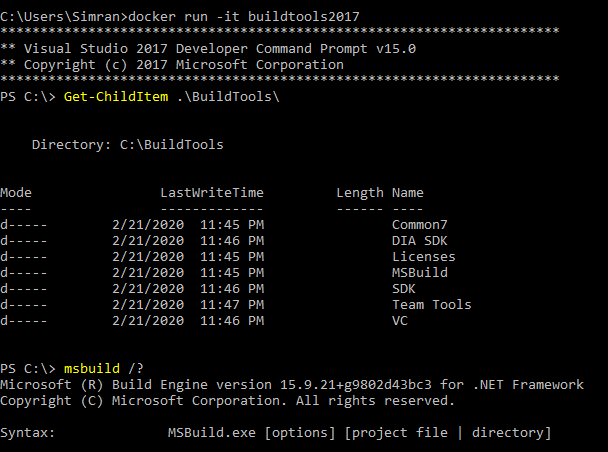
I removed ENTRYPOINT and added a combined CMD which appears to be working:
CMD [ "C:\\BuildTools\\Common7\\Tools\\VsDevCmd.bat", "&&", "powershell.exe", "-NoLogo", "-ExecutionPolicy", "Bypass" ]
 Simran-B
on 22 Feb 2020
Simran-B
on 22 Feb 2020
@Simran-B - what's your full docker file please? I am still having issues, the BuildTools folder does not seem to be generated. See my full docker file in posts in:
https://docs.microsoft.com/en-us/visualstudio/install/build-tools-container?view=vs-2019
rlordcardano
on 23 Feb 2020
@rlordcardano It's basically like this:
# escape=`

ARG FROM_IMAGE=mcr.microsoft.com/windows/servercore:ltsc2019
FROM ${FROM_IMAGE}

COPY Install.cmd C:\TEMP\

ADD https://aka.ms/vscollect.exe C:\TEMP\collect.exe

ARG CHANNEL_URL=https://aka.ms/vs/16/release/channel
ADD ${CHANNEL_URL} C:\TEMP\VisualStudio.chman

ARG BUILD_TOOLS_URL=https://aka.ms/vs/16/release/vs_buildtools.exe
ADD ${BUILD_TOOLS_URL} C:\TEMP\vs_buildtools.exe
RUN C:\TEMP\Install.cmd C:\TEMP\vs_buildtools.exe --quiet --wait --norestart --nocache `
    --installPath C:\BuildTools `
    --channelUri C:\TEMP\VisualStudio.chman `
    --installChannelUri C:\TEMP\VisualStudio.chman `
    --add Microsoft.VisualStudio.Workload.VCTools

CMD [ "C:\\BuildTools\\Common7\\Tools\\VsDevCmd.bat", "&&", "powershell.exe", "-NoLogo", "-ExecutionPolicy", "Bypass" ]
I'm actually using v15, but I suppose it doesn't make much of a difference. Note that I removed --all (and the --remove arguments), because I found --all to be problematic, i.e. I saw the virtual disk file grow >60GB and ran out of disk space after an hour or so... With just --adding the VCTools workload components I end up with a ~6 GB image. I guess it only installs what is listed as Required in the Dependency type column on https://docs.microsoft.com/en-us/visualstudio/install/workload-component-id-vs-build-tools?view=vs-2019 ?
I use something like docker build -t buildtools2019 -m 8GB . to build the image (docs say at least -m 2GB). Docker Desktop 2.2.0.3, Engine 19.03.5, under Windows 10 Pro 1903.
Simran-B
on 23 Feb 2020
I found that modifying the entrypoint syntax fixed this for me:
ENTRYPOINT ["C:\\BuildTools\\Common7\\Tools\\VsDevCmd.bat", "&&"]
The hint was the fact that the && was appended to the script string as \u0026\u0026. The above syntax explicitly defines each Entrypoint argument so it doesn't try and find an executable called
"C:\\BuildTools\\Common7\\Tools\\VsDevCmd.bat &&"
 inkychris
on 26 Feb 2020
inkychris
on 26 Feb 2020
I finally understand this warning:
---> [Warning] Shell-form ENTRYPOINT and exec-form CMD may have unexpected results
Both entries in shell-form (no escaping):
ENTRYPOINT C:\BuildTools\Common7\Tools\VsDevCmd.bat &&
CMD powershell.exe -NoLogo -ExecutionPolicy Bypass
Both entries in exec-form (JSON array, i.e. double-quotes and escaped backslashes):
ENTRYPOINT ["C:\\BuildTools\\Common7\\Tools\\VsDevCmd.bat", "&&"]
CMD ["powershell.exe", "-NoLogo", "-ExecutionPolicy", "Bypass"]
If you use the shell-form for the first, but the exec-form for the other, then above warning is raised and running the container results in an error like this:
docker: Error response from daemon: container 46fd… encountered an error during CreateProcess: failure in a Windows system call: The system cannot find the file specified. (0x2)
[Event Detail:  Provider: 00000000-0000-0000-0000-000000000000]
[Event Detail:  Provider: 00000000-0000-0000-0000-000000000000]
[Event Detail: onecore\vm\compute\management\orchestration\vmhostedcontainer\processmanagement.cpp(173)\vmcomputeagent.exe!00007FF687EC9D2B: (caller: 00007FF687E7E13A) Exception(2) tid(388) 80070002 The system cannot find the file specified.
    CallContext:[\Bridge_ProcessMessage\VmHostedContainer_ExecuteProcess]
 Provider: 00000000-0000-0000-0000-000000000000] extra info: {"CommandLine":"\"cmd /S /C C:\\BuildTools\\Common7\\Tools\\VsDevCmd.bat \u0026\u0026\" powershell -NoLogo -ExecutionPolicy Bypass","WorkingDirectory":"C:\\","EmulateConsole":true,"CreateStdInPipe":true,"CreateStdOutPipe":true,"ConsoleSize":[30,120]}.
I guess mixing both forms has the effect of && getting Unicode-escaped as \u0026\u0026, which cmd and powershell do not understand. One can try this out with e.g. \u0063\u0061\u006c\u0063 (calc). It results in the "cannot find the file" error.
If you use one of the forms consistently, then it works however! So above examples with both entries in the same form will work. BTW. The file extension .exe can apparently be omitted from powershell.exe just fine.
Simran-B
on 26 Feb 2020
This is great, thank you.
On Wed, 26 Feb 2020 at 15:11, Simran notifications@github.com wrote:
I finally understand this warning:
---> [Warning] Shell-form ENTRYPOINT and exec-form CMD may have unexpected
resultsBoth entries in shell-form (no escaping):
ENTRYPOINT C:\BuildTools\Common7\Tools\VsDevCmd.bat &&
CMD powershell.exe -NoLogo -ExecutionPolicy BypassBoth entries in exec-form (JSON array, i.e. double-quotes and escaped
backslashes):ENTRYPOINT ["C:\BuildTools\Common7\Tools\VsDevCmd.bat", "&&"]
CMD ["powershell.exe", "-NoLogo", "-ExecutionPolicy", "Bypass"]If you use the shell-form for the first, but the exec-form for the other,
then above warning is raised and running the container results in an error
like this:docker: Error response from daemon: container 46fd… encountered an error during CreateProcess: failure in a Windows system call: The system cannot find the file specified. (0x2)
[Event Detail: Provider: 00000000-0000-0000-0000-000000000000]
[Event Detail: Provider: 00000000-0000-0000-0000-000000000000]
[Event Detail: onecore\vm\compute\management\orchestration\vmhostedcontainer\processmanagement.cpp(173)\vmcomputeagent.exe!00007FF687EC9D2B: (caller: 00007FF687E7E13A) Exception(2) tid(388) 80070002 The system cannot find the file specified.
CallContext:[\Bridge_ProcessMessage\VmHostedContainer_ExecuteProcess]Provider: 00000000-0000-0000-0000-000000000000] extra info: {"CommandLine":"\"cmd /S /C C:\BuildTools\Common7\Tools\VsDevCmd.bat \u0026\u0026\" powershell -NoLogo -ExecutionPolicy Bypass","WorkingDirectory":"C:\","EmulateConsole":true,"CreateStdInPipe":true,"CreateStdOutPipe":true,"ConsoleSize":[30,120]}.
I guess mixing both forms has the effect of && getting Unicode-escaped as
\u0026\u0026, which cmd and powershell do not understand. One can try
this out with e.g. \u0063\u0061\u006c\u0063 (calc). It results in the
"cannot find the file" error.If you use one of the forms consistently, then it works however! So above
examples with both entries in the same form will work. BTW. The file
extension .exe can apparently be omitted from powershell.exe just fine.—
You are receiving this because you commented.
Reply to this email directly, view it on GitHub
https://github.com/MicrosoftDocs/visualstudio-docs/issues/3713?email_source=notifications&email_token=AAIXS4MYRLRFLXLVMOAHIBTREZTAVA5CNFSM4IIUC4W2YY3PNVWWK3TUL52HS4DFVREXG43VMVBW63LNMVXHJKTDN5WW2ZLOORPWSZGOENAFHZQ#issuecomment-591418342,
or unsubscribe
https://github.com/notifications/unsubscribe-auth/AAIXS4PCVP4GDY3FA7VDCR3REZTAVANCNFSM4IIUC4WQ
.
kingofthebongo2008
on 26 Feb 2020
Related issues
 yingang
·
3Comments
yingang
·
3Comments
 michael-hawker
·
4Comments
michael-hawker
·
4Comments
 Logerfo
·
3Comments
Logerfo
·
3Comments
 tpodolak
·
3Comments
tpodolak
·
3Comments
 ChrisMaddock
·
3Comments
ChrisMaddock
·
3Comments
Most helpful comment
A possible workaround is creating a batch file, for example
VsDevCmdPowerShell.batIn the docker file