Visualstudio-docs: Assembly Not Found for framework Xamarin.Android v9.0
I have installed new Version of Visual Studio 2019. after that i created a new Xamarin project, then i try to build a Application. Its Showing Assembly Reference issue in Following Dll.
System.dll
System.Core
System.xml
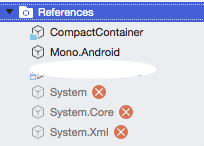
please give me any solution for solving the Issue
 pandiyan022
All 18 comments
I have the same problem. I tried to add the .dll directly in Rider but this doesn't fix problem and causes dozens of errors later.
 orestesgaolin
on 17 Apr 2019
orestesgaolin
on 17 Apr 2019
i have same problem.
Vs studio :
=== Visual Studio Community 2019 for Mac ===
Version 8.0.4 (build 0)
Installation UUID: 1758b08e-14c4-42c5-b359-5df6cfafc246
GTK+ 2.24.23 (Raleigh theme)
Xamarin.Mac 5.6.0.2 (d16-0 / 040682909)
Package version: 518010003
=== Mono Framework MDK ===
Runtime:
Mono 5.18.1.3 (2018-08/fdb26b0a445) (64-bit)
Package version: 518010003
=== NuGet ===
Version: 4.8.2.5835
=== .NET Core ===
Runtime: /usr/local/share/dotnet/dotnet
Runtime Versions:
2.1.9
2.1.2
2.0.5
SDK: /usr/local/share/dotnet/sdk/2.1.505/Sdks
SDK Versions:
2.1.505
2.1.302
2.1.4
MSBuild SDKs: /Library/Frameworks/Mono.framework/Versions/5.18.1/lib/mono/msbuild/15.0/bin/Sdks
=== Xamarin.Profiler ===
Version: 1.6.9
Location: /Applications/Xamarin Profiler.app/Contents/MacOS/Xamarin Profiler
=== Updater ===
Version: 11
=== Xamarin.Android ===
Version: 9.2.3.0 (Visual Studio Community)
Android SDK: /Users/ppatel2/Library/Developer/Xamarin/android-sdk-macosx
Supported Android versions:
6.0 (API level 23)
7.1 (API level 25)
8.0 (API level 26)
8.1 (API level 27)
SDK Tools Version: 26.1.1
SDK Platform Tools Version: 28.0.1
SDK Build Tools Version: 29.0.0 rc2
Build Information:
Mono: mono/mono/2018-08-rc@5ac37ccd385
Java.Interop: xamarin/java.interop/d16-0@c987483
LibZipSharp: grendello/LibZipSharp/d16-1@44de300
LibZip: nih-at/libzip/rel-1-5-1@b95cf3f
MXE: xamarin/mxe/xamarin@b9cbb535
ProGuard: xamarin/proguard/master@905836d
SQLite: xamarin/sqlite/3.26.0@325e91a
Xamarin.Android Tools: xamarin/xamarin-android-tools/d16-0@0a7edd6
=== Microsoft Mobile OpenJDK ===
Java SDK: /Users/ppatel2/Library/Developer/Xamarin/jdk/microsoft_dist_openjdk_8.0.25
1.8.0-25
Android Designer EPL code available here:
https://github.com/xamarin/AndroidDesigner.EPL
=== Android Device Manager ===
Version: 1.2.0.14
Hash: 86df26f
Branch: remotes/origin/d16-0
Build date: 2019-04-05 16:58:56 UTC
=== Xamarin Inspector ===
Version: 1.4.3
Hash: db27525
Branch: 1.4-release
Build date: Mon, 09 Jul 2018 21:20:18 GMT
Client compatibility: 1
=== Apple Developer Tools ===
Xcode 10.2.1 (14490.122)
Build 10E1001
=== Xamarin.Mac ===
Version: 5.8.0.0 (Visual Studio Community)
Hash: 0aa84521
Branch: d16-0
Build date: 2019-04-02 16:01:19-0400
=== Xamarin.iOS ===
Version: 12.8.0.0 (Visual Studio Community)
Hash: 0aa84521
Branch: d16-0
Build date: 2019-04-02 16:01:19-0400
=== Xamarin Designer ===
Version: 4.17.4.418
Hash: 3d086e814
Branch: remotes/origin/d16-0
Build date: 2019-04-01 09:20:10 UTC
=== Build Information ===
Release ID: 800040000
Git revision: 09831ae7eef8ea58cdfad2e923c65a5bf70d27fd
Build date: 2019-04-15 23:04:13+00
Build branch: master
Xamarin extensions: 5efedb990d786142d3b54351c01ce867af7b7680
=== Operating System ===
Mac OS X 10.14.4
Darwin 18.5.0 Darwin Kernel Version 18.5.0
Mon Mar 11 20:40:32 PDT 2019
root:xnu-4903.251.3~3/RELEASE_X86_64 x86_64
 patel-pragnesh
on 23 Apr 2019
patel-pragnesh
on 23 Apr 2019
I'm having the same issue, tried to install newest mono but didn't work. Now I can't even compile existing projects that I had.
 eduardo-rta
on 23 Apr 2019
eduardo-rta
on 23 Apr 2019
Having the same issue...
 kyurkchyan
on 9 May 2019
kyurkchyan
on 9 May 2019
Same here. It also does not list 9.0 (Android 28) as supported.
=== Visual Studio Enterprise 2019 for Mac ===
Version 8.0.5 (build 9)
=== Xamarin.Android ===
Version: 9.2.3.0 (Visual Studio Enterprise)
Android SDK: /Users/mwesolowski/Library/Developer/Xamarin/android-sdk-macosx
Supported Android versions:
5.1 (API level 22)
6.0 (API level 23)
7.0 (API level 24)
7.1 (API level 25)
8.0 (API level 26)
8.1 (API level 27)
SDK Tools Version: 26.1.1
SDK Platform Tools Version: 28.0.2
SDK Build Tools Version: 28.0.3
 awattar
on 9 May 2019
awattar
on 9 May 2019
I've too.
 biapar
on 10 May 2019
biapar
on 10 May 2019
Same here,
 ExtremeKaos
on 12 May 2019
ExtremeKaos
on 12 May 2019
I solved:
- manually change project file adding .net reference
- delete obj and bin
- close solution and reopen
- rebuild solution
biapar
on 13 May 2019
I solved:
- manually change project file adding .net reference
- delete obj and bin
- close solution and reopen
- rebuild solution
I have the same issue.
What .net reference did you add?
 SteHiggins
on 13 May 2019
SteHiggins
on 13 May 2019
Same Problem here with an existing project, that already compiled
 acmngmbh
on 4 Jun 2019
acmngmbh
on 4 Jun 2019
Same issue here :
It's an old big project with a lot of assemblies. But, impossibe to compile + weird behavior when trying to release etc..
 marcnegri
on 10 Jun 2019
marcnegri
on 10 Jun 2019
Today update VS studio.
https://developercommunity.visualstudio.com/content/problem/514955/lost-net-assemblies-after-vs-update.html
other error resolved. Still issue in java.interop.dll
patel-pragnesh
on 17 Jun 2019
Same problem!
 Afshin1980
on 22 Jun 2019
Afshin1980
on 22 Jun 2019
Please use the Help > Report a problem menu item in Visual Studio, as it will provide additional information about your system to help diagnose the problem. Thanks!
 conceptdev
on 27 Jun 2019
conceptdev
on 27 Jun 2019
Closed but no resolution??
I have this issue with my version:
=== Visual Studio Community 2019 for Mac ===
Version 8.3.10 (build 2)
Installation UUID: 3bffe7bc-0833-43a7-88e9-005cc660cacc
GTK+ 2.24.23 (Raleigh theme)
Xamarin.Mac 5.16.1.24 (d16-3 / 08809f5b)
Package version: 604000208
=== Mono Framework MDK ===
Runtime:
Mono 6.4.0.208 (2019-06/07c23f2ca43) (64-bit)
Package version: 604000208
=== NuGet ===
Version: 5.3.0.6192
=== .NET Core SDK ===
SDK: /usr/local/share/dotnet/sdk/3.0.100/Sdks
SDK Versions:
3.0.100
2.1.700
2.1.505
2.1.302
2.1.301
MSBuild SDKs: /Library/Frameworks/Mono.framework/Versions/6.4.0/lib/mono/msbuild/Current/bin/Sdks
=== .NET Core Runtime ===
Runtime: /usr/local/share/dotnet/dotnet
Runtime Versions:
3.0.0
2.1.13
2.1.11
2.1.9
2.1.2
2.1.1
=== Xamarin.Profiler ===
Version: 1.6.12.26
Location: /Applications/Xamarin Profiler.app/Contents/MacOS/Xamarin Profiler
=== Updater ===
Version: 11
=== Xamarin Designer ===
Version: 16.3.0.256
Hash: 8a223bfd7
Branch: remotes/origin/d16-3
Build date: 2019-11-01 21:02:02 UTC
=== Apple Developer Tools ===
Xcode 11.2.1 (15526.1)
Build 11B500
=== Xamarin.Mac ===
Xamarin.Mac not installed. Can't find /Library/Frameworks/Xamarin.Mac.framework/Versions/Current/Version.
=== Xamarin.iOS ===
Version: 13.6.0.12 (Visual Studio Community)
Hash: e3c2b406d
Branch: xcode11.2
Build date: 2019-11-01 00:12:08-0400
=== Xamarin.Android ===
Version: 10.0.6.2 (Visual Studio Community)
Commit: xamarin-android/d16-3/c407838
Android SDK: /Users/phadley/Library/Developer/Xamarin/android-sdk-macosx
Supported Android versions:
8.0 (API level 26)
8.1 (API level 27)
SDK Tools Version: 26.1.1
SDK Platform Tools Version: 28.0.2
SDK Build Tools Version: 28.0.3
Build Information:
Mono: mono/mono/2019-06@476d72b9e32
Java.Interop: xamarin/java.interop/d16-3@5836f58
LibZipSharp: grendello/LibZipSharp/d16-3@71f4a94
LibZip: nih-at/libzip/rel-1-5-1@b95cf3fd
ProGuard: xamarin/proguard/master@905836d
SQLite: xamarin/sqlite/3.27.1@8212a2d
Xamarin.Android Tools: xamarin/xamarin-android-tools/d16-3@cb41333
=== Microsoft Mobile OpenJDK ===
Java SDK: /Users/phadley/Library/Developer/Xamarin/jdk/microsoft_dist_openjdk_8.0.25
1.8.0-25
Android Designer EPL code available here:
https://github.com/xamarin/AndroidDesigner.EPL
=== Android SDK Manager ===
Version: 1.4.0.65
Hash: c33b107
Branch: remotes/origin/d16-3
Build date: 2019-11-19 20:33:22 UTC
=== Android Device Manager ===
Version: 1.2.0.116
Hash: d2b2af0
Branch: remotes/origin/d16-3
Build date: 2019-11-19 20:33:42 UTC
=== Xamarin Inspector ===
Version: 1.4.3
Hash: db27525
Branch: 1.4-release
Build date: Mon, 09 Jul 2018 21:20:18 GMT
Client compatibility: 1
=== Build Information ===
Release ID: 803100002
Git revision: add3a4998a5cb5b081e0404e1fe13acfecb7801d
Build date: 2019-11-20 13:35:15+00
Build branch: release-8.3
Xamarin extensions: 79c69708816813b498283eeda7bcb4d464433a04
=== Operating System ===
Mac OS X 10.14.6
Darwin 18.7.0 Darwin Kernel Version 18.7.0
Sat Oct 12 00:02:19 PDT 2019
root:xnu-4903.278.12~1/RELEASE_X86_64 x86_64
=== Enabled user installed extensions ===
Android Signature Tool 2.2.0
 tele-bird
on 13 Dec 2019
tele-bird
on 13 Dec 2019
same issue... and I assume low priority label tells everybody that no chance to get a fix in the nearest years 8(
 SABlyu
on 1 Apr 2020
SABlyu
on 1 Apr 2020
Same here! VS for Mac 8.5.1 Java.Interop not found
 Aleksey7151
on 9 Apr 2020
Aleksey7151
on 9 Apr 2020
Please use the Help > Report a problem menu item in Visual Studio, as it will provide additional information about your system to help diagnose the problem. Thanks!
We have provided all information about our systems. What additional info do you need? Why you've closed the bug, without solving it?
Aleksey7151
on 9 Apr 2020
Related issues
 DaanV2
·
4Comments
DaanV2
·
4Comments
 suhailmahmood
·
3Comments
suhailmahmood
·
3Comments
 jnpwly
·
3Comments
jnpwly
·
3Comments
 Ogglas
·
3Comments
Ogglas
·
3Comments
 wittelw
·
3Comments
wittelw
·
3Comments
Most helpful comment
Today update VS studio.
https://developercommunity.visualstudio.com/content/problem/514955/lost-net-assemblies-after-vs-update.html
other error resolved. Still issue in java.interop.dll