Visualstudio-docs: How Big Is It?
i cannot find info about the size of the offline installer
Document Details
⚠ Do not edit this section. It is required for docs.microsoft.com ➟ GitHub issue linking.
- ID: 228076d1-94bf-c502-c018-08f7c0faf377
- Version Independent ID: c64a5cd5-6236-4192-2bfc-923aa20c94da
- Content: Create an offline installation - Visual Studio
- Content Source: docs/install/create-an-offline-installation-of-visual-studio.md
- Product: visual-studio-windows
- GitHub Login: @TerryGLee
- Microsoft Alias: tglee
 johnyradio
All 33 comments
@johnyradio If you are referring to the bootstrapper file as described in "Step 1 - Download the Visual Studio bootstrapper", that file is approximately 1.45 MB. If you are referring to a layout as described in "Step 2 - Create a local install cache", then that size depends on the workloads and components that you want to install. However, there is a Note in that section that says that a "complete layout requires at least 35 GB of disk space."
 TerryGLee
on 24 Mar 2019
TerryGLee
on 24 Mar 2019
Thx, but wondering about the size of the offline installer, for a typical
config.
>
johnyradio
on 24 Mar 2019
@johnyradio I'm not sure what you are asking; for an offline installation, the bootstrapper is what you need to create a locale cache, and the size of the local cache that you'll use to create your layout to install from depends on which workloads and components that you choose. There isn't a "typical config" because it depends on what you want to develop with Visual Studio; i.e. what programming language you want to use, what platform you want to develop for, what services you want to use to coordinate team development efforts, etc.
TerryGLee
on 24 Mar 2019
the visual studio system requirement pages gives a range of hard disk space. But they also give an approximate size for "most" or "typical" users.
so i mean the same thing microsoft means.
if you prefer, let's say for developing websites, web applications, HTML, CSS, javascript, node.js, and typical components that go along with that.
johnyradio
on 25 Mar 2019
@johnyradio Thanks; it looks like then, that the Visual Studio 2017 Product Family System Requirements has provided you with the information you seek; so, "Hard disk space: up to 130 GB of available space, depending on features installed; typical installations require 20-50 GB of free space."
I'll make sure to add a link to the system requirements page from the offline installation page. We'll get that added, soon.
TerryGLee
on 25 Mar 2019
i believe that's the install footprint, correct?
i'm asking about the offline installer for a 20-50 GB install. thx
johnyradio
on 25 Mar 2019
@johnyradio I believe it will be similar to what's previously been discussed, but I will inquire further and report back.
TerryGLee
on 25 Mar 2019
i may have misunderstood. i didn't realize the "complete layout" meant the installer file. If so, that's the answer! thx
johnyradio
on 25 Mar 2019
Microsoft has just finialised version (2019) of Visual Studio.
The size of the download version is 25GB per version, This is based upon creating a local offline version. But the installer can take up to a minimal of 92GB.
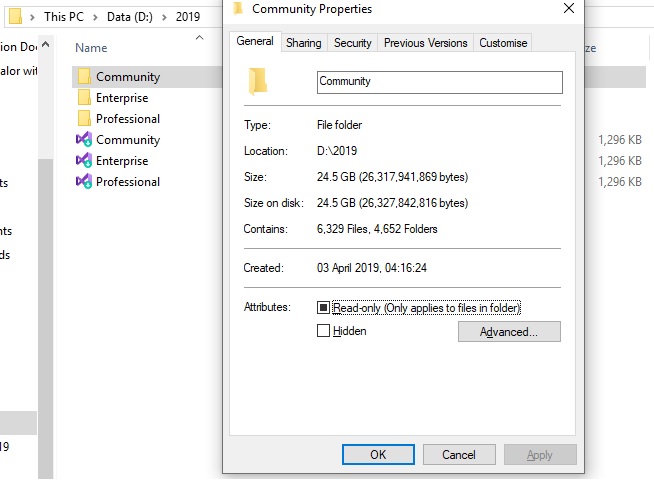

 tecky7
on 3 Apr 2019
tecky7
on 3 Apr 2019
This means it takes a maximum of 2 hours to install the product. As Visual Studio 2017 takes 4 hours to install. Visual Studio 2017 requires "double network connectivity" in creating offline version.
You need WinRar to backup MS VS and the local cache. As other utils, crash at certain point saying there is an error "at a directory". Like AnytoIso.

tecky7
on 3 Apr 2019
If you are trying to download all the files in Visual Studio 2019, then the size is nearly 19.3 GB.
 Kuldeep-kd
on 16 Apr 2019
Kuldeep-kd
on 16 Apr 2019
As programmer at BSc level @ Bolton University
I did a full off line download. Without the use of the Internet later on. And the size is still 25GB before installing all features in 2019. That represents 93GB. This includes latest updates version releases from Microsoft
tecky7
on 16 Apr 2019
How do we obtain the full offline image? That is, without necessarily having to itemize the litany of --add this, that, or the other dependencies? Is there a --full option, for instance? The delta, for instance, from the latest VS2017 offline layout is something like ~23 GB. That's quite a difference to make up.
 mwpowellhtx
on 30 Apr 2019
mwpowellhtx
on 30 Apr 2019
@mwpowellhtx On the page, there's this that should help:
To create a complete local layout with all features (this will take a long time—we have _lots_ of features!), run:
```cmd
vs_community.exe --layout c:\vslayout --lang en-US
TerryGLee
on 30 Apr 2019
@TerryGLee Right, I run that, but it delivers less than half what 2017 used to, delivering 15.9.11 for instance. How about the FULL image?
To clarify, what I really want to do is download the full image, without necessarily needing to add workload comprehension in the layout options, for instance.
mwpowellhtx
on 30 Apr 2019
@mwalschburger Gotcha. This might prove useful: Using --all from the _Command-line parameter examples for Visual Studio installation_ page.
TerryGLee
on 30 Apr 2019
@TerryGLee So if we go --layout --all, that's what we're aiming for? Remember, the goal there is to layout offline, install/update later. As contrasted with the Using --all instructions, saying, Start an interactive installation of all workloads and components that are available....
mwpowellhtx
on 1 May 2019
@TerryGLee Delayed and/or non-response I take to mean that did not work. I did verify --all --layout ..., did not retrieve all for offline layout. Same result as without --all.
mwpowellhtx
on 1 May 2019
@mwpowellhtx Yeah, using --all or not, they have same effect and FYI Visual Studio 2019 has less setup image size than Visual Studio 2017... i.e Approx. 20GB. As I've confirmed from Microsoft care.
Kuldeep-kd
on 1 May 2019
@Kuldeep-kd @TerryGLee My question is then, does this mean packages are deferred for later, during install, etc? That's what I'm trying to avoid if I can help it. That is, the more that is cached, offline layout, the better it will be for our install here.
mwpowellhtx
on 1 May 2019
Running a command with the --layout parameter (vs_enterprise.exe --layout C:\layout) creates a layout containing all packages for that version of Visual Studio for that edition. Then, installing from that layout by using the vs_enterprise.exe that is in the layout folder with --all parameter (C:\layout\vs_enterprise.exe --all) installs all workloads and components from the layout.
No downloads should occur from the web unless a package in the layout is corrupted. This can be verified with the --verify command (vs_enterprise.exe --layout C:\layout –verify). For more information, see the "How to verify a layout" section of the Update a network-based installation of Visual Studio page.
Most issues can be fixed with the --fix command (vs_enterprise.exe --layout C:\layout --fix). For more information, see the "How to fix a layout" section of the Update a network-based installation of Visual Studio page.
Last but not least, if you still run in to problems, consider using the following resources:
- Our live chat (English only) support option for installation-related issues.
- Our Visual Studio conversation in the Gitter community.
Hope this helps,
~ Terry
TerryGLee
on 1 May 2019
@TerryGLee I understand the effect of those switches, yes; my question is really, from 2017 to 2019, what happened to the ~23 GB or so of packaged bits? They were refactored out of band or what not? Are they installed after the fact?
mwpowellhtx
on 1 May 2019
@mwpowellhtx That's mostly attributed to a difference in the number of workloads, as I understand it. Visual Studio 2017 has 18 workloads, while Visual Studio 2019 has 17. Along with recategorizing workloads between the two versions, the main difference between the two is that Visual Studio 2017 includes a "Mobile development with JavaScript" workload and Visual Studio 2019 does not.
TerryGLee
on 1 May 2019
attributed to a difference in the number of workloads ...
I'm not sure what that means? That account for 23 GB difference? That's a lot of difference, I think we can agree. That -1 delta from 17 to 19 is massive, then.
Mobile development with JavaScript
What does this mean? What would the migration path be? Into Eclipse?
mwpowellhtx
on 1 May 2019
@mwpowellhtx
Is that delta really that massive? From the C++ side of things the v14.11, v14.12, v14.13, v14.14 and v14.15 C++ compiler toolsets were removed, and only the Visual Studio 15.9 version of the compiler, v14.16 is available to install in Visual Studio 2019. These compilers have an installed size of ~30.76GiB and an installer size of around 1GiB each.
There was also the removal of a lot of the Windows 10 SDKs, 4 of them, and the Windows 8.1 SDK. The installers are around 500Mib to 600MiB each, so that would be a minimum of around 2.5GiB.
This makes up at least 7.5GiB of the 23GiB easily.
There was the removal of some of the emulators and some of the older Android NDKs and Android SDKs. So I would say the majority of the difference is made up of the removal of the older stuff from the Visual Studio 2019 installer.
 DarranRowe
on 5 Jul 2019
DarranRowe
on 5 Jul 2019
@DarranRowe I appreciate the insight explaining the differences. So it sounds like much of the delta was a decision to optimize the overall delivery, distill only the essentials. That makes a huge difference! :+1:
mwpowellhtx
on 5 Jul 2019
My question is that, assuming I downloaded the setup files with the bootstrap with download all, then install option, where will the setup files saved to? I'm only asking this question because I want to copy those setup files to somewhere else and use it to reinstall it if eventually I do a clean installation of windows?
 ayenimiracle
on 24 Jul 2019
ayenimiracle
on 24 Jul 2019
There is an easier way, use the --layout command line option for the Visual Studio installer. You can get a description of how this works here.
DarranRowe
on 24 Jul 2019
DarranRowe! You haven't answered my question. It's very simple to answer
ayenimiracle
on 24 Jul 2019
My answer is very simple too. You wouldn't do what you are asking.
You would use the --layout option of the Visual Studio installer to create an offline installer and then just copy. I'm not even sure that if you copy the files from the cache that Visual Studio installer creates that it would use it at a later point.
However, if you really want to copy the files that the online installer creates then you will find it in %ProgramData%\Microsoft\VisualStudio\Packages.
DarranRowe
on 24 Jul 2019
@ayenimiracle The issue is not the installer temporary files, etc. That's not the issue. The concern are the bits that have essentially been re-engineered out of band. Meaning, reading past the hype, line towing, water pulling, etc, bits that previously were delivered in band in the monolithic install, run-times and so forth, are now deferred, and if I understand it correctly, you opt in to what you need. --layout is the right way to go there, I do this all the time tracking with the latest, stable updates.
Edit: Of course, there are always trade offs. Deferring the bits until opt in means you are spending more time during development, packaging, deployment, etc.
mwpowellhtx
on 24 Jul 2019
Thanks everyone for your comments thus far; in them, questions have been asked and also answered, including that from the original poster. I am closing this issue now; however, you can still make comments to the thread if you wish. And if there is another question that anyone has that hasn't been answered here, please feel free to open a new GitHub Issue.
TerryGLee
on 25 Jul 2019
Can someone tells me how to modify the visual studio 2019 installer without removing the previous installed products?
ayenimiracle
on 27 Jul 2019
Related issues
 gewarren
·
3Comments
gewarren
·
3Comments
 Ogglas
·
3Comments
Ogglas
·
3Comments
 CeciAc
·
3Comments
CeciAc
·
3Comments
 H35am
·
4Comments
H35am
·
4Comments
 DaanV2
·
4Comments
DaanV2
·
4Comments
Most helpful comment
Microsoft has just finialised version (2019) of Visual Studio.
The size of the download version is 25GB per version, This is based upon creating a local offline version. But the installer can take up to a minimal of 92GB.