Visualstudio-docs: Clarify future Visual Studio version
"One or more of your installed extensions will not be compatible with a future Visual Studio update"
From this I understand only extensions using AsyncPackage will be supported at some point.
Can this document clarify when that will happen? Is this something in the Visual Studio 2019 timeline (minor version updates) or something that will only be enforced starting with the next major version (2020?)
Document Details
⚠ Do not edit this section. It is required for docs.microsoft.com ➟ GitHub issue linking.
- ID: 47d448c4-f5a5-626f-a127-8c72c378d20f
- Version Independent ID: 389e04ed-15de-4882-6cb0-010218767b54
- Content: Synchronously autoloaded extensions - Visual Studio
- Content Source: docs/extensibility/synchronously-autoloaded-extensions.md
- Product: visual-studio-windows
- GitHub Login: @gregvanl
- Microsoft Alias: gregvanl
 jawn
jawn
All 10 comments
@madskristensen Can you answer this?
 gewarren
on 11 Mar 2019
gewarren
on 11 Mar 2019
Version 16.1 Preview 1 disables synchronous extensions:
- Disabled synchronous auto-loading of extensions
- Extensions that registers themselves to be auto-loaded will no longer be loaded, unless they are implementing AsyncPackage and enables background load. View our blog post on improving the responsiveness of critical scenarios by updating auto load behavior for extensions to read more about this change.
 akeeton
on 11 Apr 2019
akeeton
on 11 Apr 2019
@akeeton I don't think so, my obsolete extensions are still running with 16.1.2.
 Daedalus72
on 19 Apr 2019
Daedalus72
on 19 Apr 2019
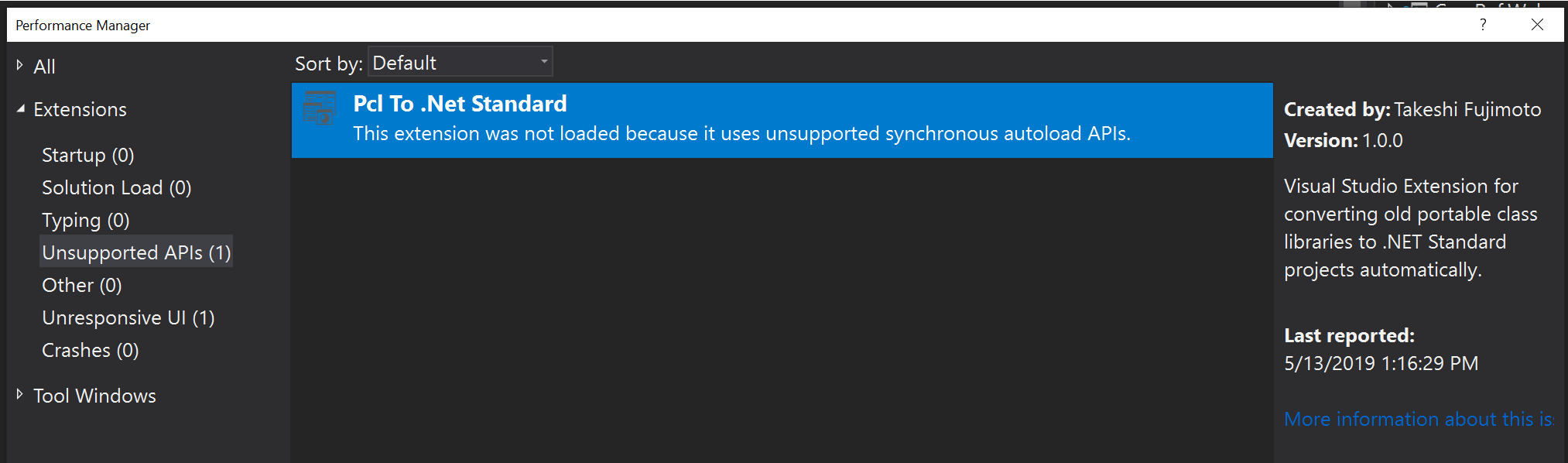
FYI, I'm on 16.1 preview 3 and I'm seeing https://github.com/tafuji/Pcl-To-NetStandard as disabled:
 spottedmahn
on 13 May 2019
spottedmahn
on 13 May 2019
https://devblogs.microsoft.com/visualstudio/new-features-for-extension-authors-in-visual-studio-2019-version-16-1/ says:
18 months ago, we sent an email to extension partners announcing the deprecation of synchronous auto-loading of extension packages. A year ago, we followed up with a blog post with more details that outlined that synchronously auto-loaded package would be unsupported in a future version of Visual Studio. That version is 16.1.
We are seeing the message changing with the different versions of Visual Studio 2019:
16.0
One or more of your installed extensions will not be compatible with a future Visual Studio update.
16.1 Preview 2
Visual Studio did not load one or more extensions that were using unsupported APIs.
16.1
Visual Studio did not load one or more extensions that were using deprecated APIs.
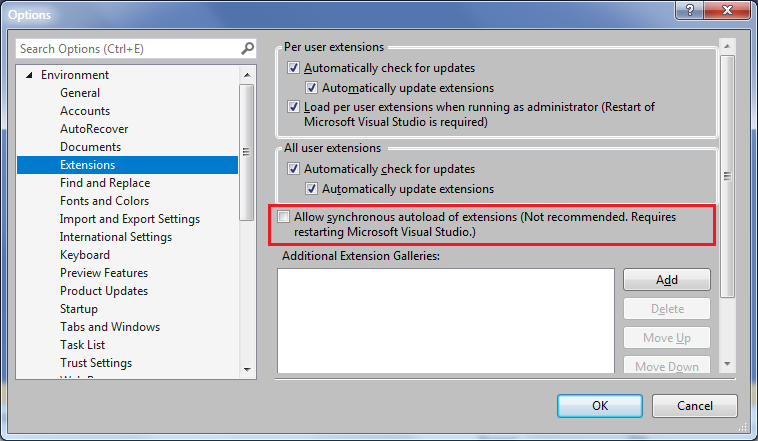
with an option to "Allow synchronous autoload"
16.2 Preview 1
Visual Studio did not load one or more extensions that were using deprecated APIs.
The extensions though don't seem to be disabled/unloaded in any of these versions. Also, there seems to be an option to allow synchronous autoload of extensions.
Which is the future update of Visual Studio 2019 when extensions that autoload synchronously will stop working?
 priyasgs
on 28 May 2019
priyasgs
on 28 May 2019
Seems like synchronous autoload is not going away: https://devblogs.microsoft.com/visualstudio/updates-to-synchronous-autoload-of-extensions-in-visual-studio-2019/
priyasgs
on 28 May 2019
It's not going away, but it is disabled by default
 madskristensen
on 28 May 2019
madskristensen
on 28 May 2019
This is how all new features/behavior should be implemented, enabled by default, but able to be switched off if the user decides that's how they want it.
 yannduran
on 28 Aug 2019
yannduran
on 28 Aug 2019
With update to v. 16.2.5, I once again got a warning about one of my (older) extensions being disabled. Although the option to allow synchronous autoload of extensions was checked, (see Tools / Options / Environment / Extensions), the it is also grayed now.
As a result I added the group policy mentioned above to the registry, restarted VStudio and the warning changed to the previous simple notification about one of my extensions using synchronous autoload.
 mdunka
on 11 Sep 2019
mdunka
on 11 Sep 2019
I've updated the page for the current behavior in version 16.4.
@mdunka -- that issue looks like it may require engineering investigation. (note to @madskristensen ) Can you open an issue on Developer Community for this? Doing so gives us setup and other logs that helps diagnose the issues. From within Visual Studio, go to Help > Send Feedback > Report a Problem
please-close
 PoulChapman
on 12 Dec 2019
PoulChapman
on 12 Dec 2019
Related issues
gewarren
·
3Comments
 DaanV2
·
4Comments
DaanV2
·
4Comments
 jnpwly
·
3Comments
jnpwly
·
3Comments
 suhailmahmood
·
3Comments
suhailmahmood
·
3Comments
 Logerfo
·
3Comments
Logerfo
·
3Comments
Most helpful comment
https://devblogs.microsoft.com/visualstudio/new-features-for-extension-authors-in-visual-studio-2019-version-16-1/ says:
18 months ago, we sent an email to extension partners announcing the deprecation of synchronous auto-loading of extension packages. A year ago, we followed up with a blog post with more details that outlined that synchronously auto-loaded package would be unsupported in a future version of Visual Studio. That version is 16.1.
We are seeing the message changing with the different versions of Visual Studio 2019:
16.0
One or more of your installed extensions will not be compatible with a future Visual Studio update.
16.1 Preview 2
Visual Studio did not load one or more extensions that were using unsupported APIs.
16.1
Visual Studio did not load one or more extensions that were using deprecated APIs.
with an option to "Allow synchronous autoload"
16.2 Preview 1
Visual Studio did not load one or more extensions that were using deprecated APIs.
The extensions though don't seem to be disabled/unloaded in any of these versions. Also, there seems to be an option to allow synchronous autoload of extensions.

Which is the future update of Visual Studio 2019 when extensions that autoload synchronously will stop working?