Visualstudio-docs: SSDT tools for Visual Studio 2019 are not available
Support for Visual Studio 2019 Preview is available through the SQL Server Data Tools (SSDT). For more information, see the SQL Server Integration Services blog.
When visiting the linked page though, you would only get the SSDT for Visual Studio 2017!
 TheRealVira
All 39 comments
@TheRealVira Thanks for letting us know! We'll investigate and report back.
 TerryGLee
on 15 Feb 2019
TerryGLee
on 15 Feb 2019
@TheRealVira We've updated the Project migration and upgrade reference for Visual Studio 2019 page with an "interim" comment and link text for the SQL Server Integration Services (SSIS) entry in the Project types table. We'll update this information again after Visual Studio 2019 is out of Preview. Meanwhile, thanks again for pointing out the link issue!
TerryGLee
on 8 Mar 2019
Visual Studio 2019 is out of preview as of today. Will there be an updated SSDT package for this version?
 anthonypants
on 3 Apr 2019
anthonypants
on 3 Apr 2019
Hello Microsoft.
Great Job on Visual Studio 2019 and great launch event too. It was awesome to see Scott Hanselman stuffing sodas into his coat...
I think most of us have the same question. Until, SSDT 2019 is released, can we use Visual Studio 2019 with SSDT 2017 ?
 nickchobotar
on 3 Apr 2019
nickchobotar
on 3 Apr 2019
Hello Microsoft.
Great Job on Visual Studio 2019 and great launch event too. It was awesome to see Scott Hanselman stuffing sodas into his coat...
I think most of us have the same question. Until, SSDT 2019 is released, can we use Visual Studio 2019 with SSDT 2017 ?
I tried to install SSDT 2017 to VS 2019 and the install failed. I hope the SSDT team gets this fixed soon.
 wedenj
on 3 Apr 2019
wedenj
on 3 Apr 2019
Hello Microsoft.
Great Job on Visual Studio 2019 and great launch event too. It was awesome to see Scott Hanselman stuffing sodas into his coat...
I think most of us have the same question. Until, SSDT 2019 is released, can we use Visual Studio 2019 with SSDT 2017 ?I tried to install SSDT 2017 to VS 2019 and the install failed. I hope the SSDT team gets this fixed soon.
Same here, I tried installing SSDT 2017 on VS2019 and got an error.
 Devnsyde
on 5 Apr 2019
Devnsyde
on 5 Apr 2019
We got it working by installing two Extensions:
- Microsoft Reporting Services Projects
- Microsoft Analysis Services Projects
wedenj
on 5 Apr 2019
We got it working by installing two Extensions:
- Microsoft Reporting Services Projects
- Microsoft Analysis Services Projects
Hmm. I just tried again and I got an error: "The requested metafile operation is not supported (0x800707D3)"
Devnsyde
on 5 Apr 2019
We got it working by installing two Extensions:
- Microsoft Reporting Services Projects
- Microsoft Analysis Services Projects
I don't think this is accurate. Even if you extract the VSIX files from the SSDT installer, and attempt to install those extensions via VSIXInstaller.exe, it won't let you.
anthonypants
on 5 Apr 2019
@TerryGLee Could you please re-open this ticket. It's too early for Microsofters to drink that champagne :) until this whole SSDT issue is resolved.
How can we get SSDT to work in our beautiful 2019 Visual Studio? It'd be nice to delete VS 2017 and use VS 2019 with SSDT.
nickchobotar
on 5 Apr 2019
I have a few internal inquiries in play and hope to have some answers posted here soon. Thanks everyone, for your continued discussion and questions.
TerryGLee
on 5 Apr 2019
Where is Integration Services extensions or what I should install to create SSIS project in VS2019?
 lukaszzborek
on 6 Apr 2019
lukaszzborek
on 6 Apr 2019
Any update on SSDT for VS19 what a crap how a company like Microsoft forget this, why it pays a huge amount of money to its employees.
Biggest Lie ever here -
(https://docs.microsoft.com/en-us/sql/ssdt/download-sql-server-data-tools-ssdt?view=sql-server-2017
Changes in SSDT for Visual Studio 2019
With Visual Studio 2019, the required functionality to enable Analysis Services, Integration Services, and Reporting Services projects have moved into the respective Visual Studio extensions. The core SSDT functionality to create Database Projects has remained integral to Visual Studio (you need to select the Data storage and processing workload during install). There is no more standalone SSDT installation required.
If you already have a license to Visual Studio 2019:
For SQL Database Projects, install the Data storage and Processing workload for Visual Studio
For Analysis Services, Integration Services or Reporting Services projects, install the appropriate extension(s) from the marketplace
If you don’t already have a license to Visual Studio 2019:
Install Visual Studio 2019 Community
Install the Analysis Services, Integration Services or Reporting Services as appropriate
 aspmonk
on 7 Apr 2019
aspmonk
on 7 Apr 2019
As of 4/7/2019, Visual Studio extensions ("Manage Extensions" menu) of the VS 2019 Community Edition does not bring up "Integration Services" as available item. I cannot create a new SSIS project (Integration Services Project) in VS 2019.

 jasonfetter
on 7 Apr 2019
jasonfetter
on 7 Apr 2019
I have an answer for at least one of the questions that has been asked in this thread:
With Visual Studio 2019, the delivery model for SSDT has changed. In short, you don't have to install any additional tools other than to first select the Data storage and processing workload from the Visual Studio Installer before you create a database project.

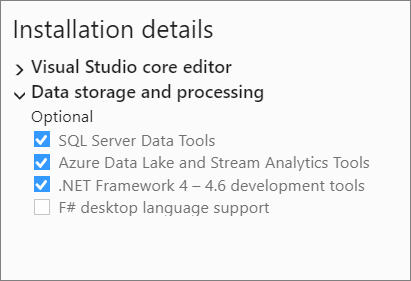
We apologize for any issues that this has caused; and please know that we're working on getting our documentation updated to reflect these changes as fast as we can.
TerryGLee
on 8 Apr 2019
Even if you have that feature installed, you can't create new SSIS solutions in VS 2019, as @jasonfetter pointed out. If you attempt to open an existing SSIS project or solution, you get a Migration Report error which states:
The application which this project type is based on was not found. Please try this link for further information: https://go.microsoft.com/fwlink/?LinkId=660952&projecttype=159641D6-6404-4A2A-AE62-294DE0FE8301
anthonypants
on 8 Apr 2019
hello all
Please refer to https://docs.microsoft.com/en-us/sql/ssdt/download-sql-server-data-tools-ssdt?view=sql-server-2017 for the updated delivery model.
SSIS extension should be coming very soon.
 dnethi
on 8 Apr 2019
dnethi
on 8 Apr 2019
@TerryGLee Data storage and processing and selecting all modules 100 Times it does not work. We need SSTD to VS19 so that we can open an existing ETL project. (.dtproj) should be supported in VS 19.
aspmonk
on 9 Apr 2019
Looks like the SSRS & SSAS Extensions have been added to the marketplace but still waiting on SSIS
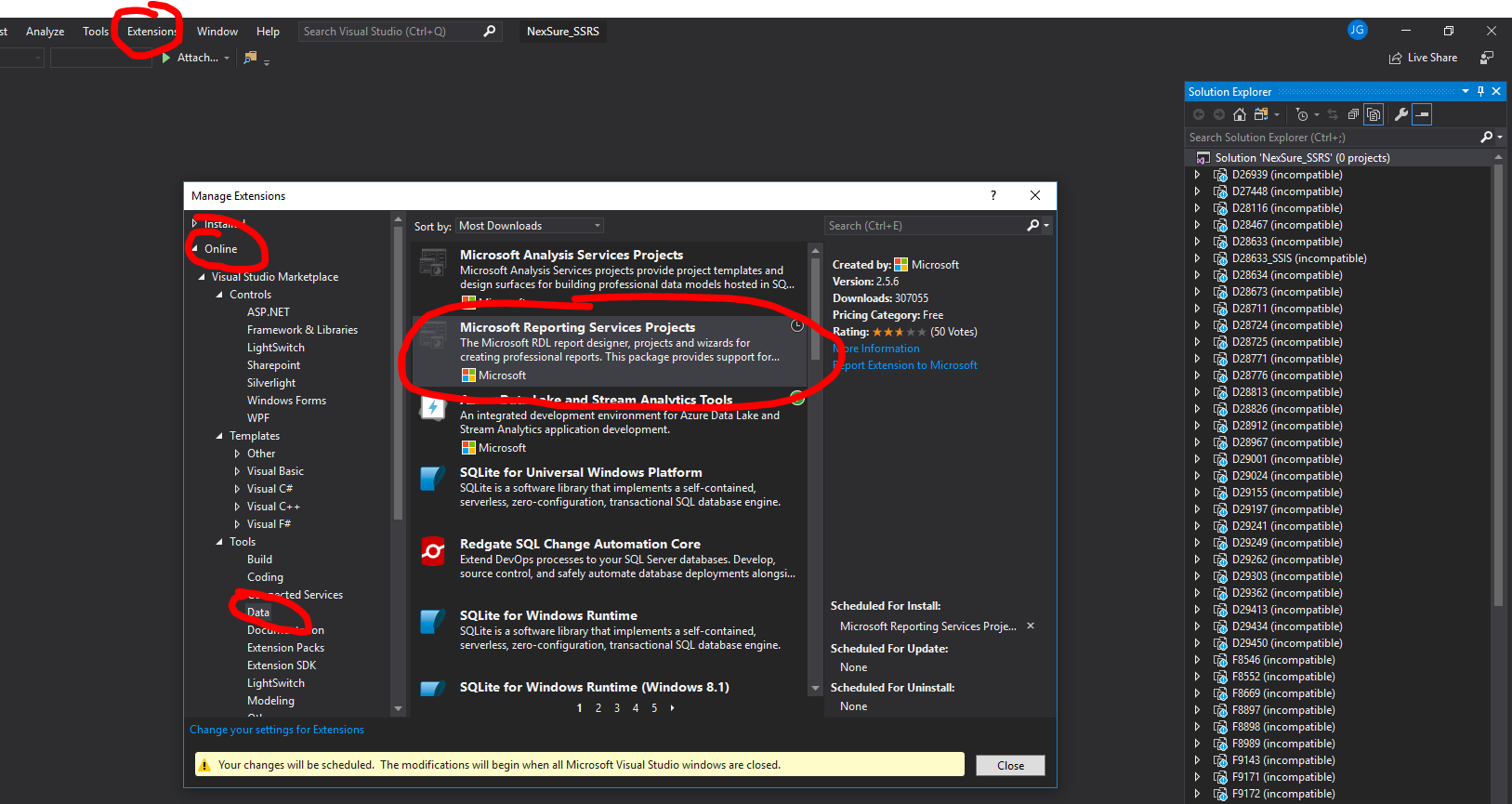
 johnny51714
on 9 Apr 2019
johnny51714
on 9 Apr 2019
Just got caught with this today! Can do SSRS and SSAS, but no SSIS... I would also recommend updating the documentation as this led me to believe that I could do this.
https://docs.microsoft.com/en-us/sql/ssdt/download-sql-server-data-tools-ssdt?view=sql-server-2017
 robhawthorne
on 11 Apr 2019
robhawthorne
on 11 Apr 2019
SSIS must be REALLY low on the priority list if it is taking this long to release the extension. I can't imagine there is THAT big of a difference between 2017 & 2019 when it comes to the extension. Get with it guys!
 BobBonser
on 12 Apr 2019
BobBonser
on 12 Apr 2019
SSIS extension is available for download now on VS market place: https://marketplace.visualstudio.com/items?itemName=SSIS.SqlServerIntegrationServicesProjects&ssr=false#overview
 timchenyx
on 13 Apr 2019
timchenyx
on 13 Apr 2019
We've added the SSIS Marketplace link to the Project migration and upgrade reference for Visual Studio 2019 page. I am closing this issue as the SSDT/SSIS documentation updates to this page are now complete. Thanks everyone for your feedback!
TerryGLee
on 15 Apr 2019
wait don't close this one yet. What about Analysis Services and Tabular projects? This is part of SSDT as well.
 garyzava
on 16 Apr 2019
garyzava
on 16 Apr 2019
AS extension is already available.
dnethi
on 16 Apr 2019
The issue of SSIS is still not resolved in 2019 latest version.I have added the extensions and still unable to create the SSIS project.Is there any way I can install the older version visual studio 2017
 preethadas
on 14 May 2019
preethadas
on 14 May 2019
SSIS extension is available for download now on VS market place: https://marketplace.visualstudio.com/items?itemName=SSIS.SqlServerIntegrationServicesProjects&ssr=false#overview
It's ok for me. I added the extension for SSIS
 adimpre
on 14 May 2019
adimpre
on 14 May 2019
yes its worked for me too in VS 2019 we got an extension for IS
 polinenizz
on 14 May 2019
polinenizz
on 14 May 2019
When running this SSIS installer on Windows Server Core 1803 as follows, I got an exitcode 1603 and it always seems to fail when installing the Microsoft.DataTools.IntegrationServices.vsix file with VSIXBootStrapper.exe. This step produces an errorcode of 0x80131500. Any help decoding this errorcode would be appreciated.
Microsoft.DataTools.IntegrationServices.exe /install:25e4e023 /quiet '/norestart' /log "c:\temp\ssisinstall.txt"
Likewise, installing SSRS and SSAS addins or updating existing extensions from devenv.exe do not work. I was able to trace it down to this:
5/22/2019 8:22:08 AM - Install Error : System.AggregateException: One or more errors occurred. ---> System.TypeLoadException: Could not find Windows Runtime type 'Windows.Networking.Connectivity.NetworkCostType'.
   at Microsoft.VisualStudio.Setup.Services.OperatingSystem.ConnectionCostPrivate()
   at Microsoft.VisualStudio.Setup.Services.OperatingSystem.get_ConnectionCost()
   at Microsoft.VisualStudio.Setup.Engine.InitializeTelemetryProperties(String operation)
   at Microsoft.VisualStudio.Setup.Engine.Install(Product product, String destination, CancellationToken token)
   at Microsoft.VisualStudio.ExtensionManager.SetupEngineService.<Install>b__14_0()
   at System.Threading.Tasks.Task`1.InnerInvoke()
   at System.Threading.Tasks.Task.Execute()
   --- End of inner exception stack trace ---
   at System.Threading.Tasks.Task.ThrowIfExceptional(Boolean includeTaskCanceledExceptions)
   at System.Threading.Tasks.Task.Wait(Int32 millisecondsTimeout, CancellationToken cancellationToken)
   at Microsoft.VisualStudio.ExtensionManager.SetupEngineService.Install()
   at Microsoft.VisualStudio.ExtensionManager.ExtensionEngineImpl.PerformSetupEngineInstall(InstallableExtensionImpl extension, Boolean installPerMachine, Boolean isPackComponent, IDictionary`2 extensionsInstalledSoFar, List`1 extensionsUninstalledSoFar, IInstalledExtensionList modifiedInstalledExtensionsList, IProgress`1 progress, InstallFlags installFlags, AsyncOperation asyncOp, Version targetedVsVersion, IInstalledExtension& newExtension)
   at Microsoft.VisualStudio.ExtensionManager.ExtensionEngineImpl.InstallInternal(InstallableExtensionImpl extension, InstallFlags installFlags, IDictionary`2 extensionsInstalledSoFar, List`1 extensionsUninstalledSoFar, IInstalledExtensionList modifiedInstalledExtensionsList, AsyncOperation asyncOp, IProgress`1 progress, Version targetedVsVersion)
   at Microsoft.VisualStudio.ExtensionManager.ExtensionEngineImpl.BeginInstall(IInstallableExtension installableExtension, InstallFlags installFlags, AsyncOperation asyncOp, Version targetedVsVersion)
   at Microsoft.VisualStudio.ExtensionManager.ExtensionEngineImpl.InstallWorker(IInstallableExtension extension, InstallFlags installFlags, AsyncOperation asyncOp)
---> (Inner Exception #0) System.TypeLoadException: Could not find Windows Runtime type 'Windows.Networking.Connectivity.NetworkCostType'.
   at Microsoft.VisualStudio.Setup.Services.OperatingSystem.ConnectionCostPrivate()
   at Microsoft.VisualStudio.Setup.Services.OperatingSystem.get_ConnectionCost()
   at Microsoft.VisualStudio.Setup.Engine.InitializeTelemetryProperties(String operation)
   at Microsoft.VisualStudio.Setup.Engine.Install(Product product, String destination, CancellationToken token)
   at Microsoft.VisualStudio.ExtensionManager.SetupEngineService.<Install>b__14_0()
   at System.Threading.Tasks.Task`1.InnerInvoke()
   at System.Threading.Tasks.Task.Execute()<---
I filed a ticket back in Nov 2018 for SSDT and was eventually informed that Server Core is not supported. Given that the release model is no longer the same as SSDT-setup.exe and that other vsix extensions in VS2019 appear to have installed just fine as part of VS2019 installation, why am I not able to install or update these extensions from devenv.exe?
 tristanbarcelon
on 22 May 2019
tristanbarcelon
on 22 May 2019
After installing Visual Studio 2019 and then the 400MB SSIS extension, It only took an hour and a half to create the first SSIS project, maybe longer. I finally went to bed and woke up to a newly created project. It was like Christmas morning.
No really, this is a total fail.
 Brain2000
on 27 Aug 2019
Brain2000
on 27 Aug 2019
After installing Visual Studio 2019 and then the 400MB SSIS extension, It only took an hour and a half to create the first SSIS project, maybe longer. I finally went to bed and woke up to a newly created project. It was like Christmas morning.
No really, this is a total fail.
I had the same experience. I waited over 4 hours for Visual Studio hours to create the first project. I eventually rebooted and tried again, and now I'm stuck in the same never ending process. I've dealt with some sad MS releases over the years, but this one tops them all.
 shonthom
on 27 Aug 2019
shonthom
on 27 Aug 2019
Still no SSIS in-built extension in VS2019.
When are they planning to do this?
 NamanMittal
on 12 Sep 2019
NamanMittal
on 12 Sep 2019
Currently I am still unable to open existing .dtproj files containing the SSIS packages in VS2019. I need to upgrade these SSIS packages to have them deployable through Azure devops. Any advice on how to proceed?
 ISAF87
on 26 Sep 2019
ISAF87
on 26 Sep 2019
This Data Tool works for Visual Studio 2019.
 surathruwan
on 5 Oct 2019
surathruwan
on 5 Oct 2019
same issue, is resetting windows the only option to windows bugs?
 altagir
on 23 Oct 2019
altagir
on 23 Oct 2019
same issue, is resetting windows the only option to windows bugs?
@altagir I had some issue in previous days. If you want create SSIS project only, then use following SSIS tool that support for visual Studio 2019. But problem is when installed SSAS tool support for VS2019 , SSIS Projects going to be Crashed. https://ssis.gallerycdn.vsassets.io/extensions/ssis/sqlserverintegrationservicesprojects/3.1/1562574939108/Microsoft.DataTools.IntegrationServices.exe
I waste lot of time to find the solution but I didn't get the solution for it . So, I decided to downgrade from VS2019 to VS2017 and re-install SSDT tool. in there all SSIS , SSAS and SSRS all are working fine.
That is the my experience. This is might be help all of you.
surathruwan
on 23 Oct 2019
I have the latest version of vs 2019 installed, and the extensions mentioned on this thread and still see no options for a report project. Any idea how I can get this to work?
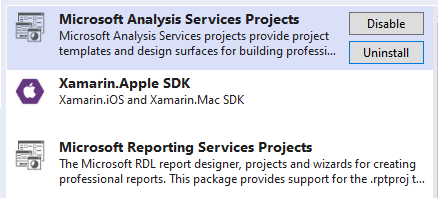

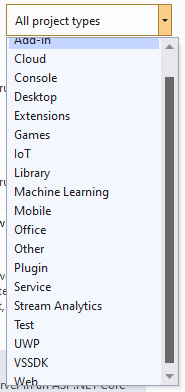
 troygerton
on 27 Jul 2020
troygerton
on 27 Jul 2020
I have install Visual stdio 2019 and (integration services projects ) is not fully compatible some SSIS like REST Source tools are missing any one can guide me

 Mrkarral
on 26 Nov 2020
Mrkarral
on 26 Nov 2020
He instalado la extensión de Microsoft Reporting Services Projects en Visual Studio 2019, pero es imposible crear un nuevo proyecto de informes. No sale la opción de crear ese tipo de proyectos.
Muchas gracias.
 Luferta
on 20 Dec 2020
Luferta
on 20 Dec 2020
Related issues
 Crono1981
·
3Comments
Crono1981
·
3Comments
 gewarren
·
3Comments
gewarren
·
3Comments
 nitinjs
·
3Comments
nitinjs
·
3Comments
 jnpwly
·
3Comments
jnpwly
·
3Comments
 Logerfo
·
3Comments
Logerfo
·
3Comments
Most helpful comment
Visual Studio 2019 is out of preview as of today. Will there be an updated SSDT package for this version?