Vision: pytorch pre-trained models preprocessing results 9 images
I am using vgg16 and for preprocessing I use transforms module (as used in the documentation)
and I don't know why, but when it takes my image as input, it outputs 9 small copy of the input image and combines them into one single image (nonetheless the output is correct)
is it a problem?
 aliamiri1380
All 4 comments
Hi @aliamiri1380, please post a minimal code example of what your are doing. Otherwise we can only give you general answers. In this case: I don't know if it is a problem within your workflow, but it is definitively unexpected.
 pmeier
on 17 Jun 2020
pmeier
on 17 Jun 2020
Hi, this is my code
import torch as T
import torch.nn as nn
import torch.nn.functional as F
from torchvision import transforms
import matplotlib.pyplot as plt
import numpy as np
_ = T.hub.load('pytorch/vision:v0.6.0', 'resnext101_32x8d', pretrained=True)
_.eval()
def preprocess(model, input_image):
    img_size = (256,256,3)
    img = Image.open(input_image)
    img = img.resize(img_size[:-1]).convert('RGB')
    preprocess = transforms.Compose([
        transforms.Resize(256),
        transforms.ColorJitter((1,2),(1,2),(1,2),(0, .5)),
        transforms.ToTensor(),
        transforms.Normalize(mean=[0.485, 0.456, 0.406], std=[0.229, 0.224, 0.225]),
    ])
    img = preprocess(img).unsqueeze(0).to(device)
    plt.imshow(img.cpu().detach().numpy().reshape(img_size))
    plt.show()
    model.to(device)
    with T.no_grad():
        output = model(img)
    return output

preprocess(_, 'bmw.jpeg').argmax(-1).item()
and my input image and outputted image respectively
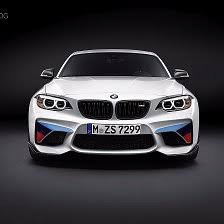
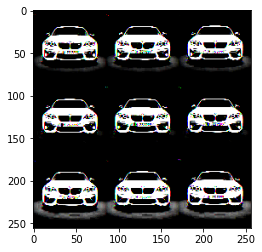
after preprocessing, the image becomes 9 copy of the input
aliamiri1380
on 17 Jun 2020
The problem lies in this line
plt.imshow(img.cpu().detach().numpy().reshape(img_size))
and specifically in .reshape(img_size). torch works with a channels-first paradigm whereas pyplot expects channels-last. The .reshape is not failing since the number of elements is correct, but you are mixing the channels with the spatial information. Thus, you are seeing the motif multiple times.
To overcome this, you can replace .reshape(img_size) with .squeeze(0).transpose(1, 2, 0). The first part removes the excess batch dimension and the latter moves the channels to the last dimension.
If you are doing this conversion solely to show the image, the ToPilImage might be helpful.
pmeier
on 17 Jun 2020
thank you for the answer, I didn't realize this keynote
aliamiri1380
on 17 Jun 2020
Related issues
 Linardos
·
4Comments
Linardos
·
4Comments
 datumbox
·
3Comments
datumbox
·
3Comments
 iacolippo
·
4Comments
iacolippo
·
4Comments
 ArashJavan
·
3Comments
ArashJavan
·
3Comments
 300LiterPropofol
·
3Comments
300LiterPropofol
·
3Comments
Most helpful comment
The problem lies in this line
and specifically in
.reshape(img_size).torchworks with a channels-first paradigm whereaspyplotexpects channels-last. The.reshapeis not failing since the number of elements is correct, but you are mixing the channels with the spatial information. Thus, you are seeing the motif multiple times.To overcome this, you can replace
.reshape(img_size)with.squeeze(0).transpose(1, 2, 0). The first part removes the excess batch dimension and the latter moves the channels to the last dimension.If you are doing this conversion solely to show the image, the
ToPilImagemight be helpful.