When using RGB images I wrote the transform like
transform_list = [transforms.ToTensor(),
transforms.Normalize((0.5, 0.5, 0.5), (0.5, 0.5, 0.5))]
And it worked perfectly.
But for grayscale images I there is no documentation for transform given on this page http://pytorch.org/docs/master/torchvision/transforms.html.
Can anyone help me on how to write a transform for grayscale images ??
Thanks in advance.
 soumyadeepg
All 9 comments
Use this: transforms.Normalize((0.5, ), (0.5, )) instead. This is because grayscale images have only one channel.
 vishwakftw
on 12 Oct 2017
vishwakftw
on 12 Oct 2017
@vishwakftw is correct. I'll send a PR which adds tests for this and updates the docs to reflect this.
 alykhantejani
on 12 Oct 2017
alykhantejani
on 12 Oct 2017
Use this:
transforms.Normalize((0.5, ), (0.5, ))instead. This is because grayscale images have only one channel.
Why is there a need of , after 0.5 in Normalize?
 samarthsarin
on 20 Oct 2019
samarthsarin
on 20 Oct 2019
Use this:
transforms.Normalize((0.5, ), (0.5, ))instead. This is because grayscale images have only one channel.Why is there a need of , after 0.5 in Normalize?
Same question here. And it indeed does not work if lack of comma
 yixuanren
on 20 Feb 2020
yixuanren
on 20 Feb 2020
Because Python requires comma to make it a 1-tuple. Without comma, Python will understand it as a singular number (0.5). In the code of Normalization, it requires an N-tuple for N channels, such as a 3-tuple for 3 channels
 VinhLoiIT
on 29 Mar 2020
VinhLoiIT
on 29 Mar 2020
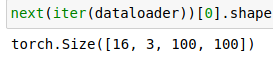
But this doesn't solve the issue, I am loading gray scale images with batch size of 16 with dim 150 * 150 and performing the transforms as shown in below images

and i am getting the one instance of dataloader as (16, 3, 100, 100), 100 is because of the resize but channel as 3 ?
 Mayurji
on 20 Jun 2020
Mayurji
on 20 Jun 2020
I think the problem is that ImageFolder loads the images as colour images although they are grayscale. You can simply add another transformation that makes them grayscale again: transforms.Grayscale(1),
 diechr
on 21 Jun 2020
diechr
on 21 Jun 2020
Yes, i have done that and it worked. But i just don't get, why it didn't worked in the first place.
Mayurji
on 21 Jun 2020
@Mayurji with latest versions of torchvision, if you pass a single value for the Normalize function and feed a 3-channel RBG Image, Normalize will still work
 fmassa
on 7 Jul 2020
fmassa
on 7 Jul 2020
Related issues
 ArashJavan
·
3Comments
ArashJavan
·
3Comments
 bodokaiser
·
3Comments
bodokaiser
·
3Comments
 xuanqing94
·
3Comments
xuanqing94
·
3Comments
 300LiterPropofol
·
3Comments
300LiterPropofol
·
3Comments
 ibtingzon
·
3Comments
ibtingzon
·
3Comments
Most helpful comment
Use this:
transforms.Normalize((0.5, ), (0.5, ))instead. This is because grayscale images have only one channel.