Visidata: [Windows] Issue with viewing HelpSheet (manpage) on Windows
Small description
pressing ctrl-h does not work
after exiting the program (gq), I see in the terminal:
[Errno 2] No such file or directory: '/dev/tty'
'man' is not recognized as an internal or external command,
operable program or batch file.
'man' is not recognized as an internal or external command,
operable program or batch file.
'man' is not recognized as an internal or external command,
operable program or batch file.
'man' is not recognized as an internal or external command,
operable program or batch file.
'man' is probably invoked every time ctrl+h is pressed.
Expected result
I expect that enter will execute the regex filter
help page should open
Actual result with screenshot
If you get an unexpected error, please include the full stack trace that you get with Ctrl-E.
Steps to reproduce with sample data and a .vd
press crtl+h
Please attach the commandlog (saved with Ctrl-D) to show the steps that led to the issue.
See here for more details.
Additional context
Please include the version of VisiData.
Same as here: #741
 bob-u
bob-u
All 17 comments
Hi!
Ctrl+H makes assumptions about the operating system having a method to view manpages, which Windows does not have. So this is an expected limitation with using VisiData on Windows. We upload the manpage online for those cases: https://www.visidata.org/docs/v2.0/man/.
One thing we possibly could do (@saulpw?), is catch this case, and output to status directing users to the website.
 anjakefala
on 22 Oct 2020
anjakefala
on 22 Oct 2020
Thanks, that's what I thought. As a new user I would be happy to be presented with a page showing all of the possible or common key combinations, like top does when you press h.
bob-u
on 22 Oct 2020
You can use z Ctrl+H to get a sheet of those. =)
anjakefala
on 22 Oct 2020
Excellent. Once the regex search is working I will be able to search though the quite extensive list. Have you considered allowing typing words (like those describing the key combinations) to make it easier for those with bad memory?
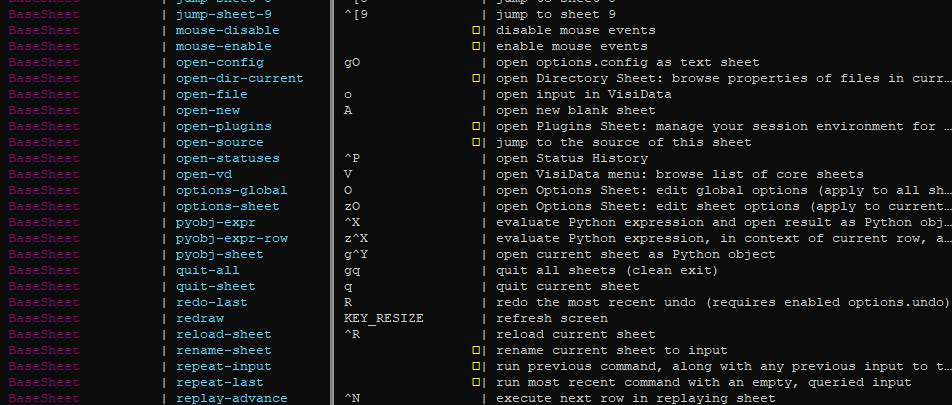
Btw, are the yellow squares a bug or a feature?
bob-u
on 23 Oct 2020
The yellow boxes are actually ∅ (null set) symbols, that your terminal font doesn't support. They mean the underlying value is None (as opposed to an empty string).
 saulpw
on 23 Oct 2020
saulpw
on 23 Oct 2020
Also, I'm not sure what you mean by "typing words (like those describing the key combinations)". You can use Spacebar to execute a longname, like "open-sheets", if you can't remember that Shift+S is the binding for that command.
saulpw
on 23 Oct 2020
Ok, thanks, I will stop making suggestions and RTFM.
Regarding the yellow symbols, now I understand - the key combination is not set. In the manual it says:
"you make your own command in your ~/.visidatarc, you can make that and bind it yourself" - where would that be under Windows?
bob-u
on 23 Oct 2020
@bob-u, you might also appreciate this cheat sheet. =)
~ should be your home directory.
anjakefala
on 23 Oct 2020
Thanks. I created .visidatarc and it is indeed being read. To test it I added following text:
bindkey('^[p','open-source')
but visidata starts with reload aborted.
bob-u
on 23 Oct 2020
@bob-u That is an occassional bug with the vdmenu, which is what opens if you launch vd with no input. =) It is a bug that does not impact anything for the user, beyond the confusing message.
anjakefala
on 23 Oct 2020
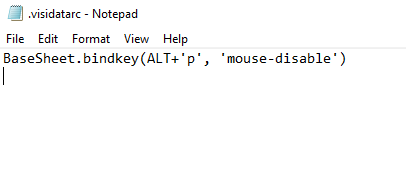
I think it might be something else because ALT+p is not defined as it should. I since revised the command to what I think is proper syntax now:
BaseSheet.bindkey(ALT+'p', 'mouse-disable')
I still get 'reload aborted' and ALT_p is unassigned.
bob-u
on 23 Oct 2020
What do you see in the lower right status when you press Alt+P ?
saulpw
on 23 Oct 2020
"no command for Alt_P"

bob-u
on 23 Oct 2020
Awesome, and thank you for the screenshot, that was very helpful. You should use 'ALT_P' (notice the quotes) instead of ALT+'p'. We'll update the docs and include a note for Windows users, if we can't just autodetect Windows curses and change the ALT variable ourselves.
saulpw
on 23 Oct 2020
@bob-u, we added a fallback vd.txt that will get pushed if man is not available on an Operating System. =) It will be part of the next release, but you are welcome to install it off the develop branch.
You can continue adding Windows stuff to this issue (or another one), I am just gonna close this because the core task is done. We have a checklist item for performing the Windows autodetection.
anjakefala
on 23 Oct 2020
Sure, thanks.
Speaking of vd. Then I type vd I get
'vd' is not recognized as an internal or external command,
operable program or batch file.
typing visidata starts the application. Happens the same on two different Windows machines. What should I check to make vd work?
bob-u
on 23 Oct 2020
@bob-u Could you open a fresh issue for that one? That is also a Windows quirk. I would need to investigate what is happening. I think you might need to manually change your PATH, it seems like your default Path might not cover where Python installed the bin.
anjakefala
on 23 Oct 2020
Related issues
 qrkourier
·
16Comments
qrkourier
·
16Comments
 geekscrapy
·
12Comments
geekscrapy
·
12Comments
 aborruso
·
12Comments
aborruso
·
12Comments
 cbrueffer
·
12Comments
cbrueffer
·
12Comments
 khughitt
·
12Comments
khughitt
·
12Comments