Visidata: Expressions run on truncated data instead of full field
Small description
When running a Python expression on a field, the full field isn't evaluated.
Expected result
The full field would be evaluated.
Actual result with screenshot
I use a regex (re.findall(r'\B#\w\w+') to extract hashtags from tweets. Unfortunately, when I extract from tweets where the full tweet text is truncated, I get truncated hashtags:
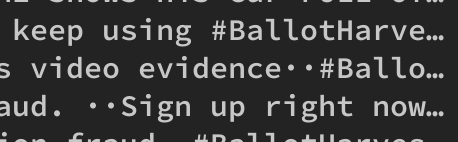
This gives me the hashtags #Ballo and #Ballotharve.
Additionally, when I expand rows with 'v', the truncation doesn't go away. I can't actually find a way to view un-truncated fields within visidata.

Steps to reproduce with sample data and a .vd
Alas, can't distribute.
Additional context
2.-4.0
 lxcode
All 3 comments
Hi @lxcode, thanks for the bug report. Can you create a small test case that exhibits this? It doesn't have to be real data, or even data of any size. Just something so that it's easier to repro as we go to fix it.
 saulpw
on 8 Oct 2020
saulpw
on 8 Oct 2020
I think what's happening here is that regex by default doesn't match after a newline. You can enable multiline matching by setting options.regex_flags = 'M'. Alternately, you can replace all newlines with spaces with the * (to create a new column) or g* (to replace in selected rows) and then input \n/.
saulpw
on 11 Oct 2020
Hi Saul, just dug into this a bit and this is actually my bad: the full_text field of Twitter API responses is truncated with the same truncation character visidata uses (\u2026) if the tweet is a retweet, shunting the actual full text into a sub-field. I assumed it was visidata doing the actual truncation due to the visual similarity.
I'll probably just change the truncation character so that I can see more easily when this is happening. Thanks!
lxcode
on 13 Oct 2020
Related issues
 frosencrantz
·
4Comments
frosencrantz
·
4Comments
 geekscrapy
·
3Comments
geekscrapy
·
3Comments
 jsvine
·
3Comments
jsvine
·
3Comments
 polm
·
4Comments
frosencrantz
·
3Comments
polm
·
4Comments
frosencrantz
·
3Comments
Most helpful comment
Hi Saul, just dug into this a bit and this is actually my bad: the full_text field of Twitter API responses is truncated with the same truncation character visidata uses (\u2026) if the tweet is a retweet, shunting the actual full text into a sub-field. I assumed it was visidata doing the actual truncation due to the visual similarity.
I'll probably just change the truncation character so that I can see more easily when this is happening. Thanks!