Visidata: [develop] concatenating selected source columns, from the Columns Sheet, does not work
Small description
Hi opening the below CSV file, and then the Columns Sheet, if I select the two columns and then click on & I have an error.
I should have a column from concatenating selected source columns.
I'm using saul.pw/VisiData v2.-4dev
My input
a,b
hello,world
viva,las vegas
Actual result with screenshot
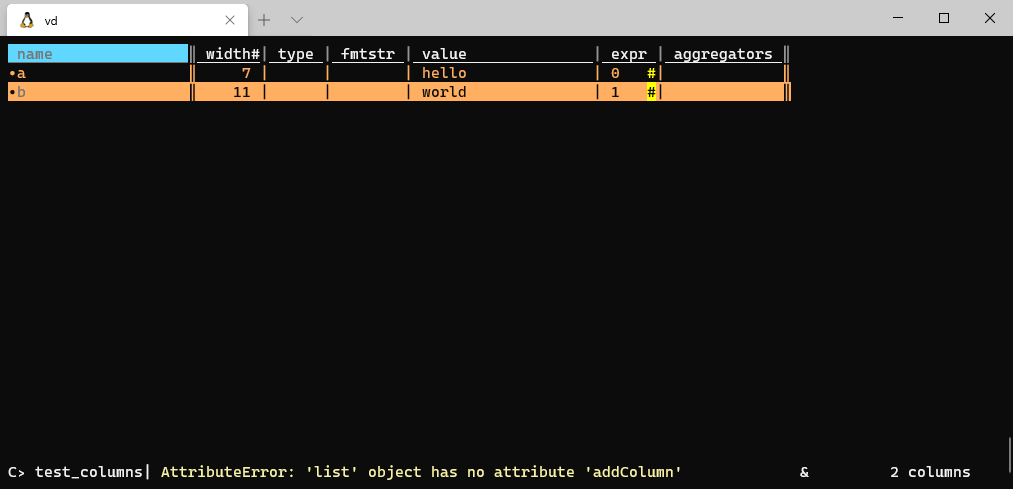
Steps to reproduce with sample data and a .vd
sheet   col row longname    input   keystrokes  comment
    SqliteSheet header  set-option  0
    UsvSheet    delimiter   set-option  ␞
    UsvSheet    row_delimiter   set-option  ␟
            open-file   test.csv    o
test            columns-sheet       C   open Columns Sheet: edit column properties for current sheet
test_columns        キa  select-row      s   select current row
test_columns        キb  select-row      s   select current row
 aborruso
All 12 comments
Hey @aborruso!
Joins happen on the level of sheets, not columns, but I am curious about the thing you wanted to do!
Given this input
a,b
hello,world
viva,las vegas
What was your expected output?
 anjakefala
on 7 May 2020
anjakefala
on 7 May 2020
hey @anjakefala simply concatenate the two columns.
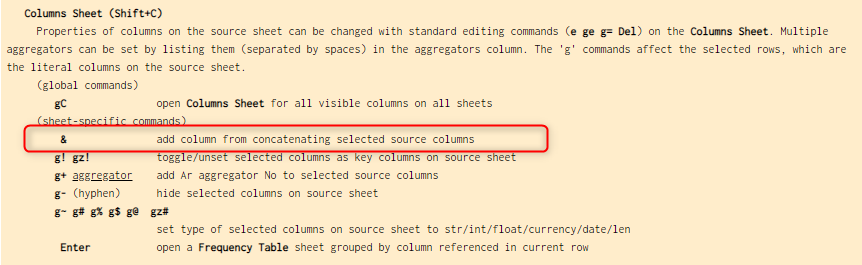
Joins happen on the level of sheets, not column
Are you sure?
aborruso
on 7 May 2020
Ah yeah, that's overloaded on the columns sheet. It's a bug, we can fix it. Though I'm not sure that it should stay bound to the & key. Do you use this feature often in 1.5.2, @aborruso ?
 saulpw
on 7 May 2020
saulpw
on 7 May 2020
To concatenate in vd way, fast and smart, it seems to me a great feature.
Thank you
aborruso
on 7 May 2020
Whoops @aborruso! Sorry for the confusion.
anjakefala
on 7 May 2020
Thank you especially for making this bug report!
anjakefala
on 7 May 2020
This should be fixed on develop now, @aborruso! =)
anjakefala
on 8 May 2020
It works, thank you!!
@anjakefala you took away my pleasure to close the issue :)
aborruso
on 8 May 2020
@anjakefala is there a way to set in the options the column join separator ? If yes what's the name of the option?
Thank you
aborruso
on 8 May 2020
@aborruso it looks like it written only as space with the ch=' '
https://github.com/saulpw/visidata/commit/44dc5ce51ca1a91ae2f7f5fc98c822bcc00f8ee2#diff-1f5a50f1a6c5a6bb7b3ae35017e52b63R166
You would need another code change.
 frosencrantz
on 8 May 2020
frosencrantz
on 8 May 2020
@frosencrantz I'm not able to do it. I'm opening a feature request.
Thank you
aborruso
on 8 May 2020
@anjakefala is there a way to set in the options the column join separator ? If yes what's the name of the option?
I have added a feature request https://github.com/saulpw/visidata/issues/550
aborruso
on 8 May 2020
Related issues
 p3k
·
21Comments
p3k
·
21Comments
 khughitt
·
14Comments
khughitt
·
14Comments
 paulklemm
·
11Comments
paulklemm
·
11Comments
 tsibley
·
19Comments
tsibley
·
19Comments
 geekscrapy
·
12Comments
geekscrapy
·
12Comments