Virtualc64: User settings for Game Port not reflected in toolbar after restart
Version: V3.3 alpha3
Scenario:
- Set Port 2 to Keyset 1
- Toolbar looks like:

- Verify the " " is not working
- Restart
- Toolbar looks like:

- Verify the " " is not working (i.e. it is correct as port 2 is actually configured with Keyset 1 but toolbar is incorrect
Same happens with Port 1 and Keyset 1 or 2 or any other setting.
An interesting thing. If after the scenario above, I change Port 1 setting, then the toolbar for Port 2 is correctly changed which demonstrate a problem in initialisation of the buttons in the toolbar.
Another small remark. The fact that Keyset 1 and 2 are the same icon makes it difficult to know what is assigned. Same applies to USB device icons.
 tsupplis
All 3 comments
Thanks for the detailed description how to reproduce the bug. Fix was easy (function validateToolbarItems() ) was not called on startup.
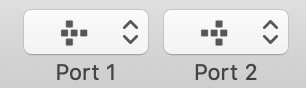
In addition, keyset 1 and keyset 2 have two different icons now:
 dirkwhoffmann
on 21 Dec 2018
dirkwhoffmann
on 21 Dec 2018
Everything working for me 😉
Just a last observation: icon L&F/similarity is also true from USB device i.e. USB 1 and USB 2 have same icon.
tsupplis
on 21 Dec 2018
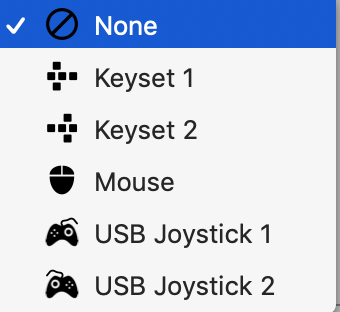
Now, USB icons are different, too:
dirkwhoffmann
on 21 Dec 2018
Related issues
dirkwhoffmann
·
5Comments
 bluecursor
·
5Comments
dirkwhoffmann
·
6Comments
bluecursor
·
5Comments
dirkwhoffmann
·
6Comments
 puleyo
·
6Comments
dirkwhoffmann
·
7Comments
puleyo
·
6Comments
dirkwhoffmann
·
7Comments