Virtualc64: Normal foreground/background switching using dock icon not working.
When virtualc64 is in the background, it sometimes does not work to bring the window in the foreground, the only way to switch back is to act on the overlapping window/application. Furthermore, the menu shows Force Quit, looking like the application is unresponsive.
This is reproducible 90% on Mojave after opening virtualc64 and loading a program from a floppy.
 tsupplis
All 15 comments
I had this issue a couple of days ago, but I thought it happened because I was running the app in Xcode (Xcode sometimes causes strange effects in debug mode). Unfortunately, I didn't find a way to reproduce it deterministically on my machine. Could you do the following for me? Start VirtualC64 from the console, reproduce the issue, and dump the debug messages that came out in the console?
Maybe, that gives us a hint. Second question: Are you running the emulator with option "Pause while in background"? Maybe it's related to that option, too. (A locked semaphore or something like that would be typical for the symptom you're describing).
 dirkwhoffmann
on 5 Nov 2018
dirkwhoffmann
on 5 Nov 2018
Happy to help, Dirk but the problem does not happen when starting from the command line. Is there a way to capture logs when opened directly?
Also where can I find the pause while in background option?
tsupplis
on 5 Nov 2018
The pause option is available in the emulator preferences under "Miscellaneous".
The question about the log messages is a good one. Back then in OS X 10.12 (or earlier?), the messages could be viewed inside the 'Console' app. Then, Apple decided to "delight" us with a super fancy logging system. Since then, I don't find the log messages any more. Fortunately, it's not a problem during development, because then, the log messages come out in Xcode's logging window.
If somebody knows how to view the log messages without running the app from the command line, please let us know.
dirkwhoffmann
on 5 Nov 2018
Here is the resulting effect.
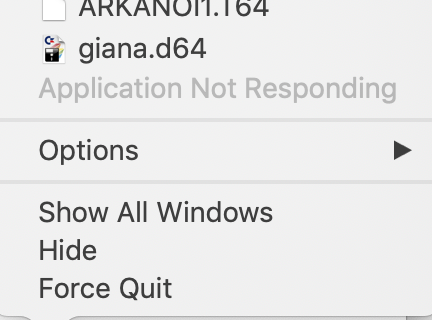
To log I renamed the binary to VirtualC64.bin and added a script in VirtualC64
!/bin/bash
exec "$0".bin "$@" 2> /tmp/virtualc64.log >&2
the last log emitted before the freeze is
Drive1: insertDisk
2018-11-05 12:10:03.678 VirtualC64.bin[27849:2311588] C64Proxy::init
C64: Creating virtual C64[0x115dad000]
ReSID: Setting clock frequency to 985249 cycles per second.
Drive1: Duration a CPU cycle is 10149 1/10 nsec.
Drive2: Duration a CPU cycle is 10149 1/10 nsec.
C64: Duration of a CPU cycle is 10149 1/10 nsec.
C64: Resetting virtual C64[0x115dad000]
ReSID: Setting sample rate to 44100 samples per second.
ROMFile: File /Users/thierry/Emulation/CBM/ROMS/basic.901226-01.bin read successfully
ROMFile: File /Users/thierry/Emulation/CBM/ROMS/characters.901225-01.bin read successfully
ROMFile: File /Users/thierry/Emulation/CBM/ROMS/kernal.901227-03.bin read successfully
ROMFile: File /Users/thierry/Emulation/CBM/ROMS/1541-II.355640-01.bin read successfully
D64File::D64File()
ReSID: Setting clock frequency to 985249 cycles per second.
Drive1: Duration a CPU cycle is 10149 1/10 nsec.
Drive2: Duration a CPU cycle is 10149 1/10 nsec.
C64: Duration of a CPU cycle is 10149 1/10 nsec.
ReSID: Emulating SID model MOS8580.
ReSID: Disabling audio filter emulation.
ReSID: Using sampling method SAMPLE_INTERPOLATE.
C64: Resetting virtual C64[0x115dad000]
Drive1: prepareToInsert
Drive1: insertDisk
A few other tests with the same problem
- 2.5.1, 3.0.1 and 3.1
- Pause in background option on/off
Test Scenario:
- open xxx.d64
- load "*",8,1
- switch to another app covering the window of virtualc64
- try to switch back to virtualc64 clicking icon in the dock. the menu shows 'application not responding'. (cf menu capture above)
- hide foreground windows till virtualc64 appears. everything seems to be working
tsupplis
on 5 Nov 2018
Hmm, I still cannot reproduce it on my machine. However, I noticed that the emulator hangs in macOS 10.14 for a couple of seconds when a file dialog opens (e.g., when selecting "Insert Disk..." from the menu). In the log output, I can see a couple of error messages:
2018-11-05 13:35:01.172637+0100 VirtualC64[19238:1447109] SecTaskLoadEntitlements failed error=22 cs_flags=20, pid=19238
2018-11-05 13:35:01.172948+0100 VirtualC64[19238:1447109] SecTaskCopyDebugDescription: VirtualC64[19238]/0#-1 LF=0
2018-11-05 13:35:12.324032+0100 VirtualC64[19238:1447145] [default] Unable to load Info.plist exceptions (eGPUOverrides)
objc[19238]: Class FIFinderSyncExtensionHost is implemented in both /System/Library/PrivateFrameworks/FinderKit.framework/Versions/A/FinderKit (0x7fff9b7671d0) and /System/Library/PrivateFrameworks/FileProvider.framework/OverrideBundles/FinderSyncCollaborationFileProviderOverride.bundle/Contents/MacOS/FinderSyncCollaborationFileProviderOverride (0x6006b43eadc8). One of the two will be used. Which one is undefined.
Not sure if this is related to the problem. By googling a bit, I've seen that a lot of developers have similar messages in their logs, but I didn't find a site pointing to a solution. Some of the messages seem to be caused by Apple's own bugs.
dirkwhoffmann
on 5 Nov 2018
I tried several times, but it never hangs on my MBP (with or without the _pause while in background option_).
 Alessandro1970
on 6 Nov 2018
Alessandro1970
on 6 Nov 2018
I'm still not able to reproduce the problem (although I did experience it in the past). Could it be that it's fixed with macOS 10.14.1? tsupplis, did you run 10.14 or 10.14.1?
dirkwhoffmann
on 8 Nov 2018
Both. It seems fairly 'reproducible'.
I have now downloaded the code, I will try to explore under debugger this week end, and I will test on older version of MacOS. (Which branch should I use?)
Can we keep the issue open for the time being?
tsupplis
on 8 Nov 2018
Thanks for looking into it! I'm frequently merging back to the master branch, so you can fork from there. Alternatively, you can fork from V3.1 which will be kept stable (only small bugfixes in case there is a need for a 3.1.2 version).
Sure, we keep this issue open.
dirkwhoffmann
on 8 Nov 2018
Just had a frozen emulator on my machine. I connected the Instruments Activity Monitor to the running program and got the following:

I have no glue where the 1,7 GiB 😳 come from, but the issue might be related to memory allocation.
dirkwhoffmann
on 9 Nov 2018
Good morning,
I saw that the version of the virtualc64 alpha10 is very stable and the tests that did not work before were adequate.
When will version 3.2 come out?
 puleyo
on 27 Nov 2018
puleyo
on 27 Nov 2018
Hi Puleyo. Yes, it might be a good time for releasing 3.2.
I'm unsure of the severity of the issue described in this thread though.
dirkwhoffmann
on 29 Nov 2018
As I said on 6/11 I cannot succeed in reproducing this issue as described before. Could it be depend by other stuff installed on Mac OS ?
Alessandro1970
on 29 Nov 2018
V3.2 has been released. I close this issue for the time being. Please reopen if it should reoccur in 3.2.
dirkwhoffmann
on 30 Nov 2018
V3.2 seems to be a little faster than V3.1.1.
In warp mode (C64-II), with all CRT effects off, I get:
V3.1.1: 7.05 MHz
V3.2: 7.95 MHz
More than 10% faster 😎.
dirkwhoffmann
on 30 Nov 2018
Related issues
dirkwhoffmann
·
5Comments
Alessandro1970
·
3Comments
dirkwhoffmann
·
4Comments
Alessandro1970
·
3Comments
 mortinus
·
6Comments
mortinus
·
6Comments