Virtualc64: Virtual keyobard bug
There is still a bug in the window and in the virtual keyboard:
if you press the commodore key several times and then the shift happens frequently as in the image that pressing the letter "A" does not get the symbol but just the letter "A".

 Alessandro1970
All 14 comments
The problem here is that the virtual keyboard does not know if the C64 is in uppercase mode or lower case mode. When you press Commodore + Shift, the C64 switches modes. In the current implementation, the virtual keyboard always shows the symbols as they appear in uppercase mode. To get around this, one had to find out the correct display mode which could perhaps be done by reading some special zero page register.
 dirkwhoffmann
on 11 Aug 2018
dirkwhoffmann
on 11 Aug 2018
Not a bug
This only occurs if you press Commodore + shift and everything remains tiny ...
... I did not realize I had entered such a keyboard mode, the keyboard was over the screen and I didn't see the letters.
Ops...I was writing....yes
Alessandro1970
on 11 Aug 2018
For reference:
Possible way to find out if C64 is in upper case or lower case mode: Peek VIC register 0xD018:
0xD018 & 0x02 == 0 : Upper case
0xD018 & 0x02 != 0 : Lower case
When I hit Commodore + "1" in the virtual keyboard, the cursor color changes to brown, but the original C64 key is labeled "BLK". How do I change to black on a real C64? Do I have to press a key other than Commodore? Does anybody remember how that worked?
dirkwhoffmann
on 12 Aug 2018
Figured it out. It was CTRL + NUMBER. This means that the CTRL key in the virtual keyboard needs to be made a "sticky key" like Shift and Commodore.
dirkwhoffmann
on 12 Aug 2018
Black=control+1
Brown=commodore+2
Alessandro1970
on 12 Aug 2018
With the “1” souldn’t come out the brown but the orange [C= + 1].
Alessandro1970
on 12 Aug 2018
This is the map of the c64 directly colour keycombination:
https://www.c64-wiki.com/wiki/Color
 rossimariolee
on 13 Aug 2018
rossimariolee
on 13 Aug 2018
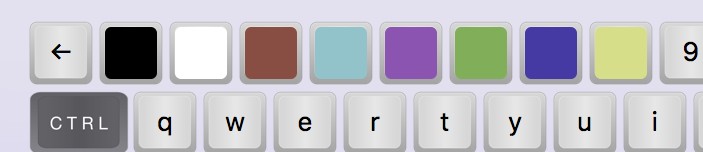
This is how it looks in V2.6 when the emulator is in lower case mode and the CTRL key is hold down:

Still missing: A custom image for REVERSE ON, REVERSE OFF
dirkwhoffmann
on 14 Aug 2018
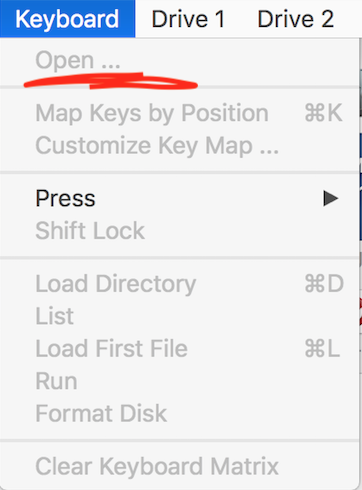
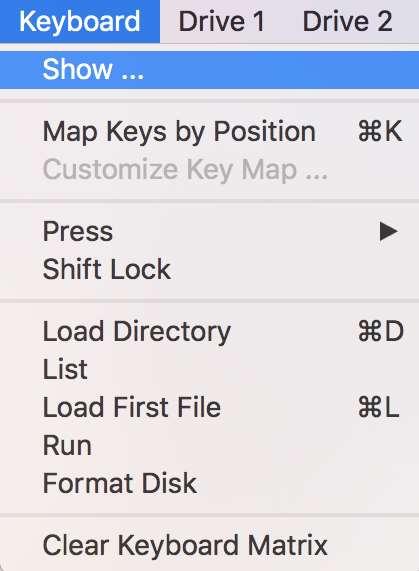
Hello, in the keyboard menu could you change the word "Open ..." with the words "Show keyboard" ?
_...someone told me that he thought it was a command to load the key settings and not a window with a virtual keyboard, written in that way._
Alessandro1970
on 18 Aug 2018
Will be named "Show ..." in 2.6
dirkwhoffmann
on 18 Aug 2018
This is the combination of colours shown when CTRL key is hold down,
But does the virtual keyboard shows also the others colours when only the C= key (sticky) is hold down with the same numbers key ?
In which version of VirtualC64 ?
 mortinus
on 21 Aug 2018
mortinus
on 21 Aug 2018
Yes, colors do change. Will come with 2.6.
dirkwhoffmann
on 23 Aug 2018
Todo: Read RGB values from VICII. Right now, they are hard-coded into the keyboard.
dirkwhoffmann
on 28 Aug 2018
Related issues
 Somuchfun
·
3Comments
Alessandro1970
·
3Comments
Somuchfun
·
3Comments
Alessandro1970
·
3Comments
 bluecursor
·
7Comments
bluecursor
·
7Comments
 ChuckCaplan
·
7Comments
Alessandro1970
·
3Comments
ChuckCaplan
·
7Comments
Alessandro1970
·
3Comments
Most helpful comment
Will be named "Show ..." in 2.6