Virtual-environments: Az.Functions module for PowershellAz is not installed on any Windows images
Describe the bug
Commands like Get-AzFunctionApp do not work on any Windows hosted images (not sure about Linux)
Area for Triage:
Question, Bug, or Feature?:
Virtual environments affected
- [ ] macOS 10.15
- [ ] Ubuntu 16.04 LTS
- [ ] Ubuntu 18.04 LTS
- [ ] Ubuntu 20.04 LTS
- [X] Windows Server 2016 R2
- [X] Windows Server 2019
Expected behavior
To be able to use Az.Function cmdlets from PowershellAz
Actual behavior
##[error]The term 'Get-AzFunctionApp' is not recognized as the name of a cmdlet, function, script file, or operable program. Check the spelling of the name, or if a path was included, verify that the path is correct and try again.
##[error]PowerShell exited with code '1'.
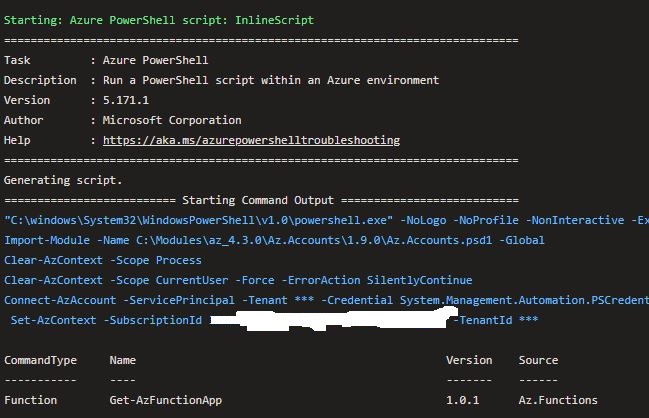
Running Get-Module -ListAvailable confirms missing Az.Functions module. Not sure how this has been missed
- In an Azure DevOps pipeline targeting the 'windows-latest' pool...
      - task: AzurePowerShell@5
        inputs:
          azureSubscription: 'MySubscription'
          ScriptType: 'InlineScript'
          Inline: |
            Write-Host "Test command"
            Get-Module -ListAvailable
            Get-AzFunctionApp -Name MyFunctionApp -ResourceGroupName MyResourceGroup
          azurePowerShellVersion: 'LatestVersion'
 mcalnd70
All 7 comments
Hello, @mcalnd70
We are planning to finish Windows Server 2019 rollout on the next week which contains the Az.Functions 1.0.1 module part of Az 4.3.0 - https://github.com/actions/virtual-environments/blob/releases/win19/20200706/images/win/Windows2019-Readme.md
 al-cheb
on 9 Jul 2020
al-cheb
on 9 Jul 2020
Thanks @al-cheb Will this also be back-ported to the Windows Server 2016 R2 pools?
mcalnd70
on 9 Jul 2020
@mcalnd70, Yep, that's right, the same for Windows Server 2016 - https://github.com/actions/virtual-environments/blob/releases/win16/20200706/images/win/Windows2016-Readme.md
Temporary workaround:
steps:
- powershell: |
   Save-Module -Path C:\Modules\az_4.3.0 -Name Az -RequiredVersion 4.3.0 -Force
  ignoreLASTEXITCODE: true
  displayName: Install Az 4.3.0
Thanks, yes just did something similar in the Powershell script that runs the Get-AzFunctionApp command. This way I figured, once its on the agents, I won't have to return to do anything further - Cheers
$findmodule = Get-Module -ListAvailable -Name Az.Functions
if (!$findmodule) {
    write-host "Az.Functions module for PowershellAz not found - Will now update the agent by running command Install-Module -Name Az -AllowClobber -Force"
    Install-Module -Name Az -AllowClobber -Force
}
Hello, @mcalnd70
Windows Server 2016 - https://github.com/actions/virtual-environments/blob/master/images/win/Windows2016-Readme.md#azure-powershell-modules
Windows Server 2019 - https://github.com/actions/virtual-environments/blob/master/images/win/Windows2019-Readme.md#azure-powershell-modules
The Az 4.3.0(Az.Functions 1.0.1) powershell module is now available for Windows Server 2016 and 2019. Could you please check out if the module is available to you?
al-cheb
on 13 Jul 2020
Feel free to open the thread if you have any concerns.
al-cheb
on 15 Jul 2020
Tested and can now see the Az.Functions module - thanks
mcalnd70
on 15 Jul 2020
Related issues
 ethomson
·
4Comments
ethomson
·
4Comments
 frankieroberto
·
4Comments
frankieroberto
·
4Comments
 mxschmitt
·
3Comments
mxschmitt
·
3Comments
 Poolitzer
·
4Comments
Poolitzer
·
4Comments
 adamsiembida
·
3Comments
adamsiembida
·
3Comments