Virtual-environments: Packer build fails because ruby 2.7 is not found
Describe the bug
I am trying to build the windows 2019 packer image. However it fails saying that Ruby 2.7 was not found in the tool cache.
I am not using anything custom.
==> vhd: Provisioning with Powershell...
==> vhd: Provisioning with powershell script: C:\dev\github\actions\virtual-environments\images\win/scripts/Installers/Validate-ToolCache.ps1
    vhd: Ruby(bin\ruby.exe) 2.4.10(x64) is successfully installed:
    vhd: ruby 2.4.10p364 (2020-03-31 revision 67879) [x64-mingw32]
    vhd: Ruby(bin\ruby.exe) 2.5.8(x64) is successfully installed:
    vhd: ruby 2.5.8p224 (2020-03-31 revision 67882) [x64-mingw32]
    vhd: Ruby(bin\ruby.exe) 2.6.6(x64) is successfully installed:
    vhd: ruby 2.6.6p146 (2020-03-31 revision 67876) [x64-mingw32]
    vhd: C:/hostedtoolcache/windows\Ruby\2.7.* was not found
==> vhd: Script exited with non-zero exit status: 1.Allowed exit codes are: [0]
==> vhd: Step "StepProvision" failed
Virtual environments affected
- [ X ] Windows Server 2019
Expected behavior
I would expect that building without changing anything, it should build correctly.
Actual behavior
The build fails
 gregpakes
All 8 comments
Hi @gregpakes! Could you please provide a full log of your packer build? It can be some transient issue since our nightly builds look fine.
 miketimofeev
on 22 Jun 2020
miketimofeev
on 22 Jun 2020
log.txt
Attached.
I have looked through it myself and I can't see it even trying 2.7.x - it does all the others and then moves on.
Transient issues are quite painful given this build took 5 hours... :(
gregpakes
on 22 Jun 2020
It looks like Ruby 2.6.6 installation failed on downloading mingw packages – installation ends at vhd: downloading mingw-w64-x86_64-gcc-8.3.0-2-any.pkg.tar.xz... but in the successful case, there are more packages to download
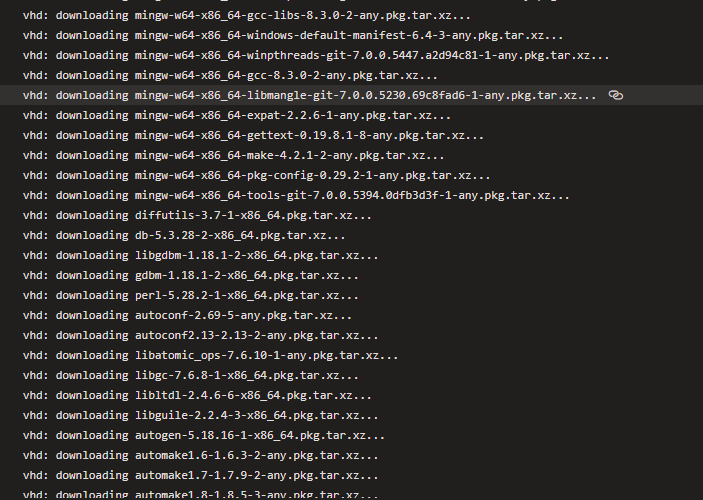
Could you please update from the latest master and run the build again? We're continuously working on toolcache installation improvements and ruby ones are on the way.
miketimofeev
on 22 Jun 2020
Ah ok - thanks. I know what to look for now.
This was built off the current master, so I’ll just try again.
gregpakes
on 22 Jun 2020
@miketimofeev Running it again worked for me.
I have one final question if that's ok. I'm pretty sure that a successful packer build is supposed to leave an image within Azure, but in my case it hasn't. There is a VHD in the storage account, but I cannot find the image.
There were a few errors in the cleanup phase, which may be responsible?
    vhd: IMAGE_STATE_COMPLETE
==> vhd: Querying the machine's properties ...
==> vhd:  -> ResourceGroupName : 'pkr-Resource-Group-ykjkykgfpn'
==> vhd:  -> ComputeName       : 'pkrvmykjkykgfpn'
==> vhd:  -> OS Disk           : 'https://adoagents001.blob.core.windows.net/images/pkrosykjkykgfpn.vhd'
==> vhd: Querying the machine's additional disks properties ...
==> vhd:  -> ResourceGroupName : 'pkr-Resource-Group-ykjkykgfpn'
==> vhd:  -> ComputeName       : 'pkrvmykjkykgfpn'
==> vhd: Powering off machine ...
==> vhd:  -> ResourceGroupName : 'pkr-Resource-Group-ykjkykgfpn'
==> vhd:  -> ComputeName       : 'pkrvmykjkykgfpn'
==> vhd: Capturing image ...
==> vhd:  -> Compute ResourceGroupName : 'pkr-Resource-Group-ykjkykgfpn'
==> vhd:  -> Compute Name              : 'pkrvmykjkykgfpn'
==> vhd:  -> Compute Location          : 'UK South'
==> vhd: Deleting resource group ...
==> vhd:  -> ResourceGroupName : 'pkr-Resource-Group-ykjkykgfpn'
==> vhd:
==> vhd: The resource group was created by Packer, deleting ...
==> vhd: Deleting the temporary OS disk ...
==> vhd:  -> OS Disk : 'https://adoagents001.blob.core.windows.net/images/pkrosykjkykgfpn.vhd'
==> vhd: Deleting the temporary Additional disk ...
==> vhd: Removing the created Deployment object: 'pkrdpykjkykgfpn'
==> vhd: ERROR: -> ResourceGroupNotFound : Resource group 'pkr-Resource-Group-ykjkykgfpn' could not be found.
==> vhd:
==> vhd: Removing the created Deployment object: 'kvpkrdpykjkykgfpn'
==> vhd: ERROR: -> ResourceGroupNotFound : Resource group 'pkr-Resource-Group-ykjkykgfpn' could not be found.
==> vhd:
Build 'vhd' finished.

==> Builds finished. The artifacts of successful builds are:
--> vhd: Azure.ResourceManagement.VMImage:

OSType: Windows
StorageAccountLocation: uksouth
OSDiskUri: https://[redacted]
OSDiskUriReadOnlySas: https://[redacted]
Edit - I've looked into this a little more and according to the packer documentation for the Azure arm builder, an image will only be created if the following are specified (which they don't appear ti be):
- managed_image_name
- managed_image_resourcegroup_name
I guess I was confused because the powershell script included in the repository is called GenerateResourcesAndImages.ps1. So I assumed it created images. Also the synopsis of the function is :
A helper function to help generate an image.
Is my understanding correct?
gregpakes
on 23 Jun 2020
@gregpakes I'm afraid the naming is really confusing because the result of the script is VHD and deployment template, not the actual VM image. You can create the image from VHD using a separate script, which comes along with the previous one https://github.com/actions/virtual-environments/blob/7e20013bcbe9ad23b1f19dc15fcc21f6bbea5dda/helpers/CreateAzureVMFromPackerTemplate.ps1 Just need to specify a template file.
Or you can use this similar solution https://docs.microsoft.com/en-us/azure/virtual-machines/windows/ps-template
miketimofeev
on 23 Jun 2020
Thanks - I think I've figured it out.
I'll close this now. Appreciate your help.
gregpakes
on 23 Jun 2020
@gregpakes Feel free to contact us if you have any questions.
Thank you!
miketimofeev
on 23 Jun 2020
Related issues
 motss
·
3Comments
motss
·
3Comments
 ethomson
·
4Comments
ethomson
·
4Comments
 estebanes22
·
3Comments
estebanes22
·
3Comments
 raulpopadineti
·
3Comments
raulpopadineti
·
3Comments
 shogo82148
·
3Comments
shogo82148
·
3Comments
Most helpful comment
Thanks - I think I've figured it out.
I'll close this now. Appreciate your help.