Virtual-environments: "/" is not owned by root in the environment
Describe the bug
When launching an Azure Pipeline environment, or even sometimes in GitHub actions (though I have not reproduced that myself), we see that "/" is owned by a vsts user, rather than by root which is expected. This will prevent snapd and snap packages from running, because snap packages running when "/" is a security vulnerability (for snapd), because snapd stores BPF programs in /var/lib/snapd/seccomp/bpf, which are compiled and run in the kernel, and so whatever user owns "/" could theoretically manipulate the filesystem to place files in /var/lib/snapd/seccomp/bpf, when this is an action that should only be allowed by root. See also https://forum.snapcraft.io/t/permissions-problem-using-snapcraft-in-azure-pipelines/13258/10?u=ijohnson
Area for Triage:
Question, Bug, or Feature?:
Bug
Virtual environments affected
- [ ] macOS 10.15
- [x] Ubuntu 16.04 LTS
- [x] Ubuntu 18.04 LTS
- [ ] Windows Server 2016 R2
- [ ] Windows Server 2019
Expected behavior
"/" will be owned by root.
Actual behavior
- Provision ubuntu instance
- ls -lah "/" shows it is owned by root
 anonymouse64
All 9 comments
CC @jdstrand and @zyga
anonymouse64
on 6 Apr 2020
Hi @anonymouse64! We fixed something very similar a month ago - https://github.com/actions/virtual-environments/issues/422
Have you ever experienced the issue since then?
 miketimofeev
on 6 Apr 2020
miketimofeev
on 6 Apr 2020
Hi, I have not checked in the last month, but I will ask others to do so. Thanks
anonymouse64
on 6 Apr 2020
@anonymouse64 I'm going to close the issue. Feel free to reopen if the issue persists.
miketimofeev
on 7 Apr 2020
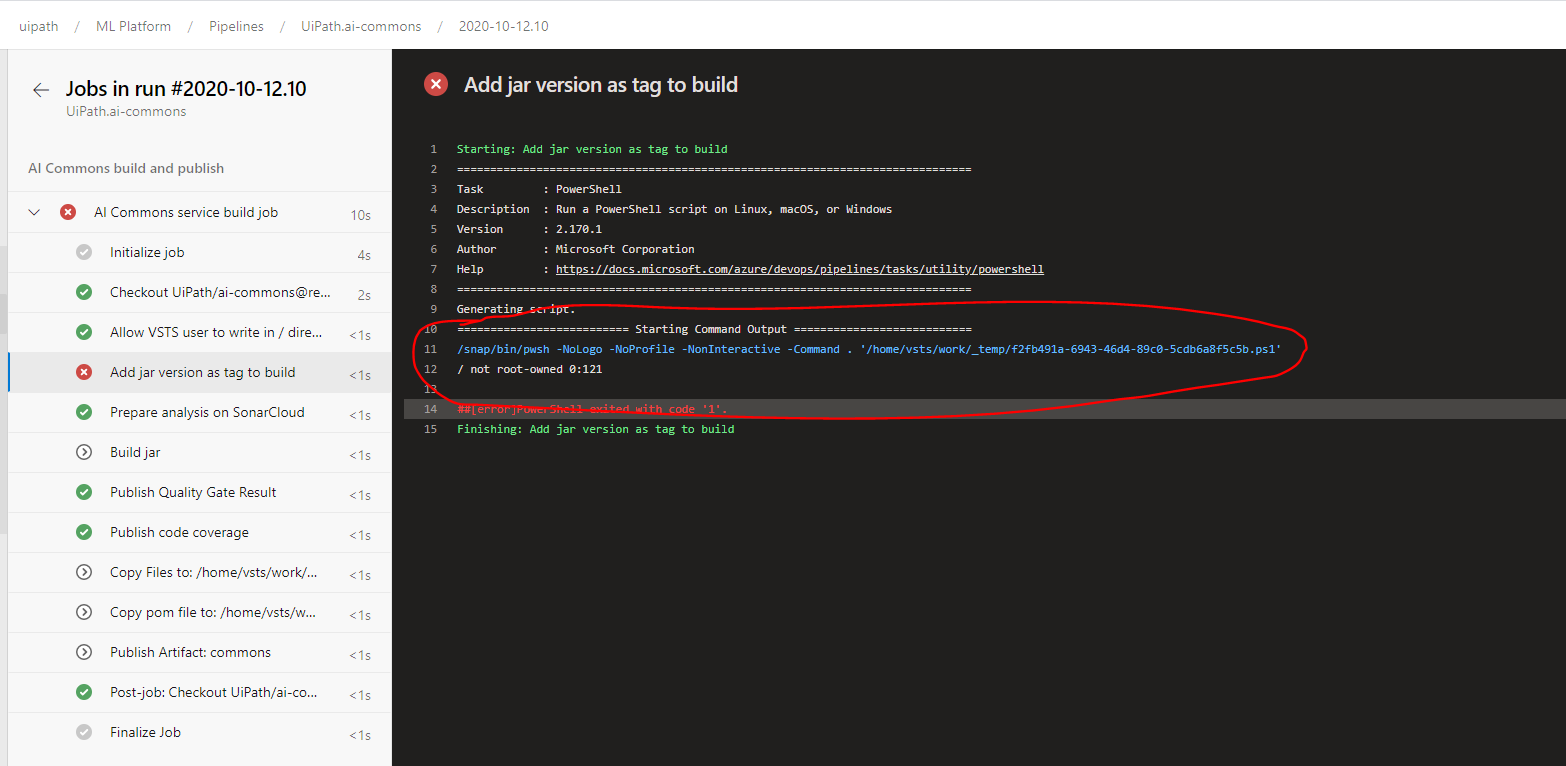
@miketimofeev this is happening with Ubuntu 20.04 images :( , I have a powershell script which is running fine with Ubuntu 16 and 18, but I need Java 11, so i changed the agent to Ubuntu 20.04 and powershell script is failing here
 rajivml
on 12 Oct 2020
rajivml
on 12 Oct 2020
@rachmari , Java 11 exists on Ubuntu 18.04 and Ubuntu 16.04 environments.
You can use Java Tool Installer to switch it.
 maxim-lobanov
on 12 Oct 2020
maxim-lobanov
on 12 Oct 2020
@rajivml could you please run the following on Ubuntu20?
steps:
- bash: 'ls -la /'
It looks fine for me:

miketimofeev
on 12 Oct 2020
hi @miketimofeev thanks for your reply, actually I figured out that it's an other step which is messing up the permissions, before the powershell script we have this step and I have changed the order of this step i.e now am running this after the powershell script and it's now running me
With Ubuntu 16 and 18, even if the below step was running before the powershell script, it was running fine without any issues.
  - script: |
      sudo chmod 775 /
      sudo chown root:docker /
    displayName: 'Allow VSTS user to write in / directory'
@maxim-lobanov
@rachmari , Java 11 exists on Ubuntu 18.04 and Ubuntu 16.04 environments.
You can use Java Tool Installer to switch it.
We document all of the software installed on the runners in this repo. It looks like we already document support for Java 11: https://github.com/actions/virtual-environments/blob/main/images/linux/Ubuntu1804-README.md#java
 rachmari
on 12 Oct 2020
rachmari
on 12 Oct 2020
Related issues
 jayaddison
·
3Comments
jayaddison
·
3Comments
 damccorm
·
3Comments
damccorm
·
3Comments
 adamsiembida
·
3Comments
adamsiembida
·
3Comments
 frankieroberto
·
4Comments
frankieroberto
·
4Comments
 ethomson
·
4Comments
ethomson
·
4Comments