Virtual-environments: SharePoint SDK is missing on every agent. Build failed
Because no one answer in previous topics (linked here) I create new one.
Everything is described here:
https://github.com/actions/virtual-environments/issues/532
https://github.com/actions/virtual-environments/issues/68#issuecomment-602652021
https://github.com/actions/virtual-environments/pull/556#issuecomment-608478741
Question, Bug, or Feature?:
"Bug"
Virtual environments affected
- [ ] macOS 10.15
- [ ] Ubuntu 16.04 LTS
- [ ] Ubuntu 18.04 LTS
- [x] Windows Server 2016 R2
- [x] Windows Server 2019
Expected behavior
Build Sharepoint 2013 solutions
Actual behavior
"Are missing assembly?" as told in previous issues.
So guys, where are all these assemblies for building SharePoint applications?
 VerdonTrigance
All 16 comments
@alepauly @miketimofeev @AlenaSviridenko @wnjenkin
Guys, installing VS components not enough to build Sharepoint 2013 solutions. It requires SharePoint libraries and license actually. We can't build anything a whole week already. Please give us back vs2015 image.
This is about that whole stuff:
https://docs.microsoft.com/en-us/previous-versions/visualstudio/visual-studio-2010/ff622991(v=msdn.10)?redirectedfrom=MSDN
https://msftplayground.com/2013/10/tfs-and-sharepoint-builds-including-automatic-deployments-part-1/
VerdonTrigance
on 9 Apr 2020
Hi @VerdonTrigance !
We are currently trying to find out what exact components we need to install to make your build works again.
It would really help us if you could provide a sample project where you use required components, because on our side we don't have a sample SharePoint 2013 project on which we could test changes.
Could you please provide it?
 AlenaSviridenko
on 9 Apr 2020
AlenaSviridenko
on 9 Apr 2020
@AlenaSviridenko
https://github.com/VerdonTrigance/PublicSharepoint2013.git
This is simplest one. Hope it will help.
After this project will be built I provide some new required references that ruin build again (probably).
VerdonTrigance
on 9 Apr 2020
Hi @VerdonTrigance !
We have investigated your sample project, thanks for that, it really helped!
The source of the problem seems to be in the changing references format from "package.config" to "project references" and inability to restore nugets in VS2017, no additional tools installations are required. We were able to make your build work with some migration steps. Link to successful build: https://dev.azure.com/v-sedoli/SharePoint2013/_build/results?buildId=34&view=logs&j=275f1d19-1bd8-5591-b06b-07d489ea915a
In order to make this build success we made few modification in the project itself, please, see this commit https://github.com/dsame/PublicSharepoint2013/commit/81cdb022f4c2859ae5cafaea04fe8a6c5e782c75.
Also we used nuget.exe instead of "dotnet restore/msbuild -t:restore"
The recommended steps to migrate the project to VS2017 are:
- Manually add references to the necessary nugets in order to create references in the correct format
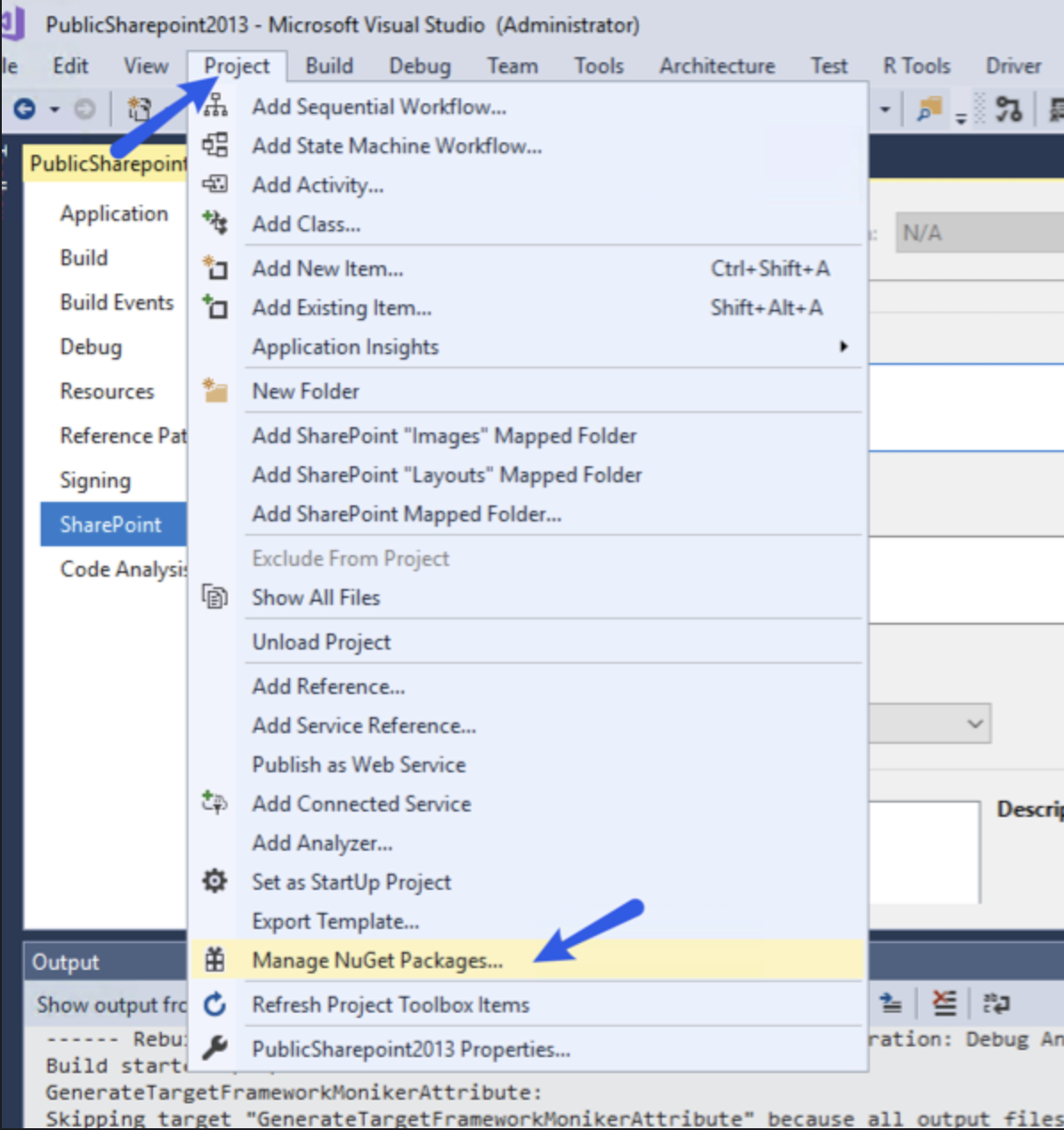
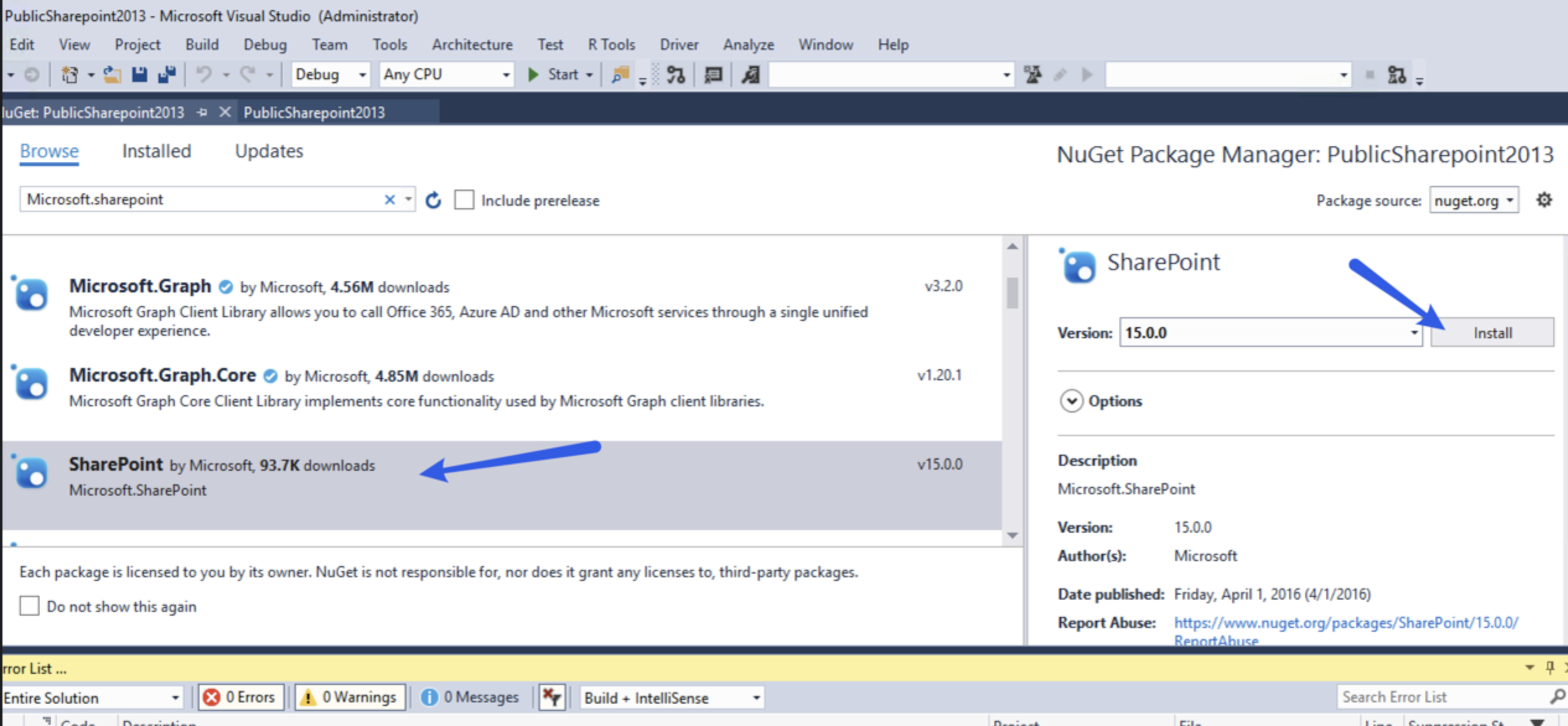
- Use nuget.exe to restore nugets because dotnet and msubuild does not seem to support the legacy packages.config format

Could you please try these steps and let me know if it helped?
Thanks!
AlenaSviridenko
on 13 Apr 2020
Sorry for delay, but I still can't verify this because of being busy for last weeks. I will check this ASAP and return with answer in a week probably.
VerdonTrigance
on 16 Apr 2020
I was able to try this after losing 4 days trying to troubleshoot.
Anyway in my case I needed to add
Microsoft.SharePoint, Microsoft.SharePoint.Client, Microsoft.SharePoint.ClientRuntime, Microsoft.SharePoint.ServerRuntime from NuGet. My solution is a farm solution with a couple of VS workflows, list definitions, content types, site columns and scripts. In the end it finally got past "Build solution ***.sln
Thanks
 hgibson1122
on 23 Apr 2020
hgibson1122
on 23 Apr 2020
HI @VerdonTrigance! Are there any updates on this issue?
AlenaSviridenko
on 24 Apr 2020
HI @VerdonTrigance! Are there any updates on this issue?
Thank you for waiting, I am on my way to do this on this weekend. I confirm that there are numbers of NuGet packages with SharePoint/Office and I was able to build solution localy on my PC, but I still had no chance to run build in Azure.
VerdonTrigance
on 24 Apr 2020
HI @VerdonTrigance! Are there any updates on this issue?
Hi, I just checked it and it works. Thank you for help.
VerdonTrigance
on 29 Apr 2020
And now I come back.
Microsoft.SharePoint.IdentityModel is missing in nuget explorer. Does it mean that Microsoft.SharePoint.IdentityModel still has not been packed in NuGet?
VerdonTrigance
on 28 May 2020
Hi @VerdonTrigance, there's a nuget with the name https://www.nuget.org/packages/SharePointPnP.IdentityModel.Extensions/ - please make sure it is compatible with your current .net version
AlenaSviridenko
on 28 May 2020
Hi @VerdonTrigance, there's a nuget with the name https://www.nuget.org/packages/SharePointPnP.IdentityModel.Extensions/ - please make sure it is compatible with your current .net version
IdentityModelSignInPageBase class is missing there.
VerdonTrigance
on 29 May 2020
@VerdonTrigance unfortunately, we are not experts in SharePoint development, and also we are not owning NuGet packages for it. Please, try to ask SharePoint specific question on SharePoint community forum https://techcommunity.microsoft.com/t5/sharepoint/ct-p/SharePoint
AlenaSviridenko
on 29 May 2020
@VerdonTrigance unfortunately, we are not experts in SharePoint development, and also we are not owning NuGet packages for it. Please, try to ask SharePoint specific question on SharePoint community forum https://techcommunity.microsoft.com/t5/sharepoint/ct-p/SharePoint
I can do such package with my own, but is it legal to share SharePoint libraries through NuGet?
VerdonTrigance
on 1 Jun 2020
@VerdonTrigance I don't think so. I believe it is more reliable in terms of further support to upgrade project dependencies
AlenaSviridenko
on 1 Jun 2020
@VerdonTrigance I don't think so. I believe it is more reliable in terms of further support to upgrade project dependencies
I guess it's not possible to 'upgrade' because there is nothing to upgrade to. I don't see alternatives supported by Microsoft.
PS: It's a bit strange not allowing to share such libraries as MS do the same. For example core component Microsoft.SharePoint.dll is shared with everyone though NuGet...
VerdonTrigance
on 1 Jun 2020
Related issues
 ethomson
·
4Comments
ethomson
·
4Comments
 mxschmitt
·
3Comments
mxschmitt
·
3Comments
 motss
·
3Comments
motss
·
3Comments
 Poolitzer
·
4Comments
Poolitzer
·
4Comments
 trajano
·
3Comments
trajano
·
3Comments
Most helpful comment
Hi @VerdonTrigance !
We have investigated your sample project, thanks for that, it really helped!
The source of the problem seems to be in the changing references format from "package.config" to "project references" and inability to restore nugets in VS2017, no additional tools installations are required. We were able to make your build work with some migration steps. Link to successful build: https://dev.azure.com/v-sedoli/SharePoint2013/_build/results?buildId=34&view=logs&j=275f1d19-1bd8-5591-b06b-07d489ea915a
In order to make this build success we made few modification in the project itself, please, see this commit https://github.com/dsame/PublicSharepoint2013/commit/81cdb022f4c2859ae5cafaea04fe8a6c5e782c75.
Also we used nuget.exe instead of "dotnet restore/msbuild -t:restore"
The recommended steps to migrate the project to VS2017 are:
Could you please try these steps and let me know if it helped?
Thanks!